
ElasticSearch 7.8.1集群搭建
通往集群的大门
集群由什么用?
高可用
高可用(High Availability)是分布式系统架构设计中必须考虑的因素之一,它通常是指,通过设计减少系统不能提供服务的时间。如果系统每运行100个时间单位,会有1个时间单位无法提供服务,我们说系统的可用性是99%。
负载均衡
将流量均衡的分布在不同的节点上,每个节点都可以处理一部分负载,并且可以在节点之间动态分配负载,以实现平衡。
高性能
将流量分发到不同机器,充分利用多机器多CPU,从串行计算到并行计算提供系统性能。
ES集群的基本核心概念
Cluster集群
一个ElasticSearch集群由一个或多个节点(Node)组成,每个集群都有一个共同的集群名称作为标识。
Node节点
一个ElasticSearch实例即一个Node,一台机器可以有多个实例,正常使用下每个实例应该会部署在不同机器上。ElasticSearch的配置文件中可以通过node.master、node.data来设置节点类型。
node.master:表示节点是否具有称为主节点的资格
true代表的是有资格竞选主节点
false代表的是没有资格竞选主节点
node.data:表示节点是否存储数据
Node节点组合
主节点+数据节点(master+data)
节点即有称为主节点的资格,又存储数据
node.master: true

node.data: true
数据节点(data)
节点没有成为主节点的资格,不参与选举,只会存储数据
node.master: false

node.data: true
客户端节点(client)
不会成为主节点,也不会存储数据,主要是针对海量请求的时候,可以进行负载均衡
node.master: false

node.data: false
分片
每个索引有一个或多个分片,每个分片存储不同的数据。分片可分为主分片(primary shard)和复制分片(replica shard),复制分片是主分片的拷贝。默认每个主分片有一个复制分片,一个索引的复制分片的数量可以动态地调整,复制分片匆匆不与它的主分片在同一个节点上。
搭建ES集群
搭建步骤
- 拷贝ES7.8.1安装包3份,分别命名es-a,es-b,es-c
- 分别修改elasticsearch.yml文件
- 分别启动a、b、c三个节点
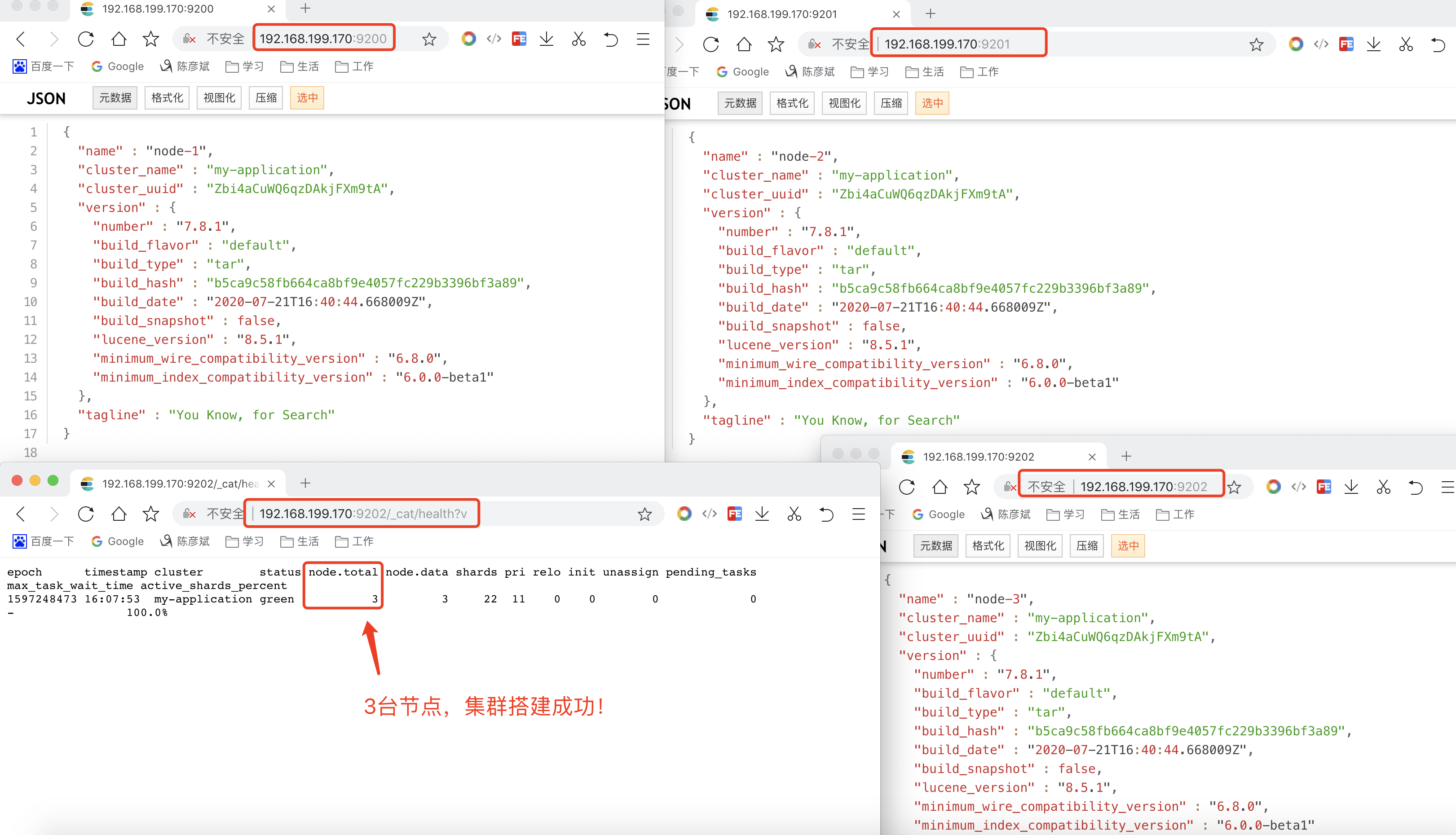
- 打开浏览器输入:ip:port/_cat/health?v,如果返回的nodt.total是3,代表集群搭建成功
配置文件
#集群名称,三台集群,要配置相同的集群名称!!!

cluster.name: my-application

#节点名称

node.name: node-1 #是不是有资格主节点

node.master: true

#是否存储数据

node.data: true

#最⼤集群节点数

node.max_local_storage_nodes: 3 #⽹关地址

network.host: 0.0.0.0

#端⼝

http.port: 9200

#内部节点之间沟通端⼝

transport.tcp.port: 9300

#es7.x 之后新增的配置,写⼊候选主节点的设备地址,在开启服务后可以被选为主节点

discovery.seed_hosts: ["localhost:9300","localhost:9400","localhost:9500"]

#es7.x 之后新增的配置,初始化⼀个新的集群时需要此配置来选举master

cluster.initial_master_nodes: ["node-1", "node-2","node-3"] #数据和存储路径

path.data: /Users/louis.chen/Documents/study/search/storage/a/data

path.logs: /Users/louis.chen/Documents/study/search/storage/a/logs
注意
因为我是一台服务器上,搞了3搞ES启动端口号不同,拷贝了3份es,具体还要跟实际情况相应调整
真实配置-a
# ======================== Elasticsearch Configuration =========================

#

# NOTE: Elasticsearch comes with reasonable defaults for most settings.

#       Before you set out to tweak and tune the configuration, make sure you

#       understand what are you trying to accomplish and the consequences.

#

# The primary way of configuring a node is via this file. This template lists

# the most important settings you may want to configure for a production cluster.

#

# Please consult the documentation for further information on configuration options:

# https://www.elastic.co/guide/en/elasticsearch/reference/index.html

#

# ---------------------------------- Cluster -----------------------------------

#

# Use a descriptive name for your cluster:

#

# 集群名称

cluster.name: my-application

#

# ------------------------------------ Node ------------------------------------

#

# Use a descriptive name for the node:

#

# 集群名称

node.name: node-1

# 是不是有资格主节点

node.master: true

# 是否存储数据

node.data: true

# 最大集群节点数,因为3个集群,所以配置3

node.max_local_storage_nodes: 3

#

# Add custom attributes to the node:

#

#node.attr.rack: r1

#

# ----------------------------------- Paths ------------------------------------

#

# Path to directory where to store the data (separate multiple locations by comma):

# 数据存储路径

path.data: /var/soft/es7.8.1/elasticsearch-7.8.1/data

# 日志存储路径

# Path to log files:

#

path.logs: /var/soft/es7.8.1/elasticsearch-7.8.1/logs

#

# ----------------------------------- Memory -----------------------------------

#

# Lock the memory on startup:

#

#bootstrap.memory_lock: true

#

# Make sure that the heap size is set to about half the memory available

# on the system and that the owner of the process is allowed to use this

# limit.

#

# Elasticsearch performs poorly when the system is swapping the memory.

#

# ---------------------------------- Network -----------------------------------

#

# Set the bind address to a specific IP (IPv4 or IPv6):

# 网关地址

network.host: 0.0.0.0

#

# Set a custom port for HTTP:

# 端口

http.port: 9200

# 内部节点之间沟通端口

transport.tcp.port: 9300

#

# For more information, consult the network module documentation.

#

# --------------------------------- Discovery ----------------------------------

#

# Pass an initial list of hosts to perform discovery when this node is started:

# The default list of hosts is ["127.0.0.1", "[::1]"]

# es7.x之后新增的配置,写入候选主节点的设备地址,在开启服务后可以被选为主节点

discovery.seed_hosts: ["127.0.0.1:9300", "127.0.0.1:9400", "127.0.0.1:9500"]

#

# Bootstrap the cluster using an initial set of master-eligible nodes:

# es7.x之后新增的配置,初始化一个新的集群时需要此配置来选举master

cluster.initial_master_nodes: ["node-1", "node-2", "node-3"]

#

# For more information, consult the discovery and cluster formation module documentation.

#

# ---------------------------------- Gateway -------------------------bootstrap.system_call_filter: false----------

#

# Block initial recovery after a full cluster restart until N nodes are started:

#

#gateway.recover_after_nodes: 3

#

# For more information, consult the gateway module documentation.

#

# ---------------------------------- Various -----------------------------------

#

# Require explicit names when deleting indices:

#

#action.destructive_requires_name: true

bootstrap.system_call_filter: false

http.cors.allow-origin: "*"

http.cors.enabled: true

http.cors.allow-headers : X-Requested-With,X-Auth-Token,Content-Type,Content-Length,Authorization

http.cors.allow-credentials: true
真实配置-b
# ======================== Elasticsearch Configuration =========================

#

# NOTE: Elasticsearch comes with reasonable defaults for most settings.

#       Before you set out to tweak and tune the configuration, make sure you

#       understand what are you trying to accomplish and the consequences.

#

# The primary way of configuring a node is via this file. This template lists

# the most important settings you may want to configure for a production cluster.

#

# Please consult the documentation for further information on configuration options:

# https://www.elastic.co/guide/en/elasticsearch/reference/index.html

#

# ---------------------------------- Cluster -----------------------------------

#

# Use a descriptive name for your cluster:

#

# 集群名称

cluster.name: my-application

#

# ------------------------------------ Node ------------------------------------

#

# Use a descriptive name for the node:

#

# 集群名称

node.name: node-2

# 是不是有资格主节点

node.master: true

# 是否存储数据

node.data: true

# 最大集群节点数,因为3个集群,所以配置3

node.max_local_storage_nodes: 3

#

# Add custom attributes to the node:

#

#node.attr.rack: r1

#

# ----------------------------------- Paths ------------------------------------

#

# Path to directory where to store the data (separate multiple locations by comma):

# 数据存储路径

path.data: /var/soft/es-b/data

# 日志存储路径

# Path to log files:

#

path.logs: /var/soft/es-b/logs

#

# ----------------------------------- Memory -----------------------------------

#

# Lock the memory on startup:

#

#bootstrap.memory_lock: true

#

# Make sure that the heap size is set to about half the memory available

# on the system and that the owner of the process is allowed to use this

# limit.

#

# Elasticsearch performs poorly when the system is swapping the memory.

#

# ---------------------------------- Network -----------------------------------

#

# Set the bind address to a specific IP (IPv4 or IPv6):

# 网关地址

network.host: 0.0.0.0

#

# Set a custom port for HTTP:

# 端口

http.port: 9201

# 内部节点之间沟通端口

transport.tcp.port: 9400

#

# For more information, consult the network module documentation.

#

# --------------------------------- Discovery ----------------------------------

#

# Pass an initial list of hosts to perform discovery when this node is started:

# The default list of hosts is ["127.0.0.1", "[::1]"]

# es7.x之后新增的配置,写入候选主节点的设备地址,在开启服务后可以被选为主节点

discovery.seed_hosts: ["127.0.0.1:9300", "127.0.0.1:9400", "127.0.0.1:9500"]

#

# Bootstrap the cluster using an initial set of master-eligible nodes:

# es7.x之后新增的配置,初始化一个新的集群时需要此配置来选举master

cluster.initial_master_nodes: ["node-1", "node-2", "node-3"]

#

# For more information, consult the discovery and cluster formation module documentation.

#

# ---------------------------------- Gateway -------------------------bootstrap.system_call_filter: false----------

#

# Block initial recovery after a full cluster restart until N nodes are started:

#

#gateway.recover_after_nodes: 3

#

# For more information, consult the gateway module documentation.

#

# ---------------------------------- Various -----------------------------------

#

# Require explicit names when deleting indices:

#

#action.destructive_requires_name: true

bootstrap.system_call_filter: false

http.cors.allow-origin: "*"

http.cors.enabled: true

http.cors.allow-headers : X-Requested-With,X-Auth-Token,Content-Type,Content-Length,Authorization

http.cors.allow-credentials: true
只修改了,2个端口、数据和日志存储路径
真实配置-c
# ======================== Elasticsearch Configuration =========================

#

# NOTE: Elasticsearch comes with reasonable defaults for most settings.

#       Before you set out to tweak and tune the configuration, make sure you

#       understand what are you trying to accomplish and the consequences.

#

# The primary way of configuring a node is via this file. This template lists

# the most important settings you may want to configure for a production cluster.

#

# Please consult the documentation for further information on configuration options:

# https://www.elastic.co/guide/en/elasticsearch/reference/index.html

#

# ---------------------------------- Cluster -----------------------------------

#

# Use a descriptive name for your cluster:

#

# 集群名称

cluster.name: my-application

#

# ------------------------------------ Node ------------------------------------

#

# Use a descriptive name for the node:

#

# 集群名称

node.name: node-3

# 是不是有资格主节点

node.master: true

# 是否存储数据

node.data: true

# 最大集群节点数,因为3个集群,所以配置3

node.max_local_storage_nodes: 3

#

# Add custom attributes to the node:

#

#node.attr.rack: r1

#

# ----------------------------------- Paths ------------------------------------

#

# Path to directory where to store the data (separate multiple locations by comma):

# 数据存储路径

path.data: /var/soft/es-c/data

# 日志存储路径

# Path to log files:

#

path.logs: /var/soft/es-c/logs

#

# ----------------------------------- Memory -----------------------------------

#

# Lock the memory on startup:

#

#bootstrap.memory_lock: true

#

# Make sure that the heap size is set to about half the memory available

# on the system and that the owner of the process is allowed to use this

# limit.

#

# Elasticsearch performs poorly when the system is swapping the memory.

#

# ---------------------------------- Network -----------------------------------

#

# Set the bind address to a specific IP (IPv4 or IPv6):

# 网关地址

network.host: 0.0.0.0

#

# Set a custom port for HTTP:

# 端口

http.port: 9202

# 内部节点之间沟通端口

transport.tcp.port: 9500

#

# For more information, consult the network module documentation.

#

# --------------------------------- Discovery ----------------------------------

#

# Pass an initial list of hosts to perform discovery when this node is started:

# The default list of hosts is ["127.0.0.1", "[::1]"]

# es7.x之后新增的配置,写入候选主节点的设备地址,在开启服务后可以被选为主节点

discovery.seed_hosts: ["127.0.0.1:9300", "127.0.0.1:9400", "127.0.0.1:9500"]

#

# Bootstrap the cluster using an initial set of master-eligible nodes:

# es7.x之后新增的配置,初始化一个新的集群时需要此配置来选举master

cluster.initial_master_nodes: ["node-1", "node-2", "node-3"]

#

# For more information, consult the discovery and cluster formation module documentation.

#

# ---------------------------------- Gateway -------------------------bootstrap.system_call_filter: false----------

#

# Block initial recovery after a full cluster restart until N nodes are started:

#

#gateway.recover_after_nodes: 3

#

# For more information, consult the gateway module documentation.

#

# ---------------------------------- Various -----------------------------------

#

# Require explicit names when deleting indices:

#

#action.destructive_requires_name: true

bootstrap.system_call_filter: false

http.cors.allow-origin: "*"

http.cors.enabled: true

http.cors.allow-headers : X-Requested-With,X-Auth-Token,Content-Type,Content-Length,Authorization

http.cors.allow-credentials: true
只修改了,2个端口、数据和日志存储路径
踩坑录(必看)
坑一

坑二
因为我是在一台linux上搭建的集群,然后用端口号9200、9201、9202区分开来的,es-b、es-c是拷贝es-a的,但是es-a的data目录有数据,需要将es-b和es-c的data目录清空,然后重启es即可!!!
启动
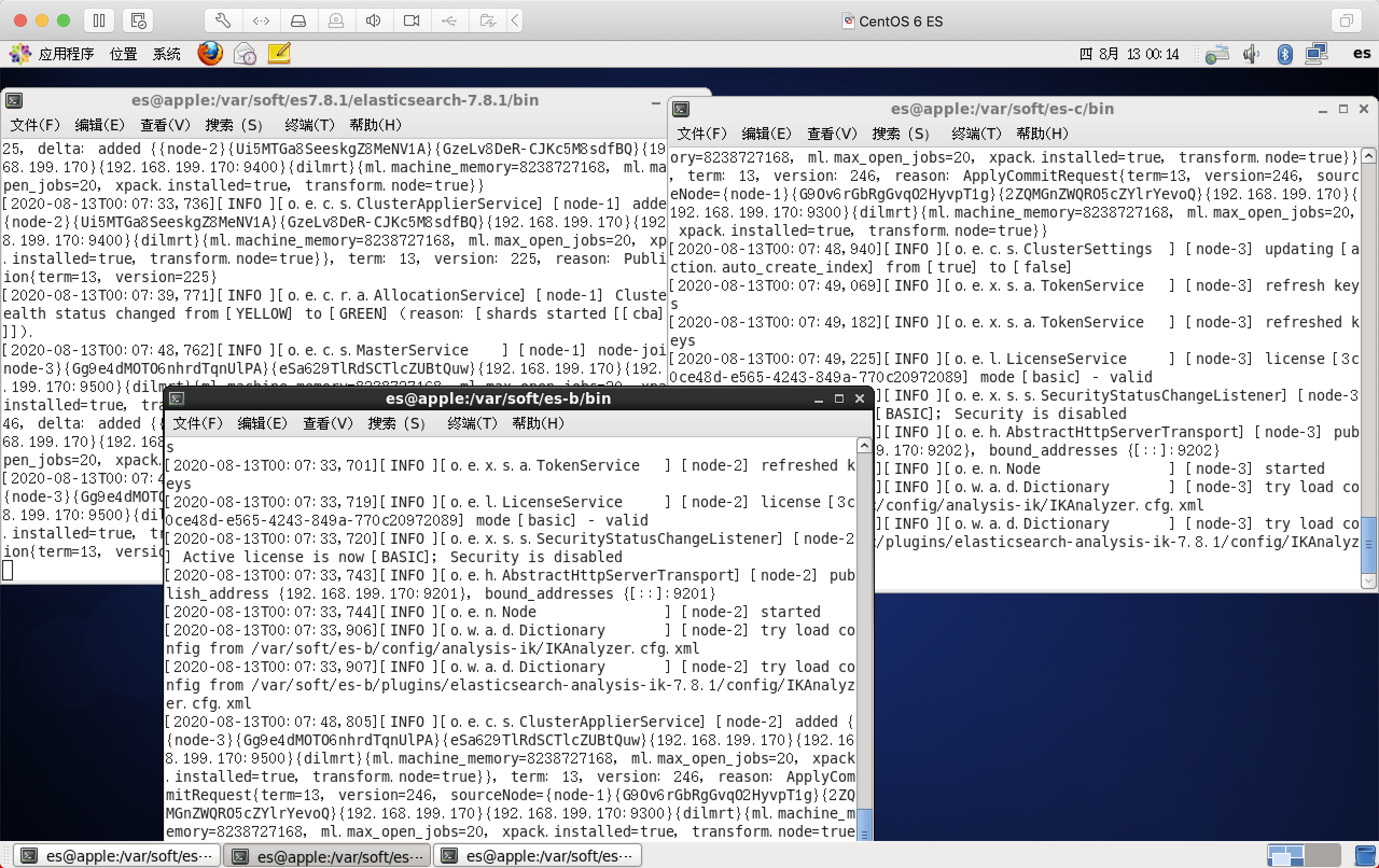
集群搭建成功
ElasticSearch 7.8.1集群搭建的更多相关文章
- ElasticSearch 高可用分布式集群搭建,与PHP多线程测试
方案: 使用HAproxy:当其中一台ElasticSearch Master宕掉时,ElasticSearch集群会自动将运行正常的节点提升为Master,但HAproxy不会将失败的请求重新分发到 ...
- Elasticsearch(ELK)集群搭建
一.前言 Elasticsearch是一个开源的高扩展的分布式全文检索引擎,它可以近乎实时的存储.检索数据:本身扩展性很好,可以扩展到上百台服务器,处理PB级别的数据.Elasticsearch也使用 ...
- Elasticsearch单机安装_集群搭建_索引基本操作_Head插件安装与基本操作_ik分词器配置_logstash实现数据同步_教程
一.Elasticsearch单机安装 1.将es安装包传到服务器上 这是安装包 这里我是用的是WinSCP上传工具,上传到/home/plugins文件下. 进入Xshell,验证一下是否上传成功. ...
- elasticsearch集群搭建实例
elasticsearch集群搭建实例 下个月又开始搞搜索了,几个月没动这块还好没有落下. 晚上在自己虚拟机上搭建了一个简易搜索集群,分享一下. 操作系统环境: Red Hat 4.8.2-16 el ...
- elasticsearch系列八:ES 集群管理(集群规划、集群搭建、集群管理)
一.集群规划 搭建一个集群我们需要考虑如下几个问题: 1. 我们需要多大规模的集群? 2. 集群中的节点角色如何分配? 3. 如何避免脑裂问题? 4. 索引应该设置多少个分片? 5. 分片应该设置几个 ...
- Elasticsearch集群搭建及使用Java客户端对数据存储和查询
本次博文发两块,前部分是怎样搭建一个Elastic集群,后半部分是基于Java对数据进行写入和聚合统计. 一.Elastic集群搭建 1. 环境准备. 该集群环境基于VMware虚拟机.CentOS ...
- 和我一起打造个简单搜索之ElasticSearch集群搭建
我们所常见的电商搜索如京东,搜索页面都会提供各种各样的筛选条件,比如品牌.尺寸.适用季节.价格区间等,同时提供排序,比如价格排序,信誉排序,销量排序等,方便了用户去找到自己心里理想的商品. 站内搜索对 ...
- ElasticStack之Elasticsearch集群搭建
需搭建服务器环境 操作系统 Host:port node 1 CentOS 7.2.1511 11.1.11.127:9200 node1 2 CentOS 7.2.1511 11.1.11.128: ...
- elasticsearch 集群管理(集群规划、集群搭建、集群管理)
一.集群规划 搭建一个集群我们需要考虑如下几个问题: 1. 我们需要多大规模的集群? 2. 集群中的节点角色如何分配? 3. 如何避免脑裂问题? 4. 索引应该设置多少个分片? 5. 分片应该设置几个 ...
随机推荐
- CSS:有点难的面试题①
1 举例说明匿名块框和匿名行内框2 什么是标准文档流?3 inline-block遵循怎样的渲染规则?4 什么是BFC?如何触发BFC?5 什么是Line box?(最好画图说明) 6 <met ...
- C++与正则表达式入门
什么是正则表达式? 正则表达式是一组由字母和符号组成的特殊文本, 当你想要判断许多字符串是否符合某个特定格式:当你想在一大段文本中查找出所有的日期和时间:当你想要修改大量日志中所有的时间格式,在这些情 ...
- 基于Centos7安装Docker-registry2.0
我们可能希望构建和存储包含不想公开的信息或数据的镜像,因为Docker公司的团队开源了docker-registry的代码,这样我们就可以基于此代码在内部运行自己的registry. 服务端1.拉去仓 ...
- Python日期和时间_什么是Tick_什么是时间元组_获取当前时间
Python 日期和时间_什么是 Tick _什么是时间元组: 时间和日期:某年某月某日某时某分某秒 Tick: 时间间隔以 秒 为单位的浮点小数,起始时间为:1970年1月1日0点0分开始 # Ti ...
- 线程_multiprocessing异步
from multiprocessing import Pool import time import os def test(): print("---进程池中的进程---pid=%d,p ...
- 4.17 斐波那契数列 K维斐波那契数列 矩阵乘法 构造
一道矩阵乘法的神题 早上的时候我开挂了 想了2h想出来了. 关于这道题我推了很多矩阵 最终推出两个核心矩阵 发现这两个矩阵放在一起做快速幂就行了. 当k==1时 显然的矩阵乘法 多开一个位置维护前缀和 ...
- CF 题目选做
写省选的题目对noip没什么大用 关键是 细节题或者是思考题比较重要 练思维自然是CF比较好了 把我见到的比较好的CF题放上来刷一刷. LINK:Complete the projects 就是说一个 ...
- Linux的VMWare中Centos7磁盘分区管理 fdisk分区和制作文件系统格式化和开机自动挂载
一.硬盘的组成零件扇区 磁道 磁盘容量 磁盘分区 简介 硬盘由容量.柱面数.磁头数.扇区数 C/H/S, Cylinder, Head, Sector(柱面/磁头数/扇区数) 1.磁头数表示硬盘总共有 ...
- Linux下运行windows 系统下编辑的Python脚本显示“: 没有那个文件或目录”的过程及解决方案
今天在 linux 系统下执行一windows下编辑的python脚本,提示(:没有那个文件或目录)英文提示:(:No such file of directory)如下: 查看文件的权限发现并没有问 ...
- MySQL-安装配置篇
一.MySQL二进制安装包安装 1.环境初始化 1)创建目录mkdir /app/database --安装路径 mkdir /data/3306 --存放数据路径 mkdir /binlog/330 ...