
ElasticSearch 7.8.1集群搭建
通往集群的大门
集群由什么用?
高可用
高可用(High Availability)是分布式系统架构设计中必须考虑的因素之一,它通常是指,通过设计减少系统不能提供服务的时间。如果系统每运行100个时间单位,会有1个时间单位无法提供服务,我们说系统的可用性是99%。
负载均衡
将流量均衡的分布在不同的节点上,每个节点都可以处理一部分负载,并且可以在节点之间动态分配负载,以实现平衡。
高性能
将流量分发到不同机器,充分利用多机器多CPU,从串行计算到并行计算提供系统性能。
ES集群的基本核心概念
Cluster集群
一个ElasticSearch集群由一个或多个节点(Node)组成,每个集群都有一个共同的集群名称作为标识。
Node节点
一个ElasticSearch实例即一个Node,一台机器可以有多个实例,正常使用下每个实例应该会部署在不同机器上。ElasticSearch的配置文件中可以通过node.master、node.data来设置节点类型。
node.master:表示节点是否具有称为主节点的资格
true代表的是有资格竞选主节点
false代表的是没有资格竞选主节点
node.data:表示节点是否存储数据
Node节点组合
主节点+数据节点(master+data)
节点即有称为主节点的资格,又存储数据
node.master: true

node.data: true
数据节点(data)
节点没有成为主节点的资格,不参与选举,只会存储数据
node.master: false

node.data: true
客户端节点(client)
不会成为主节点,也不会存储数据,主要是针对海量请求的时候,可以进行负载均衡
node.master: false

node.data: false
分片
每个索引有一个或多个分片,每个分片存储不同的数据。分片可分为主分片(primary shard)和复制分片(replica shard),复制分片是主分片的拷贝。默认每个主分片有一个复制分片,一个索引的复制分片的数量可以动态地调整,复制分片匆匆不与它的主分片在同一个节点上。
搭建ES集群
搭建步骤
- 拷贝ES7.8.1安装包3份,分别命名es-a,es-b,es-c
- 分别修改elasticsearch.yml文件
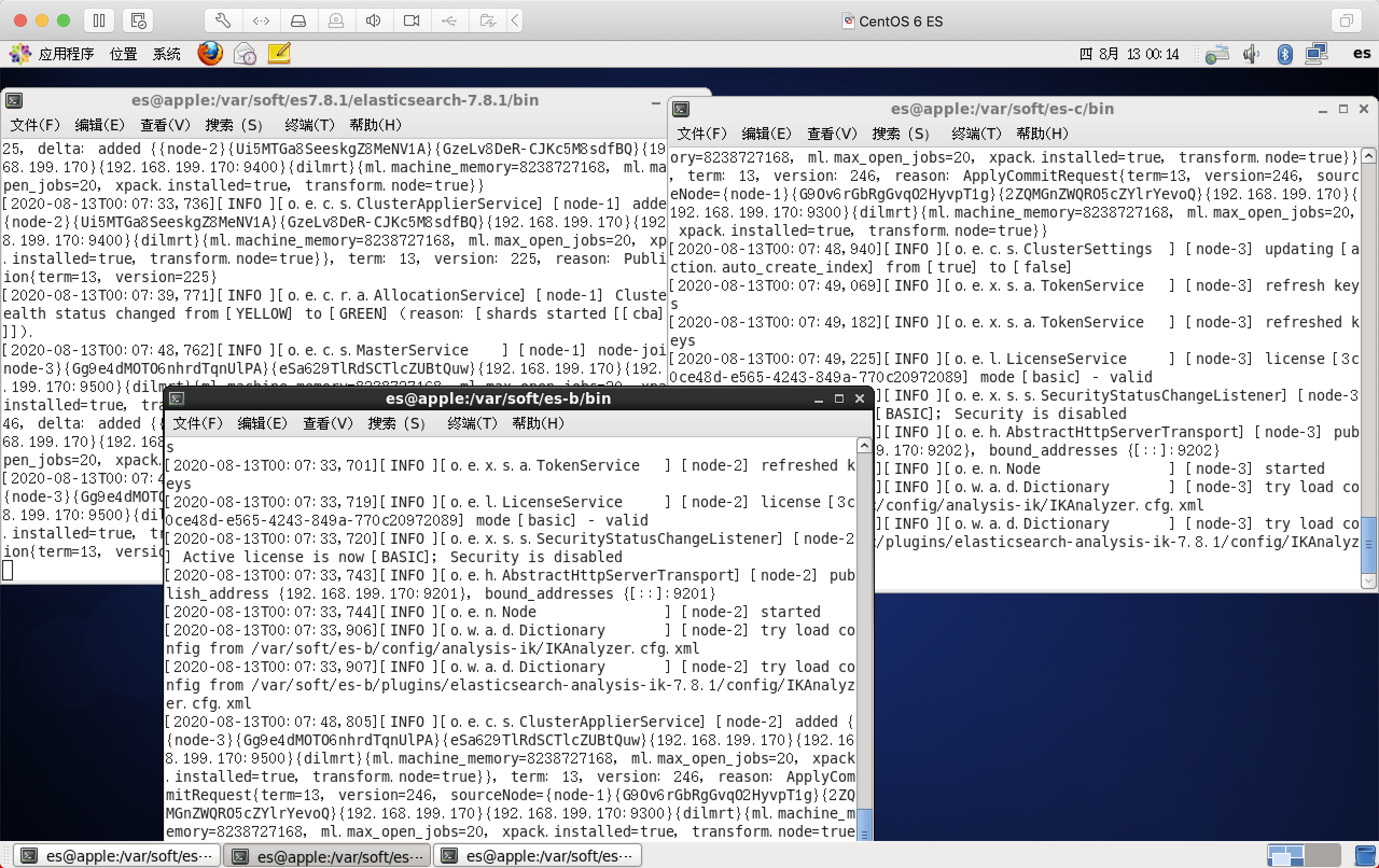
- 分别启动a、b、c三个节点
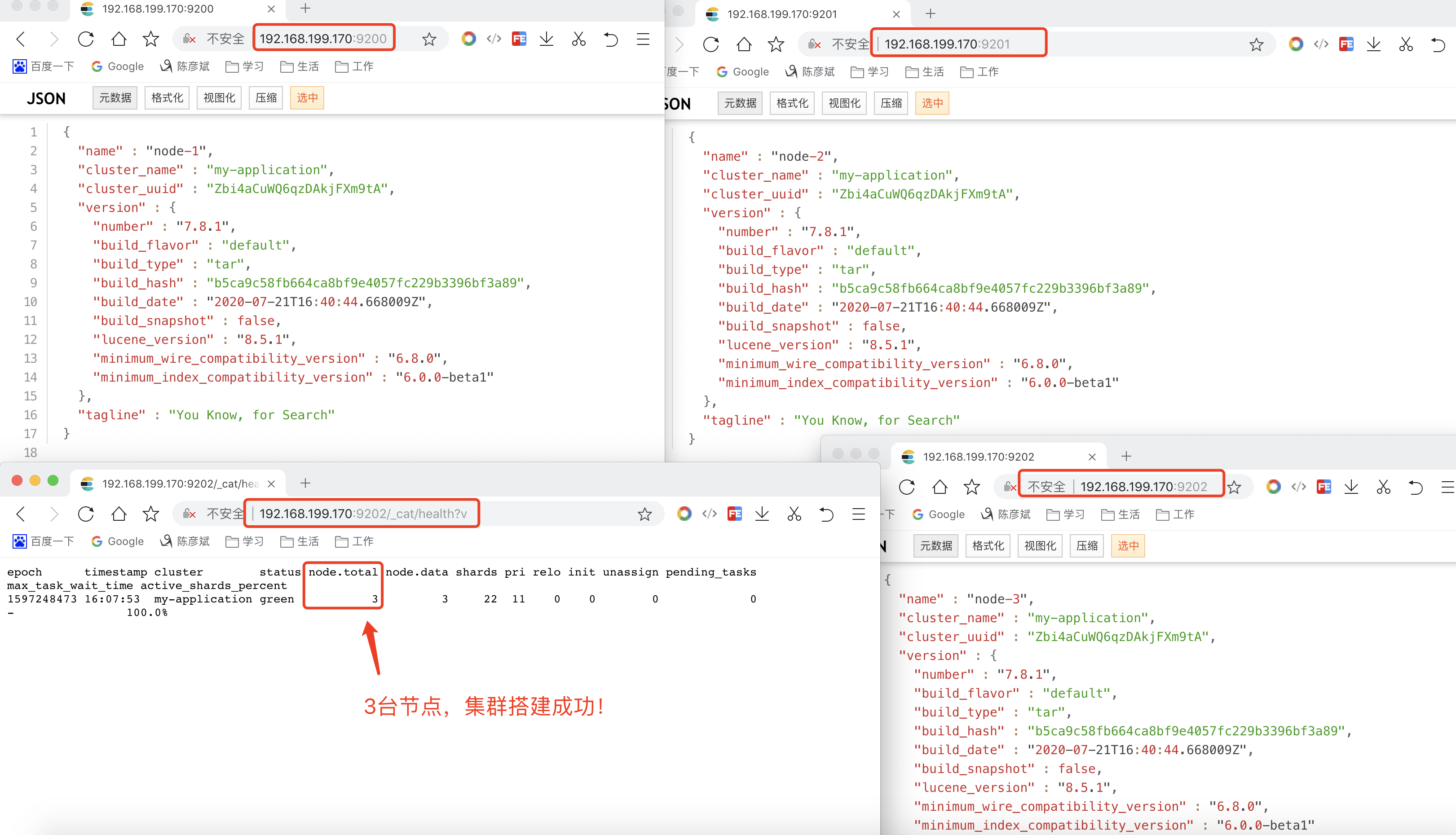
- 打开浏览器输入:ip:port/_cat/health?v,如果返回的nodt.total是3,代表集群搭建成功
配置文件
#集群名称,三台集群,要配置相同的集群名称!!!

cluster.name: my-application

#节点名称

node.name: node-1 #是不是有资格主节点

node.master: true

#是否存储数据

node.data: true

#最⼤集群节点数

node.max_local_storage_nodes: 3 #⽹关地址

network.host: 0.0.0.0

#端⼝

http.port: 9200

#内部节点之间沟通端⼝

transport.tcp.port: 9300

#es7.x 之后新增的配置,写⼊候选主节点的设备地址,在开启服务后可以被选为主节点

discovery.seed_hosts: ["localhost:9300","localhost:9400","localhost:9500"]

#es7.x 之后新增的配置,初始化⼀个新的集群时需要此配置来选举master

cluster.initial_master_nodes: ["node-1", "node-2","node-3"] #数据和存储路径

path.data: /Users/louis.chen/Documents/study/search/storage/a/data

path.logs: /Users/louis.chen/Documents/study/search/storage/a/logs
注意
因为我是一台服务器上,搞了3搞ES启动端口号不同,拷贝了3份es,具体还要跟实际情况相应调整
真实配置-a
# ======================== Elasticsearch Configuration =========================

#

# NOTE: Elasticsearch comes with reasonable defaults for most settings.

#       Before you set out to tweak and tune the configuration, make sure you

#       understand what are you trying to accomplish and the consequences.

#

# The primary way of configuring a node is via this file. This template lists

# the most important settings you may want to configure for a production cluster.

#

# Please consult the documentation for further information on configuration options:

# https://www.elastic.co/guide/en/elasticsearch/reference/index.html

#

# ---------------------------------- Cluster -----------------------------------

#

# Use a descriptive name for your cluster:

#

# 集群名称

cluster.name: my-application

#

# ------------------------------------ Node ------------------------------------

#

# Use a descriptive name for the node:

#

# 集群名称

node.name: node-1

# 是不是有资格主节点

node.master: true

# 是否存储数据

node.data: true

# 最大集群节点数,因为3个集群,所以配置3

node.max_local_storage_nodes: 3

#

# Add custom attributes to the node:

#

#node.attr.rack: r1

#

# ----------------------------------- Paths ------------------------------------

#

# Path to directory where to store the data (separate multiple locations by comma):

# 数据存储路径

path.data: /var/soft/es7.8.1/elasticsearch-7.8.1/data

# 日志存储路径

# Path to log files:

#

path.logs: /var/soft/es7.8.1/elasticsearch-7.8.1/logs

#

# ----------------------------------- Memory -----------------------------------

#

# Lock the memory on startup:

#

#bootstrap.memory_lock: true

#

# Make sure that the heap size is set to about half the memory available

# on the system and that the owner of the process is allowed to use this

# limit.

#

# Elasticsearch performs poorly when the system is swapping the memory.

#

# ---------------------------------- Network -----------------------------------

#

# Set the bind address to a specific IP (IPv4 or IPv6):

# 网关地址

network.host: 0.0.0.0

#

# Set a custom port for HTTP:

# 端口

http.port: 9200

# 内部节点之间沟通端口

transport.tcp.port: 9300

#

# For more information, consult the network module documentation.

#

# --------------------------------- Discovery ----------------------------------

#

# Pass an initial list of hosts to perform discovery when this node is started:

# The default list of hosts is ["127.0.0.1", "[::1]"]

# es7.x之后新增的配置,写入候选主节点的设备地址,在开启服务后可以被选为主节点

discovery.seed_hosts: ["127.0.0.1:9300", "127.0.0.1:9400", "127.0.0.1:9500"]

#

# Bootstrap the cluster using an initial set of master-eligible nodes:

# es7.x之后新增的配置,初始化一个新的集群时需要此配置来选举master

cluster.initial_master_nodes: ["node-1", "node-2", "node-3"]

#

# For more information, consult the discovery and cluster formation module documentation.

#

# ---------------------------------- Gateway -------------------------bootstrap.system_call_filter: false----------

#

# Block initial recovery after a full cluster restart until N nodes are started:

#

#gateway.recover_after_nodes: 3

#

# For more information, consult the gateway module documentation.

#

# ---------------------------------- Various -----------------------------------

#

# Require explicit names when deleting indices:

#

#action.destructive_requires_name: true

bootstrap.system_call_filter: false

http.cors.allow-origin: "*"

http.cors.enabled: true

http.cors.allow-headers : X-Requested-With,X-Auth-Token,Content-Type,Content-Length,Authorization

http.cors.allow-credentials: true
真实配置-b
# ======================== Elasticsearch Configuration =========================

#

# NOTE: Elasticsearch comes with reasonable defaults for most settings.

#       Before you set out to tweak and tune the configuration, make sure you

#       understand what are you trying to accomplish and the consequences.

#

# The primary way of configuring a node is via this file. This template lists

# the most important settings you may want to configure for a production cluster.

#

# Please consult the documentation for further information on configuration options:

# https://www.elastic.co/guide/en/elasticsearch/reference/index.html

#

# ---------------------------------- Cluster -----------------------------------

#

# Use a descriptive name for your cluster:

#

# 集群名称

cluster.name: my-application

#

# ------------------------------------ Node ------------------------------------

#

# Use a descriptive name for the node:

#

# 集群名称

node.name: node-2

# 是不是有资格主节点

node.master: true

# 是否存储数据

node.data: true

# 最大集群节点数,因为3个集群,所以配置3

node.max_local_storage_nodes: 3

#

# Add custom attributes to the node:

#

#node.attr.rack: r1

#

# ----------------------------------- Paths ------------------------------------

#

# Path to directory where to store the data (separate multiple locations by comma):

# 数据存储路径

path.data: /var/soft/es-b/data

# 日志存储路径

# Path to log files:

#

path.logs: /var/soft/es-b/logs

#

# ----------------------------------- Memory -----------------------------------

#

# Lock the memory on startup:

#

#bootstrap.memory_lock: true

#

# Make sure that the heap size is set to about half the memory available

# on the system and that the owner of the process is allowed to use this

# limit.

#

# Elasticsearch performs poorly when the system is swapping the memory.

#

# ---------------------------------- Network -----------------------------------

#

# Set the bind address to a specific IP (IPv4 or IPv6):

# 网关地址

network.host: 0.0.0.0

#

# Set a custom port for HTTP:

# 端口

http.port: 9201

# 内部节点之间沟通端口

transport.tcp.port: 9400

#

# For more information, consult the network module documentation.

#

# --------------------------------- Discovery ----------------------------------

#

# Pass an initial list of hosts to perform discovery when this node is started:

# The default list of hosts is ["127.0.0.1", "[::1]"]

# es7.x之后新增的配置,写入候选主节点的设备地址,在开启服务后可以被选为主节点

discovery.seed_hosts: ["127.0.0.1:9300", "127.0.0.1:9400", "127.0.0.1:9500"]

#

# Bootstrap the cluster using an initial set of master-eligible nodes:

# es7.x之后新增的配置,初始化一个新的集群时需要此配置来选举master

cluster.initial_master_nodes: ["node-1", "node-2", "node-3"]

#

# For more information, consult the discovery and cluster formation module documentation.

#

# ---------------------------------- Gateway -------------------------bootstrap.system_call_filter: false----------

#

# Block initial recovery after a full cluster restart until N nodes are started:

#

#gateway.recover_after_nodes: 3

#

# For more information, consult the gateway module documentation.

#

# ---------------------------------- Various -----------------------------------

#

# Require explicit names when deleting indices:

#

#action.destructive_requires_name: true

bootstrap.system_call_filter: false

http.cors.allow-origin: "*"

http.cors.enabled: true

http.cors.allow-headers : X-Requested-With,X-Auth-Token,Content-Type,Content-Length,Authorization

http.cors.allow-credentials: true
只修改了,2个端口、数据和日志存储路径
真实配置-c
# ======================== Elasticsearch Configuration =========================

#

# NOTE: Elasticsearch comes with reasonable defaults for most settings.

#       Before you set out to tweak and tune the configuration, make sure you

#       understand what are you trying to accomplish and the consequences.

#

# The primary way of configuring a node is via this file. This template lists

# the most important settings you may want to configure for a production cluster.

#

# Please consult the documentation for further information on configuration options:

# https://www.elastic.co/guide/en/elasticsearch/reference/index.html

#

# ---------------------------------- Cluster -----------------------------------

#

# Use a descriptive name for your cluster:

#

# 集群名称

cluster.name: my-application

#

# ------------------------------------ Node ------------------------------------

#

# Use a descriptive name for the node:

#

# 集群名称

node.name: node-3

# 是不是有资格主节点

node.master: true

# 是否存储数据

node.data: true

# 最大集群节点数,因为3个集群,所以配置3

node.max_local_storage_nodes: 3

#

# Add custom attributes to the node:

#

#node.attr.rack: r1

#

# ----------------------------------- Paths ------------------------------------

#

# Path to directory where to store the data (separate multiple locations by comma):

# 数据存储路径

path.data: /var/soft/es-c/data

# 日志存储路径

# Path to log files:

#

path.logs: /var/soft/es-c/logs

#

# ----------------------------------- Memory -----------------------------------

#

# Lock the memory on startup:

#

#bootstrap.memory_lock: true

#

# Make sure that the heap size is set to about half the memory available

# on the system and that the owner of the process is allowed to use this

# limit.

#

# Elasticsearch performs poorly when the system is swapping the memory.

#

# ---------------------------------- Network -----------------------------------

#

# Set the bind address to a specific IP (IPv4 or IPv6):

# 网关地址

network.host: 0.0.0.0

#

# Set a custom port for HTTP:

# 端口

http.port: 9202

# 内部节点之间沟通端口

transport.tcp.port: 9500

#

# For more information, consult the network module documentation.

#

# --------------------------------- Discovery ----------------------------------

#

# Pass an initial list of hosts to perform discovery when this node is started:

# The default list of hosts is ["127.0.0.1", "[::1]"]

# es7.x之后新增的配置,写入候选主节点的设备地址,在开启服务后可以被选为主节点

discovery.seed_hosts: ["127.0.0.1:9300", "127.0.0.1:9400", "127.0.0.1:9500"]

#

# Bootstrap the cluster using an initial set of master-eligible nodes:

# es7.x之后新增的配置,初始化一个新的集群时需要此配置来选举master

cluster.initial_master_nodes: ["node-1", "node-2", "node-3"]

#

# For more information, consult the discovery and cluster formation module documentation.

#

# ---------------------------------- Gateway -------------------------bootstrap.system_call_filter: false----------

#

# Block initial recovery after a full cluster restart until N nodes are started:

#

#gateway.recover_after_nodes: 3

#

# For more information, consult the gateway module documentation.

#

# ---------------------------------- Various -----------------------------------

#

# Require explicit names when deleting indices:

#

#action.destructive_requires_name: true

bootstrap.system_call_filter: false

http.cors.allow-origin: "*"

http.cors.enabled: true

http.cors.allow-headers : X-Requested-With,X-Auth-Token,Content-Type,Content-Length,Authorization

http.cors.allow-credentials: true
只修改了,2个端口、数据和日志存储路径
踩坑录(必看)
坑一

坑二
因为我是在一台linux上搭建的集群,然后用端口号9200、9201、9202区分开来的,es-b、es-c是拷贝es-a的,但是es-a的data目录有数据,需要将es-b和es-c的data目录清空,然后重启es即可!!!
启动
集群搭建成功
ElasticSearch 7.8.1集群搭建的更多相关文章
- ElasticSearch 高可用分布式集群搭建,与PHP多线程测试
方案: 使用HAproxy:当其中一台ElasticSearch Master宕掉时,ElasticSearch集群会自动将运行正常的节点提升为Master,但HAproxy不会将失败的请求重新分发到 ...
- Elasticsearch(ELK)集群搭建
一.前言 Elasticsearch是一个开源的高扩展的分布式全文检索引擎,它可以近乎实时的存储.检索数据:本身扩展性很好,可以扩展到上百台服务器,处理PB级别的数据.Elasticsearch也使用 ...
- Elasticsearch单机安装_集群搭建_索引基本操作_Head插件安装与基本操作_ik分词器配置_logstash实现数据同步_教程
一.Elasticsearch单机安装 1.将es安装包传到服务器上 这是安装包 这里我是用的是WinSCP上传工具,上传到/home/plugins文件下. 进入Xshell,验证一下是否上传成功. ...
- elasticsearch集群搭建实例
elasticsearch集群搭建实例 下个月又开始搞搜索了,几个月没动这块还好没有落下. 晚上在自己虚拟机上搭建了一个简易搜索集群,分享一下. 操作系统环境: Red Hat 4.8.2-16 el ...
- elasticsearch系列八:ES 集群管理(集群规划、集群搭建、集群管理)
一.集群规划 搭建一个集群我们需要考虑如下几个问题: 1. 我们需要多大规模的集群? 2. 集群中的节点角色如何分配? 3. 如何避免脑裂问题? 4. 索引应该设置多少个分片? 5. 分片应该设置几个 ...
- Elasticsearch集群搭建及使用Java客户端对数据存储和查询
本次博文发两块,前部分是怎样搭建一个Elastic集群,后半部分是基于Java对数据进行写入和聚合统计. 一.Elastic集群搭建 1. 环境准备. 该集群环境基于VMware虚拟机.CentOS ...
- 和我一起打造个简单搜索之ElasticSearch集群搭建
我们所常见的电商搜索如京东,搜索页面都会提供各种各样的筛选条件,比如品牌.尺寸.适用季节.价格区间等,同时提供排序,比如价格排序,信誉排序,销量排序等,方便了用户去找到自己心里理想的商品. 站内搜索对 ...
- ElasticStack之Elasticsearch集群搭建
需搭建服务器环境 操作系统 Host:port node 1 CentOS 7.2.1511 11.1.11.127:9200 node1 2 CentOS 7.2.1511 11.1.11.128: ...
- elasticsearch 集群管理(集群规划、集群搭建、集群管理)
一.集群规划 搭建一个集群我们需要考虑如下几个问题: 1. 我们需要多大规模的集群? 2. 集群中的节点角色如何分配? 3. 如何避免脑裂问题? 4. 索引应该设置多少个分片? 5. 分片应该设置几个 ...
随机推荐
- 05 . ELK Stack+Redis日志收集平台
环境清单 IP hostname 软件 配置要求 网络 备注 192.168.43.176 ES/数据存储 elasticsearch-7.2 内存2GB/硬盘40GB Nat,内网 192.168. ...
- Dcoker docker: Error starting userland proxy: Bind for 0.0.0.0:80: unexpected error (Failure EADDRINUSE).
https://stackoverflow.com/questions/46533482/error-starting-userland-proxy-bind-for-0-0-0-080-unexpe ...
- commvalut oracle backup command
run { allocate channel ch1 type 'sbt_tape'PARMS="SBT_LIBRARY=<software_installation_path> ...
- 01 . RPC简介原理及用Go实现一个简单的RCP
RPC简介 本地过程调用 // 正常情况下程序的执行和调用情况.例如有如下go语言代码: package main import "fmt" func main() { var a ...
- Django学习路34_models 文件创建数据表
from django.db import models # Create your models here. class BookInfoManager(models.Manager): '''图书 ...
- 美团Leaf——全局序列生成器
Leaf的Github地址: https://github.com/Meituan-Dianping/Leaf Leaf美团技术团队博客地址: https://tech.meituan.com/201 ...
- PHP array_unshift() 函数
实例 插入元素 "blue" 到数组中: <?php$a=array("a"=>"red","b"=> ...
- PHP curl_share_setopt函数
(PHP 5 >= 5.5.0) curl_share_setopt — 设置 cURL 共享句柄的一个选项. 说明 bool curl_share_setopt ( resource $sh ...
- PHP filesize() 函数
定义和用法 filesize() 函数返回指定文件的大小. 如果成功,该函数返回文件大小的字节数.如果失败,则返回 FALSE. 语法 filesize(filename) 参数 描述 filenam ...
- HTML - XHTML
HTML - XHTML XHTML 是以 XML 格式编写的 HTML.高佣联盟 www.cgewang.com 什么是 XHTML? XHTML 指的是可扩展超文本标记语言 XHTML 与 HTM ...