
Hexo博客美化之蝴蝶(butterfly)主题魔改
Hexo是轻量级的极客博客,因为它简便,轻巧,扩展性强,搭建部署方便深受广大人们的喜爱。各种琳琅满路的Hexo主题也是被各种大佬开发出来,十分钦佩,向大佬仰望,大声称赞:流批!!!
我在翻看各种主题后,便选择了蝴蝶这个主题,蝴蝶主题是由大佬Jerry制作的,其简洁,具有现代风格,扩展强,配置简单明了将我所吸引。
效果图:
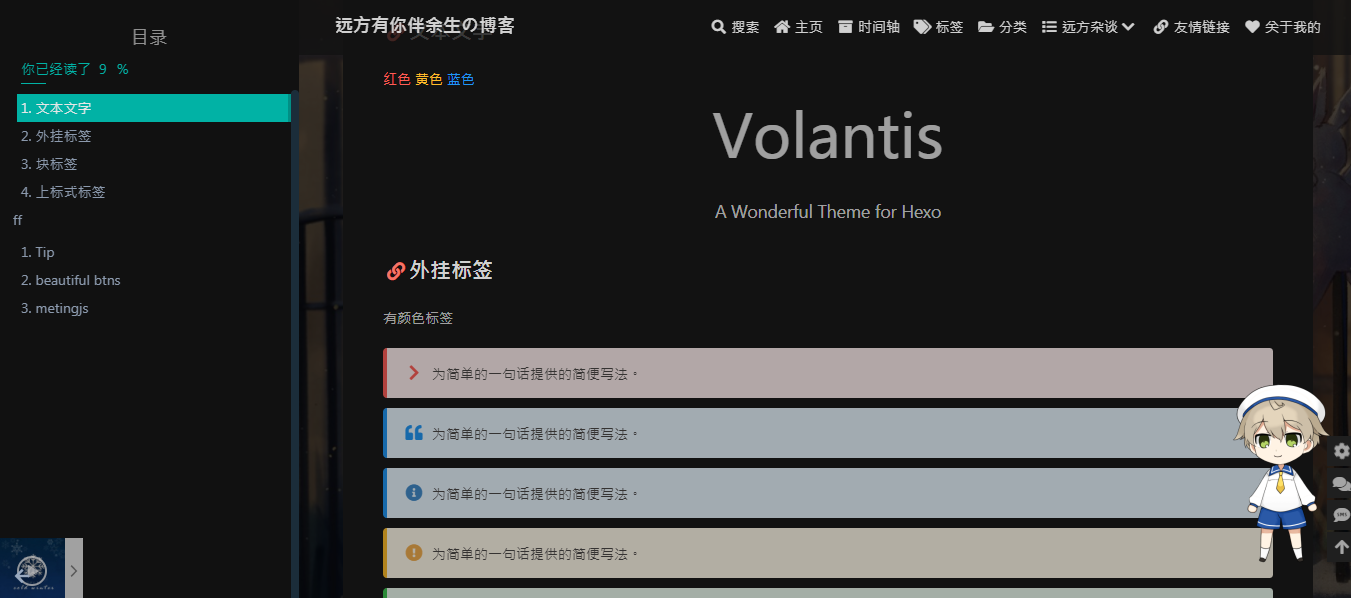
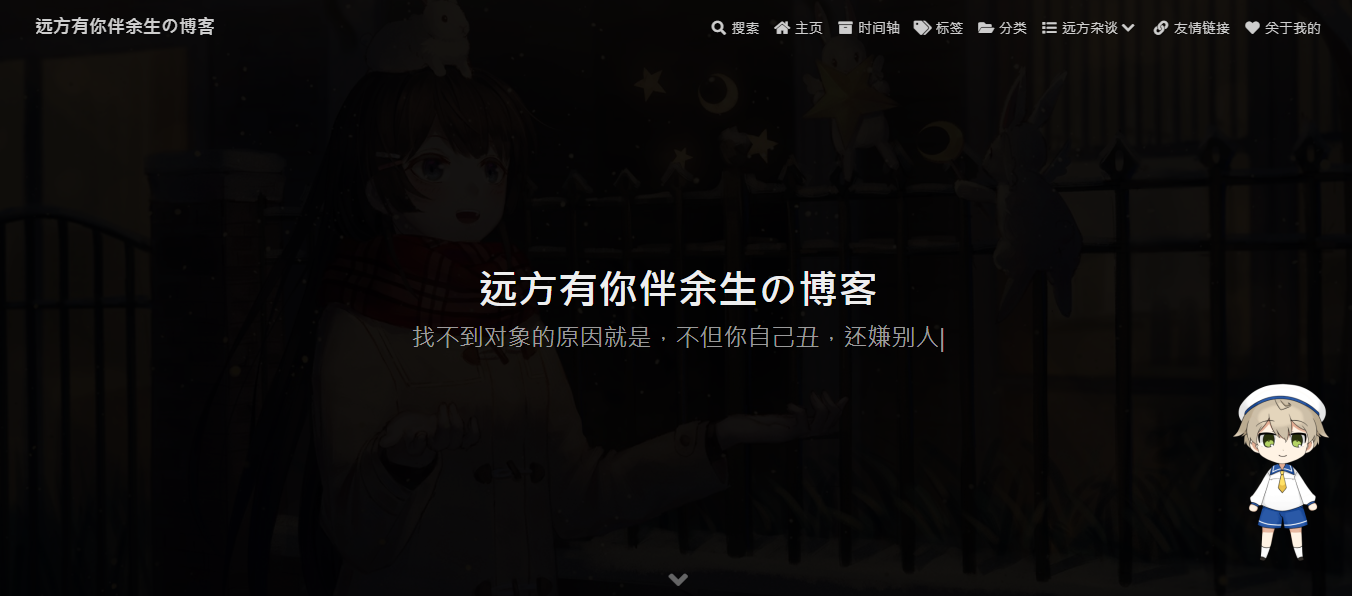
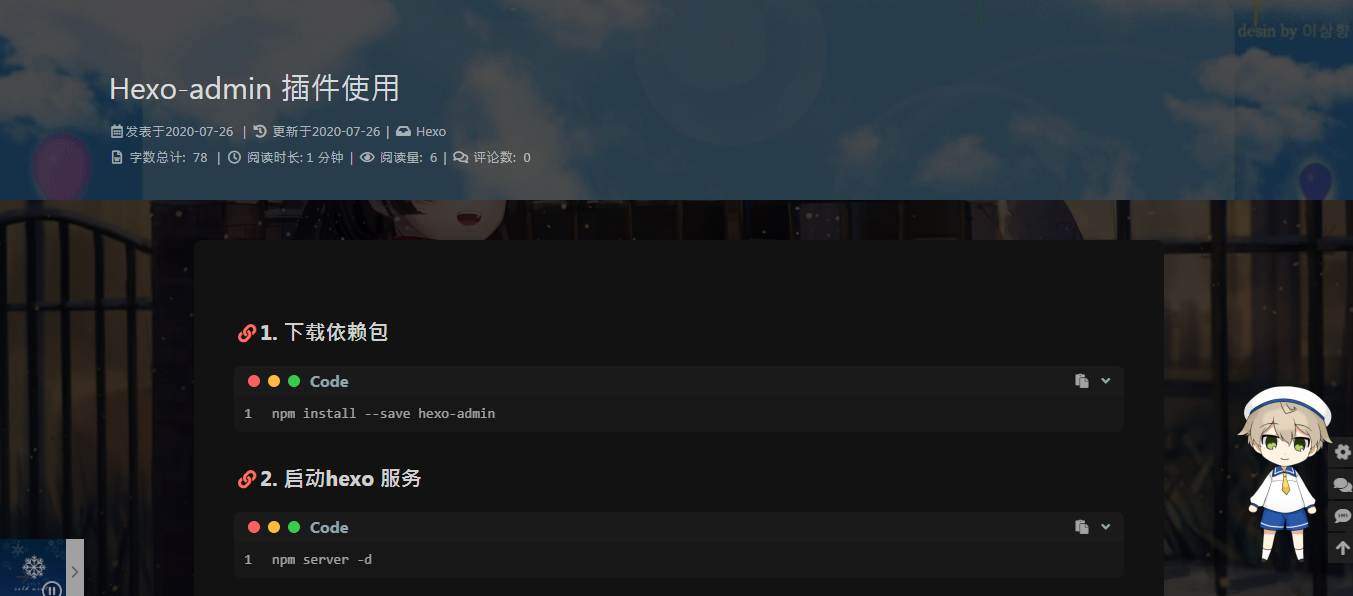
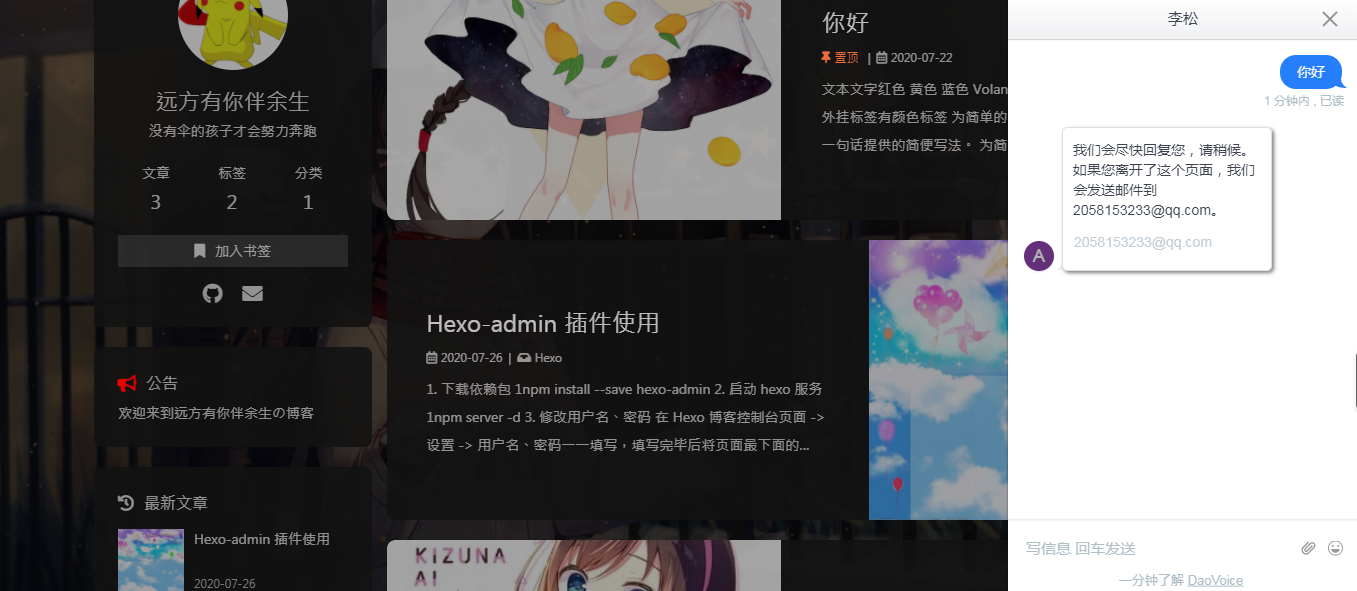
于是我按照主题的文档完成主题配置,参照其他butterfly使用者,又添加了一点魔改。为了方便大家,减少配置上花的时间,我就把脚手架代码放到gitee上,欢迎大家下载。
下面说一下我的配置步骤
首先下载主题
在你的博客路径打开终端,用git下载,如果下载太慢,可以在com后面追加.cnpm.org,这个是淘宝镜像源

git clone -b master https://github.com/jerryc127/hexo-theme-butterfly.git themes/butterfly

//这个是stylus,主题的依赖,必须安装

npm install hexo-renderer-pug hexo-renderer-stylus
然后在hexo的_config.yaml(记住是你博客的配置文件,不是刚下载的主题配置文件)更改theme:butterfly,保存,重启hexo server,就可以看到效果。

配置博客主题_config.yaml
配置前须知
Valine需要获取APP ID 和 APP Key
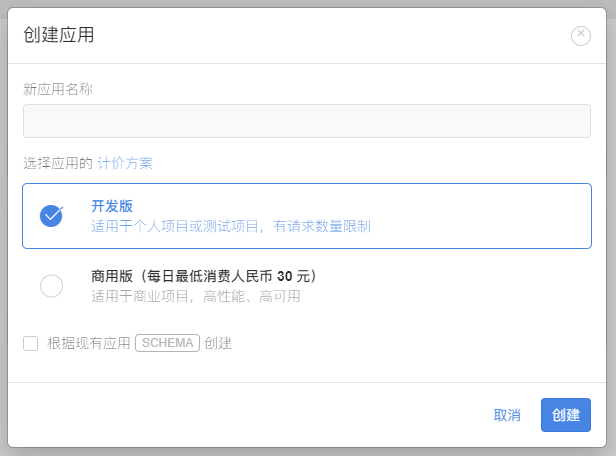
请先登录或注册 LeanCloud, 进入控制台后点击左下角创建应用:
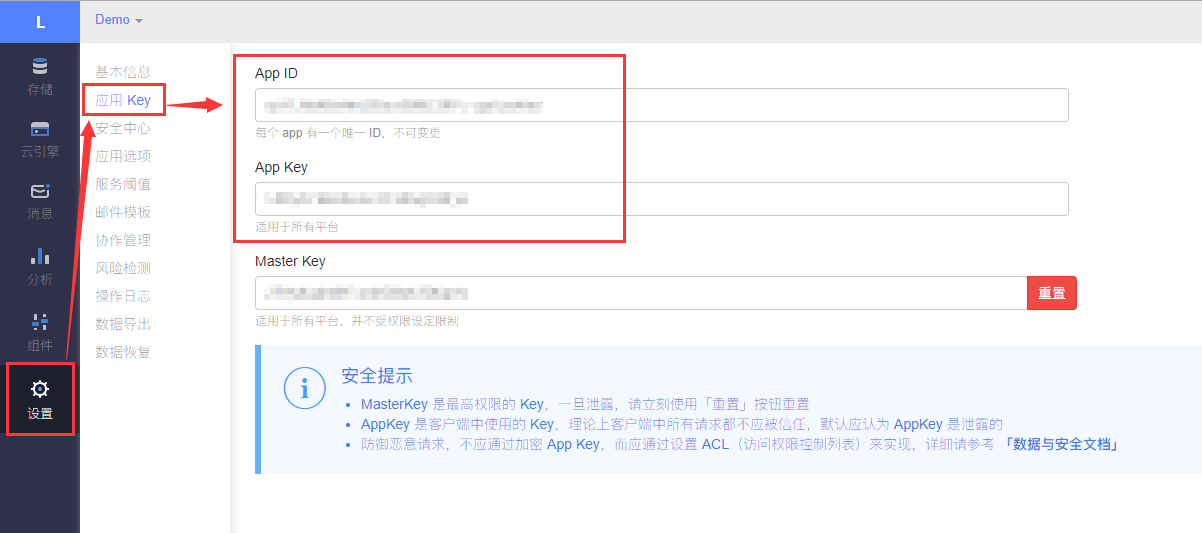
应用创建好以后,进入刚刚创建的应用,选择左下角的设置>应用Key,然后就能看到你的APP ID和APP Key了:
_config.yaml配置简单介绍
# Main menu navigation (導航目錄)

# --------------------------------------

# format: name: link || icon

# sub-menu

# name || icon:

#   name || link || icon

menu:       //按照上面给的格式配置你想设计的导航栏内容

  Home: / || fas fa-home

  Archives: /archives/ || fas fa-archive

  Tags: /tags/ || fas fa-tags

  Categories: /categories/ || fas fa-folder-open

  List||fas fa-list:

    - Music || /music/ || fas fa-music

    - Movie || /movies/ || fas fa-video

  Link: /link/ || fas fa-link

  About: /about/ || fas fa-heart

# Code Blocks (代碼相關)

# --------------------------------------  //代码高亮配置 我喜欢mac light样式,可以自行选择

highlight_theme: light # default / darker / pale night / light / ocean / mac / false

highlight_copy: true # copy button

highlight_lang: true # show the code language

highlight_shrink: false # true: shrink the code blocks / false: expand the code blocks | none: expand code blocks and hide the button

code_word_wrap: false

# copy settings

# copyright: Add the copyright information after copied content (複製的內容後面加上版權信息)

copy:

  enable: true

  copyright: false  //这里改成true就可以看到你的版权协议

# social settings (社交圖標設置)  //此主题图标引用的是fontsomev5,,不过你也可以引入阿里图标,没有css经验就不要贸然尝试了,容易翻车,最好备份一下

# formal:

#   icon: link || the description

social:

  fab fa-github: https://github.com/xxxxx || Github

  fas fa-envelope: mailto:xxxxxx@gmail.com || Email

# search (搜索)

# --------------------------------------  //主题内置的搜索功能有algolia外部搜索和local search本地搜索,我是打开了,这个配置需要下载依赖,具体查看

                                          //官方文档

# Algolia search

algolia_search:

  enable: false

  hits:

    per_page: 6

  labels:

    input_placeholder: Search for Posts

    hits_empty: "We didn't find any results for the search: ${query}" # if there are no result

    hits_stats: '${hits} results found in ${time} ms'

# Local search

local_search:

  enable: false

  labels:

    input_placeholder: Search for Posts

    hits_empty: "We didn't find any results for the search: ${query}" # if there are no result

# Math (數學)

# --------------------------------------

# About the per_page

# if you set it to true, it will load mathjax/katex script in each page (true 表示每一頁都加載js)

# if you set it to false, it will load mathjax/katex script according to your setting (add the 'mathjax: true' in page's front-matter)

# (false 需要時加載,須在使用的 Markdown Front-matter 加上 mathjax: true)

# MathJax   //数学公式,我用的是katex

mathjax:

  enable: false

  per_page: false

# KaTeX

katex:

  enable: false

  per_page: false

  hide_scrollbar: true

# Image (圖片設置)

# --------------------------------------

# Favicon(網站圖標)

favicon: /img/favicon.png

# Avatar (頭像)

avatar:

  img: /img/avatar.png

  effect: false

# the banner image of home page

index_img:

# if the banner of page not setting,it will show the top_img

default_top_img: https://i.loli.net/2020/05/01/IuWi8QbHvzjlOPw.jpg

# the banner image of archive page

archive_img:

# the banner image of tag page

# tag page, look like https://xxxxxxxxx.com/tags/butterfly

tag_img:

# the banner image of category page

# category page, look like https://xxxxxxxxx.com/categories/butterfly

category_img:

# If you are using hexo-douban, you can configure it (如果你有使用 hexo-douban,可配置這個)

# douban:

#   meta: false

#   movies_img:

#   books_img:

#   games_img:

cover:

  # display the cover or not (是否顯示文章封面)

  index_enable: true

  aside_enable: true

  archives_enable: true

  # the position of cover in home page (封面顯示的位置)

  # left/right/both

  position: both

  # When cover is not set, the default cover is displayed (當沒有設置cover時,默認的封面顯示)

  default_cover:

    - https://i.loli.net/2020/05/01/gkihqEjXxJ5UZ1C.jpg

# Replace Broken Images (替換無法顯示的圖片)

error_img:

  flink: /img/friend_404.gif

  post_page: /img/404.jpg

# A simple 404 page

error_404:

  enable: false

  subtitle: 'Page Not Found'

  background: https://i.loli.net/2020/05/19/aKOcLiyPl2JQdFD.png

post_meta:

  page: # Home Page

    date_type: created # created or updated or both 主頁文章日期是創建日或者更新日或都顯示

    categories: true # true or false 主頁是否顯示分類

    tags: false # true or false 主頁是否顯示標籤

  post:

    date_type: both # created or updated or both 文章頁日期是創建日或者更新日或都顯示

    categories: true # true or false 文章頁是否顯示分類

    tags: true # true or false 文章頁是否顯示標籤

# wordcount (字數統計)  //字数统计,打开前需要下载依赖,查看官方文档

wordcount:

  enable: false

  post_wordcount: true

  min2read: true

  total_wordcount: true

# Display the article introduction on homepage

# 1: description

# 2: both (if the description exists, it will show description. or show the auto_excerpt)

# 3: auto_excerpt (default)

index_post_content:

  method: 3

  length: 500 # if you set method to 2 or 3, the length need to config

# Post

# --------------------------------------

# toc (目錄)

toc:

  enable: true

  number: true

  auto_open: true # auto open the sidebar

post_copyright:

  enable: true

  decode: false

  license: CC BY-NC-SA 4.0

  license_url: https://creativecommons.org/licenses/by-nc-sa/4.0/

# Sponsor/reward  //打赏功能, 图片自行设计

reward:

  enable: false

  QR_code:

    - img: /img/wechat.jpg

      link:

      text: wechat

    - img: /img/alipay.jpg

      link:

      text: alipay

# Related Articles

related_post:

  enable: true

  limit: 6 # Number of posts displayed

  date_type: created # or created or updated 文章日期顯示創建日或者更新日

# figcaption (圖片描述文字)

photofigcaption: false

# anchor

# when you scroll in post, the URL will update according to header id.

anchor: false

# Share System (分享功能)  //推荐valine,需要配置appid和appkey才能使用

# --------------------------------------

# AddThis

# https://www.addthis.com/

addThis:

  enable: false

  pubid:

# Share.js

# https://github.com/overtrue/share.js

sharejs:

  enable: true

  sites: facebook,twitter,wechat,weibo,qq

# AddToAny

# https://www.addtoany.com/

addtoany:

  enable: false

  item:

    - facebook

    - twitter

    - wechat

    - sina_weibo

    - facebook_messenger

    - email

    - copy_link

# Comments System

# --------------------------------------

# disqus

# https://disqus.com/

disqus:

  enable: false

  shortname:

  count: false # dispaly comment count in top_img

# Alternative Disqus - Render comments with Disqus API

# DisqusJS評論系統,可以實現在網路審查地區載入 Disqus 評論列表,兼容原版

# https://github.com/SukkaW/DisqusJS

disqusjs:

  enable: false

  shortname:

  siteName:

  apikey:

  api:

  nocomment: # display when a blog post or an article has no comment attached

  admin:

  adminLabel:

  count: false # dispaly comment count in top_img

# livere(來必力)

# https://www.livere.com/

livere:

  enable: false

  uid:

# gitalk

# https://github.com/gitalk/gitalk

gitalk:

  enable: false

  client_id:

  client_secret:

  repo:

  owner:

  admin:

  language: en # en, zh-CN, zh-TW, es-ES, fr, ru

  perPage: 10 # Pagination size, with maximum 100.

  distractionFreeMode: false # Facebook-like distraction free mode.

  pagerDirection: last # Comment sorting direction, available values are last and first.

  createIssueManually: false # Gitalk will create a corresponding github issue for your every single page automatically

  count: false # dispaly comment count in top_img

# valine

# https://valine.js.org

valine:

  enable: false # if you want use valine,please set this value is true

  appId: # leancloud application app id

  appKey: # leancloud application app key

  pageSize: 10 # comment list page size

  avatar: monsterid # gravatar style https://valine.js.org/#/avatar

  lang: en # i18n: zh-CN/zh-TW/en/ja

  placeholder: Please leave your footprints # valine comment input placeholder(like: Please leave your footprints )

  guest_info: nick,mail,link #valine comment header info (nick/mail/link)

  recordIP: false # Record reviewer IP

  serverURLs: # This configuration is suitable for domestic custom domain name users, overseas version will be automatically detected (no need to manually fill in)

  bg: # valine background    //现版本已经把背景改成透明了,想要背景可自行更改,或者参考我的脚手架

  emojiCDN: # emoji CDN      //表情自定义,可查看主题官方文档配置

  enableQQ: false # enable the Nickname box to automatically get QQ Nickname and QQ Avatar

  requiredFields: nick,mail # required fields (nick/mail)

  count: false # dispaly comment count in top_img

# utterances

# https://utteranc.es/

utterances:

  enable: false

  repo:

  # Issue Mapping: pathname/url/title/og:title

  issue_term: pathname

  # Theme: github-light/github-dark/github-dark-orange/icy-dark/dark-blue/photon-dark

  light_theme: github-light

  dark_theme: photon-dark

# Facebook Comments Plugin

# https://developers.facebook.com/docs/plugins/comments/

facebook_comments:

  enable: false

  app_id:

  user_id: # optional

  pageSize: 10 # The number of comments to show

  order_by: social # social/time/reverse_time

  lang: en_US # Language en_US/zh_CN/zh_TW and so on

  count: false

# Chat Services  //即时聊天服务,需要注册,再打开chat_btn和你选择的某一款聊天服务,我选择的是daovoice

# --------------------------------------

# Chat Button [recommend]

# It will create a button in the bottom right corner of website, and hide the origin button

chat_btn: false

# The origin chat button is displayed when scrolling up, and the button is hidden when scrolling down

chat_hide_show: false

# chatra

# https://chatra.io/

chatra:

  enable: false

  id:

# tidio

# https://www.tidio.com/

tidio:

  enable: false

  public_key:

# daovoice

# http://daovoice.io/

daovoice:

  enable: false

  app_id:

# gitter

# https://gitter.im/

gitter:

  enable: false

  room:

# Footer Settings

# --------------------------------------   //页脚配置

since: 2020

footer_custom_text:

footer_copyright: true

ICP:

  enable: false

  url:

  text:

  icon: /img/icp.png

# Analysis

# --------------------------------------   //网站分析模块,我没有配置,这个查看主题文档吧

# Baidu Analytics

baidu_analytics:

# Google Analytics

google_analytics:

# Tencent Analytics ID

tencent_analytics:

# Advertisement

# --------------------------------------

# Google Adsense (谷歌廣告)

google_adsense:

  enable: false

  js: https://pagead2.googlesyndication.com/pagead/js/adsbygoogle.js

  client:

  enable_page_level_ads: true

# Insert ads manually (手動插入廣告)

# ad:

#   index:

#   aside:

#   post:

# Verification (站長驗證)

# --------------------------------------

# Google Webmaster tools verification setting

# See: https://www.google.com/webmasters/

google_site_verification:

# Bing Webmaster tools verification setting

# See: https://www.bing.com/webmaster/

bing_site_verification:

# Baidu Webmaster tools verification setting

# See: https://ziyuan.baidu.com/site/

baidu_site_verification:

# 360 Webmaster tools verification setting

# see http://zhanzhang.so.com/

qihu_site_verification:

# Beautify/Effect (美化/效果) //自定义美化效果,没有css经验请绕行

# --------------------------------------

# Theme color for customize

# Notice: color value must in double quotes like "#000" or may cause error!

# theme_color:

#   enable: true

#   main: "#49B1F5"

#   paginator: "#00c4b6"

#   button_hover: "#FF7242"

#   text_selection: "#00c4b6"

#   link_color: "#99a9bf"

#   meta_color: "#858585"

#   hr_color: "#A4D8FA"

#   code_foreground: "#F47466"

#   code_background: "rgba(27, 31, 35, .05)"

#   toc_color: "#00c4b6"

#   blockquote_padding_color: "#49b1f5"

#   blockquote_background_color: "#49b1f5"

# The top_img settings of home page

# default: top img - full screen, site info - middle (默認top_img全屏,site_info在中間)

# The positon of site info, eg: 300px/300em/300rem/10% (主頁標題距離頂部距離)

index_site_info_top:

# The height of top_img, eg: 300px/300em/300rem (主頁top_img高度)

index_top_img_height:

# The user interface setting of category and tag page (category和tag頁的UI設置)

# index - same as Homepage UI (index 值代表 UI將與首頁的UI一樣)

# default - same as archives UI 默認跟archives頁面UI一樣

category_ui: # 留空或 index

tag_ui: # 留空或 index

# Website Background (設置網站背景)

# can set it to color or image (可設置圖片 或者 顔色)

# The formal of color: '#49B202'

# The formal of image: url(http://xxxxxx.com/xxx.jpg)

# White color will be shown as default

background:               //网站背景,因为魔改将banner设为透明,如果不添加背景就会一片白,背景格式: url(网络路径或者本地相对路径)

# Show the footer background image (same as top_img)

footer_bg: false

# the position of bottom right button/default unit: px (右下角按鈕距離底部的距離/默認單位為px)

rightside-bottom:

# Background effects (背景特效)  //处于对性能考虑,最好不要都打开,背景,鼠标效果各选一个

# --------------------------------------

# canvas_ribbon (靜止彩帶背景)

# See: https://github.com/hustcc/ribbon.js

canvas_ribbon:

  enable: false

  size: 150

  alpha: 0.6

  zIndex: -1

  click_to_change: false

  mobile: false

# Dynamic ribbon (動態彩帶)

canvas_ribbon_piao:

  enable: false

  mobile: false

# canvas_nest

# https://github.com/hustcc/canvas-nest.js

canvas_nest:

  enable: false

  color: '0,0,255' #color of lines, default: '0,0,0'; RGB values: (R,G,B).(note: use ',' to separate.)

  opacity: 0.7 # the opacity of line (0~1), default: 0.5.

  zIndex: -1 # z-index property of the background, default: -1.

  count: 99 # the number of lines, default: 99.

  mobile: false

# Typewriter Effect (打字效果)

# https://github.com/disjukr/activate-power-mode

activate_power_mode:

  enable: false

  colorful: true # open particle animation (冒光特效)

  shake: true #  open shake (抖動特效)

# Mouse click effects: fireworks (鼠標點擊效果: 煙火特效)

fireworks:

  enable: false

  zIndex: 9999 # -1 or 9999

# Mouse click effects: Heart symbol (鼠標點擊效果: 愛心)

click_heart: false

# Mouse click effects: words (鼠標點擊效果: 文字)

ClickShowText:

  enable: false

  text:

    - I

    - LOVE

    - YOU

  fontSize: 15px

# Default display mode (網站默認的顯示模式)

# light (default) / dark

display_mode: light

# Beautify (美化頁面顯示)

beautify:

  enable: false

  field: post # site/post

  title-prefix-icon: '\f0c1'

  title-prefix-icon-color: '#F47466'

# Global font settings

# Don't modify the following settings unless you know how they work (非必要不要修改)

font:

  font-family:

  code-font:

# Font settings for the site title and site subtitle

# 左上角網站名字 主頁居中網站名字

blog_title_font:

  font_link: https://fonts.googleapis.com/css?family=Titillium+Web&display=swap

  font-family: Titillium Web, 'PingFang SC', 'Hiragino Sans GB', Microsoft YaHei', sans-serif

# The setting of divider icon (水平分隔線圖標設置)

hr_icon:

  enable: true

  icon: # the unicode value of Font Awesome icon

  icon-top:

# the subtitle on homepage (主頁subtitle)

subtitle:

  enable: true

  # Typewriter Effect (打字效果)

  effect: true

  # loop (循環打字)

  loop: true

  # source調用第三方服務

  # source: false 關閉調用

  # source: 1  調用搏天api的隨機語錄(簡體) https://api.btstu.cn/

  # source: 2  調用一言網的一句話(簡體) https://hitokoto.cn/

  # source: 3  調用一句網(簡體) http://yijuzhan.com/

  # source: 4  調用今日詩詞(簡體) https://www.jinrishici.com/

  # subtitle 會先顯示 source , 再顯示 sub 的內容

  source: false

  # 如果有英文逗號' , ',請使用轉義字元 ,

  # 如果有英文雙引號' " ',請使用轉義字元 "

  # 開頭不允許轉義字元,如需要,請把整個句子用雙引號包住

  # 如果關閉打字效果,subtitle只會顯示sub的第一行文字

  sub:

    - 今日事,今日畢

    - Never put off till tomorrow what you can do today

# Loading Animation (加載動畫)

preloader: false

# aside (側邊欄)

# --------------------------------------

aside:

  enable: true

  mobile: true # display on mobile

  position: right # left or right

  card_author:

    enable: true

    description:

  card_announcement:

    enable: true

    content: This is my Blog

  card_recent_post:

    enable: true

    limit: 5 # if set 0 will show all

  card_categories:

    enable: true

    limit: 8 # if set 0 will show all

    expand: none # none/true/false

  card_tags:

    enable: true

    limit: 40 # if set 0 will show all

    color: false

  card_archives:

    enable: true

    type: monthly # yearly or monthly

    format: MMMM YYYY # eg: YYYY年MM月

    order: -1 # Sort of order. 1, asc for ascending; -1, desc for descending

    limit: 8 # if set 0 will show all

  card_webinfo: true

# busuanzi count for PV / UV in site

# 訪問人數

busuanzi:

  site_uv: true

  site_pv: true

  page_pv: true

# Time difference between publish date and now (網頁運行時間)

# Formal: Month/Day/Year Time or Year/Month/Day Time

runtimeshow:

  enable: false

  publish_date:

# Bottom right button (右下角按鈕)

# --------------------------------------

# Conversion between Traditional and Simplified Chinese (簡繁轉換)

translate:

  enable: true

  # The text of a button

  default: 繁

  # the language of website (1 - Traditional Chinese/ 2 - Simplified Chinese)

  defaultEncoding: 2

  # Time delay

  translateDelay: 0

  # The text of the button when the language is Simplified Chinese

  msgToTraditionalChinese: '繁'

  # The text of the button when the language is Traditional Chinese

  msgToSimplifiedChinese: '簡'

# Read Mode (閲讀模式)

readmode: true

# dark mode

darkmode:

  enable: true

  # Toggle Button to switch dark/light mode

  button: true

  # Switch dark/light mode automatically (自動切換 dark mode和 light mode)

  # autoChangeMode: 1  Following System Settings, if the system doesn't support dark mode, it will switch dark mode between 6 pm to 6 am

  # autoChangeMode: 2  Switch dark mode between 6 pm to 6 am

  # autoChangeMode: false

  autoChangeMode: false

# Lightbox (圖片大圖查看模式)

# --------------------------------------

# You can only choose one, or neither (只能選擇一個 或者 兩個都不選)

# medium-zoom

# https://github.com/francoischalifour/medium-zoom

medium_zoom: false

# fancybox

# http://fancyapps.com/fancybox/3/

fancybox: true

# Tag Plugins settings (標籤外掛)

# --------------------------------------

# mermaid

# see https://github.com/knsv/mermaid

mermaid:

  enable: false

  # built-in themes: default/forest/dark/neutral

  theme: default

# Note (Bootstrap Callout)

note:

  # Note tag style values:

  #  - simple    bs-callout old alert style. Default.

  #  - modern    bs-callout new (v2-v3) alert style.

  #  - flat      flat callout style with background, like on Mozilla or StackOverflow.

  #  - disabled  disable all CSS styles import of note tag.

  style: flat

  icons: true

  border_radius: 3

  # Offset lighter of background in % for modern and flat styles (modern: -12 | 12; flat: -18 | 6).

  # Offset also applied to label tag variables. This option can work with disabled note tag.

  light_bg_offset: 0

# other

# --------------------------------------

# Snackbar (Toast Notification 彈窗)  //操作提示弹窗

# https://github.com/polonel/SnackBar

# position 彈窗位置

# 可選 top-left / top-center / top-right / bottom-left / bottom-center / bottom-right

snackbar:

  enable: false

  position: bottom-left

  bg_light: '#49b1f5' # The background color of Toast Notification in light mode

  bg_dark: '#121212' # The background color of Toast Notification in dark mode

# Baidu Push (百度推送)

baidu_push: false

# https://instant.page/

# prefetch (預加載)

instantpage: true

# https://github.com/vinta/pangu.js

# Insert a space between Chinese character and English character (中英文之間添加空格)

pangu:

  enable: false

  field: site # site/post

# Lazyload (圖片懶加載)

# https://github.com/verlok/lazyload

lazyload:

  enable: true

  post: /img/loading.gif

# PWA

# See https://github.com/JLHwung/hexo-offline

# ---------------

# pwa:

#   enable: false

#   manifest: /image/pwa/manifest.json

#   theme_color: "#fff"

#   apple_touch_icon: /image/pwa/apple-touch-icon.png

#   favicon_32_32: /image/pwa/32.png

#   favicon_16_16: /image/pwa/16.png

#   mask_icon: /image/pwa/safari-pinned-tab.svg

# Disable Baidu transformation on mobile devices (禁止百度轉碼)

disable_baidu_transformation: true

# Open graph meta tags

# https://developers.facebook.com/docs/sharing/webmasters/

Open_Graph_meta: true

# Caches the contents in a fragment, speed up the generation (開啟hexo自帶的緩存,加快生成速度)

fragment_cache: true

# Inject

# Insert the code to head (before '</head>' tag) and the bottom (before '</body>' tag)

# 插入代码到头部 </head> 之前 和 底部 </body> 之前            //外挂方式引入自定义css和js,推荐在这里引入自定义css和js

inject:

  head:

    # - <link rel="stylesheet" href="/xxx.css">

  bottom:

    # - <script src="xxxx"></script>

# CDN

# Don't modify the following settings unless you know how they work

# 非必要請不要修改

CDN:

  # main

  main_css: /css/index.css

  jquery: https://cdn.jsdelivr.net/npm/jquery@latest/dist/jquery.min.js

  main: /js/main.js

  utils: /js/utils.js

  # comments

  blueimp_md5: https://cdn.jsdelivr.net/npm/blueimp-md5/js/md5.min.js

  gitalk: https://cdn.jsdelivr.net/npm/gitalk@latest/dist/gitalk.min.js

  gitalk_css: https://cdn.jsdelivr.net/npm/gitalk/dist/gitalk.min.css

  valine: https://cdn.jsdelivr.net/npm/valine/dist/Valine.min.js

  disqusjs: https://cdn.jsdelivr.net/npm/disqusjs@1/dist/disqus.js

  disqusjs_css: https://cdn.jsdelivr.net/npm/disqusjs@1/dist/disqusjs.css

  utterances: https://utteranc.es/client.js

  # share

  addtoany: https://static.addtoany.com/menu/page.js

  sharejs: https://cdn.jsdelivr.net/npm/social-share.js/dist/js/social-share.min.js

  sharejs_css: https://cdn.jsdelivr.net/npm/social-share.js/dist/css/share.min.css

  # search

  local_search: /js/search/local-search.js

  algolia_js: /js/search/algolia.js

  algolia_search: https://cdn.jsdelivr.net/npm/instantsearch.js@2.10.5/dist/instantsearch.min.js

  algolia_search_css: https://cdn.jsdelivr.net/npm/instantsearch.js@2.10.5/dist/instantsearch.min.css

  # math

  mathjax: https://cdn.jsdelivr.net/npm/mathjax/MathJax.js?config=TeX-AMS-MML_HTMLorMML

  katex: https://cdn.jsdelivr.net/npm/katex@latest/dist/katex.min.css

  katex_copytex: https://cdn.jsdelivr.net/npm/katex-copytex@latest/dist/katex-copytex.min.js

  katex_copytex_css: https://cdn.jsdelivr.net/npm/katex-copytex@latest/dist/katex-copytex.min.css

  mermaid: https://cdn.jsdelivr.net/npm/mermaid/dist/mermaid.min.js

  # count

  busuanzi: //busuanzi.ibruce.info/busuanzi/2.3/busuanzi.pure.mini.js

  # background effect

  canvas_ribbon: /js/third-party/canvas-ribbon.js

  canvas_ribbon_piao: /js/third-party/piao.js

  canvas_nest: /js/third-party/canvas-nest.js

  lazyload: https://cdn.jsdelivr.net/npm/vanilla-lazyload/dist/lazyload.iife.min.js

  instantpage: https://cdn.jsdelivr.net/npm/instant.page/instantpage.min.js

  typed: https://cdn.jsdelivr.net/npm/typed.js

  pangu: https://cdn.jsdelivr.net/npm/pangu/dist/browser/pangu.min.js

  # photo

  fancybox_css: https://cdn.jsdelivr.net/npm/@fancyapps/fancybox@latest/dist/jquery.fancybox.min.css

  fancybox: https://cdn.jsdelivr.net/npm/@fancyapps/fancybox@latest/dist/jquery.fancybox.min.js

  medium_zoom: https://cdn.jsdelivr.net/npm/medium-zoom/dist/medium-zoom.min.js

  # snackbar

  snackbar_css: https://cdn.jsdelivr.net/npm/node-snackbar/dist/snackbar.min.css

  snackbar: https://cdn.jsdelivr.net/npm/node-snackbar/dist/snackbar.min.js

  # effect

  anime: https://cdn.jsdelivr.net/npm/animejs@latest/anime.min.js

  activate_power_mode: /js/third-party/activate-power-mode.js

  fireworks: /js/third-party/fireworks.js

  click_heart: /js/third-party/click_heart.js

  ClickShowText: /js/third-party/ClickShowText.js

  # fontawesome

  fontawesome: https://cdn.jsdelivr.net/npm/@fortawesome/fontawesome-free/css/all.min.css

  # Conversion between Traditional and Simplified Chinese

  translate: /js/tw_cn.js

  # justifiedGallery

  justifiedGallery_js: https://cdn.jsdelivr.net/npm/justifiedGallery/dist/js/jquery.justifiedGallery.min.js

  justifiedGallery_css: https://cdn.jsdelivr.net/npm/justifiedGallery/dist/css/justifiedGallery.min.css

  # aplayer

  aplayer_css: https://cdn.jsdelivr.net/npm/aplayer/dist/APlayer.min.css

  aplayer_js: https://cdn.jsdelivr.net/npm/aplayer/dist/APlayer.min.js

  meting_js: https://cdn.jsdelivr.net/npm/meting@1.2.0/dist/Meting.min.js
配置完成后,需要hexo clean && hexo g,然后开启hexo服务查看效果。
如果参考我的脚手架,大家可以阅读readme和changelog文件,和蝴蝶主题官方文档。
码字不易,如果喜欢给个推荐或者关注,谢谢
Hexo博客美化之蝴蝶(butterfly)主题魔改的更多相关文章
- Hexo博客搭建以及Next主题美化的经验之谈
这并不是一篇博客搭建教程.内容主要包含个人对于Hexo博客搭建的心得,Next6.0主题美化的部分建议,以及摘录一些各种用于博客搭建的link. 在博客园3年6个月,确实也学到了很多,博客园也是目前为 ...
- Hexo博客收录百度和谷歌-基于Next主题
Hexo博客收录百度和谷歌-基于Next主题(应该是比较全面的一篇教程) 我们的博客做出来当然是希望别人来访问,但是Github和Coding都做了防爬虫处理,这样子我们博客可能就无法被搜索引擎收录, ...
- Hexo博客框架攻略
前言 前天无意在b站看到up主CodeSheep上传的博客搭建教程,引起了我这个有需求但苦于没学过什么博客框架的小白的兴趣.于是花了两天时间终于终于把自己的博客搭建好了,踩了无数的坑,走偏了无数的路, ...
- hexo博客的相关配置
获得更多资料欢迎进入我的网站或者 csdn或者博客园 前面两节讲解了hexo博客的搭建以及jacman主题的配置,这节主要讲解博客的一些相关配置.比如404页面,图床,自定义页面,个人网站绑定(重要的 ...
- hexo博客出现“Cannot GET/xxxx”的错误
最近在github上搭了一个hexo博客系统,非常轻量级的,只需要几句nodejs命令就搭建完成了.我了解了一下,hexo博客是基于nodejs写的,采用ejs模板引擎编写页面. 因为默认的主题风格不 ...
- Hexo博客Next v7.X 主题升级,美化警示录
本文转载于:Hexo博客Next v7.X 主题升级,美化警示录丨奥怪的小栈 前言 经历了好几天(懒癌晚期懒得数了)的与主题升级斗争后,我终于完成基本上完成了next主题的升级!升到了V7.3!哈哈哈 ...
- hexo博客yili主题个性化自定义教程(1) ——借鉴中学习,初认yili主题
文章转载于:hexo博客yili主题个性化自定义教程(1) --借鉴中学习,初认yili主题 这个博客跌跌撞撞也弄了好多天了,由于Next主题不知道什么情况,被我玩坏了.所以换了一个主题. 大名鼎鼎的 ...
- Hexo博客主题优化
Hexo博客主题优化 添加背景图 在 themes/*/source/css/_custom/custom.styl 中添加如下代码: body{ background:url(/images/bg. ...
- U盘便携式hexo&博客搭建&极速纯净低bug主题推荐&部署到coding&SEO优化搜索
指南:U盘便携式hexo&博客搭建&极速纯净低bug主题推荐&部署到coding&SEO优化搜索 U盘便携式hexo随处写博客 简述:在任意一台联网的电脑上续写he ...
随机推荐
- 致Spring Boot初学者
1.引言 Spring Boot是近两年来火的一塌糊涂,来这里的每一位同学,之前应该大致上学习了web项目开发方面的知识,正在努力成长过程中.因为最近有不少人来向我“请教”,他们大都是一些刚入门的新手 ...
- 【k8s学习笔记】使用 kubeadm 部署 v1.18.5 版本 Kubernetes集群
说明 本文系搭建kubernetes v1.18.5 集群笔记,使用三台虚拟机作为 CentOS 测试机,安装kubeadm.kubelet.kubectl均使用yum安装,网络组件选用的是 flan ...
- HDFS和MR的配置和使用
一.分布式HDFS的安装和启动 ①在$HADOOP_HOME/etc/hadoop/core-site.xml文件 <configuration> <property> < ...
- 使用flex实现5种常用布局
Sticky Footer 经典的上-中-下布局. 当页面内容高度小于可视区域高度时,footer 吸附在底部:当页面内容高度大于可视区域高度时,footer 被撑开排在 content 下方 dem ...
- js创建函数的方式
一般一下这三种方式 第一种(函数声明): function sum1(num1,num2){ return num1+num2;} 没啥好说的 第二种(函数表达式): var sum2 = fun ...
- 「线段树」「单点修改」洛谷P1198 [JSOI2008]最大数
「线段树」「单点修改」洛谷P1198 [JSOI2008]最大数 题面描述 现在请求你维护一个数列,要求提供以下两种操作: 1. 查询操作. 语法:Q L 功能:查询当前数列中末尾L个数中的最大的数, ...
- 「区间DP」「洛谷P1043」数字游戏
「洛谷P1043」数字游戏 日后再写 代码 /*#!/bin/sh dir=$GEDIT_CURRENT_DOCUMENT_DIR name=$GEDIT_CURRENT_DOCUMENT_NAME ...
- CVE-2020-5902 F5 BIG-IP 远程代码执行RCE
cve-2020-5902 : RCE:curl -v -k 'https://[F5 Host]/tmui/login.jsp/..;/tmui/locallb/workspace/tmshCmd. ...
- Java并发编程——为什么要用volatile关键字
首发地址 https://blog.leapmie.com/archives/66ba646f/ 日常编程中出现 volatile 关键字的频率并不高,大家可能对 volatile 关键字比较陌生,再 ...
- LintCode笔记 - 8. 旋转字符串
这一题相对简单,但是代码质量可能不是很好,我分享一下我的做题笔记以及做题过程给各位欣赏,有什么不足望各位大佬指出来 原题目,各位小伙伴也可以试着做一下 . 旋转字符串 中文English 给定一个字符 ...