
Pytest(12)pytest缓存
前言
pytest 运行完用例之后会生成一个 .pytest_cache 的缓存文件夹,用于记录用例的ids和上一次失败的用例。
方便我们在运行用例的时候加上--lf 和 --ff 参数,快速运行上一次失败的用例。
--lf, --last-failed 只重新运行上次运行失败的用例(或如果没有失败的话会全部跑)
--ff, --failed-first 运行所有测试,但首先运行上次运行失败的测试(这可能会重新测试,从而导致重复的fixture setup/teardown)
cache
pytest -h 查看命令行参数,关于 cache 参数的使用方式
> pytest -h

--lf, --last-failed   rerun only the tests that failed at the last

                      run (or all if none failed)

--ff, --failed-first  run all tests, but run the last failures first.

                      This may re-order tests and thus lead to repeated fixture                                   											setup/teardown.

--nf, --new-first     run tests from new files first, then the rest of the tests sorted by 												file mtime

--cache-show=[CACHESHOW]

                      show cache contents, don't perform collection or tests. Optional      											argument: glob(default: '*').

--cache-clear         remove all cache contents at start of test run.
参数说明:
- --lf 也可以使用
--last-failed仅运行上一次失败的用例 - --ff 也可以使用
--failed-first运行全部的用例,但是上一次失败的用例先运行 - --nf 也可以使用
--new-first根据文件插件的时间,新的测试用例会先运行 - --cache-show=[CACHESHOW] 显示.pytest_cache文件内容,不会收集用例也不会测试用例,选项参数: glob (默认: '*')
- --cache-clear 测试之前先清空.pytest_cache文件
--cache-show
案例
def test_01():

    a = "hello"

    b = "hello"

    assert a == b

def test_02():

    a = "hello"

    b = "hello world"

    assert a == b

def test_03():

    a = "hello"

    b = "hello world"

    assert a in b

def test_04():

    a = "hello"

    b = "hello world"

    assert a not in b
命令行输入 运行完成后,会有2个用例失败,2个用例成功
collecting ...

 case/test_1.py ✓                                                                                                                                                                                         25% ██▌

 case/test_1.py ⨯✓                                                                                                                                                                                        75% ███████▌

 case/test_1.py ⨯                                                                                                                                                                                        100% ██████████
运行完成后,会在当前的目录生成一个 .pytest_cache 的缓存文件夹,层级结构如下
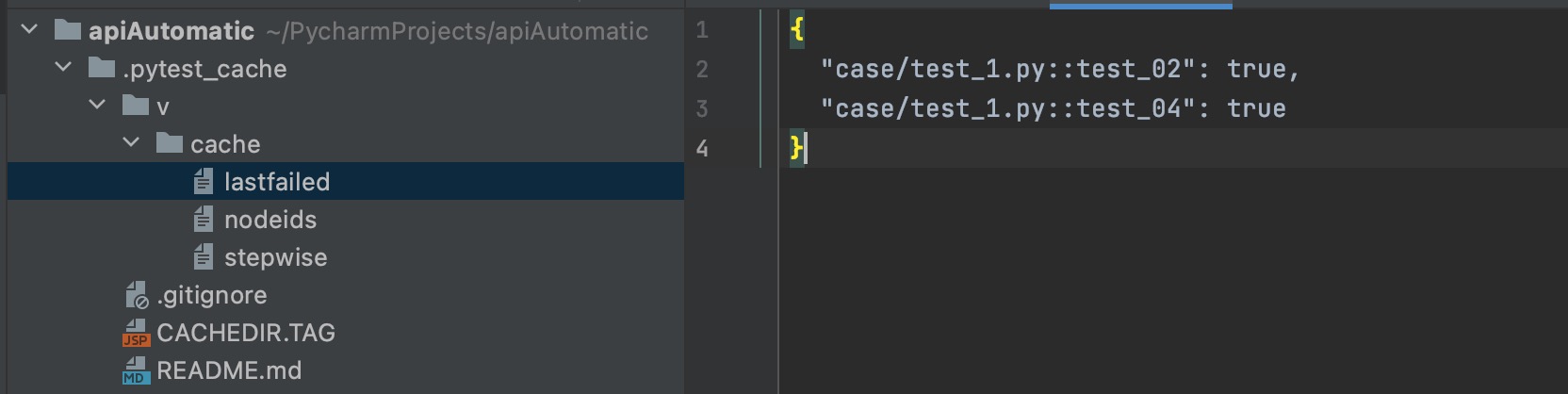
lastfailed 文件记录上一次运行失败的用例
{

  "test_x.py::test_02": true,

  "test_x.py::test_04": true

}
nodeids 文件记录所有用例的节点
[

  "test_x.py::test_01",

  "test_x.py::test_02",

  "test_x.py::test_03",

  "test_x.py::test_04"

]
于是可以通过 pytest --cache-show 命令查看cache目录
(pytest_env) ➜  apiAutomatic pytest --cache-show

Test session starts (platform: darwin, Python 3.7.6, pytest 6.2.1, pytest-sugar 0.9.4)

rootdir: /Users/jkc/PycharmProjects/apiAutomatic, configfile: pytest.ini

plugins: assume-2.4.2, sugar-0.9.4, rerunfailures-9.1.1, base-url-1.4.2, html-3.1.1, metadata-1.11.0, ordering-0.6, cov-2.10.1, repeat-0.9.1, xdist-2.2.0, forked-1.3.0, allure-pytest-2.8.29

cachedir: /Users/jkc/PycharmProjects/apiAutomatic/.pytest_cache

------------------------------------------------------------------------------------------------- cache values for '*' -------------------------------------------------------------------------------------------------

cache/lastfailed contains:

  {'case/test_1.py::test_02': True, 'case/test_1.py::test_04': True}

cache/nodeids contains:

  ['case/test_1.py::test_01',

   'case/test_1.py::test_02',

   'case/test_1.py::test_03',

   'case/test_1.py::test_04']

cache/stepwise contains:

  []

Results (0.02s):
--cache-clear
--cache-clear 用于在测试用例开始之前清空cache的内容
查看pytest关于cache的更多文档https://docs.pytest.org/en/latest/cache.html
Pytest(12)pytest缓存的更多相关文章
- pytest 12 函数传参和fixture传参数request
前沿: 有的case,需要依赖于某些特定的case才可以执行,比如,登陆获取到的cookie,每次都需要带着他,为了确保是同一个用户,必须带着和登陆获取到的同一个cookies. 大部分的用例都会先登 ...
- pytest(12)-Allure常用特性allure.attach、allure.step、fixture、environment、categories
上一篇文章pytest Allure生成测试报告我们学习了Allure中的一些特性,接下来继续学习其他常用的特性. allure.attach allure.attach用于在测试报告中添加附件,补充 ...
- 二、为什么要选用pytest以及 pytest与unittest比较
为什么要选择pytest,我看中的如下: 写case,不需要像unittest那样,创建测试类,继承unittest.TestCase pytest中的fixture(类似于setUp.tearDow ...
- pytest 用 @pytest.mark.usefixtures("fixtureName")或@pytest.fixture(scope="function", autouse=True)装饰,实现类似setup和TearDown的功能
conftest.py import pytest @pytest.fixture(scope="class") def class_auto(): print("&qu ...
- pytest 用 @pytest.mark.usefixtures("fixtureName")装饰类,可以让执行每个case前,都执行一遍指定的fixture
conftest.py import pytest import uuid @pytest.fixture() def declass(): print("declass:"+st ...
- suse 12 利用缓存创建本地源供内网服务使用
文章目录 服务端获取 添加源 刷新源 清除缓存 安装软件 获取rpm包 客户端测试 zypper --help 前言: 其实,咱也不知道为啥写了这篇博客,咱就是想学一学suse,咱也不会,咱也只能学, ...
- pytest配置文件pytest.ini
说明: pytest.ini是pytest的全局配置文件,一般放在项目的根目录下 是一个固定的文件-pytest.ini 可以改变pytest的运行方式,设置配置信息,读取后按照配置的内容去运行 py ...
- python笔记-12 redis缓存
一.redis引入 1.简要概括redis 1.1 redis默认端口:6379 1.2 redis实现的效果:资源共享 1.3 redis实现的基本原理:不同的进程和一个公共的进程之间建立socke ...
- 12 Memcached 缓存无底洞现象
一:Memcached 缓存无底洞现象(1)facebook的工作人员反应的,facebook在2010年左右,memcached节点就已经达到了3000个,存储的数据进千G的数据存储. 他们发现一个 ...
- docker(12)使用Dockerfile创建jenkins+python3+pytest环境
前言 之前我们用docker手动安装了jenkins环境,在jenkins中又安装了python3环境和各种安装包,如果我们想要在其他3台机器上安装,又是重复操作,重复劳动,那会显得很low,这里可以 ...
随机推荐
- Spring源码深度解析之数据库连接JDBC
Spring源码深度解析之数据库连接JDBC JDBC(Java Data Base Connectivity,Java数据库连接)是一种用于执行SQL语句的Java API,可以为多种关系数据库提供 ...
- 如何将项目推到github上面
1.先查看是否安装git. 2.如果没有安装git ,下载之后别忘了配置环境变量.(右击此电脑 --属性--高级系统设置--环境变量--系统变量中的path) 3.推代码 查看状态(可查可不查) gi ...
- nodejs事件和事件循环详解
目录 简介 nodejs中的事件循环 phase详解 timers pending callbacks idle, prepare poll轮询 check close callbacks setTi ...
- 机器学习笔记·adaboost
一.算法简介 Adaboost算法是一种集成算法,所谓集成算法就是将多个弱的分类器组合在一起变成一个强的分类器.弱分类器通常是指分类效果比随机分类稍微好一点的分类器.就像我们在做一个重要决定的时候,通 ...
- 剑指offer之重建二叉树
1.问题描述:输入某二叉树的前序遍历和中序遍历的结果,请重建出该二叉树.假设输入的前序遍历和中序遍历的结果中都不含重复的数字. 例如输入前序遍历序列pre {1,2,4,7,3,5,6, ...
- Java 使用 commons-fileupload 实现文件上传工具类
依赖包 文件上传可以使用 Apache 文件上传组件, commons-fileupload, 它依赖于 commons-io commons-io.jar: https://repo1.maven. ...
- 更改mysql的密码
mysql> set password for 'root'@'localhost' =PASSWORD('');Query OK, 0 rows affected (0.17 sec) mys ...
- 【Linux】tcpdump
tcpdump介绍 tcpdump 是一个运行在命令行下的抓包工具.它允许用户拦截和显示发送或收到过网络连接到该计算机的TCP/IP和其他数据包.tcpdump 适用于 大多数的类Unix系统操作系统 ...
- Oracle 索引原理分析
索引是一种允许直接访问数据表中某一数据行的树型结构,为了提高查询效率而引入,是一个独立于表的对象,可以存放在与表不同的表空间中.索引记录中存有索引关键字和指向表中数据的指针(地址).对索引进行的I/O ...
- ctfhub技能树—sql注入—UA注入
手注 打开靶机 查看页面信息 抓取数据包 根据提示注入点在User-Agent文件头中 开始尝试注入 成功查到数据库名 查询数据表名 查询字段名 查询字段信息 成功拿到flag 盲注 测试是否存在时间 ...