
SpringBoot基于EasyExcel解析Excel实现文件导出导入、读取写入
1. 简介
Java解析、生成Excel比较有名的框架有Apache poi、jxl。但他们都存在一个严重的问题就是非常的耗内存,poi有一套SAX模式的API可以一定程度的解决一些内存溢出的问题,但POI还是有一些缺陷,比如07版Excel解压缩以及解压后存储都是在内存中完成的,内存消耗依然很大。easyexcel重写了poi对07版Excel的解析,能够原本一个3M的excel用POI sax依然需要100M左右内存降低到几M,并且再大的excel不会出现内存溢出,03版依赖POI的sax模式,在上层做了模型转换的封装,让使用者更加简单方便。
64M内存1分钟内读取75M(46W行25列)的Excel:

更多请参考:https://github.com/alibaba/easyexcel
2. 示例代码
- 创建工程
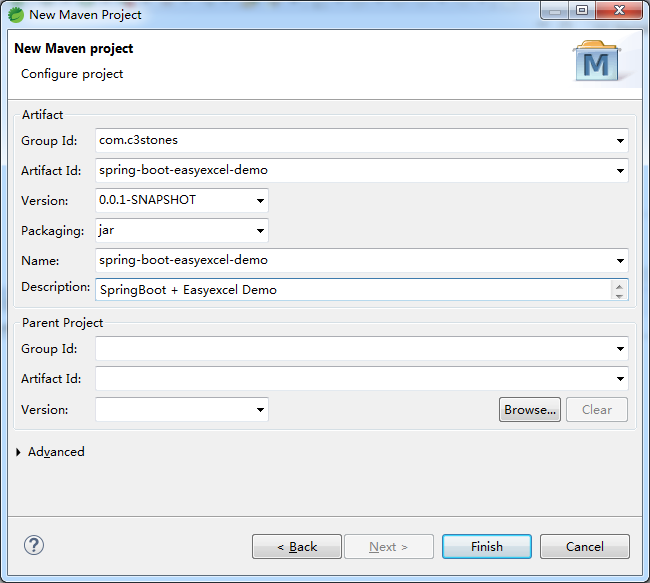
- 修改pom.xml
<project xmlns="http://maven.apache.org/POM/4.0.0"

	xmlns:xsi="http://www.w3.org/2001/XMLSchema-instance"

	xsi:schemaLocation="http://maven.apache.org/POM/4.0.0 https://maven.apache.org/xsd/maven-4.0.0.xsd">

	<modelVersion>4.0.0</modelVersion>

	<groupId>com.c3stones</groupId>

	<artifactId>spring-boot-easyexcel-demo</artifactId>

	<version>0.0.1-SNAPSHOT</version>

	<name>spring-boot-easyexcel-demo</name>

	<description>SpringBoot + Easyexcel Demo</description>

	<parent>

		<groupId>org.springframework.boot</groupId>

		<artifactId>spring-boot-starter-parent</artifactId>

		<version>2.2.8.RELEASE</version>

		<relativePath />

	</parent>

	<dependencies>

		<dependency>

			<groupId>com.alibaba</groupId>

			<artifactId>easyexcel</artifactId>

			<version>2.2.6</version>

		</dependency>

		<dependency>

			<groupId>org.projectlombok</groupId>

			<artifactId>lombok</artifactId>

			<optional>true</optional>

		</dependency>

		<dependency>

			<groupId>org.springframework.boot</groupId>

			<artifactId>spring-boot-starter-web</artifactId>

		</dependency>

	</dependencies>

</project>
- 创建实体
import java.util.Date;

import com.alibaba.excel.annotation.ExcelProperty;

import com.alibaba.excel.annotation.write.style.ColumnWidth;

import com.alibaba.excel.annotation.write.style.ContentRowHeight;

import com.alibaba.excel.annotation.write.style.HeadRowHeight;

import lombok.AllArgsConstructor;

import lombok.Data;

import lombok.NoArgsConstructor;

/**

 * 学生实体

 *

 * @author CL

 *

 */

@Data

@NoArgsConstructor

@AllArgsConstructor

@HeadRowHeight(20)

@ColumnWidth(20)

@ContentRowHeight(15)

public class Student {

	@ExcelProperty(index = 0, value = "学号")

	private String sno;

	@ExcelProperty(index = 1, value = "姓名")

	private String name;

	@ExcelProperty(index = 2, value = "年龄")

	private Integer age;

	@ExcelProperty(index = 3, value = "性别")

	private String gender;

	@ExcelProperty(index = 4, value = "籍贯")

	private String nativePlace;

	@ExcelProperty(index = 5, value = "入学时间")

	private Date enrollmentTime;

}
- 创建文件读取类
该类需要继承抽象类AnalysisEventListener,但是不需要被Spring管理。
import java.util.ArrayList;

import java.util.List;

import com.alibaba.excel.context.AnalysisContext;

import com.alibaba.excel.event.AnalysisEventListener;

import com.c3stones.entity.Student;

import lombok.Getter;

/**

 * 学生读取类

 *

 * @author CL

 *

 */

public class StudentListener extends AnalysisEventListener<Student> {

	@Getter

	private List<Student> studentList = new ArrayList<Student>();

	public StudentListener() {

		super();

		studentList.clear();

	}

	/**

	 * 每一条数据解析都会调用

	 */

	@Override

	public void invoke(Student student, AnalysisContext context) {

		studentList.add(student);

	}

	/**

	 * 所有数据解析完成都会调用

	 */

	@Override

	public void doAfterAllAnalysed(AnalysisContext context) {

		studentList.forEach(System.out::println);

	}

}
- 创建文件导出导入Controller示例
import java.io.IOException;

import java.net.URLEncoder;

import java.text.ParseException;

import java.text.SimpleDateFormat;

import java.util.ArrayList;

import java.util.List;

import javax.servlet.http.HttpServletRequest;

import javax.servlet.http.HttpServletResponse;

import org.springframework.web.bind.annotation.RequestMapping;

import org.springframework.web.bind.annotation.RestController;

import org.springframework.web.multipart.MultipartFile;

import com.alibaba.excel.EasyExcel;

import com.c3stones.entity.Student;

import com.c3stones.listener.StudentListener;

/**

 * 学生Controller

 *

 * @author CL

 *

 */

@RestController

@RequestMapping(value = "student")

public class StudentController {

	/**

	 * 导出学生信息

	 *

	 * @param response

	 * @param request

	 * @throws IOException

	 * @throws ParseException

	 */

	@SuppressWarnings("serial")

	@RequestMapping(value = "export")

	public void exportStudentInfos(HttpServletResponse response, HttpServletRequest request)

			throws IOException, ParseException {

		// 设置响应类型

		response.setContentType("application/vnd.ms-excel");

		// 设置字符编码

		response.setCharacterEncoding("utf-8");

		// 设置响应头信息

		response.setHeader("Content-disposition",

				"attachment;filename*=utf-8''" + URLEncoder.encode("学生花名册", "UTF-8") + ".xlsx");

		List<Student> studentList = new ArrayList<Student>() {

			{

				SimpleDateFormat dateFormat = new SimpleDateFormat("yyyy-MM-dd");

				add(new Student("1001", "张三", 23, "男", "陕西西安", dateFormat.parse("2020-09-01")));

				add(new Student("1002", "李四", 22, "女", "陕西渭南", dateFormat.parse("2020-09-01")));

			}

		};

		// 写入文件

		EasyExcel.write(response.getOutputStream(), Student.class).sheet("学生信息").doWrite(studentList);

	}

	/**

	 * 导入学生信息

	 *

	 * @param file

	 * @throws IOException

	 */

	@RequestMapping(value = "import")

	public List<Student> importStudentInfos(MultipartFile file) throws IOException {

		StudentListener studentListener = new StudentListener();

		EasyExcel.read(file.getInputStream(), Student.class, studentListener).sheet().doRead();

		return studentListener.getStudentList();

	}

}
- 创建文件读取写入Controller示例
import java.text.ParseException;

import java.text.SimpleDateFormat;

import java.util.ArrayList;

import java.util.List;

import org.springframework.web.bind.annotation.RequestMapping;

import org.springframework.web.bind.annotation.RestController;

import com.alibaba.excel.EasyExcel;

import com.c3stones.entity.Student;

import com.c3stones.listener.StudentListener;

/**

 * 文件Controller

 *

 * @author CL

 *

 */

@RestController

@RequestMapping(value = "file")

public class FileController {

	/**

	 * 读取Excel

	 *

	 * @return

	 */

	@RequestMapping(value = "readExcel")

	public List<Student> readExcel() {

		String fileName = "C:\\Users\\Administrator\\Desktop\\学生花名册.xlsx";

		StudentListener studentListener = new StudentListener();

		EasyExcel.read(fileName, Student.class, studentListener).sheet().doRead();

		return studentListener.getStudentList();

	}

	/**

	 * 写入Excel

	 *

	 * @return

	 * @throws ParseException

	 */

	@SuppressWarnings("serial")

	@RequestMapping(value = "writeExcel")

	public Boolean writeExcel() throws ParseException {

		String fileName = "C:\\Users\\Administrator\\Desktop\\学生花名册2.xlsx";

		List<Student> studentList = new ArrayList<Student>() {

			{

				SimpleDateFormat dateFormat = new SimpleDateFormat("yyyy-MM-dd");

				add(new Student("2001", "张三2", 23, "男", "陕西西安", dateFormat.parse("2020-09-01")));

				add(new Student("2002", "李四2", 22, "女", "陕西渭南", dateFormat.parse("2020-09-01")));

			}

		};

		EasyExcel.write(fileName, Student.class).sheet("学生信息2").doWrite(studentList);

		return true;

	}

}
- 创建启动类
import org.springframework.boot.SpringApplication;

import org.springframework.boot.autoconfigure.SpringBootApplication;

/**

 * 启动类

 *

 * @author CL

 *

 */

@SpringBootApplication

public class Application {

	public static void main(String[] args) {

		SpringApplication.run(Application.class, args);

	}

}
- 启动项目
3. 测试
通过Postman依次测试导出、导入、读取和写入:
- 测试导出
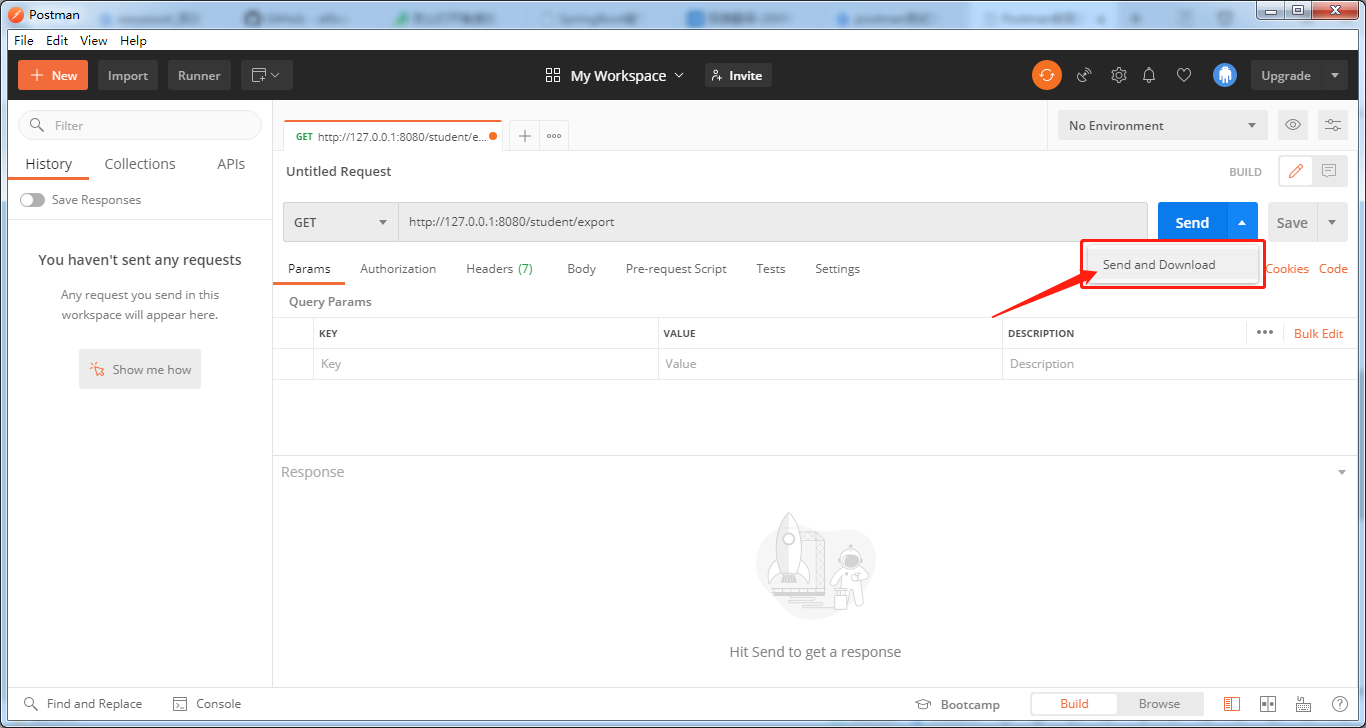
将导出文件保存到桌面(学生花名册.xlsx)。 - 测试导入
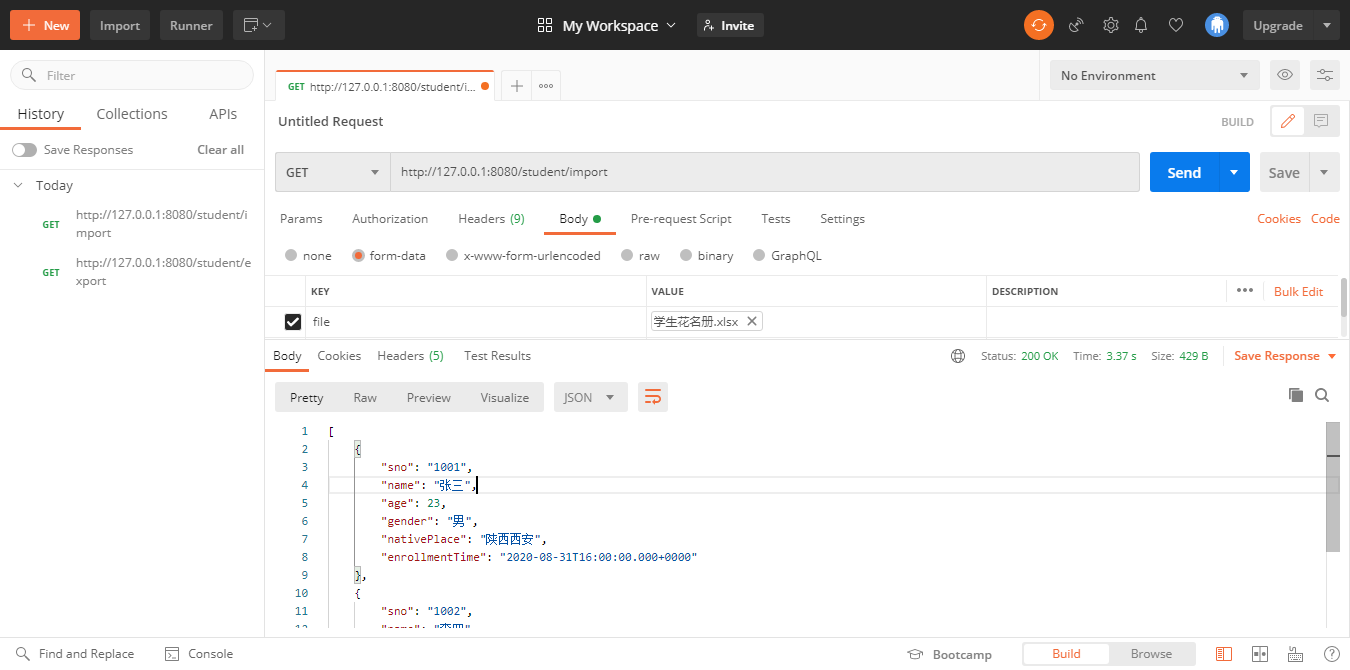
- 测试读取
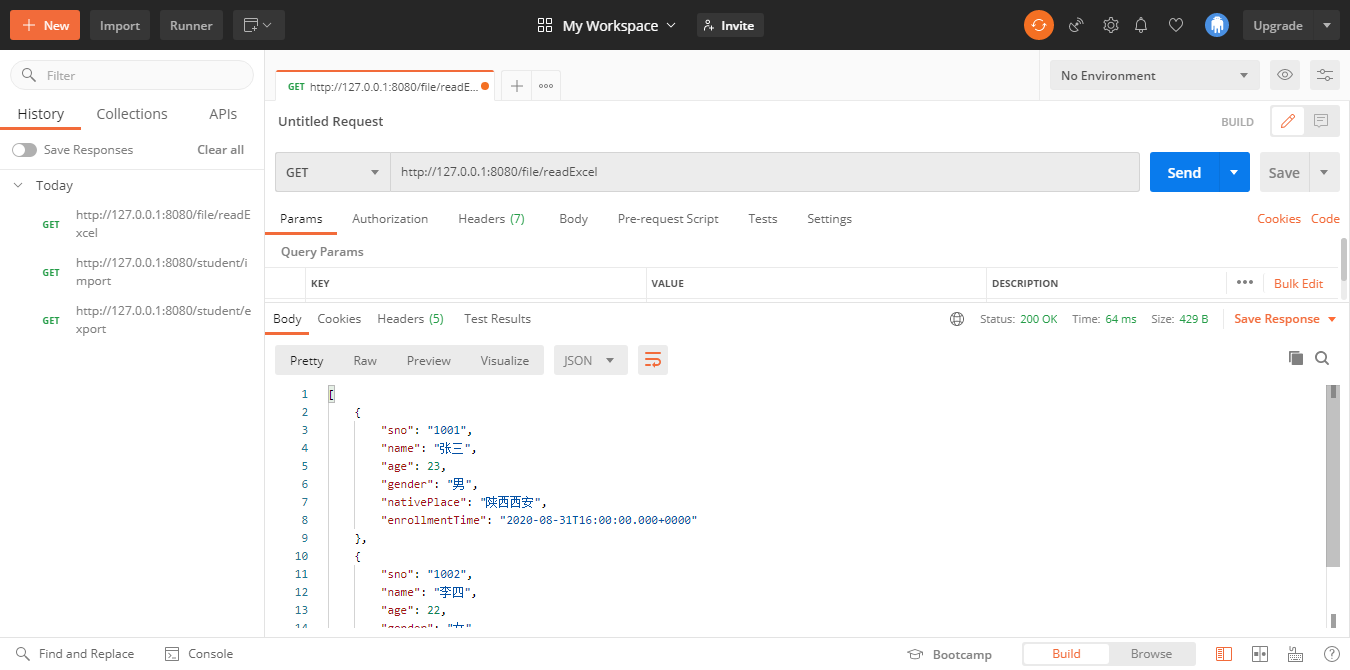
- 测试写入
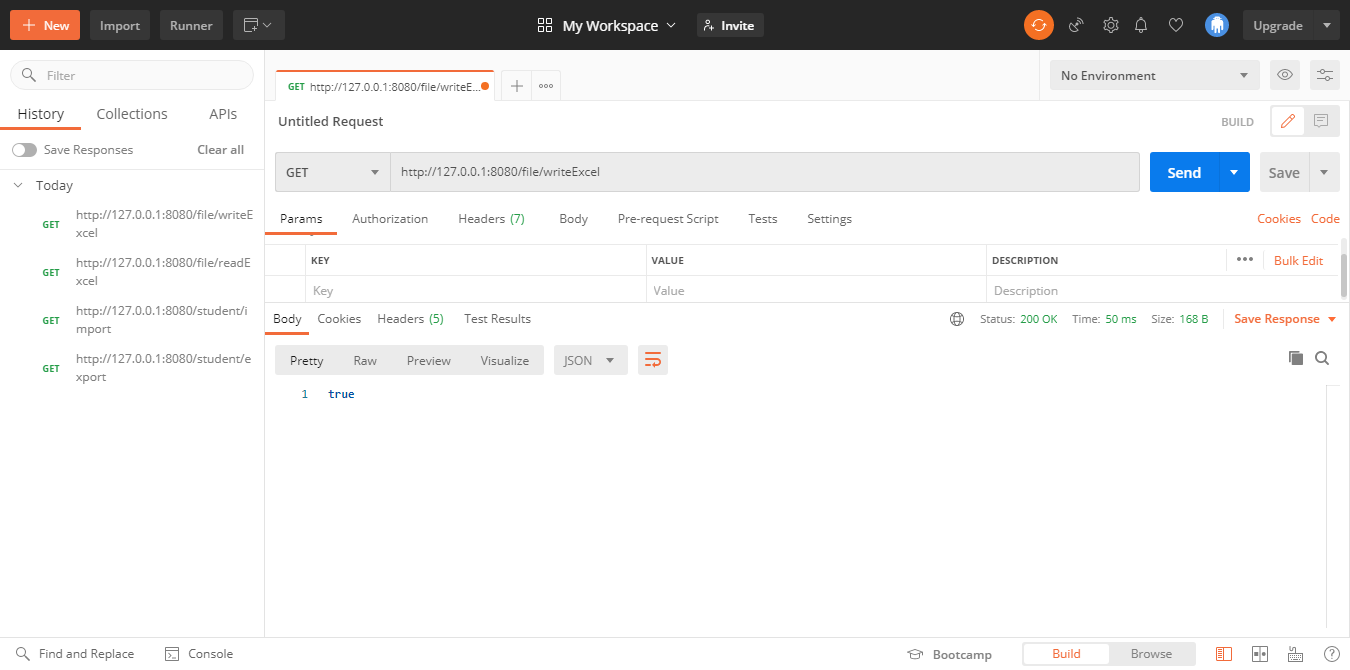
可以看到在代码中配置的文件目录已存在写入成功的文件(学生花名册2.xlsx)。
4. 项目地址
SpringBoot基于EasyExcel解析Excel实现文件导出导入、读取写入的更多相关文章
- SpringBoot基于easyexcel导出和写入Excel
easyexcel是阿里巴巴旗下开源项目,主要用于Excel文件的导入和导出处理,今天我们利用SpringBoot和easyexcel实战演示如何导出和写入Excel文件. 一.加入我们需要的ea ...
- SpringBoot整合Easyexcel操作Excel,闲暇之余,让我们学习更多
关于封面:晚饭后回自习室的路上 Easyexcel 官方文档 Easyexcel | github 前言 最近也是在写的一个小练习中,需要用到这个.趁着这次就将写个整合的Demo给大家. 希望能够让大 ...
- 手动解析Excel获取文件元数据
工作中有遇到需要获取上传的Excel文件的列明.最大行数.大小等元数据信息.通常做法是通过Apache的POI工具加载文件然后再读取行列进行处理.这种方法很大的弊端就是需要把excel文件加载到内存, ...
- SpringBoot整合easyexcel实现Excel的导入与导出
导出 在一般不管大的或者小的系统中,各家的产品都一样,闲的无聊的时候都喜欢让我们这些程序员导出一些数据出来供他观赏,非说这是必须需求,非做不可,那么我们就只能苦逼的哼哧哼哧的写bug喽. 之前使用PO ...
- springboot整合easyexcel实现Excel导入导出
easyexcel:快速.简单避免OOM的java处理Excel工具 Java解析.生成Excel比较有名的框架有Apache poi.jxl.但他们都存在一个严重的问题就是非常的耗内存,poi有一套 ...
- excel poi 文件导出,支持多sheet、多列自动合并。
参考博客: http://www.oschina.net/code/snippet_565430_15074 增加了多sheet,多列的自动合并. 修改了部分过时方法和导出逻辑. 优化了标题,导出信息 ...
- C#_服务器EXCEL模板文件导出
A-1:EXCEL模板导出 非常简单,将EXCEL模板上传到项目中后,将其浏览URL保存下来(excelUrl),然后: window.location.href="http://local ...
- EasyExcel 解析excel
参考:https://blog.csdn.net/jiangjiandecsd/article/details/81115622 https://blog.csdn.net/jianggujin/ar ...
- MYSQL 大文件导出导入
1.导出sql文件 mysqldump --column-statistics=0 -uusername -ppassword -hyour server ip --default-characte ...
随机推荐
- PHP 统计目录下文件数和文件大小
1 /** 2 * 统计文件数和文件大小 3 */ 4 private function getFileCacheCount($pathName) 5 { 6 $data = [ 7 'num' =& ...
- python升级版本
前言 目前大部分使用的3.6或者3.7以及更低版本存在不少问题,随着python的更新很多问题得到修复并且具有更多新的功能. 更新 3.y.x版本升级到3.y.z 下载需要升级的exe安装包点击upg ...
- 【P4211 LNOI2014】LCA——树链剖分 +询问离线
(7.16晚)更完先在B站颓一会儿-- --------------------------------------------------------------- (以下为luogu题面) 题目描 ...
- Java集合【6】-- Collection和Collections的区别
刚开始学java的时候,分不清Collection和Collections,其实这两个东西是完全不一样的东西. Collection是一个接口,是java集合中的顶级接口之一,衍生出了java集合的庞 ...
- 你知道第一个C语言C++编译器是如何诞生的吗?
当今几乎所有的实用的编译器/解释器(以下统称编译器)都是用 C 语言编写的,有一些语言比如 Clojure,Jython 等是基于 JVM 或者说是用 Java 实现的,IronPython 等是基于 ...
- sqli-labs-master less06
第六关与第五关步骤无区别,请参考 sqli-labs-master less05 及 Burp Suite暴力破解示例 区别:在第二步判断注入类型时发现 加单引号与不加单引号没有区别,加双引号时报错, ...
- C语言项目——工程化编程的案例分析
一.VSCode安装及环境配置 初始在Win下安装Mingw-w64/GCC 和 GDB,在VSCode下打开项目案例,发现在linktable中需要包含pthread头文件.此文件是基于Linux系 ...
- WireShark抓包分析以及对TCP/IP三次握手与四次挥手的分析
WireShark抓包分析TCP/IP三次握手与四次挥手 Wireshark介绍: Wireshark(前称Ethereal)是一个网络封包分析软件.功能十分强大,是一个可以在多个操作系统平台上的开源 ...
- VMware Workstation Pro 16 官方正式版下载(含密钥)
VMware官方网站 https://www.vmware.com VMware Workstation Pro已于近日更新.毫无疑问,这可能是Windows系统上最强大最好用的虚拟机! VMware ...
- 网络拓扑实例10:MSTP+VRRP组合组网
组网图形 MSTP+VRRP组合简介 网络中部署VRRP负载分担时,多台设备同时承担业务,每个虚拟设备都包括一个Master设备和若干个Backup设备.如果为了接入备份需要同时部署冗余链路,则需要部 ...