
Spring框架零基础学习(一):IOC|DI、AOP
参考链接:
HOW2J.CN:Spring
idea创建一个spring项目
一、IDEA创建Spring项目
创建方法:idea创建一个spring项目
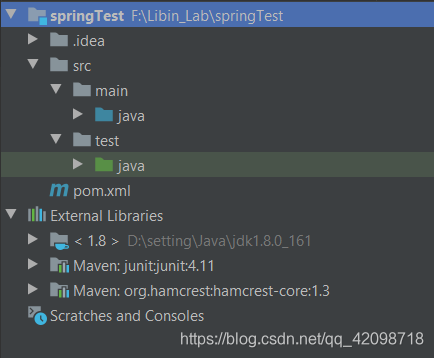
maven管理项目,生成项目结构如下:
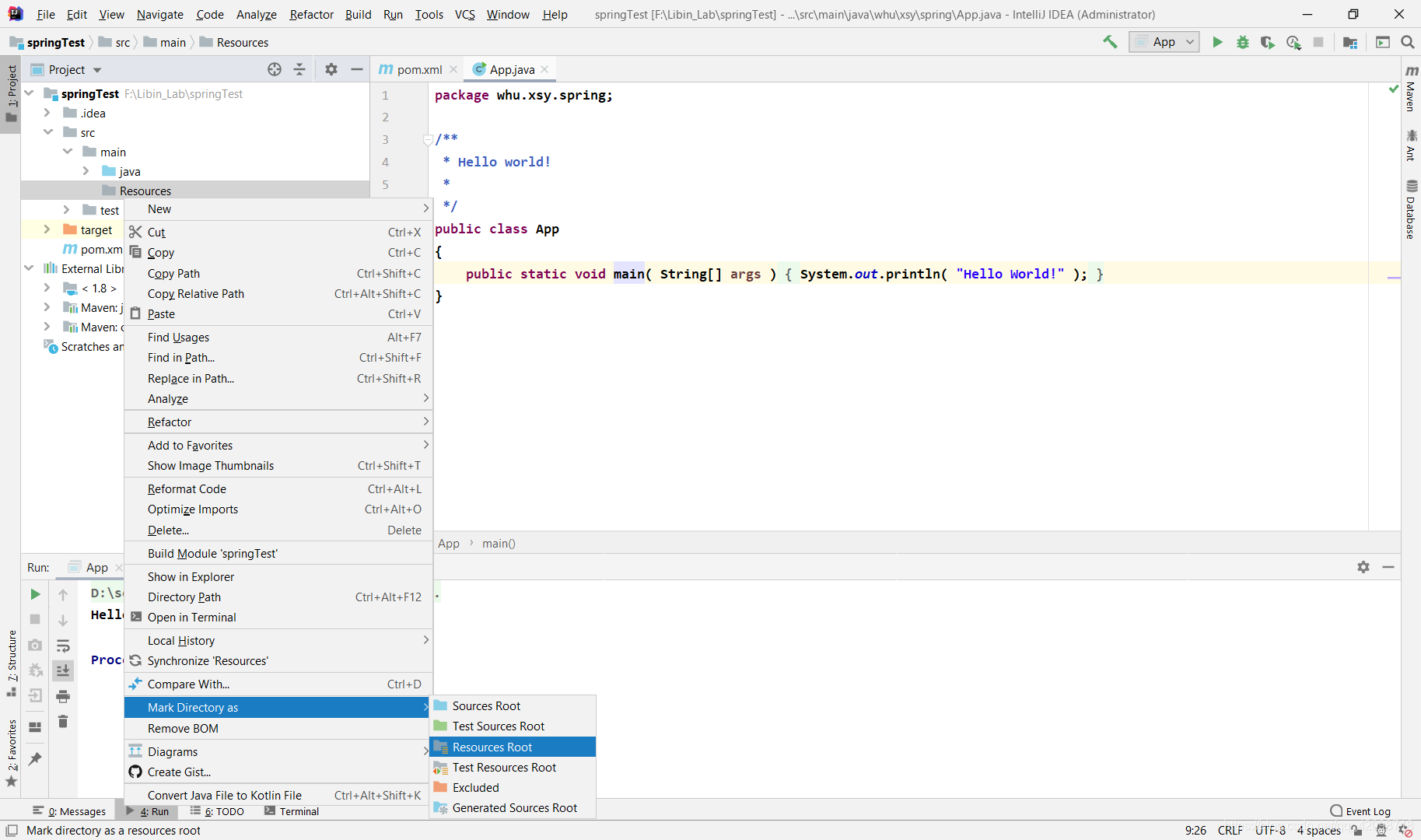
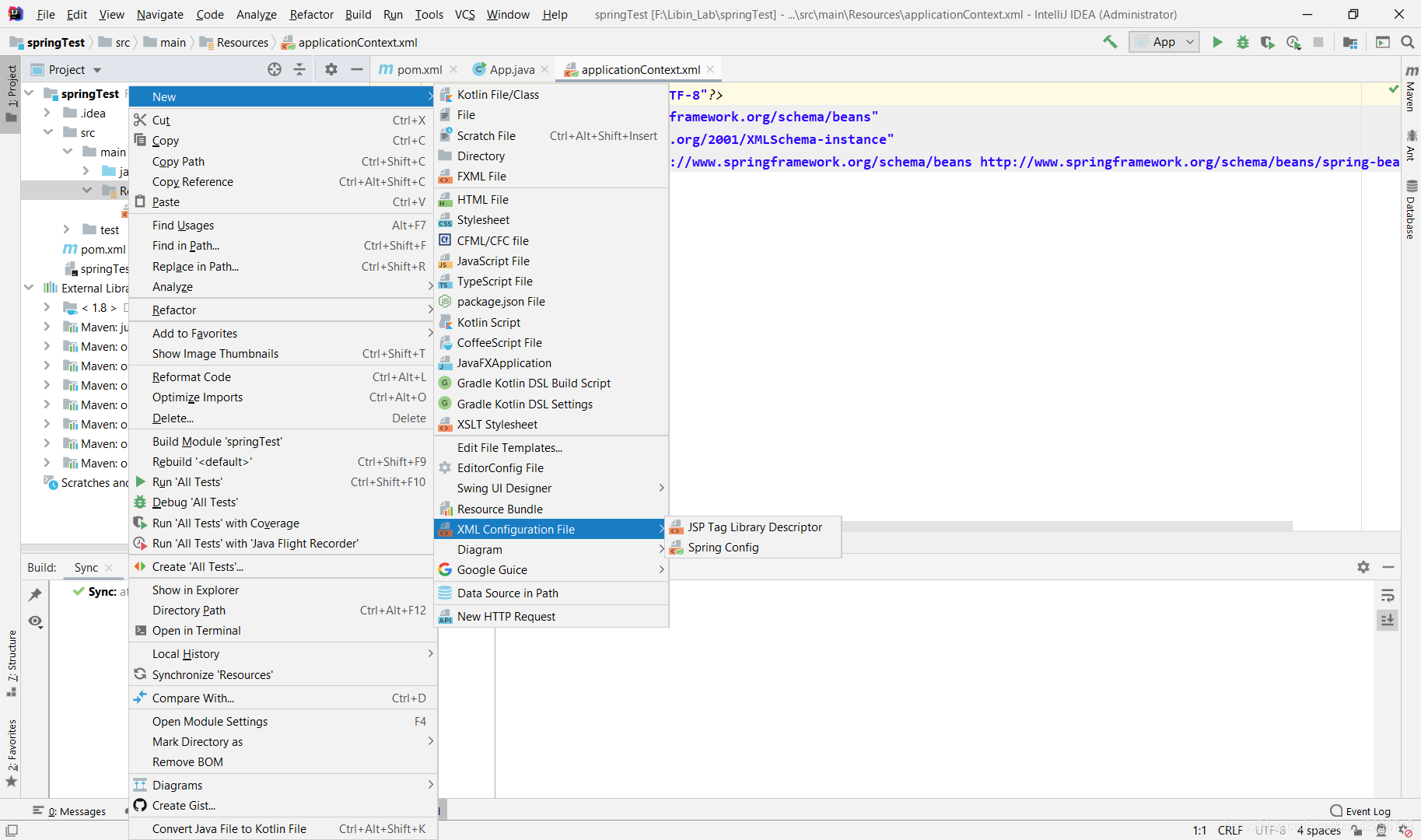
在main文件夹下新建Resources目录,并且将此目录设置为资源文件夹,在此文件夹下创建文件applicationContext.xml。
然后在pom.xml中添加spring的依赖:
<dependency>

   	<groupId>org.springframework</groupId>

  	<artifactId>spring-context</artifactId>

    <version>5.1.5.RELEASE</version>

</dependency>
到这里Spring的基本配置弄完了。
二、Spring: IOC和DI
IOC:反转控制,将对象创建的过程交给Spring
DI:依赖注入,拿到的对象,属性可以被注入了相关值,直接可以使用。
我觉得how2j的站长对于spring的IOC的比喻非常好:
传统方式:相当于你自己去菜市场new 了一只鸡,不过是生鸡,要自己拔毛,去内脏,再上花椒,酱油,烤制,经过各种工序之后,才可以食用。
用 IOC:相当于去馆子(Spring)点了一只鸡,交到你手上的时候,已经五味俱全,你就只管吃就行了。
接下来我们来看看我们如何直接去Spring“餐馆”点一只做好的鸡(对象),以下为写配置文件实现,还可以使用注解实现,注解方法不在此展示
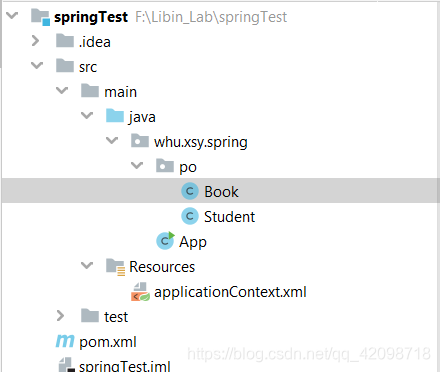
- 创建一个Student类和一个Book类
public class Book {

    private String name;

    private double money;

    public String getName() {

        return name;

    }

    public void setName(String name) {

        this.name = name;

    }

    public double getMoney() {

        return money;

    }

    public void setMoney(double money) {

        this.money = money;

    }

}
public class Student {

    private String name;

    private Book book;

    public Book getBook() {

        return book;

    }

    public void setBook(Book book) {

        this.book = book;

    }

    public String getName() {

        return name;

    }

    public void setName(String name) {

        this.name = name;

    }

}
- 在applicationContext.xml中编写关于Student类和Book类的配置:
下面这段代码的意思是通过Spring拿到Student对象时,Spring会注入属性name和book,并且name被赋值为张三,book被赋予名字语文,好比你直接拿到了一个姓名为张三,带着语文书的Student对象
<?xml version="1.0" encoding="UTF-8"?>

<beans xmlns="http://www.springframework.org/schema/beans"

       xmlns:xsi="http://www.w3.org/2001/XMLSchema-instance"

       xsi:schemaLocation="http://www.springframework.org/schema/beans http://www.springframework.org/schema/beans/spring-beans.xsd">

    <bean name="Student" class="whu.xsy.spring.po.Student">

        <property name="name" value="张三"></property>

        <property name="book" ref="Book"></property>

    </bean>

    <bean name="Book" class="whu.xsy.spring.po.Book">

        <property name="name" value="语文" />

    </bean>

</beans>
- 获取对象
public class App {

    public static void main( String[] args ){

        ApplicationContext context = new ClassPathXmlApplicationContext(

                new String[] { "applicationContext.xml" });

        Student s = (Student)context.getBean("Student");

        System.out.println(s.getName());

        System.out.println(s.getBook().getName());

    }

}
结果如下:
张三
语文
三、Spring: AOP
AOP 即 Aspect Oriented Program 面向切面编程。
在面向切面编程的思想中,把功能分为了核心业务功能和周边功能。
核心业务功能:比如登录、增删改查数据库等逻辑业务功能
周边功能(切面):比如记日志、事务管理等等
在项目中,通常将核心业务功能和周边功能分别独立开发,在项目运行时又“交织”在一起进行。这种编程思想就叫AOP
- 创建SaleService.java文件,作为学生卖书的逻辑业务类
public class SaleService {

    //标价

    public void markPrice(){

        System.out.println("标价服务");

    }

}
- 如果每次调用SaleService的对象之前,都要提醒一句话:”当前正在进行交易“,那么每次调用之前,都要写一句(非常麻烦):
System.out.println("当前正在进行交易")
如果使用AOP思想,只需要在applicationContext.xml中配置一下就行。
先在pom.xml中加入如下依赖:
    <dependency>

      <groupId>org.aspectj</groupId>

      <artifactId>aspectjweaver</artifactId>

      <version>1.8.9</version>

    </dependency>
创建专门的切面类(用于日志提示):
public class LoggerAspect {

    public Object log(ProceedingJoinPoint joinPoint) throws Throwable {

        System.out.println("start log:" + joinPoint.getSignature().getName());

        Object object = joinPoint.proceed();

        System.out.println("end log:" + joinPoint.getSignature().getName());

        return object;

    }

}
编写配置文件:
<?xml version="1.0" encoding="UTF-8"?>

<beans xmlns="http://www.springframework.org/schema/beans"

       xmlns:xsi="http://www.w3.org/2001/XMLSchema-instance"

       xmlns:aop="http://www.springframework.org/schema/aop"

       xsi:schemaLocation="http://www.springframework.org/schema/beans

       http://www.springframework.org/schema/beans/spring-beans.xsd

       http://www.springframework.org/schema/aop

       http://www.springframework.org/schema/aop/spring-aop.xsd">

    <bean name="Student" class="whu.xsy.spring.po.Student">

        <property name="name" value="张三"></property>

        <property name="book" ref="Book"></property>

    </bean>

    <bean name="Book" class="whu.xsy.spring.po.Book">

        <property name="name" value="语文" />

    </bean>

    <bean name="SaleService" class="whu.xsy.spring.service.SaleService">

    </bean>

    <bean id="loggerAspect" class="whu.xsy.spring.log.LoggerAspect"/>

    <aop:config>

        <aop:pointcut id="loggerCutpoint"

                      expression=

                              "execution(* whu.xsy.spring.service.SaleService.*(..)) "/>

        <aop:aspect id="logAspect" ref="loggerAspect">

            <aop:around pointcut-ref="loggerCutpoint" method="log"/>

        </aop:aspect>

    </aop:config>

</beans>
- 三次调用SaleService对象
public class App {

    public static void main( String[] args ){

        ApplicationContext context = new ClassPathXmlApplicationContext(

                new String[] { "applicationContext.xml" });

        Student s = (Student)context.getBean("Student");

        SaleService service = (SaleService)context.getBean("SaleService");

        for(int i = 0; i < 3; i++){

            service.markPrice();

        }

    }

}
结果为(每次调用markPrice时,都在前后打印了日志):
start log:markPrice
标价服务
end log:markPrice
start log:markPrice
标价服务
end log:markPrice
start log:markPrice
标价服务
end log:markPrice
Spring框架零基础学习(一):IOC|DI、AOP的更多相关文章
- 深入浅出学习Spring框架(四):IoC和AOP的应用——事务配置
在前文 深入浅出学习Spring框架(一):通过Demo阐述IoC和DI的优势所在. 深入浅出学习Spring框架(三):AOP 详解 分别介绍了Spring的核心功能——IoC和AOP,光讲知识远远 ...
- Yaf零基础学习总结2-Yaf框架的安装
接着上一篇文章<Yaf零基础学习总结1-Yaf框架简介>我们对Yaf框架有那么一个大概的了解了,但是对于程序员来说,那些文字都是表面的,他们最想的就是开始敲代码了.当然这也是学习Yaf框架 ...
- 如何从零基础学习VR
转载请声明转载地址:http://www.cnblogs.com/Rodolfo/,违者必究. 近期很多搞技术的朋友问我,如何步入VR的圈子?如何从零基础系统性的学习VR技术? 本人将于2017年1月 ...
- HTML5零基础学习Web前端需要知道哪些?
HTML零基础学习Web前端网页制作,首先是要掌握一些常用标签的使用和他们的各个属性,常用的标签我总结了一下有以下这些: html:页面的根元素. head:页面的头部标签,是所有头部元素的容器. b ...
- Yaf零基础学习总结5-Yaf类的自动加载
Yaf零基础学习总结5-Yaf类的自动加载 框架的一个重要功能就是类的自动加载了,在第一个demo的时候我们就约定自己的项目的目录结构,框架就基于这个目录结构来自动加载需要的类文件. Yaf在自启动的 ...
- Yaf零基础学习总结4-Yaf的配置文件
在上一节的hello yaf当中我们已经接触过了yaf的配置文件了, Yaf和用户共用一个配置空间, 也就是在Yaf_Application初始化时刻给出的配置文件中的配置. 作为区别, Yaf的配置 ...
- Yaf零基础学习总结3-Hello Yaf
Yaf零基础学习总结3-Hello Yaf 上一次我们已经学习了如何安装yaf了,准备工作做好了之后我们来开始实际的编码了,码农都知道一个经典的语句就是“Hello World”了,今天我们开始入手Y ...
- [原]零基础学习视频解码之android篇系列文章
截止今天,<零基础学习视频解码系列文章>.<零基础学习在Android进行SDL开发系列文章>以及<零基础学习视频解码之android篇>系列文章基本算是告一段落了 ...
- 译:Spring框架参考文档之IoC容器(未完成)
6. IoC容器 6.1 Spring IoC容器和bean介绍 这一章节介绍了Spring框架的控制反转(IoC)实现的原理.IoC也被称作依赖注入(DI).It is a process wher ...
随机推荐
- SpringCloud Alibaba (三):Sentinel 流量控制组件
SpringCloud Alibaba (三):Sentinel 流量控制组件 Sentinel 是什么 随着微服务的流行,服务和服务之间的稳定性变得越来越重要.Sentinel 是面向分布式服务架构 ...
- 【漏洞三】跨站点脚本(XSS)攻击
[漏洞] 跨站点脚本(XSS)攻击 [原因] 跨站点脚本(也称为xss)是一个漏洞,攻击者可以发送恶意代码(通常在(Javascript的形式)给另一个用户.因为浏览器无法知道脚本是否值得信任,所以它 ...
- Perl入门 - Perl方法的使用
1.定义一个方法 Perl使用sub定义方法. 语法: sub 方法名称{方法体} 2.调用一个方法 Perl直接使用方法名称调用方法. 调用方式有以下四种: 方法名称: &方法名称: 方法名 ...
- 微服务配置中心 Apollo 源码解析——Admin 发送发布消息
内容参考:https://www.toutiao.com/a6643383570985386509/ 摘要: 原创出处http://www.iocoder.cn/Apollo/admin-server ...
- win10使用WSL 2运行Docker Desktop,运行文件从C盘迁移到其他目录
前言 前几天重装系统,把系统升到了Windows 10 2004,然后在安装Docker Desktop(2.3.0.3版本)时发现跟以前不太一样了.现在Docker Desktop默认使用WLS 2 ...
- 入门大数据---Hbase是什么?
一.Hbase是什么? Hbase属于NoSql的一种. NoSql数据库分为如下几类: Key-Value类型数据库 这类数据库主要会使用到一个哈希表,这个表有一个特定的键和一个指针指向特定的数据. ...
- python高阶-Linux基础命令集
声明: 1)仅作为个人学习,如有冒犯,告知速删! 2)不想误导,如有错误,不吝指教! 1: 查看文件信息:ls ls常用参数: 参数 含义 -a 显示指定目录下所有子目录与文件,包括隐藏文件 -l 以 ...
- msf stagers开发不完全指北(一)
采用c开发stagers 前言 之前有写过一篇 metasploit payload运行原理浅析(sockedi调用约定是什么),里面有提到以后了解这些东西后可以做的事情,其实包括但不限于自写stag ...
- Nginx 从入门到放弃(三)
今天来学习nginx的日志管理,并通过日志脚本来切割日志并保存. nginx日志管理 在nginx中设置日志格式 http { log_format main '$remote_addr - ...
- 三.cmdb
一.服务器管理: https://github.com/rfjer/autoAdmin/tree/master/apps/servers 一服务器信息收集方式: 1.物理服务器 跑脚本传(bash/a ...