
docker-compose All In One
docker-compose All In One
docker-compose
多容器应用
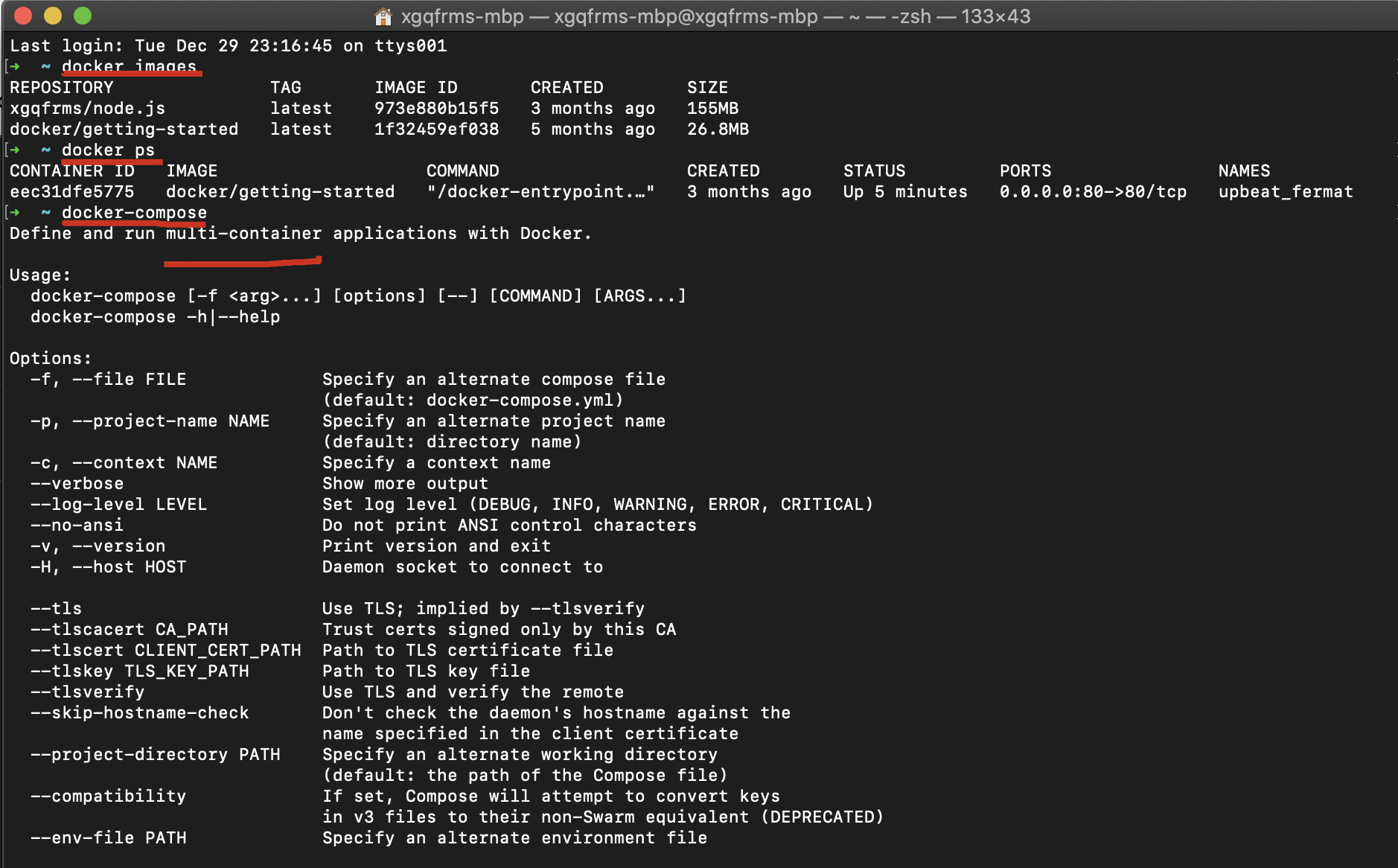
$ docker-compose -h

Define and run multi-container applications with Docker.

Usage:

  docker-compose [-f <arg>...] [options] [--] [COMMAND] [ARGS...]

  docker-compose -h|--help

Options:

  -f, --file FILE             Specify an alternate compose file

                              (default: docker-compose.yml)

  -p, --project-name NAME     Specify an alternate project name

                              (default: directory name)

  -c, --context NAME          Specify a context name

  --verbose                   Show more output

  --log-level LEVEL           Set log level (DEBUG, INFO, WARNING, ERROR, CRITICAL)

  --no-ansi                   Do not print ANSI control characters

  -v, --version               Print version and exit

  -H, --host HOST             Daemon socket to connect to

  --tls                       Use TLS; implied by --tlsverify

  --tlscacert CA_PATH         Trust certs signed only by this CA

  --tlscert CLIENT_CERT_PATH  Path to TLS certificate file

  --tlskey TLS_KEY_PATH       Path to TLS key file

  --tlsverify                 Use TLS and verify the remote

  --skip-hostname-check       Don't check the daemon's hostname against the

                              name specified in the client certificate

  --project-directory PATH    Specify an alternate working directory

                              (default: the path of the Compose file)

  --compatibility             If set, Compose will attempt to convert keys

                              in v3 files to their non-Swarm equivalent (DEPRECATED)

  --env-file PATH             Specify an alternate environment file

Commands:

  build              Build or rebuild services

  config             Validate and view the Compose file

  create             Create services

  down               Stop and remove containers, networks, images, and volumes

  events             Receive real time events from containers

  exec               Execute a command in a running container

  help               Get help on a command

  images             List images

  kill               Kill containers

  logs               View output from containers

  pause              Pause services

  port               Print the public port for a port binding

  ps                 List containers

  pull               Pull service images

  push               Push service images

  restart            Restart services

  rm                 Remove stopped containers

  run                Run a one-off command

  scale              Set number of containers for a service

  start              Start services

  stop               Stop services

  top                Display the running processes

  unpause            Unpause services

  up                 Create and start containers

  version            Show version information and quit
refs
xgqfrms 2012-2020
www.cnblogs.com 发布文章使用:只允许注册用户才可以访问!
docker-compose All In One的更多相关文章
- Docker compose学习笔记
一.compose compose 作用 你的应用可能需要很多个服务,比如web服务,数据库服务,缓存服务等等.我们可以把这些服务放到单独的容器里面,如果手工去配置这些服务会有些麻烦,docker c ...
- docker compose 笔记
https://www.youtube.com/watch?v=Uez88TWOECg 是基于这个视频做的笔记. Docker Compose: Compose is a tool for defin ...
- 利用docker compose启动gitlab及runner
添加docker compose配置文件 新建文件docker-compose.yml,输入如下内容: gitlab: image: 'gitlab/gitlab-ce:latest' contain ...
- Docker Compose to CoreOS
taken from https://docs.docker.com/compose/install/ the only thing is that /usr is read only, but /o ...
- Docker Compose—简化复杂容器应用的利器
Compose是用于定义和运行复杂Docker应用的工具.你可以在一个文件中定义一个多容器的应用,然后使用一条命令来启动你的应用,然后所有相关的操作都会被自动完成. 1. 安装Docker和Compo ...
- .NET遇上Docker - 使用Docker Compose组织Ngnix和.NETCore运行
本文工具准备: Docker for Windows Visual Studio 2015 与 Visual Studio Tools for Docker 或 Visual Studio 2017 ...
- Docker Compose容器编排
Compose是Docker官方的开源项目,可以实现对Docker容器集群的快速编排.Compose 中有两个重要的概念:服务(service):一个应用的容器,实际上可以包括若干运行相同镜像的容器实 ...
- Docker(四):Docker 三剑客之 Docker Compose
前两篇文章我们介绍了 Dockerfile 的使用Docker(二):Dockerfile 使用介绍,我们知道使用一个 Dockerfile 模板文件可以定义一个单独的应用容器,如果需要定义多个容器就 ...
- Spring Boot 2.0(五):Docker Compose + Spring Boot + Nginx + Mysql 实践
我知道大家这段时间看了我写关于 docker 相关的几篇文章,不疼不痒的,仍然没有感受 docker 的便利,是的,我也是这样认为的,I know your felling . 前期了解概念什么的确实 ...
- Docker学习笔记 - Docker Compose 脚本命令
Docker Compose 配置文件包含 version.services.networks 三大部分,最关键的是 services 和 networks 两个部分, version: '2' se ...
随机推荐
- 前端面试准备笔记之JavaScript(03)
01. 变量声明提升 在预解析的时候,成员变量和函数,被提升到最高的位置,方便其他程序访问. 可以先使用后声明. 只提升变量名,不提升变量值 let const 声明的变量不具有变量声明提升. // ...
- Zerotier在windows下实现内网远程桌面
Zerotier实现内网远程桌面 使用背景 实验室设备条件过于恶劣 向日葵在有些场景下会莫名崩溃,或者画面不动. Teamviewer免费版在之前用的时候出现过疑似商业行为被断连,github上寻解决 ...
- What is the difference between Serialization and Marshaling?
How to serialize and deserialize JSON using C# - .NET | Microsoft Docs https://docs.microsoft.com/en ...
- 服务端 TCP 连接的 TIME_WAIT 过多问题的分析与解决
https://mp.weixin.qq.com/s/VRQ_12tzy3gRYD091cI7Ew
- # Set the asyncio reactor's event loop as global # TODO: Should we instead pass the global one into the reactor?
daphne/server.py at master · django/daphne https://github.com/django/daphne/blob/master/daphne/serve ...
- (转载)微软数据挖掘算法:Microsoft顺序分析和聚类分析算法(8)
前言 本篇文章继续我们的微软挖掘系列算法总结,前几篇文章已经将相关的主要算法做了详细的介绍,我为了展示方便,特地的整理了一个目录提纲篇:大数据时代:深入浅出微软数据挖掘算法总结连载,有兴趣的童鞋可以点 ...
- epoll在fork子进程中的问题
epoll_create 创建的 文件描述符和其他文件描述符一样,是被fork出的子进程继承的,那也就是子进程可以使用这个epoll fd添加感兴趣的io(epoll_ctl),然后是可以影响到父进程 ...
- 【转】DDD-应用架构
简介: 应用架构,指软件系统中固定不变的代码结构.设计模式.规范和组件间的通信方式.在应用开发中架构之所以是最重要的第一步,因为一个好的架构能让系统安全.稳定.快速迭代.但是今天我们在做业务研发时,更 ...
- 「笔记」AC 自动机
目录 写在前面 定义 引入 构造 暴力 字典图优化 匹配 在线 离线 复杂度 完整代码 例题 P3796 [模板]AC 自动机(加强版) P3808 [模板]AC 自动机(简单版) 「JSOI2007 ...
- jvm系列五-java内存模型(2)
原作者系列文章链接:并发编程系列博客传送门 前言# 在网上看了很多文章,也看了好几本书中关于JMM的介绍,我发现JMM确实是Java中比较难以理解的概念.网上很多文章中关于JMM的介绍要么是照搬了一些 ...