
(二)学习了解OrchardCore笔记——开篇:OrchardCore的中间件
现在开始看Starpup的中间件。这是一个扩展方法app.UseOrchardCore()
        public void Configure(IApplicationBuilder app, IHostEnvironment env)

        {

            if (env.IsDevelopment())

            {

                app.UseDeveloperExceptionPage();

            }

            app.UseStaticFiles();

            app.UseOrchardCore();

        }
直接查看扩展方法,vs都是直接按住ctrl键+鼠标左键就可以跳转到具体方法,下面我我们定位到方法里面去。
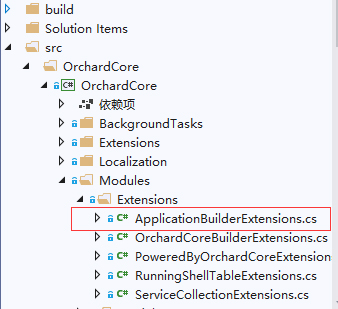
可以清楚的看到下面代码又是很熟悉的结构。
    public static class ApplicationBuilderExtensions

    {

        /// <summary>

        /// Enables multi-tenant requests support for the current path.

        /// </summary>

        public static IApplicationBuilder UseOrchardCore(this IApplicationBuilder app, Action<IApplicationBuilder> configure = null)

        {

            var env = app.ApplicationServices.GetRequiredService<IHostEnvironment>();

            var appContext = app.ApplicationServices.GetRequiredService<IApplicationContext>();

            env.ContentRootFileProvider = new CompositeFileProvider(

                new ModuleEmbeddedFileProvider(appContext),

                env.ContentRootFileProvider);

            // Init also the web host 'ContentRootFileProvider'.

            app.ApplicationServices.GetRequiredService<IWebHostEnvironment>()

                .ContentRootFileProvider = env.ContentRootFileProvider;

            app.UseMiddleware<PoweredByMiddleware>();

            // Ensure the shell tenants are loaded when a request comes in

            // and replaces the current service provider for the tenant's one.

            app.UseMiddleware<ModularTenantContainerMiddleware>();

            configure?.Invoke(app);

            app.UseMiddleware<ModularTenantRouterMiddleware>(app.ServerFeatures);

            return app;

        }

    }
OrchardCore自己也注释的很清楚:为当前路径启用多租户请求支持。网上很多都介绍OrchardCore是一个多租户的cms,那么什么是租户呢?我的理解就是像虚拟主机一类的东西。都知道Program的main方法就是构建一个kestrel主机运行起来(这里我直接当作iis运行起来,这样比较好理解),kestrel是一个很简陋的主机,很多功能都没有,比如像iis那样的服务器能创建虚拟主机它是没办法的,它只能提供一个主机服务,而多租户就是类似于iis上的虚拟主机了,也就是可以提供多个web站点服务。当然我表述比较土,换个角度,我们要开通web服务,就必须像服务商租用web主机,服务商有一台服务器,而我们只要开一个web服务,因此只要租用一个虚拟主机就够了而不用租用整台服务器,当然我们朋友要多开个web服务就可以多租一个虚拟主机就够了。OrchardCore就是web服务器,而我们可以开n个web服务,OrchardCore提供足够的虚拟主机给我们租用。也就是说每个租户都是独立不干扰的虚拟主机,各自提供自己的web服务。我语文比较差,大概就这么个意思。
开始看代码,前面这几行没啥好说的,看过asp.net core源码的都能直接跳过了!就是获取环境变量,初始化Web主机“ ContentRootFileProvider”。好像很难理解,其实就是指定租户的wwwroot文件夹。后面有空再追踪下这段,先跳过。
var env = app.ApplicationServices.GetRequiredService<IHostEnvironment>();

            var appContext = app.ApplicationServices.GetRequiredService<IApplicationContext>();

            env.ContentRootFileProvider = new CompositeFileProvider(

                new ModuleEmbeddedFileProvider(appContext),

                env.ContentRootFileProvider);

            // Init also the web host 'ContentRootFileProvider'.

            app.ApplicationServices.GetRequiredService<IWebHostEnvironment>()

                .ContentRootFileProvider = env.ContentRootFileProvider;
前面跳过是因为下面这几行才是整个OrchardCore的灵魂,先搞懂这几行,其它先旁支忽略吧
            app.UseMiddleware<PoweredByMiddleware>();

            // Ensure the shell tenants are loaded when a request comes in

            // and replaces the current service provider for the tenant's one.

            app.UseMiddleware<ModularTenantContainerMiddleware>();

            configure?.Invoke(app);

            app.UseMiddleware<ModularTenantRouterMiddleware>(app.ServerFeatures);
app.UseMiddleware多么熟悉的结构,就是加了三个中间件PoweredByMiddleware、ModularTenantContainerMiddleware和ModularTenantRouterMiddleware,从名称上已经可以大致明白他们的作用。分别是版权、模块化租户容器和模块化租户路由。
PoweredByMiddleware比较简单,基本点进去直接看源码就明白了。
    /// <summary>

    /// Adds the X-Powered-By header with values OrchardCore.

    /// </summary>

    public class PoweredByMiddleware

    {

        private readonly RequestDelegate _next;

        private readonly IPoweredByMiddlewareOptions _options;

        public PoweredByMiddleware(RequestDelegate next, IPoweredByMiddlewareOptions options)

        {

            _next = next;

            _options = options;

        }

        public Task Invoke(HttpContext httpContext)

        {

            if (_options.Enabled)

            {

                httpContext.Response.Headers[_options.HeaderName] = _options.HeaderValue;

            }

            return _next.Invoke(httpContext);

        }

    }
asp.net core中间件熟悉的界面,一个构造函数和一个Invoke(或者异步的InvokeAsync),options也是下面的接口和类直接注入。也就是把Headers[X-Powered-By]的值设置为“OrchardCore”写入上下文对象。
    public interface IPoweredByMiddlewareOptions

    {

        bool Enabled { get; set; }

        string HeaderName { get; }

        string HeaderValue { get; set; }

    }

    internal class PoweredByMiddlewareOptions : IPoweredByMiddlewareOptions

    {

        private const string PoweredByHeaderName = "X-Powered-By";

        private const string PoweredByHeaderValue = "OrchardCore";

        public string HeaderName => PoweredByHeaderName;

        public string HeaderValue { get; set; } = PoweredByHeaderValue;

        public bool Enabled { get; set; } = true;

    }
ModularTenantContainerMiddleware这个中间件就是整个OrchardCore所有能力的体现了。这个Invoke比PoweredByMiddleware的复杂多了,感觉拆开可以讲三天三夜,而且坑也很多(是我知识水平太低被坑,而不是说项目不好),下次就篇再分析吧,简单说就租户主机没创建的创建,没开启的启动,收到请求的如何处理请求等等。这个Shell我是翻译不出意思,直接理解成具体某一个吧,说错请纠正,这也是我发学习笔记的原因。
    /// <summary>

    /// This middleware replaces the default service provider by the one for the current tenant

    /// </summary>

    public class ModularTenantContainerMiddleware

    {

        private readonly RequestDelegate _next;

        private readonly IShellHost _shellHost;

        private readonly IRunningShellTable _runningShellTable;

        public ModularTenantContainerMiddleware(

            RequestDelegate next,

            IShellHost shellHost,

            IRunningShellTable runningShellTable)

        {

            _next = next;

            _shellHost = shellHost;

            _runningShellTable = runningShellTable;

        }

        public async Task Invoke(HttpContext httpContext)

        {

            // Ensure all ShellContext are loaded and available.

            await _shellHost.InitializeAsync();

            var shellSettings = _runningShellTable.Match(httpContext);

            // We only serve the next request if the tenant has been resolved.

            if (shellSettings != null)

            {

                if (shellSettings.State == TenantState.Initializing)

                {

                    httpContext.Response.Headers.Add(HeaderNames.RetryAfter, "");

                    httpContext.Response.StatusCode = StatusCodes.Status503ServiceUnavailable;

                    await httpContext.Response.WriteAsync("The requested tenant is currently initializing.");

                    return;

                }

                // Makes 'RequestServices' aware of the current 'ShellScope'.

                httpContext.UseShellScopeServices();

                var shellScope = await _shellHost.GetScopeAsync(shellSettings);

                // Holds the 'ShellContext' for the full request.

                httpContext.Features.Set(new ShellContextFeature

                {

                    ShellContext = shellScope.ShellContext,

                    OriginalPath = httpContext.Request.Path,

                    OriginalPathBase = httpContext.Request.PathBase

                });

                await shellScope.UsingAsync(scope => _next.Invoke(httpContext));

            }

        }
最后ModularTenantRouterMiddleware这个中间件一看就跟路由有关,具体代码自己ctrl+鼠标左键点吧,简单的可以理解成asp.net core web应用程序或者asp.net core web api里的app.UseEndpoints,当然不是这么简单,毕竟是模块化,所以有个StartupBase的自定义类要理解下,这也是说OrchardCore的模块化多租户不是asp.net core的原因。开始接触我也想怎么有这么矛盾的事情,明明OrchardCore就是一个asp.net core的程序,怎么有很多观点说它只是类似于asp.net core而不是asp.net core呢?现在我才明白,没错,OrchardCore是asp.net core,但是他提供模块化多租户的形式并不是跟asp.net core一样(不然哪里来的多租户,废话)。这个后面有时间再说,下一篇笔记应该是开始读上面那个ModularTenantContainerMiddleware中间件了。
(二)学习了解OrchardCore笔记——开篇:OrchardCore的中间件的更多相关文章
- (一)学习了解OrchardCore笔记——开篇:基于asp.net core的OrchardCore
想深入了解OrchadCore源码许久了,但是读源码的时候遇到很多问题而网上的参考资料太少了(几乎都是OrchadCms不带OrchardCore的),现在解决得差不多了,做下笔记方便自己查看,有错误 ...
- (三)学习了解OrchardCore笔记——灵魂中间件ModularTenantContainerMiddleware的第一行①的模块部分
了解到了OrchardCore主要由两个中间件(ModularTenantContainerMiddleware和ModularTenantRouterMiddleware)构成,下面开始了解Modu ...
- (四)学习了解OrchardCore笔记——将模块的名字添加到程序集的ModuleName
关于如何将模块名添加到程序集的ModuleName说简单吧也简单,说不简单吧也不简单. 简单的原因是代码只有几行,不简单的原因是这些都不是c#,都是MSbuild的代码.这可真难为我了,所以这个地方我 ...
- 【Head-First设计模式】C#版-学习笔记-开篇及文章目录
原文地址:[Head-First设计模式]C#版-学习笔记-开篇及文章目录 最近一年断断续续的在看技术书,但是回想看的内容,就忘了书上讲的是什么东西了,为了记住那些看过的东西,最好的办法就是敲代码验证 ...
- hadoop2.5.2学习及实践笔记(二)—— 编译源代码及导入源码至eclipse
生产环境中hadoop一般会选择64位版本,官方下载的hadoop安装包中的native库是32位的,因此运行64位版本时,需要自己编译64位的native库,并替换掉自带native库. 源码包下的 ...
- Python学习笔记开篇
已经快30岁了,中专学历,不会什么技术,因为好吃懒做最喜欢的就是吃肉睡觉. 每次想学习技术如PhotoShop,绘声绘影,PHP,易语言,按键精灵都只是3分钟热血. 今天我想在业余时间学习Python ...
- Python学习的个人笔记(基础语法)
Python学习的个人笔记 题外话: 我是一个大二的计算机系的学生,这份python学习个人笔记是趁寒假这一周在慕课网,w3cschool,还有借鉴了一些博客,资料整理出来的,用于自己方便的时候查阅, ...
- hadoop2.5.2学习及实践笔记(四)—— namenode启动过程源码概览
对namenode启动时的相关操作及相关类有一个大体了解,后续深入研究时,再对本文进行补充 >实现类 HDFS启动脚本为$HADOOP_HOME/sbin/start-dfs.sh,查看star ...
- Elasticsearch7.X 入门学习第二课笔记----基本api操作和CRUD
原文:Elasticsearch7.X 入门学习第二课笔记----基本api操作和CRUD 版权声明:本文为博主原创文章,遵循CC 4.0 BY-SA版权协议,转载请附上原文出处链接和本声明. 本文链 ...
随机推荐
- go mod 与单元测试
目录 go mod 创建mod 默认模块名 指定模块名 引入其他模块 go 单元测试 创建源文件和测试文件 calc.go calc_test.go 运行测试用例 go mod 为解决go模块间的相互 ...
- Python--函数&过程
函数式编程与过程式编程打的区分:过程是没有返回值的函数,过程在python3中也有返回值,为None 函数的作用:代码复用.保持代码的一致性.使代码更容易扩展 过程的定义与调用: 1 def func ...
- Java操作符,<<、>>等
数学意义:在数字没有溢出的前提下,对于正数和负数,左移一位都相当于乘以2的1次方,左移n位就相当于乘以2的n次方. 计算:3 << 2 3 << 2,则是将数字3左移2位 1. ...
- CentOS 7设置静态IP并修改DNS
1. 设置静态IP 首先需要确定网线插在服务器的哪一个网络接口上,接口旁边一般都有写.我这边是插在1号接口上的. 然后修改网络配置文件,文件位于 /etc/sysconfig/network-scri ...
- python+selenium识别图片验证码
import timeimport pytesseractfrom PIL import Image, ImageEnhancefrom selenium import webdriver url = ...
- Calender类——字段值介绍
今天,看到有人这样编写代码,有点不明所以: Calendar calendar = Calendar.getInstance(); calendar.get(1): calendar.get(2)+1 ...
- map集合 可变对象
#map集合 可变对象 stu = {'xiaoming':34,'xiaohogn':56,'小王':569} print(stu['小王']) ''' 如果key不存在,dict就会报错: > ...
- Android学习笔记点击事件和触摸事件的区别
当我们点击手机屏幕的时候Android系统不仅会触发单击事件,还会触发触摸事件.在Android中它会先触发触摸事件,如果这个触摸事件没有被消费掉再去触发单击事件 代码示例: MainActivty. ...
- 特性速览| Apache Hudi 0.5.3版本正式发布
1. 下载连接 源代码下载:Apache Hudi 0.5.3 Source Release (asc, sha512) 0.5.3版本相关jar包地址:https://repository.apac ...
- PHP 多维数组转json对象
PHP 多维数组转json对象 php 数组转json对象,可能大家都知道要用json_encode,但是转换出来的格式多有不同,此处做个小小的记录! 1. 一维数组转json对象 <?php ...