
实例应用 自定义页面taglib标签
关于继承TagSupport与BodyTagSupport的区别说明
* <code>TagSupport</code>与<code>BodyTagSupport</code>的区别主要是标签处理类是否需要与标签体交互。
* 如果不需要交互的就用<code>TagSupport</code>,如果需要交互就用<code>BodyTagSupport</code>。
* 交互就是标签处理类是否要读取标签体的内容和改变标签体返回的内容。
* 用<code>TagSupport</code>实现的标签,都可以用<code>BodyTagSupport</code>来实现,因为<code>BodyTagSupport</code>继承了<code>TagSupport</code>。
实例应用:创建页内广告标签
步骤一:创建标签对应的tld文件,实例中文件名称为plugin.tld,将文件放置在src目录下
<?xml version="1.0" encoding="UTF-8"?>

<!DOCTYPE taglib

  PUBLIC "-//Sun Microsystems, Inc.//DTD JSP Tag Library 1.2//EN"

  "http://java.sun.com/dtd/web-jsptaglibrary_1_2.dtd">

<taglib>

    <tlib-version>1.0</tlib-version>

      <jsp-version>1.2</jsp-version>

      <!-- follow config used in page include short-name value for prefix and uri value for uri  -->

      <short-name>pudp</short-name>

     <uri>http://org.pudp.com/webutil/advtag</uri>

    <tag>

        <name>adv</name>

        <tag-class>org.dennisit.util.tag.AdvTag</tag-class>

        <body-content>empty</body-content>

        <description>AdvTag for Page Content</description>

        <attribute>

            <name>type</name>

            <required>true</required>

            <rtexprvalue>true</rtexprvalue>

            <type>java.lang.String</type>

            <description>resource type, value accept [media|image]</description>

        </attribute>

        <attribute>

            <name>src</name>

            <required>true</required>

            <rtexprvalue>true</rtexprvalue>

            <type>java.lang.String</type>

            <description>resource src, used for resource founding</description>

        </attribute>

        <attribute>

            <name>width</name>

            <required>true</required>

            <rtexprvalue>true</rtexprvalue>

            <type>java.lang.String</type>

            <description>width size for resource</description>

        </attribute>

        <attribute>

            <name>height</name>

            <required>true</required>

            <rtexprvalue>true</rtexprvalue>

            <type>java.lang.String</type>

            <description>height size for resource</description>

        </attribute>

        <attribute>

            <name>title</name>

            <required>false</required>

            <rtexprvalue>true</rtexprvalue>

            <type>java.lang.String</type>

            <description>title info show from mouse over on tag resource</description>

        </attribute>

        <attribute>

            <name>link</name>

            <required>true</required>

            <rtexprvalue>true</rtexprvalue>

            <type>java.lang.String</type>

            <description>target link for mouse click</description>

        </attribute>

        <attribute>

            <name>target</name>

            <required>false</required>

            <rtexprvalue>true</rtexprvalue>

            <type>java.lang.String</type>

            <description>resource open way, accept value [_blank,_self,_parent,_top], default value is _selft</description>

        </attribute>

    </tag>

</taglib>
步骤二:编写标签实现类
package org.dennisit.util.tag;

import java.io.IOException;

import javax.servlet.jsp.JspException;

import javax.servlet.jsp.tagext.TagSupport;

/**

 * 类说明:

 *

 * <code>TagSupport</code>与<code>BodyTagSupport</code>的区别主要是标签处理类是否需要与标签体交互。

 *

 * 如果不需要交互的就用<code>TagSupport</code>,如果需要交互就用<code>BodyTagSupport</code>。

 *

 * 交互就是标签处理类是否要读取标签体的内容和改变标签体返回的内容。

 *

 * 用<code>TagSupport</code>实现的标签,都可以用<code>BodyTagSupport</code>来实现,因为<code>BodyTagSupport</code>继承了<code>TagSupport</code>。

 *

 * @author <a href='mailto:dennisit@163.com'>Cn.苏若年(En.dennisit)</a> Copy Right since 2013-9-22

 *

 * org.dennisit.util.tag.AdvTag.java

 *

 */

public class AdvTag extends TagSupport{

    /**

     *

     */

    private static final long serialVersionUID = 7474617660272039786L;

    private String type;    //资源类型

    private String src;        //资源路径

    private String width;    //资源宽度

    private String height;    //资源高度

    private String title;    //资源显示标签

    private String link;    //资源跳转路径

    /**资源打开的方式*/

    private String target = AdvTag.TARGET_SELF;

    //设定资源的类型

    private static final String TYPE_MEDIA = "media";

    private static final String TYPE_IMAGE = "image";

    //设定跳转路径

    /** _blank 浏览器总在一个新打开 */

    private static final String TARGET_BLANK = "_blank";

    /** _self  这个目标的值对所有没有指定目标的 标签是默认目标 */

    private static final String TARGET_SELF = "_self";

    /** _parent 这个目标使得文档载入父窗口或者包含来超链接引用的框架的框架集。如果这个引用是在窗口或者在顶级框架中,那么它与目标 _self 等效。*/

    private static final String TARGET_PARENT = "_parent";

    /** _top 这个目标使得文档载入包含这个超链接的窗口,用 _top 目标将会清除所有被包含的框架并将文档载入整个浏览器窗口。*/

    private static final String TARGET_TOP = "_top";

    public AdvTag(){

        this.setTitle(null);

        this.setTarget(AdvTag.TARGET_SELF);

        this.setLink(link);

    }

    @Override

    public int doStartTag() throws JspException {

        //SKIP_BODY 表示不用处理标签体,直接调用doEndTag()方法。

        return SKIP_BODY;

        /*    其它相关参数

             SKIP_PAGE 忽略标签后面的JSP内容。

             EVAL_PAGE 处理标签后,继续处理JSP后面的内容。

             EVAL_BODY_BUFFERED 表示需要处理标签体。

             EVAL_BODY_INCLUDE 表示需要处理标签体,但绕过setBodyContent()和doInitBody()方法

             EVAL_BODY_AGAIN 对标签体循环处理。

         */

    }

    @Override

    public int doEndTag() throws JspException {

        StringBuilder ret=new StringBuilder();

        //如果是图片资源广告

        if (this.type.equals(AdvTag.TYPE_IMAGE)) {

            ret.append("<a href='").append(this.link).append("' target='"+this.target+"'>");

            ret.append("<img src='").append(this.src);

            if(this.getTitle().trim().length()>0){

                ret.append("' alt='").append(this.title);

            }

            ret.append("' border='0' width='").append(this.width).append("' height='").append(this.height).append("'/></a>");

        }

        //如果是flash资源广告

        if (this.type.equals(AdvTag.TYPE_MEDIA)) {

            ret.append("<a href='").append(this.link);

            if(this.getTitle().trim().length()>0){

                ret.append("' title='").append(this.title);

            }

            ret.append("' target='"+this.target+"' style='cursor:pointer;'>");

            ret.append("<object classid='clsid:D27CDB6E-AE6D-11cf-96B8-444553540000' ");

            ret.append("codebase='http://download.macromedia.com/pub/shockwave/cabs/flash/swflash.cab#version=7,0,19,0' ");

            ret.append(" width='").append(this.width).append("' height='").append(this.height).append("'>");

            ret.append("<param name='movie' value='").append(this.src).append("' />");

            ret.append("<param name='quality' value='high' />");

            ret.append("<embed src='").append(this.src).append("' quality='high' ");

            ret.append("pluginspage='http://www.macromedia.com/go/getflashplayer' type='application/x-shockwave-flash' ");

            ret.append("width='").append(this.width).append("' height='").append(this.height).append("'></embed></object></a>");

        }

        try {

            this.pageContext.getOut().print(ret.toString());

        } catch (IOException e) {

            e.printStackTrace();

        }

        //表示JSP页面继续运行

        return EVAL_PAGE;

    }

    public String getType() {

        return type;

    }

    public void setType(String type) {

        this.type = type;

    }

    public String getSrc() {

        return src;

    }

    public void setSrc(String src) {

        this.src = src;

    }

    public String getWidth() {

        return width;

    }

    public void setWidth(String width) {

        this.width = width;

    }

    public String getHeight() {

        return height;

    }

    public void setHeight(String height) {

        this.height = height;

    }

    public String getTitle() {

        return title;

    }

    public void setTitle(String title) {

        if(null!=title && !title.trim().equals("")){

            this.title = title;

        }

        this.title = "";

    }

    public String getLink() {

        return link;

    }

    public void setLink(String link) {

        if(null!=link && link.trim().length()>0){

            if(link.indexOf("http://")==-1){

                link = "http://" + link;

            }

        }

        this.link = link;

    }

    public String getTarget() {

        return target;

    }

    public void setTarget(String target) {

        if(target.equals(AdvTag.TARGET_BLANK)){

            this.target = AdvTag.TARGET_BLANK;

        }

        if(target.equals(AdvTag.TARGET_PARENT)){

            this.target = AdvTag.TARGET_PARENT;

        }

        if(target.equals(AdvTag.TARGET_SELF)){

            this.target = AdvTag.TARGET_SELF;

        }

        if(target.equals(AdvTag.TARGET_TOP)){

            this.target = AdvTag.TARGET_TOP;

        }

        //其它的非法标签,都按照AdvTag.TARGET_SELF处理

        this.target = AdvTag.TARGET_SELF;

    }

}
步骤三:在页面内使用标签
<%@ page language="java" import="java.util.*" pageEncoding="UTF-8"%>

<%@ taglib prefix="pudp" uri="http://org.pudp.com/webutil/advtag"%>

<!DOCTYPE HTML PUBLIC "-//W3C//DTD HTML 4.01 Transitional//EN">

<html>

  <head>

    <title>自定义标签</title>

    <meta http-equiv="pragma" content="no-cache">

    <meta http-equiv="cache-control" content="no-cache">

    <meta http-equiv="expires" content="0">

    <meta http-equiv="keywords" content="keyword1,keyword2,keyword3">

    <meta http-equiv="description" content="This is my page">

  </head>

  <body>

    <!-- 使用自定义标签 放置图片广告 -->

    <pudp:adv type="image" src="adves/w470h40.png"

              height="40px" width="470px"

              link="www.baidu.com" title="百度广告" />

    <!-- 使用自定义标签放置flash广告 -->

       <pudp:adv type="media" src="adves/dalib.swf"

                 height="80px" width="400px;"

                 link="www.baidu.com"/>

       <!-- 使用html标准加载flash广告的 -->

       <a href="http://www.baidu.com" title="百度广告">

            <OBJECT codeBase=http://download.macromedia.com/pub/shockwave/cabs/flash/swflash.cab#version=5,0,0,0 height=30 width=30 classid=clsid:D27CDB6E-AE6D-11cf-96B8-444553540000>

             <PARAM NAME="movie" VALUE="adves/dalib.swf">

             <PARAM NAME="quality" VALUE="High"><PARAM NAME="wmode" VALUE="transparent">

             <param name="menu" value="false">

             <param name=wmode value=opaque>

             <embed src="adves/dalib.swf" quality="High" pluginspage="http://www.macromedia.com/shockwave/download/index.cgi?P1_Prod_Version=ShockwaveFlash" type="application/x-shockwave-flash" width="400" height="80"  wmode="transparent" menu="false"></embed>

           </OBJECT>

       </a>

  </body>

</html>
引用方式说明:
方式一:tld文件防止在src目录下.jsp页面中引用
<%@ page language="java" import="java.util.*" pageEncoding="UTF-8"%>

<%@ taglib prefix="pudp" uri="http://org.pudp.com/webutil/advtag"%>
方式二:将tld文件防止在/WEB-INF/tld/目录下,在jsp页面中可以使用下面方式引用
<%@ page language="java" import="java.util.*" pageEncoding="UTF-8"%>

<%@ taglib prefix="pudp" uri="/WEB-INF/tld/plugin.tld" %>
方式二中位置的的引用貌似也可以用方式一种那样引用,貌似web应用启动后,只要tld在web容器可访范围内都可以访到,不知道对不对,我测试时放置在/WEB-INF/tld/目录下,使用方式一种的引用也是可以的.我放置在WEB-INF目录下,使用方式一的引入也是可以实现的.具体怎么找到的 应该看一下源码就明白了.
代码规整后结构图如下: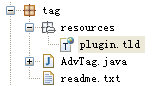
转载请注明出处:[http://www.cnblogs.com/dennisit/p/3334276.html]
实例应用 自定义页面taglib标签的更多相关文章
- SSM框架练习之Jsp页面使用taglib标签报错500的问题
最近在练手一个SSM的基于AdminLET框架模板的后台管理系统,使用的环境是tomcat9,使用Maven构建并通过添加Web模板框架的项目,在添加完所有的配置文件后启动tomcat运行,出现了一个 ...
- 整理ASP.NET MVC 5各种错误请求[401,403,404,500]的拦截及自定义页面处理实例
http://2sharings.com/2015/asp-net-mvc-5-custom-404-500-error-hanlde https://blog.csdn.net/yhyhyhy/ar ...
- jsp如何自定义tag的标签库?
虽然和上一次的使用自定义的tld标签简化jsp的繁琐操作的有点不同,但是目的也是一致的.自定义tag比较简单. 1.新建tag标签 在WEB-INF目录下新建一个tags的文件夹,是自定义tag标签的 ...
- JSP自定义tld方法标签
卧槽 我们可以通过tld文件,自定义一个方法标签,以便在页面中使用,目录通常放在WEB-INF下面的tlds文件夹: 引入方式示例,直接在jsp上引入tld标签文件: <%@ taglib pr ...
- Django学习——Django settings 源码、模板语法之传值、模板语法之获取值、模板语法之过滤器、模板语法之标签、自定义过滤器、标签、inclusion_tag、模板的导入、模板的继承
Django settings 源码 """ 1.django其实有两个配置文件 一个是暴露给用户可以自定义的配置文件 项目根目录下的settings.py 一个是项目默 ...
- Html页面head标签元素的意义和应用场景
相信在html5之前,很少人会关注html页面上head里标签元素的定义和应用场景,可能记得住的只有"title"."keyword"和"descri ...
- datatables跳转自定义页面(后端分页)
在后端分页的情况下,怎么做到跳转自定义页面? 0x01 难点: 一. 怎么添加自定义代码? 前提:datatables在整个html加载完毕后,进行datatables数据的渲染,并且把右下角的 “上 ...
- 一、变量.二、过滤器(filter).三、标签(tag).四、条件分支tag.五、迭代器tag.六、自定义过滤器与标签.七、全系统过滤器(了解)
一.变量 ''' 1.视图函数可以通过两种方式将变量传递给模板页面 -- render(request, 'test_page.html', {'变量key1': '变量值1', ..., '变量ke ...
- 【Spring Security】四、自定义页面
在前面例子中,登陆页面都是用的Spring Security自己提供的,这明显不符合实际开发场景,同时也没有退出和注销按钮,因此在每次测试的时候都要通过关闭浏览器来注销达到清除session的效果. ...
随机推荐
- CareerCup Facebook Total number of substring palindrome
Write a function for retrieving the total number of substring palindromes. For example the input is ...
- Mac 隐私与安全没有允许任何来源选项
mac 允许任何来源的 app 在 macOS Sierra 10.12 及之后的版本,都没有 打开任何来源 的选项,解决方法: 终端执行命令: sudo spctl --master-disable
- C++ 构造与析构的执行顺序
1.代码如下:class A{public: int _Id; A():_Id(0) { printf("A[%d]\n",_Id); } ~A() { printf(" ...
- 解决 IE6 背景缓存
解决 IE6 背景缓存 <!--[if IE 6]><script type="text/javascript">document.execCommand( ...
- LintCode: Fizz Buzz
C++ class Solution { public: /** * param n: As description. * return: A list of strings. */ vector&l ...
- Android studio 导入 github 工程
最近从 github 下载两个开源项目,导入 Android Studio 都以 Studio 卡死结束.第一次以为是项目问题,第二次查询资料发现导入方式不正确,在此整理. 原目录结构如下: Andr ...
- ubuntu中apache2的安装与卸载
一.装apache2 安装命令:sudo apt-get install apache2 启动/停止/重启apache2: service apache2 start/stop/restart 二. ...
- PYQT实现简单的浏览器功能
主要的类 QMainWindow 提供一个有菜单条.锚接窗口(例如工具条)和一个状态条的主应用程序窗口. http://www.kuqin.com/qtdocument/qmainwindow.htm ...
- WebViewJavascriptBridge源代码分析
近期抽时间看了一遍WebViewJavascriptBridge这个开源框架,把看到的内容记录下来 源代码地址:https://github.com/marcuswestin/WebViewJavas ...
- java json与map互相转换(二)
java json与map互相转换(二) CreationTime--2018年7月16日15点09分 Author:Marydon 1.准备工作 所需jar包: commons-beanutil ...