
08_Flume_Selector实践
实践一:replicating selector
1、目标场景
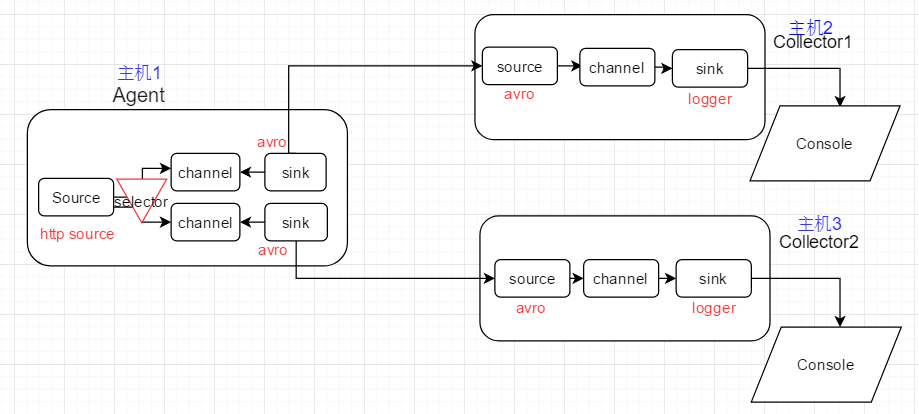
selector将event复制,分发给所有下游节点
2、Flume Agent配置
Agent配置
# Name the components on this agent

a1.sources = r1

a1.sinks = k1 k2

a1.channels = c1 c2

# http source, with replicating selector

a1.sources.r1.type = http

a1.sources.r1.port = 6666

a1.sources.r1.bind = master

a1.sources.r1.selector.type = replicating

# Describe the sink

a1.sinks.k1.type = avro

a1.sinks.k1.hostname = slave1  # bind to remote host,RPC

a1.sinks.k1.port =

a1.sinks.k2.type = avro

a1.sinks.k2.hostname = slave2  # bind to remote host,PRC

a1.sinks.k2.port =

#  channels in selector test

a1.channels.c1.type = memory

a1.channels.c1.capacity =

a1.channels.c1.transactionCapacity =

a1.channels.c2.type = memory

a1.channels.c2.capacity =

a1.channels.c2.transactionCapacity =

# bind source ,sink to channels

a1.sources.r1.channels = c1 c2

a1.sinks.k1.channel = c1

a1.sinks.k2.channel = c2
Collector1配置
#  specify agent,source,sink,channel

a1.sources = r1

a1.sinks = k1

a1.channels = c1

# 02 avro source,connect to local port 6666

a1.sources.r1.type = avro

a1.sources.r1.bind = slave1

a1.sources.r1.port =

#  logger sink

a1.sinks.k1.type = logger

#  channel,memory

a1.channels.c1.type = memory

a1.channels.c1.capacity =

a1.channels.c1.transactionCapacity =

#  bind source,sink to channel

a1.sources.r1.channels = c1

a1.sinks.k1.channel = c1
Collector2配置
#  specify agent,source,sink,channel

a1.sources = r1

a1.sinks = k1

a1.channels = c1

# 02 avro source,connect to local port 6666

a1.sources.r1.type = avro

a1.sources.r1.bind = slave2

a1.sources.r1.port =

#  logger sink

a1.sinks.k1.type = logger

#  channel,memory

a1.channels.c1.type = memory

a1.channels.c1.capacity =

a1.channels.c1.transactionCapacity =

#  bind source,sink to channel

a1.sources.r1.channels = c1

a1.sinks.k1.channel = c1
3、验证Replicating selector
Agent端通过curl -X POST -d 'json数据' 模拟HTTP请求,Agent Souce将其转换为event,并复制两份,分别发给Collector1, Collector2
* 模拟的HTTP请求

* Collector1收到的event

* Collector2收到的event

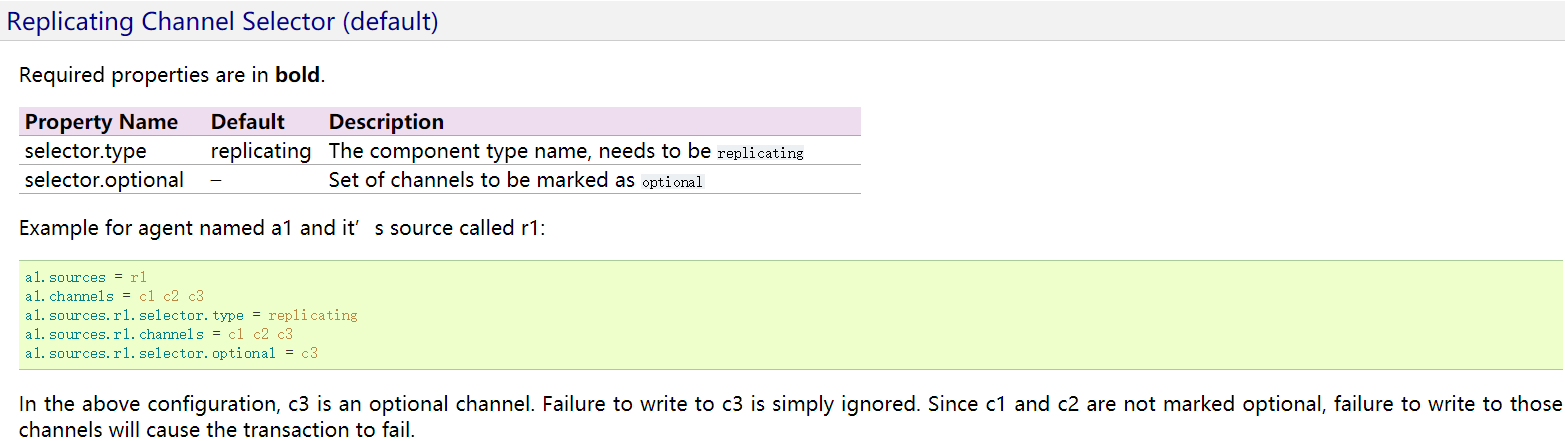
4、replicating selector的官网配置参考
实践二:multiplexing selector
1、目标场景
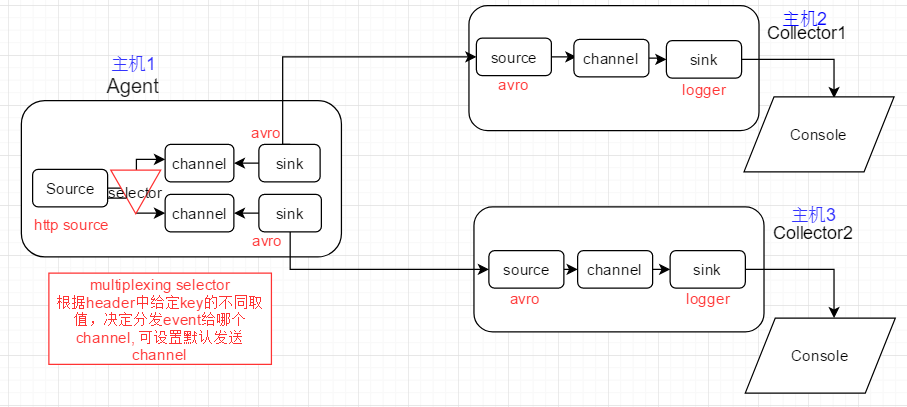
2、Flume Agent配置
Agent配置
# Name the components on this agent

a1.sources = r1

a1.sinks = k1 k2

a1.channels = c1 c2

# http source,with multiplexing selector

a1.sources.r1.type = http

a1.sources.r1.bind = master

a1.sources.r1.port =

# for header with key country

# send to c1 if country's value is china

# send to c2 if country's value is singapore

a1.sources.r1.selector.type= multiplexing

a1.sources.r1.selector.header= country

a1.sources.r1.selector.mapping.china = c1

a1.sources.r1.selector.mapping.singapore = c2

a1.sources.r1.selector.default= c1

# Describe the sink

a1.sinks.k1.type = avro

a1.sinks.k1.hostname = slave1   # bind to remote host, RPC

a1.sinks.k1.port =

a1.sinks.k2.type = avro

a1.sinks.k2.hostname = slave2   # bind to remote host, RPC

a1.sinks.k2.port =

#  channels, for selection

a1.channels.c1.type = memory

a1.channels.c1.capacity =

a1.channels.c1.transactionCapacity =

a1.channels.c2.type = memory

a1.channels.c2.capacity =

a1.channels.c2.transactionCapacity =

# bind source,sink to channels

a1.sources.r1.channels= c1 c2

a1.sinks.k1.channel = c1

a1.sinks.k2.channel = c2
Collector1配置
#  specify agent,source,sink,channel

a1.sources = r1

a1.sinks = k1

a1.channels = c1

# 02 avro source,connect to local port 6666

a1.sources.r1.type = avro

a1.sources.r1.bind = slave1

a1.sources.r1.port =

#  logger sink

a1.sinks.k1.type = logger

#  channel,memory

a1.channels.c1.type = memory

a1.channels.c1.capacity =

a1.channels.c1.transactionCapacity =

#  bind source,sink to channel

a1.sources.r1.channels = c1

a1.sinks.k1.channel = c1
Collector2配置
#  specify agent,source,sink,channel

a1.sources = r1

a1.sinks = k1

a1.channels = c1

# 02 avro source,connect to local port 6666

a1.sources.r1.type = avro

a1.sources.r1.bind = slave2

a1.sources.r1.port =

#  logger sink

a1.sinks.k1.type = logger

#  channel,memory

a1.channels.c1.type = memory

a1.channels.c1.capacity =

a1.channels.c1.transactionCapacity =

#  bind source,sink to channel

a1.sources.r1.channels = c1

a1.sinks.k1.channel = c1
3、验证multiplexing selector
验证思路:
Agent端通过curl -X POST -d 'json数据' 模拟HTTP请求,Agent Souce将其转换为event,并根据header中key为country的不同value值,进行分发
value为china,则分发给C1,最终到达Collecotor1; value为singapore, 则分发给C2,最终到达Collector2; 其他取值,则分发给默认通道C1
1)发送带有country:china的HTTP请求

2)Collecotor1收到并在终端打印出flume event

3)发送带有country:singapore的HTTP请求

4) Collector2收到并在终端打印出flume event

5) 发送带有country:unknown的HTTP请求

6) Collector1因为被配置为默认通道,因此收到该flume event,并打印到终端

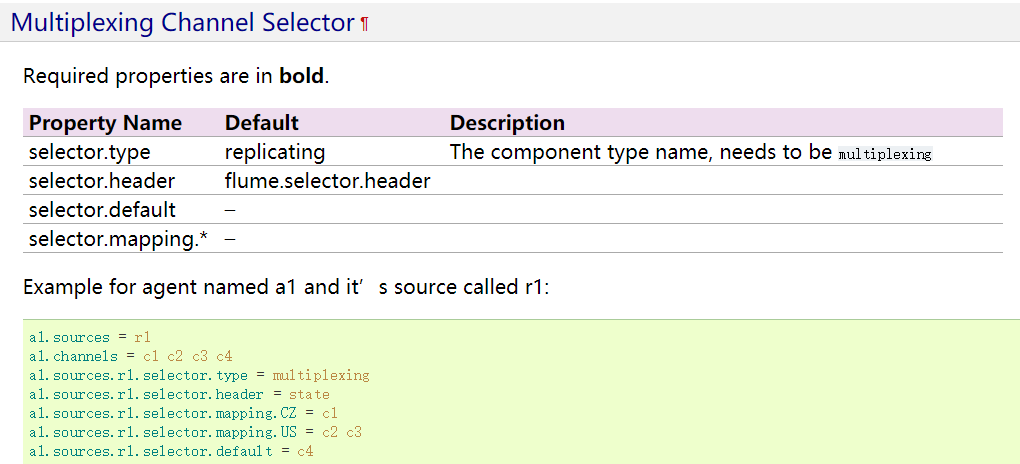
4、multiplexing selector官方配置参考
08_Flume_Selector实践的更多相关文章
- webp图片实践之路
最近,我们在项目中实践了webp图片,并且抽离出了工具模块,整合到了项目的基础模板中.传闻IOS10也将要支持webp,那么使用webp带来的性能提升将更加明显.估计在不久的将来,webp会成为标配. ...
- Hangfire项目实践分享
Hangfire项目实践分享 目录 Hangfire项目实践分享 目录 什么是Hangfire Hangfire基础 基于队列的任务处理(Fire-and-forget jobs) 延迟任务执行(De ...
- TDD在Unity3D游戏项目开发中的实践
0x00 前言 关于TDD测试驱动开发的文章已经有很多了,但是在游戏开发尤其是使用Unity3D开发游戏时,却听不到特别多关于TDD的声音.那么本文就来简单聊一聊TDD如何在U3D项目中使用以及如何使 ...
- Logstash实践: 分布式系统的日志监控
文/赵杰 2015.11.04 1. 前言 服务端日志你有多重视? 我们没有日志 有日志,但基本不去控制需要输出的内容 经常微调日志,只输出我们想看和有用的 经常监控日志,一方面帮助日志微调,一方面及 ...
- 【大型网站技术实践】初级篇:借助Nginx搭建反向代理服务器
一.反向代理:Web服务器的“经纪人” 1.1 反向代理初印象 反向代理(Reverse Proxy)方式是指以代理服务器来接受internet上的连接请求,然后将请求转发给内部网络上的服务器,并将从 ...
- Windows平台分布式架构实践 - 负载均衡
概述 最近.NET的世界开始闹腾了,微软官方终于加入到了对.NET跨平台的支持,并且在不久的将来,我们在VS里面写的代码可能就可以通过Mono直接在Linux和Mac上运行.那么大家(开发者和企业)为 ...
- Mysql事务探索及其在Django中的实践(二)
继上一篇<Mysql事务探索及其在Django中的实践(一)>交代完问题的背景和Mysql事务基础后,这一篇主要想介绍一下事务在Django中的使用以及实际应用给我们带来的效率提升. 首先 ...
- Mysql事务探索及其在Django中的实践(一)
前言 很早就有想开始写博客的想法,一方面是对自己近期所学知识的一些总结.沉淀,方便以后对过去的知识进行梳理.追溯,一方面也希望能通过博客来认识更多相同技术圈的朋友.所幸近期通过了博客园的申请,那么今天 ...
- netty5 HTTP协议栈浅析与实践
一.说在前面的话 前段时间,工作上需要做一个针对视频质量的统计分析系统,各端(PC端.移动端和 WEB端)将视频质量数据放在一个 HTTP 请求中上报到服务器,服务器对数据进行解析.分拣后从不同的 ...
随机推荐
- 配置tomcat通过客户端访问
1:在tomcat conf/tomcat-users.xml 文件里 配置用户名和密码,以及访问方式 For example, to add the manager-gui role to ...
- CentOS6.5安装Redis数据库
1.以安装redis2.8.19为例 下载安装包:http://redis.io tar zxvf redis-2.8.19.tar.gz #解压 cd redis-2.8.19 #进入解压后的文件夹 ...
- LINQ的左连接、右连接、内连接和Lamda表达式实现Left join
1.左连接: var LeftJoin = from t1 in l1join t2 in l2on t1.ID equals t2.ID into Joinedt12from t3 in Joine ...
- EL—表达式
El的数据访问操作: 1:获取变量名(四大作用域中的变量?六大作用域?) 只能从这六个区域中拿数据!!! 2:获取对象的属性值 3:获取集合元素 4:执行表达式 1:获取变量名(四大作用域中的变量) ...
- bind,live,delegate
.live() 到目前为止,一切似乎很完美.可惜,事实并非如此.因为.live()方法并不完美,它有如下几个主要缺点: $()函数会找到当前页面中的所有td元素并创建jQuery对象,但在确认事件目标 ...
- bootstrap3浏览器支持情况
Internet Explorer 8 和 9 是被支持的,但是还是有很多CSS3属性和HTML5元素 -- 例如,圆角矩形和投影 -- 是肯定不被支持的.另外,Internet Explorer 8 ...
- Intro to Python for Data Science Learning 7 - 2D NumPy Arrays
2D NumPy Arrays from:https://campus.datacamp.com/courses/intro-to-python-for-data-science/chapter-4- ...
- 复制控件出错--提示XX控件不存在
有时候比较喜欢复制粘贴,但是结果就是,经常出现XX控件找不到,或者不存在之类的话~~ 错误如下: 在相当郁闷的时候,尝试了一种很土土的方法,就是直接新建一个同名新页面,把前台和后台的代码复制进去~~ ...
- 2018-2019-2 20165209 《网络对抗技术》 Kali安装
2018-2019-2 20165209 <网络对抗技术> Kali安装 目录内容 下载 安装 网络 共享 软件源 下载kali kali下载官网地址 我下载的版本(如下图所示) 安装 打 ...
- Zookeeper学习记录(二):使用以及配置
zookeeper已经介绍了它的原理设计以及实现方式,我们接下来介绍zookeeper的使用方法以及简单配置. 下载 获取Zookeeper的发布包,从Apache下载映像中下载一个最新稳定版本. 单 ...