
Java语言编写MD5加密方法,Jmeter如何给字符串MD5加密
package md5package;

import java.io.UnsupportedEncodingException;

import java.security.MessageDigest;

import java.security.NoSuchAlgorithmException;

public class String2md5 {

	public static void main(String args[]) {

		String aaa=StringToMd5("abc");

		if(aaa.equals("900150983cd24fb0d6963f7d28e17f72"))

		System.out.println("MD5加密后的值是:"+aaa);

		else

			System.out.println("-----sorry-"+aaa);

	}

	public static String StringToMd5(String psw) {

        {

            try {

                MessageDigest md5 = MessageDigest.getInstance("MD5");

                md5.update(psw.getBytes("UTF-8"));

                byte[] encryption = md5.digest();

                StringBuffer strBuf = new StringBuffer();

                for (int i = 0; i < encryption.length; i++) {

                    if (Integer.toHexString(0xff & encryption[i]).length() == 1) {

                        strBuf.append("0").append(Integer.toHexString(0xff & encryption[i]));

                    } else {

                        strBuf.append(Integer.toHexString(0xff & encryption[i]));

                    }

                }

                return strBuf.toString();

            } catch (NoSuchAlgorithmException e) {

                return "";

            } catch (UnsupportedEncodingException e) {

                return "";

            }

        }

    }

}
找了一下,目前Jmeter4.0版本中已经默认自带这个md5方法了,源码如下:
//

// Source code recreated from a .class file by IntelliJ IDEA

// (powered by Fernflower decompiler)

//

package org.apache.commons.codec.digest;

import java.io.BufferedInputStream;

import java.io.File;

import java.io.FileInputStream;

import java.io.IOException;

import java.io.InputStream;

import java.nio.ByteBuffer;

import java.security.MessageDigest;

import java.security.NoSuchAlgorithmException;

import org.apache.commons.codec.binary.Hex;

import org.apache.commons.codec.binary.StringUtils;

public class DigestUtils {

    private static final int STREAM_BUFFER_LENGTH = 1024;

    private final MessageDigest messageDigest;

    public static byte[] digest(MessageDigest messageDigest, byte[] data) {

        return messageDigest.digest(data);

    }

    public static byte[] digest(MessageDigest messageDigest, ByteBuffer data) {

        messageDigest.update(data);

        return messageDigest.digest();

    }

    public static byte[] digest(MessageDigest messageDigest, File data) throws IOException {

        return updateDigest(messageDigest, data).digest();

    }

    public static byte[] digest(MessageDigest messageDigest, InputStream data) throws IOException {

        return updateDigest(messageDigest, data).digest();

    }

    public static MessageDigest getDigest(String algorithm) {

        try {

            return MessageDigest.getInstance(algorithm);

        } catch (NoSuchAlgorithmException var2) {

            throw new IllegalArgumentException(var2);

        }

    }

    public static MessageDigest getDigest(String algorithm, MessageDigest defaultMessageDigest) {

        try {

            return MessageDigest.getInstance(algorithm);

        } catch (Exception var3) {

            return defaultMessageDigest;

        }

    }

    public static MessageDigest getMd2Digest() {

        return getDigest("MD2");

    }

    public static MessageDigest getMd5Digest() {

        return getDigest("MD5");

    }

    public static MessageDigest getSha1Digest() {

        return getDigest("SHA-1");

    }

    public static MessageDigest getSha256Digest() {

        return getDigest("SHA-256");

    }

    public static MessageDigest getSha384Digest() {

        return getDigest("SHA-384");

    }

    public static MessageDigest getSha512Digest() {

        return getDigest("SHA-512");

    }

    /** @deprecated */

    @Deprecated

    public static MessageDigest getShaDigest() {

        return getSha1Digest();

    }

    public static byte[] md2(byte[] data) {

        return getMd2Digest().digest(data);

    }

    public static byte[] md2(InputStream data) throws IOException {

        return digest(getMd2Digest(), data);

    }

    public static byte[] md2(String data) {

        return md2(StringUtils.getBytesUtf8(data));

    }

    public static String md2Hex(byte[] data) {

        return Hex.encodeHexString(md2(data));

    }

    public static String md2Hex(InputStream data) throws IOException {

        return Hex.encodeHexString(md2(data));

    }

    public static String md2Hex(String data) {

        return Hex.encodeHexString(md2(data));

    }

    public static byte[] md5(byte[] data) {

        return getMd5Digest().digest(data);

    }

    public static byte[] md5(InputStream data) throws IOException {

        return digest(getMd5Digest(), data);

    }

    public static byte[] md5(String data) {

        return md5(StringUtils.getBytesUtf8(data));

    }

    public static String md5Hex(byte[] data) {

        return Hex.encodeHexString(md5(data));

    }

    public static String md5Hex(InputStream data) throws IOException {

        return Hex.encodeHexString(md5(data));

    }

    public static String md5Hex(String data) {

        return Hex.encodeHexString(md5(data));

    }

    /** @deprecated */

    @Deprecated

    public static byte[] sha(byte[] data) {

        return sha1(data);

    }

    /** @deprecated */

    @Deprecated

    public static byte[] sha(InputStream data) throws IOException {

        return sha1(data);

    }

    /** @deprecated */

    @Deprecated

    public static byte[] sha(String data) {

        return sha1(data);

    }

    public static byte[] sha1(byte[] data) {

        return getSha1Digest().digest(data);

    }

    public static byte[] sha1(InputStream data) throws IOException {

        return digest(getSha1Digest(), data);

    }

    public static byte[] sha1(String data) {

        return sha1(StringUtils.getBytesUtf8(data));

    }

    public static String sha1Hex(byte[] data) {

        return Hex.encodeHexString(sha1(data));

    }

    public static String sha1Hex(InputStream data) throws IOException {

        return Hex.encodeHexString(sha1(data));

    }

    public static String sha1Hex(String data) {

        return Hex.encodeHexString(sha1(data));

    }

    public static byte[] sha256(byte[] data) {

        return getSha256Digest().digest(data);

    }

    public static byte[] sha256(InputStream data) throws IOException {

        return digest(getSha256Digest(), data);

    }

    public static byte[] sha256(String data) {

        return sha256(StringUtils.getBytesUtf8(data));

    }

    public static String sha256Hex(byte[] data) {

        return Hex.encodeHexString(sha256(data));

    }

    public static String sha256Hex(InputStream data) throws IOException {

        return Hex.encodeHexString(sha256(data));

    }

    public static String sha256Hex(String data) {

        return Hex.encodeHexString(sha256(data));

    }

    public static byte[] sha384(byte[] data) {

        return getSha384Digest().digest(data);

    }

    public static byte[] sha384(InputStream data) throws IOException {

        return digest(getSha384Digest(), data);

    }

    public static byte[] sha384(String data) {

        return sha384(StringUtils.getBytesUtf8(data));

    }

    public static String sha384Hex(byte[] data) {

        return Hex.encodeHexString(sha384(data));

    }

    public static String sha384Hex(InputStream data) throws IOException {

        return Hex.encodeHexString(sha384(data));

    }

    public static String sha384Hex(String data) {

        return Hex.encodeHexString(sha384(data));

    }

    public static byte[] sha512(byte[] data) {

        return getSha512Digest().digest(data);

    }

    public static byte[] sha512(InputStream data) throws IOException {

        return digest(getSha512Digest(), data);

    }

    public static byte[] sha512(String data) {

        return sha512(StringUtils.getBytesUtf8(data));

    }

    public static String sha512Hex(byte[] data) {

        return Hex.encodeHexString(sha512(data));

    }

    public static String sha512Hex(InputStream data) throws IOException {

        return Hex.encodeHexString(sha512(data));

    }

    public static String sha512Hex(String data) {

        return Hex.encodeHexString(sha512(data));

    }

    /** @deprecated */

    @Deprecated

    public static String shaHex(byte[] data) {

        return sha1Hex(data);

    }

    /** @deprecated */

    @Deprecated

    public static String shaHex(InputStream data) throws IOException {

        return sha1Hex(data);

    }

    /** @deprecated */

    @Deprecated

    public static String shaHex(String data) {

        return sha1Hex(data);

    }

    public static MessageDigest updateDigest(MessageDigest messageDigest, byte[] valueToDigest) {

        messageDigest.update(valueToDigest);

        return messageDigest;

    }

    public static MessageDigest updateDigest(MessageDigest messageDigest, ByteBuffer valueToDigest) {

        messageDigest.update(valueToDigest);

        return messageDigest;

    }

    public static MessageDigest updateDigest(MessageDigest digest, File data) throws IOException {

        BufferedInputStream stream = new BufferedInputStream(new FileInputStream(data));

        MessageDigest var3;

        try {

            var3 = updateDigest(digest, (InputStream)stream);

        } finally {

            stream.close();

        }

        return var3;

    }

    public static MessageDigest updateDigest(MessageDigest digest, InputStream data) throws IOException {

        byte[] buffer = new byte[1024];

        for(int read = data.read(buffer, 0, 1024); read > -1; read = data.read(buffer, 0, 1024)) {

            digest.update(buffer, 0, read);

        }

        return digest;

    }

    public static MessageDigest updateDigest(MessageDigest messageDigest, String valueToDigest) {

        messageDigest.update(StringUtils.getBytesUtf8(valueToDigest));

        return messageDigest;

    }

    public static boolean isAvailable(String messageDigestAlgorithm) {

        return getDigest(messageDigestAlgorithm, (MessageDigest)null) != null;

    }

    /** @deprecated */

    @Deprecated

    public DigestUtils() {

        this.messageDigest = null;

    }

    public DigestUtils(MessageDigest digest) {

        this.messageDigest = digest;

    }

    public DigestUtils(String name) {

        this(getDigest(name));

    }

    public MessageDigest getMessageDigest() {

        return this.messageDigest;

    }

    public byte[] digest(byte[] data) {

        return updateDigest(this.messageDigest, data).digest();

    }

    public byte[] digest(String data) {

        return updateDigest(this.messageDigest, data).digest();

    }

    public byte[] digest(ByteBuffer data) {

        return updateDigest(this.messageDigest, data).digest();

    }

    public byte[] digest(File data) throws IOException {

        return updateDigest(this.messageDigest, data).digest();

    }

    public byte[] digest(InputStream data) throws IOException {

        return updateDigest(this.messageDigest, data).digest();

    }

    public String digestAsHex(byte[] data) {

        return Hex.encodeHexString(this.digest(data));

    }

    public String digestAsHex(String data) {

        return Hex.encodeHexString(this.digest(data));

    }

    public String digestAsHex(ByteBuffer data) {

        return Hex.encodeHexString(this.digest(data));

    }

    public String digestAsHex(File data) throws IOException {

        return Hex.encodeHexString(this.digest(data));

    }

    public String digestAsHex(InputStream data) throws IOException {

        return Hex.encodeHexString(this.digest(data));

    }

}
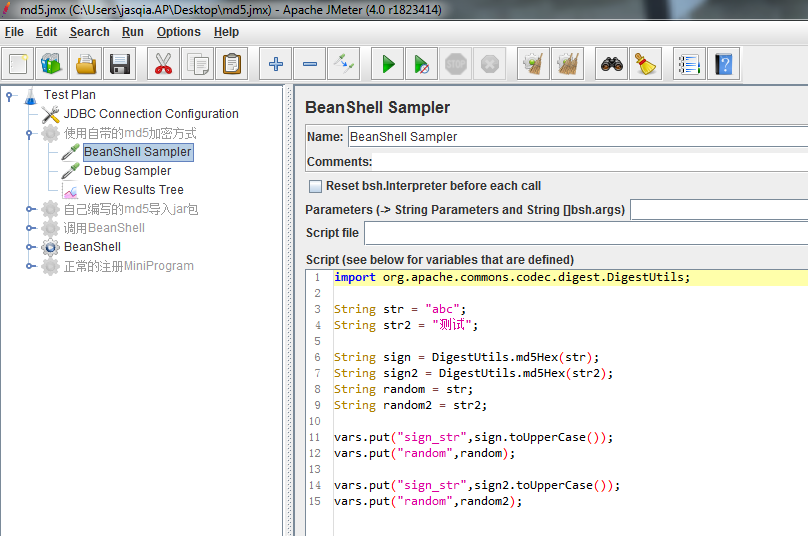
Jmeter要如何引用呢
import org.apache.commons.codec.digest.DigestUtils;

String str = "abc";

String str2 = "测试";

String sign = DigestUtils.md5Hex(str);

String sign2 = DigestUtils.md5Hex(str2);

String random = str;

String random2 = str2;

vars.put("sign_str",sign.toUpperCase());

vars.put("random",random);

vars.put("sign_str",sign2.toUpperCase());

vars.put("random",random2);
Java语言编写MD5加密方法,Jmeter如何给字符串MD5加密的更多相关文章
- Atiitt 使用java语言编写sql函数或存储过程
Atiitt 使用java语言编写sql函数或存储过程 1.1. java编写sql函数或存储过程的机制1 1.2. Java编写sp的优点1 1.3. 支持java源码,class文件,blog f ...
- Fastjson是一个Java语言编写的高性能功能完善的JSON库。
简介 Fastjson是一个Java语言编写的高性能功能完善的JSON库. 高性能 fastjson采用独创的算法,将parse的速度提升到极致,超过所有json库,包括曾经号称最快的jackson. ...
- 使用Java语言编写一个五子棋UI界面并实现网络对战功能(非局域网)
使用Java语言编写一个五子棋UI界面并实现网络对战功能(非局域网) 一,前期准备 1,Java IDE(Eclipse)与JDK的安装与配置jdk-15.0.1-免配置路径版提取码:earu免安装版 ...
- 使用java语言编写窗口按钮
使用java语言编写窗口按钮 代码如下: package Day08; import java.awt.FlowLayout; import javax.swing.JButton;import ja ...
- java语言规范,main方法必须声明为public
注释: 根据java语言规范,main方法必须声明为public. 当main方法不是public时,有些版本的java解释器也可以执行java应用程序.有个程序员报告了这个bug. 如果感兴趣可以查 ...
- 第二次作业利用java语言编写计算器进行四则运算
随着第一次作业的完成,助教 牛老师又布置了第二次作业:用java语言编写一个程序然后进行四则运算用户用键盘输入一个字符来结束程序显示统计结果.一开始看到这个题目我也着实吓了一跳 因为不知道如何下手而且 ...
- 用Java语言编写一个简易画板
讲了三篇概博客的概念,今天,我们来一点实际的东西.我们来探讨一下如何用Java语言,编写一块简易的画图板. 一.需求分析 无论我们使用什么语言,去编写一个什么样的项目,我们的第一步,总是去分析这个项目 ...
- java语言编写矩阵的四则运算
题目要求如下: 设计程序实现矩阵的四则运算 设计要求: (1) 实现矩阵的四则运算. (2) 考虑实现带变元的矩阵计算. (3)考虑实现矩阵的特征值和特征向量的计算. 我使用java语言写的 目录结构 ...
- java基础知识回顾之---java String final类普通方法的应用之字符串数组排序
/* * 1,给定一个字符串数组.按照字典顺序进行从小到大的排序. * {"nba","abc","cba","zz", ...
随机推荐
- test examples/test scripts
//https://www.getpostman.com/docs/v6/postman/scripts/test_examples //Setting an environment variable ...
- [LeetCode] 310. Minimum Height Trees_Medium tag: BFS
For a undirected graph with tree characteristics, we can choose any node as the root. The result gra ...
- Linux系统——Keepalived高可用集群
#### keepalived服务的三个重要功能1. 管理LVS负载均衡软件Keepalived可以通过读取自身的配置文件,实现通过更底层的接口直接管理LVS的配置以及控制服务的启动,停止功能,这使得 ...
- 翻译[RFC6238] TOTP: Time-Based One-Time Password Algorithm
在闲暇时间做了一个TOTP相关的开源项目,在项目初步完成之余,我尝试对[RFC6238]文档进行了翻译,供大家参考与查阅,若有不妥之处,还望各位前辈海涵斧正. [RFC6238] : Time-Bas ...
- Codeforces 1144G Two Merged Sequences
题意: 将一个序列分成两个序列,两个序列中元素的相对顺序保持和原序列不变,使得分出的两个序列一个严格上升,一个严格下降. 思路: 我们考虑每个元素都要进入其中一个序列. 那么我们维护一个上升序列和一个 ...
- Loadrunder场景设计篇——添加windows Resource计数器和指标说明
目的 监控要测试的windows服务器的资源使用情况 A.添加计数器步骤 1.添加视图,方法双击.拖动左侧的Windows Rescources到右边图形区,或右键右侧已有视图,Open a New ...
- python xml childNodes,childNodes[1].childNodes[0].data例子
xml: <?xml version='1.0' encoding='utf-8'?><!--this is a test about xml--><booklist t ...
- linux服务器---squid缓存
Squid缓存 代理服务器会在本地硬盘设置缓存,这样可以提高网络效率 1修改squid配置文件“/etc/squid/squid.conf”,参数“cache_dir_ufs”就是设置缓存目录的 [r ...
- [转载]论asp.net out、ref、return
论asp.net out.ref.return ref(引用类型) ref引用类型进出都必须赋值,赋值后会改变类型原来的指针. out(值类型) out值类型进可以不赋值,出必须赋值. r ...
- 计算概论(A)/基础编程练习1(8题)/7:奇数求和
#include<stdio.h> int main() { // 输入非负整数 int m, n; scanf("%d %d", &m, &n); / ...