
Linux 系统安装配置PHP服务(源码安装)
简介:
PHP(外文名:PHP: Hypertext Preprocessor,中文名:“超文本预处理器”)是一种通用开源脚本语言。语法吸收了C语言、Java和Perl的特点,利于学习,使用广泛,主要适用于Web开发领域。
标注:
配置nginx请参考此教程:
http://www.cnblogs.com/zoulongbin/p/6253568.html
配置mysql请参考此教程:
http://www.cnblogs.com/zoulongbin/p/6287167.html
配置网络yum源参考此教程:
http://www.cnblogs.com/zoulongbin/p/5773330.html
需要安装以下安装包:(使用网络yum源在线安装以下四个依赖包,本教程大部分使用下载的源码安装进行编译安装)
[root@ssticentos65 src]# yum -y install libcurl-devel (必须安装)
[root@ssticentos65 src]# yum -y install libXpm-devel (必须安装)
[root@ssticentos65 src]# yum -y install libxml2-devel (必须安装)
[root@ssticentos65 src]# yum -y install php-mbstring (自行选择安装)
提示:Linux软件编译安装都需要依赖两个安装包 gcc gcc-c++ make 可使用 yum -y install gcc gcc-c++ make 在线安装。
标注:下载的软件安装包统一存放路径在 /usr/local/src 目录下进行解压编译安装
1、 安装yasm
下载地址:http://www.tortall.net/projects/yasm/releases/
[root@ssticentos65 src]# cd yasm-1.3.0
[root@ssticentos65 yasm-1.3.0]# ./configure
[root@ssticentos65 yasm-1.3.0]# make
[root@ssticentos65 yasm-1.3.0]# make install
2、 安装libmcrypt
下载地址:https://sourceforge.net/projects/mcrypt/files/Libmcrypt/2.5.8/
[root@ssticentos65 src]# cd libmcrypt-2.5.8
[root@ssticentos65 libmcrypt-2.5.8]# ./configure
[root@ssticentos65 libmcrypt-2.5.8]# make
[root@ssticentos65 libmcrypt-2.5.8]# make install
3、 安装libvpx
下载地址: http://www.linuxfromscratch.org/blfs/view/svn/multimedia/libvpx.html
[root@ssticentos65 src]# cd libvpx-1.6.0
[root@ssticentos65 libvpx-1.6.0]#./configure --prefix=/usr/local/libvpx --enable-shared --enable-vp9
[root@ssticentos65 libvpx-1.6.0]# make
[root@ssticentos65 libvpx-1.6.0]# make install
4、 安装tiff
下载地址: http://download.osgeo.org/libtiff/
[root@ssticentos65 src]# cd tiff-4.0.6
[root@ssticentos65 tiff-4.0.6]#./configure --prefix=/usr/local/tiff --enable-shared
[root@ssticentos65 tiff-4.0.6]# make
[root@ssticentos65 tiff-4.0.6]# make install
5、 安装libpng
下载地址:http://www.libpng.org/pub/png/libpng.html
[root@ssticentos65 src]# cd libpng-1.6.28
[root@ssticentos65 libpng-1.6.28]#./configure --prefix=/usr/local/libpng --enable-shared
[root@ssticentos65 libpng-1.6.28]# make
[root@ssticentos65 libpng-1.6.28]# make install
6、 安装freetype
下载地址:http://ring.u-toyama.ac.jp/archives/graphics/freetype/freetype2/
[root@ssticentos65 src]# cd freetype-2.7.1
[root@ssticentos65 freetype-2.7.1]#./configure --prefix=/usr/local/freetype --enable-shared
[root@ssticentos65 freetype-2.7.1]# make
[root@ssticentos65 freetype-2.7.1]# make install
7、 安装jpeg
下载地址:http://www.ijg.org/files/
[root@ssticentos65 src]# cd jpeg-9a
[root@ssticentos65 jpeg-9a]#./configure --prefix=/usr/local/jpeg --enable-shared
[root@ssticentos65 jpeg-9a]# make
[root@ssticentos65 jpeg-9a]# make install
8、 安装libgd
下载地址:https://github.com/libgd/libgd/releases
[root@ssticentos65 src]# cd libgd-2.2.0
[root@ssticentos65 libgd-2.2.0]#./configure --prefix=/usr/local/libgd --enable-shared --with-jpeg=/usr/local/jpeg --with-png=/usr/local/libpng --with-freetype=/usr/local/freetype --with-fontconfig=/usr/local/freetype --with-xpm=/usr/ --with-tiff=/usr/local/tiff --with-webp=/usr/local/libwebp/
[root@ssticentos65 libgd-2.2.0]# make
[root@ssticentos65 libgd-2.2.0]# make install
9、 安装t1lib
下载地址:http://download.csdn.net/download/sunkaivg/9696064
[root@ssticentos65 src]# cd t1lib-5.1.2
[root@ssticentos65 t1lib-5.1.2]#./configure --prefix=/usr/local/t1lib --enable-shared
[root@ssticentos65 t1lib-5.1.2]# make without_doc
[root@ssticentos65 t1lib-5.1.2]# make install
10、 安装php
下载地址 :http://www.php.net/downloads.php
[root@ssticentos65 src]# ls
php-5.6.28 php-5.6.28.tar.gz
[root@ssticentos65 src]# pwd
/usr/local/src
[root@ssticentos65 src]# cd php-5.6.28
[root@ssticentos65 php-5.6.28]#./configure --prefix=/usr/local/php --with-config-file-path=/usr/local/php/etc --with-pdo-mysql=/usr/local/mysql --with-mysqli=/usr/local/mysql/bin/mysql_config --with-mysql-sock=/tmp/mysql.sock --with-pdo-mysql=/usr/local/mysql --with-gd --with-png-dir=/usr/local/libpng --with-jpeg-dir=/usr/local/jpeg --with-freetype-dir=/usr/local/freetype --with-xpm-dir=/usr/ --with-zlib-dir=/usr/local/zlib --with-iconv --enable-libxml --enable-xml --enable-bcmath --enable-shmop --enable-sysvsem --enable-inline-optimization --enable-opcache --enable-mbregex --enable-fpm --enable-mbstring --enable-ftp --enable-gd-native-ttf --with-openssl --enable-pcntl --enable-sockets --with-xmlrpc --enable-zip --enable-soap --without-pear --with-gettext --enable-session --with-mcrypt --with-curl --enable-ctype
[root@ssticentos65 php-5.6.28]# make
[root@ssticentos65 php-5.6.28]# make install
11、配置PHP
#显示php安装包存放路径
[root@ssticentos65 src]# pwd
/usr/local/src
[root@ssticentos65 src]# ls
php-5.6.28 php-5.6.28.tar.gz
[root@ssticentos65 src]# cd php-5.6.28
#复制php配置文件到安装目录
[root@ssticentos65 php-5.6.28]# cp php.ini-production /usr/local/php/etc/php.ini
#删除系统自带配置文件
[root@ssticentos65 php-5.6.28]# rm -rf /etc/php.ini
#添加软链接到 /etc目录
[root@ssticentos65 php-5.6.28]# ln -s /usr/local/php/etc/php.ini /etc/php.ini
[root@ssticentos65 php-5.6.28]# ls -l /etc/php.ini
lrwxrwxrwx 1 root root 26 Jan 6 02:22 /etc/php.ini -> /usr/local/php/etc/php.ini
#复制模板文件为php-fpm配置
[root@ssticentos65 php-5.6.28]# cp /usr/local/php/etc/php-fpm.conf.default /usr/local/php/etc/php-fpm.conf
#添加软件链接到 /etc目录
[root@ssticentos65 php-5.6.28]#ln -s /usr/local/php/etc/php-fpm.conf /etc/php-fpm.conf
#编辑php配置文件php-fpm.conf
[root@ssticentos65 php-5.6.28]# vim /usr/local/php/etc/php-fpm.conf
pid = run/php-fpm.pid //如果这个选项在配置文件存在就取消掉注释使用,如果不存在可以忽略,请勿手动添加,否则PHP启动会报错。
user = www
group = www
:wq! #保存并退出
12、设置php-fpm开机自启动
#复制php-fpm到启动目录
[root@ssticentos65 ~]# cp /usr/local/src/php-5.6.28/sapi/fpm/init.d.php-fpm /etc/init.d/php-fpm
[root@ssticentos65 ~]# ls -l /etc/init.d/php-fpm
-rw-r--r--. 1 root root 2354 Jan 6 02:37 /etc/init.d/php-fpm
#赋予php-fpm执行权限
[root@ssticentos65 ~]# chmod 755 /etc/init.d/php-fpm
[root@ssticentos65 ~]# ls -l /etc/init.d/php-fpm
-rwxr-xr-x. 1 root root 2354 Jan 6 02:37 /etc/init.d/php-fpm
#设置php-fpm开机启动
[root@ssticentos65 ~]# chkconfig php-fpm on
[root@ssticentos65 ~]# chkconfig --list php-fpm
php-fpm 0:off 1:off 2:on 3:on 4:on 5:on 6:off
#编辑php配置文件php.ini
[root@ssticentos65 ~]# vim /usr/local/php/etc/php.ini
找到:disable_functions =
修改成disable_functions= passthru,exec,system,chroot,scandir,chgrp,chown,shell_exec,proc_open,proc_get_status,ini_alter,ini_alter,ini_restore,dl,openlog,syslog,readlink,symlink,popepassthru,stream_socket_server,escapeshellcmd,dll,popen,disk_free_space,checkdnsrr,checkdnsrr,getservbyname,getservbyport,disk_total_space,posix_ctermid,posix_get_last_error,posix_getcwd,posix_getegid,posix_geteuid,posix_getgid,posix_getgrgid,posix_getgrnam,posix_getgroups,posix_getlogin,posix_getpgid,posix_getpgrp,posix_getpid,posix_getppid,posix_getpwnam,posix_getpwuid, posix_getrlimit,posix_getsid,posix_getuid,posix_isatty, posix_kill,posix_mkfifo,posix_setegid,posix_seteuid,posix_setgid, posix_setpgid,posix_setsid,posix_setuid,posix_strerror,posix_times,posix_ttyname,posix_uname
找到:date.timezone =
修改为:date.timezone = PRC #设置时区
找到:expose_php = On
修改为:expose_php = Off #禁止显示php版本的信息
找到:short_open_tag = Off
修改为:short_open_tag = On #支持php短标签
找到opcache.enable=0
修改为opcache.enable=1 #php支持opcode缓存
找到:opcache.enable_cli=1 #php支持opcode缓存
修改为:opcache.enable_cli=0
在最后一行添加:zend_extension=opcache.so #开启opcode缓存功能 (在文本按Shift+G就能跳到最后一行)
:wq! #保存并退出
13、配置nginx支持php
检查www用户和www用户组是否存在,不存在请手动创建
[root@ssticentos65 ~]# cat /etc/passwd | grep www
apache:x:48:48:Apache:/var/www:/sbin/nologin
www:x:501:3005::/home/www:/bin/bash
[root@ssticentos65 ~]# cat /etc/group | grep www
www:x:3005:
[root@ssticentos65 ~]# vim /usr/local/nginx/conf/nginx.conf
user www www;
#首行user去掉注释,修改Nginx运行组为www www;必须与/usr/local/php/etc/php-fpm.d/www.conf中的user,group配置相同,否则php运行出错
location / {
root html;
index index.html index.htm index.php; #添加index.php
}
location ~ \.php$ {
root html;
fastcgi_pass 127.0.0.1:9000;
fastcgi_index index.php;
fastcgi_param SCRIPT_FILENAME $document_root$fastcgi_script_name;
include fastcgi_params;
}
#取消FastCGI server部分location的注释,注意fastcgi_param行的参数,改为$document_root$fastcgi_script_name,或者使用绝对路径
:wq! #保存并退出
#启动nginx服务
[root@ssticentos65 ~]# /etc/init.d/nginx restart
#启动php服务
[root@ssticentos65 ~]# /etc/init.d/php-fpm start
14、测试php配置
#进入nginx默认网站根目录
[root@ssticentos65 ~]# cd /usr/local/nginx/html/
[root@ssticentos65 html]# ls
50x.html index.html
#删除默认测试页
[root@ssticentos65 html]# rm -rf /usr/local/nginx/html/*
[root@ssticentos65 html]# pwd
/usr/local/nginx/html
#新建index.php文件进行测试
[root@ssticentos65 html]# vim index.php
<?php
phpinfo();
?>
:wq! #保存并退出
#设置目录所有者为 www
[root@ssticentos65 html]# chown www.www /usr/local/nginx/html/ -R
#设置目录权限
[root@ssticentos65 html]# chmod 755 /usr/local/nginx/html/ -R
打开浏览器输入服务器IP地址,会看到下面的界面就是php安装成功
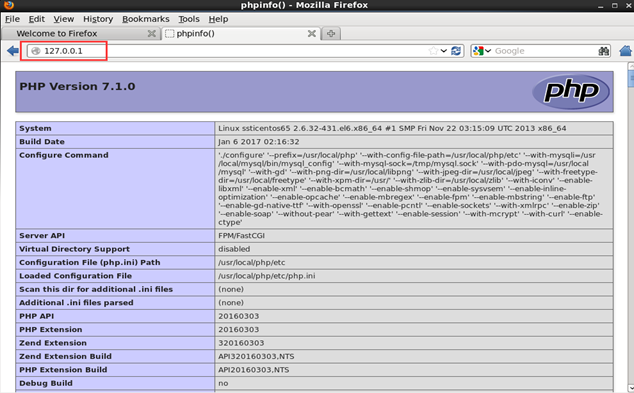
感谢此博客提供参考 http://www.osyunwei.com/archives/7891.html
Linux 系统安装配置PHP服务(源码安装)的更多相关文章
- linux 系统安装配置 zabbix服务(源码安装)
简介: zabbix是一个基于WEB界面的提供分布式系统监视以及网络监视功能的企业级的开源解决方案. zabbix能监视各种网络参数,保证服务器系统的安全运营:并提供灵活的通知机制以让系统管理员快速定 ...
- linux系统安装配置exim4(源码安装)
一.Exim4概述 Exim是一个MTA(Mail Transfer Agent,邮件传输代理)服务器软件,该软件基于GPL协议开发,是一款开源软件.该软件主要运行于类UNIX系统.通常该软件会与Do ...
- linux下MySQL 5.6源码安装
linux下MySQL 5.6源码安装 1.下载:当前mysql版本到了5.6.20 http://dev.mysql.com/downloads/mysql 选择Source Code 2.必要软件 ...
- linux应用之nginx的源码安装及配置(centos)
1.准备工作选首先安装这几个软件:GCC,PCRE(Perl Compatible Regular Expression),zlib,OpenSSL.Nginx是C写的,需要用GCC编译:Nginx的 ...
- centos下配置LNMP环境(源码安装)
准备工作,安装依赖库 yum -y install gcc automake autoconf libtool make gcc-c++ glibc libxslt-devel libjpeg lib ...
- 【程序包管理】Linux软件管理之src源码安装编译
在很多时候我们需要自定义软件的特性,这时就需要用到源码安装.那么,网上有很多编译源码的工具,那么,我们怎么知道别人使用的是什么工具呢.其实我也不知道(*^▽^*). 那么本篇博客主要是写C代码的源码安 ...
- linux下PostgreSQL数据库的源码安装
实验环境>>>>>>>>>>>>>>>>>>操作系统:CentOS release 6.3 ...
- linux应用之apache的源码安装(centos)
第一部分:前期准备 需要下载的东西 下载 Apache 源码包 下载地址: http://httpd.apache.org/download.cgi ...
- Apache网站服务源码安装与站点部署
简介: 在Internet 网络环境中,Web服务无疑是最为主流的应用系统,有了WEB站点,企业可以充分展示自己的产品,公司,宣传自己的企业形象,提供各种网上交流,业务平台等. Apache起源:源于 ...
随机推荐
- APT典型应用示例
Ubuntu下的APT(Advanced Packaging Tools,高级软件包管理工具)是用于在Ubuntu下用于软件安装.升级.维护的工具.注意运行apt指令需要root权限. 下面是一个简单 ...
- Python nose单元测试框架结合requests库进行web接口测试
[本文出自天外归云的博客园] 之前写过一篇关于nose使用方法的博客.最近在做一元乐购产品的接口测试,结合着python的requests库可以很方便的进行web接口测试并生成测试结果.接口测试脚本示 ...
- linux 的内核的作用和功能
Linux内核[kernel]是整个操作系统的最底层, 它负责整个硬件的驱动,以及提供各种系统所需的核心功能, 包括防火墙机制.是否支持LVM或Quota等文件系统等等, 如果内核不认识某个最新的硬件 ...
- 第22章 RTX 低功耗之停机模式
以下内容转载自安富莱电子: http://forum.armfly.com/forum.php STM32F103 停机模式介绍 本章节我们主要讲解停机模式,停机模式是在 Cortex™-M3 的深睡 ...
- C# 多态理解
封装.继承.多态,面向对象的三大特性,前两项理解相对容易,但要理解多态,特别是深入的了解,对于初学者而言可能就会有一定困难了.我一直认为学习OO的最好方法就是结合实践,封装.继承在实际工作中的应用随处 ...
- docker探索-swarm搭建docker集群(七)
前言 Swarm 在 Docker 1.12 版本之前属于一个独立的项目,在 Docker 1.12 版本发布之后,该项目合并到了 Docker 中,成为 Docker 的一个子命令,docker s ...
- Qwe中的数值结算
可以利用t-esc标签进行计算,如: 需要注意的是t-esc标签的计算值并不会显示货币符号,如果需要使用货币符号,仍然需要使用t-field标签进行计算后显示.
- [数据结构]迪杰斯特拉(Dijkstra)算法
基本思想 通过Dijkstra计算图G中的最短路径时,需要指定起点vs(即从顶点vs开始计算). 此外,引进两个集合S和U.S的作用是记录已求出最短路径的顶点,而U则是记录还未求出最短路径的顶点(以及 ...
- android开发(31) 动画演示 - 从页面底部向上弹出dialog,消失时逐渐向下
我想实现一个效果,从底部向上逐渐弹出.如下图所示: 1.点击 显示 按钮时,一个dialog对话框从底部慢慢向上弹出. 2.关闭dialog时, dialog缓慢的移动向底部消失.很平滑的效果. ...
- 升级 Elasticsearch 集群数量实战记录
搜索引擎 升级 Elasticsearch 集群数量实战记录 现在线上有一个elasticsearch集群搜索服务有三台elasticsearch实例(es1.es2.es3),打算将其升级为5台(增 ...