
【EasyUI学习-2】Easyui Tree的异步加载
2. tree的相关介绍
3. 异步加载tree数据,并实现tree的折叠展开
3.1 功能说明:
3.2 前台代码
3.3 后台代码
4. 其他
1. 摘要
2. tree的相关介绍

[{"id":1,"text":"My Documents","children":[{"id":11,"text":"Photos","state":"closed","children":[{"id":111,"text":"Friend"},{"id":112,"text":"Wife"},{"id":113,"text":"Company"}]},{"id":12,"text":"Program Files","children":[{"id":121,"text":"Intel"},{"id":122,"text":"Java","attributes":{"p1":"Custom Attribute1","p2":"Custom Attribute2"}},{"id":123,"text":"Microsoft Office"},{"id":124,"text":"Games","checked":true}]},{"id":13,"text":"index.html"},{"id":14,"text":"about.html"},{"id":15,"text":"welcome.html"}]}]
- id: 唯一标示;
- text: 显示的文本;
- children:子节点;
- state:closed或open,表示节点是展开还是折叠;
- attributes:属性,这里可以自定义若干属性;
3. 异步加载tree数据,并实现tree的折叠展开
3.1 功能说明:


3.2 前台代码

<%@ page language="java" pageEncoding="UTF-8"%><%@ taglib uri="http://java.sun.com/jsp/jstl/core" prefix="c"%><%String path = request.getContextPath();String basePath = request.getScheme() + "://"+ request.getServerName() + ":" + request.getServerPort()+ path + "/";response.setHeader("Pragma", "no-cache");response.setHeader("Cache-Control", "no-cache");response.setDateHeader("Expires", 0);%><!DOCTYPE html PUBLIC "-//W3C//DTD XHTML 1.0 Transitional//EN" "http://www.w3.org/TR/xhtml1/DTD/xhtml1-transitional.dtd"><html><head><title>测试系统</title><script type="text/javascript">var basePath = "<%=basePath%>";</script><link rel="stylesheet" type="text/css" href="<%=basePath%>js/easyui/themes/default/easyui.css"><link rel="stylesheet" type="text/css" href="<%=basePath%>js/easyui/themes/icon.css"><link rel="stylesheet" type="text/css" href="<%=basePath%>js/easyui/demo.css"><script type="text/javascript" src="<%=basePath%>js/easyui/jquery.min.js"></script><script type="text/javascript" src="<%=basePath%>js/easyui/jquery.easyui.min.js"></script><script type="text/javascript" src="<%=basePath%>js/mytreeTest.js"></script></head><body><h2>easyui tree</h2><div class="easyui-layout" style="width:1300px;height:550px;"><div data-options="region:'west',split:true,border:false" title="导航菜单" style="width:200px"><ul id="myTree" class="easyui-tree"></ul></div><div data-options="region:'center'"></div></div></body></html>
mytreeTest.js

$(function() {$('#myTree').tree({// checkbox: true,animate : true,lines : true,url : basePath + "loadTreeJson.action", //默认会将节点的id传递到后台loadFilter : function(data) { //必须有这个函数,否则出不来,不知道为什么return data.treeJson;},onClick : function(node) {alert("自己添加的属性: 【URL】"+node.attributes.url+", 【info】"+node.attributes.info);}});});
3.3 后台代码
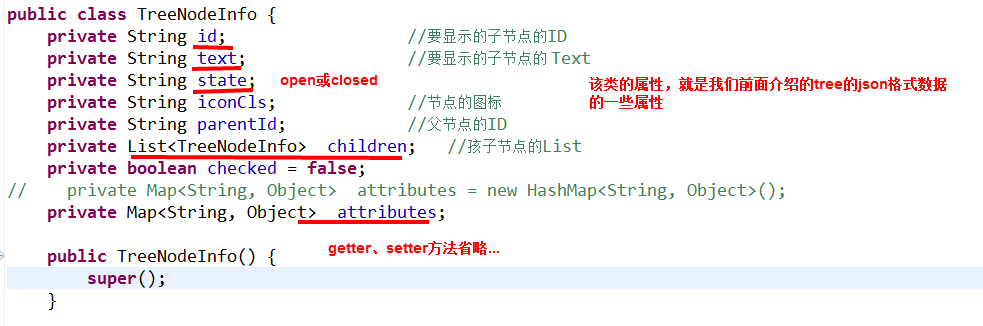
package com.ll.domain;import java.util.List;import java.util.Map;public class TreeNodeInfo {private String id; //要显示的子节点的IDprivate String text; //要显示的子节点的 Textprivate String state;private String iconCls; //节点的图标private String parentId; //父节点的IDprivate List<TreeNodeInfo> children; //孩子节点的Listprivate boolean checked = false;// private Map<String, Object> attributes = new HashMap<String, Object>();private Map<String, Object> attributes;public TreeNodeInfo() {super();}public TreeNodeInfo(String id, String text, String state, String iconCls,String parentId, List<TreeNodeInfo> children, boolean checked,Map<String, Object> attributes) {super();this.id = id;this.text = text;this.state = state;this.iconCls = iconCls;this.parentId = parentId;this.children = children;this.checked = checked;this.attributes = attributes;}public String getId() {return id;}public void setId(String id) {this.id = id;}public String getText() {return text;}public void setText(String text) {this.text = text;}public String getState() {return state;}public void setState(String state) {this.state = state;}public String getIconCls() {return iconCls;}public void setIconCls(String iconCls) {this.iconCls = iconCls;}public String getParentId() {return parentId;}public void setParentId(String parentId) {this.parentId = parentId;}public List<TreeNodeInfo> getChildren() {return children;}public void setChildren(List<TreeNodeInfo> children) {this.children = children;}public boolean isChecked() {return checked;}public void setChecked(boolean checked) {this.checked = checked;}public Map<String, Object> getAttributes() {return attributes;}public void setAttributes(Map<String, Object> attributes) {this.attributes = attributes;}}
loadTreeJson.action


package com.ll.web;import java.util.ArrayList;import java.util.HashMap;import java.util.List;import java.util.Map;import javax.servlet.http.HttpServletRequest;import org.springframework.beans.factory.annotation.Autowired;import org.springframework.stereotype.Controller;import org.springframework.ui.ModelMap;import org.springframework.web.bind.annotation.RequestMapping;import com.ll.domain.TreeNodeInfo;import com.ll.domain.User;import com.ll.service.IUserService;@Controllerpublic class LoginController {@Autowiredprivate IUserService userService;@RequestMapping(value = "/index.action")public String loginPage() {// return "login";return "myEasyuiTree";}@RequestMapping(value = "/loadTreeJson.action")public String loadTreeJson(ModelMap mm, String id,String info) {List<TreeNodeInfo> treeList = new ArrayList<TreeNodeInfo>();if((id==null) || "".equals(id)){ //首次加载tree节点//模拟从数据库读数据,并将读出的数据赋值给treelistfor (int i = 0; i < 5; i++) {TreeNodeInfo e = new TreeNodeInfo();e.setId(i+"");e.setText("节点【"+i+"】的内容");Map<String, Object> attributes = new HashMap<String, Object>();attributes.put("url", "www.baidu.com");attributes.put("info", "可以设置许多属性值,这是第"+i+"个节点");e.setAttributes(attributes);//模拟子节点的数量-第1个和第3个有子节点,默认closed;if ((i==1) || (i==3)) {// 节点状态,'open' 或 'closed',默认是 'open'。// 当设置为 'closed'时,该节点有子节点,并且将从远程站点加载它们e.setState("closed");}//第2个节点也有子节点,但是默认openif((i==2)){List<TreeNodeInfo> node2ChildrenList = new ArrayList<TreeNodeInfo>();for (int j = 22; j < 25; j++) {TreeNodeInfo e2 = new TreeNodeInfo();e2.setId(j + "");e2.setText("节点【" + j + "】的内容");Map<String, Object> attributes2 = new HashMap<String, Object>();attributes2.put("url", "www.baidu.com");attributes2.put("info", "这是子节点【" + j + "】");e2.setAttributes(attributes2);node2ChildrenList.add(e2);}e.setChildren(node2ChildrenList);}treeList.add(e);}}else{ //展开节点//判断节点的id号if("1".equals(id)){ //有3个子节点for (int i = 10; i < 13; i++) {TreeNodeInfo e = new TreeNodeInfo();e.setId(i + "");e.setText("节点【" + i + "】的内容");Map<String, Object> attributes = new HashMap<String, Object>();attributes.put("url", "www.baidu.com");attributes.put("info", "这是子节点【" + i + "】");e.setAttributes(attributes);treeList.add(e);}}else if ("3".equals(id)) { //有4个子节点for (int i = 30; i < 34; i++) {TreeNodeInfo e = new TreeNodeInfo();e.setId(i + "");e.setText("节点【" + i + "】的内容");Map<String, Object> attributes = new HashMap<String, Object>();attributes.put("url", "www.baidu.com");attributes.put("info", "这是子节点【" + i + "】");e.setAttributes(attributes);treeList.add(e);}}}mm.addAttribute("treeJson", treeList);return "treeJsonBean";}@RequestMapping(value = "/test.action")public String test(HttpServletRequest request, LoginCommand loginCommand) {System.out.println("用户名:" + loginCommand.getUserName() + "--密码:"+ loginCommand.getPassword());User user = new User();user.setUserName(loginCommand.getUserName());user.setPassword(loginCommand.getPassword());userService.save(user);request.getSession().setAttribute("user", user);return "main";}}
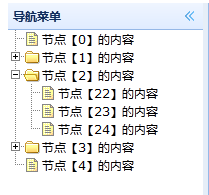
当首次加载时,tree如下图所示:


4. 其他
浏览器:http://localhost:8080/MainFrameTest/index.action ,执行该程序。


<?xml version="1.0" encoding="UTF-8" ?><beans xmlns="http://www.springframework.org/schema/beans"xmlns:xsi="http://www.w3.org/2001/XMLSchema-instance" xmlns:p="http://www.springframework.org/schema/p"xmlns:context="http://www.springframework.org/schema/context"xmlns:mvc="http://www.springframework.org/schema/mvc"xsi:schemaLocation="http://www.springframework.org/schema/beanshttp://www.springframework.org/schema/beans/spring-beans-3.0.xsdhttp://www.springframework.org/schema/contexthttp://www.springframework.org/schema/context/spring-context-3.0.xsdhttp://www.springframework.org/schema/mvchttp://www.springframework.org/schema/mvc/spring-mvc-3.0.xsd"><!-- 扫描web包,应用Spring的注解 --><context:component-scan base-package="com.ll.web" /><mvc:annotation-driven /><!-- 配置视图解析器,将ModelAndView及字符串解析为具体的页面 --><beanclass="org.springframework.web.servlet.view.InternalResourceViewResolver"p:viewClass="org.springframework.web.servlet.view.JstlView" p:prefix="/jsp/"p:suffix=".jsp" /><!-- bean 视图解析器 --><bean class="org.springframework.web.servlet.view.BeanNameViewResolver"p:order="10" /><!-- 返回tree-json 状态 --><bean id="treeJsonBean"class="org.springframework.web.servlet.view.json.MappingJacksonJsonView"><property name="renderedAttributes"><set><value>treeJson</value></set></property></bean></beans>
附件列表
【EasyUI学习-2】Easyui Tree的异步加载的更多相关文章
- easyui学习笔记8—在手风琴中加载其他的页面
在手风琴中加载其他页面和在表格中加载其他的页面有写类似的,就是请求另外一个页面显示数据. 1.先看看引用的资源文件 <link rel="stylesheet" href=& ...
- Jquery EasyUI tree 的异步加载(遍历指定文件夹,根据文件夹内的文件生成tree)
private void SMT(HttpContext context) { string SqlConnection82 = System.Configuration.ConfigurationM ...
- spring mvc easyui tree 异步加载树
使用spring mvc 注解 异步加载一棵树 jsp: <ul id="orgInfoTree"></ul> $(function(){ loadOrgT ...
- 玩转Web之easyui(二)-----easy ui 异步加载生成树节点(Tree),点击树生成tab(选项卡)
关于easy ui 异步加载生成树及点击树生成选项卡,这里直接给出代码,重点部分代码中均有注释 前台: $('#tree').tree({ url: '../servlet/School_Tree?i ...
- EasyUI ComboTree无限层级异步加载示例
<%@ Page Language="C#" AutoEventWireup="true" CodeFile="EasuUIDemoTree.a ...
- jquery easyui easyui-treegrid 使用异步加载数据
jquery easyui easyui-treegrid 使用异步加载数据 jquery easyui easyui-treegrid 异步请求 >>>>>>&g ...
- easyui datagrid 异步加载数据时滚动条有时会自动滚到最底部的问题
在使用easyui 的datagrid异步加载数据时发现滚动条有时会自动滚到最底部.经测试发现,如果加载数据前没有选中行则不会出现这个问题.这样我们可以在重新异步加载数据前取消选中行就可以避免这个问题 ...
- CI 笔记7,easyui 异步加载
在做后台导航时,需要异步加载,pid和id的循环问题,在controller中,建立另外一个方法,嵌套循环,查找是否pid〉1. public function nav_list() { $this- ...
- jQuery EasyUI动态添加控件或者ajax加载页面后不能自动渲染问题的解决方法
博客分类: jquery-easyui jQueryAjax框架HTML 现象: AJAX返回的html无法做到自动渲染为EasyUI的样式.比如:class="easyui-layout ...
随机推荐
- 当前标识没有对“C:\Windows\Microsoft.NET\Framework64\v4.0.30319\Temporary ASP.NET Files”的写访问权限。
解决方案: PHP程序如果遇到这个问题,请将应用程序池.NET改成无托管代码
- EhLib的行Checkbox
方法1 http://www.cnblogs.com/jupt/p/4291902.html 在Indicator中添加动态Checkbox,无需绑定数据源,支持全选 - Ehlib学习(二) 先 ...
- js 怎样获取div 图片等的宽度,只要值,不要px
给你的div命名id=“abc”,js中用下面的语句就能获取到js的宽度并赋值给a a=document.all.abc.offsetWidth; 然后通过 alert(a); 就能弹出这个值来了.
- SOD范例
SOD申请台站波形数据范例: <?xml version="1.0"?> <sod> <eventArm> <fdsnEvent> ...
- L212
Just 33 minutes into the New Year, NASA's New Horizons probe made space exploration history, flying ...
- JavaScript console控制台调试 post
fetch("api_v1/XinSheng_QQPay_QRCode", { body: "charset=1&msgExt=%u4ea4%u6613%u621 ...
- jsp参考手册
DHTML手册javascript programmer's reference
- 15款Cocos2d-x游戏源码
(1)用cocos2d-x开发的中国象棋游戏源码 使用Cocos2d-X2.2.3开发的一款中国象棋游戏,游戏中可以实现.新局面.悔棋.游戏音乐.胜利后会显示游戏结果. 源码下载:http://www ...
- 正则表达式,清除HTML标签,但要保留 <br>和<img>标签,其他的清除
最近有个需求, 要替换到html当中的除了br和img以外的所有标签, 遂百度之, 在百度知道遇到大神 , 在这记录一下 /<(?!\/?br\/?.+?>|\/?img.+?>)[ ...
- python海龟绘图
最近学了python,看了几本书之后,才明白python的强大,python是一种解释型的语言,即每写一行程序就执行一行. 而且在科学计算方面,处理的能力特别的方便. 比如python中的字典dict ...