
Java 导出数据库表信息生成Word文档
一、前言
最近看见朋友写了一个导出数据库生成word文档的业务,感觉很有意思,研究了一下,这里也拿出来与大家分享一波~
先来看看生成的word文档效果吧
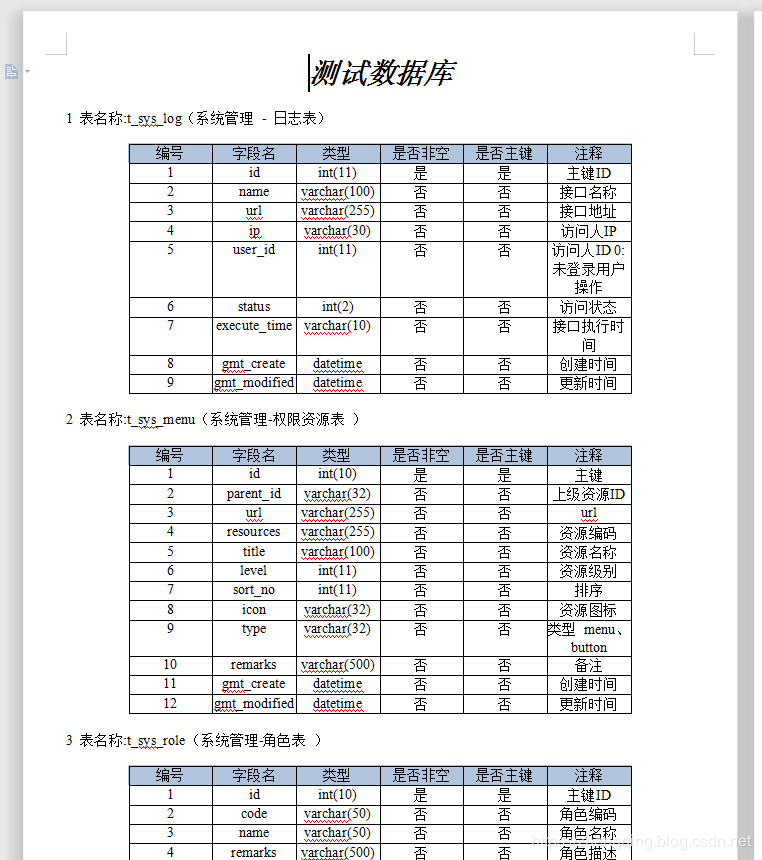
下面我们也来一起简单的实现吧
二、Java 导出数据库表信息生成Word文档
温馨小提示:下面只是简单的展示一些主要代码,详情可参考文末给出的案例demo源码
基本环境
- spring-boot 2.1.8
- mybatis-plus 2.2.0
- mysql 数据库
1、新增依赖
		<!-- ================== 将数据库表信息生成word文档信息所需 ====================== -->

        <!-- https://mvnrepository.com/artifact/com.lowagie/itext -->

        <dependency>

            <groupId>com.lowagie</groupId>

            <artifactId>itext</artifactId>

            <version>2.1.7</version>

        </dependency>

        <!-- https://mvnrepository.com/artifact/com.itextpdf/itext-asian -->

        <dependency>

            <groupId>com.itextpdf</groupId>

            <artifactId>itext-asian</artifactId>

            <version>5.2.0</version>

        </dependency>

        <!-- https://mvnrepository.com/artifact/com.lowagie/itext-rtf -->

        <dependency>

            <groupId>com.lowagie</groupId>

            <artifactId>itext-rtf</artifactId>

            <version>2.1.7</version>

        </dependency>
2、查询表数据信息
@Mapper

public interface TableMapper {

    /**

     * 获取指定数据库下所有表名和注释

     *

     * @param dbName:数据库名

     * @return: java.util.List<com.zhengqing.demo.modules.system.entity.Tables>

     */

    @Select("select table_name as name,table_comment as comment from information_schema.tables where table_schema =#{dbName} order by table_name")

    List<Tables> getAllTables(@Param("dbName") String dbName);

    /**

     * 获取指定表信息

     *

     * @param tableName:表

     * @return: java.util.List<com.zhengqing.demo.modules.system.entity.TableFileds>

     */

    @Select("SHOW FULL FIELDS FROM ${tableName}")

    List<TableFileds> getTable(@Param("tableName") String tableName);

}
3、生成word文档实现类
@Service

public class TableService implements ITableService {

    @Autowired

    private TableMapper tableMapper;

    @Autowired

    private TableToWordUtil tableToWordUtil;

    @Override

    public String getTableInfo() {

        // 1、获取数据库所有表信息

        List<Tables> tables = tableMapper.getAllTables(Constants.DATABASE);

        // 2、生成文件名信息 - 年月日时分秒

        String date = null;

        try {

            date = DateTimeUtils.dateFormat(new Date(), DateTimeUtils.PARSE_PATTERNS[12]);

        } catch (ParseException e) {

            e.printStackTrace();

        }

        String docFileName = Constants.FILE_PATH + "\\" + Constants.FILE_NAME + "-" + date + ".doc";

        // 3、调用工具类生成文件

        tableToWordUtil.toWord(tables, docFileName, Constants.FILE_NAME);

        // 4、返回文件地址

        String filePath = docFileName.replaceAll("\\\\", "/");

        return filePath;

    }

}
4、其中生成word文档工具类
@Service

public class TableToWordUtil {

    @Autowired

    TableMapper tableMapper;

    /**

     * 生成word文档

     *

     * @param tables:该数据库下所有表信息

     * @param fileName:生成文件地址

     * @param title:文件内容标题

     * @return: void

     */

    public void toWord(List<Tables> tables, String fileName, String title) {

        Document document = new Document(PageSize.A4);

        try {

            // 创建文件夹

            File dir = new File(Constants.FILE_PATH);

            dir.mkdirs();

            // 创建文件

            File file = new File(fileName);

            if (file.exists() && file.isFile()) {

                file.delete();

            }

            file.createNewFile();

            // 写入文件信息

            RtfWriter2.getInstance(document, new FileOutputStream(fileName));

            document.open();

            Paragraph ph = new Paragraph();

            Font f = new Font();

            Paragraph p = new Paragraph(title, new Font(Font.NORMAL, 24, Font.BOLDITALIC, new Color(0, 0, 0)));

            p.setAlignment(1);

            document.add(p);

            ph.setFont(f);

            for (int i = 0; i < tables.size(); i++) {

                String table_name = tables.get(i).getName();

                String table_comment = tables.get(i).getComment();

                List<TableFileds> fileds = tableMapper.getTable(tables.get(i).getName());

                String all = "" + (i + 1) + " 表名称:" + table_name + "(" + table_comment + ")";

                Table table = new Table(6);

                document.add(new Paragraph(""));

                table.setBorderWidth(1);

                table.setPadding(0);

                table.setSpacing(0);

                //添加表头的元素,并设置表头背景的颜色

                Color chade = new Color(176, 196, 222);

                Cell cell = new Cell("编号");

                addCell(table, cell, chade);

                cell = new Cell("字段名");

                addCell(table, cell, chade);

                cell = new Cell("类型");

                addCell(table, cell, chade);

                cell = new Cell("是否非空");

                addCell(table, cell, chade);

                cell = new Cell("是否主键");

                addCell(table, cell, chade);

                cell = new Cell("注释");

                addCell(table, cell, chade);

                table.endHeaders();

                // 表格的主体

                for (int k = 0; k < fileds.size(); k++) {

                    addContent(table, cell, (k + 1) + "");

                    addContent(table, cell, fileds.get(k).getField());

                    addContent(table, cell, fileds.get(k).getType());

                    addContent(table, cell, fileds.get(k).getNull().equals("YES") ? "否" : "是");

                    addContent(table, cell, fileds.get(k).getKey() != "" ? "是" : "否");

                    addContent(table, cell, fileds.get(k).getComment());

                }

                Paragraph pheae = new Paragraph(all);

                //写入表说明

                document.add(pheae);

                //生成表格

                document.add(table);

            }

            document.close();

        } catch (Exception e) {

            e.printStackTrace();

        }

    }

    /**

     * 添加表头到表格

     *

     * @param table

     * @param cell

     * @param chade

     */

    private void addCell(Table table, Cell cell, Color chade) {

        cell.setHorizontalAlignment(Element.ALIGN_CENTER);

        cell.setBackgroundColor(chade);

        table.addCell(cell);

    }

    /**

     * 添加内容到表格

     *

     * @param table

     * @param content

     */

    private void addContent(Table table, Cell cell, String content) {

        cell = new Cell(content);

        cell.setHorizontalAlignment(Element.ALIGN_CENTER);

        table.addCell(cell);

    }

}
5、其中的一些常量参数
public class Constants {

    /**

     * 需要生成word文档的数据库

     */

    public static final String DATABASE = "demo";

    /**

     * 生成文件名前缀

     */

    public static final String FILE_NAME = "测试数据库";

    /**

     * 生成文件地址

     */

    public static String FILE_PATH = "D:\\www";

}
三、测试生成效果
小编在demo中提供了一个get请求的接口http://localhost:8080/api/tableToWord
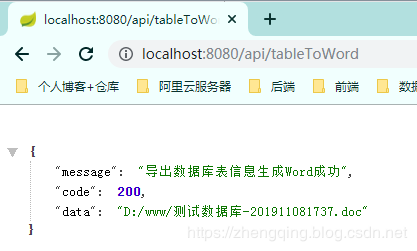
接下来我们就可以去返回的地址中查看生成文件了
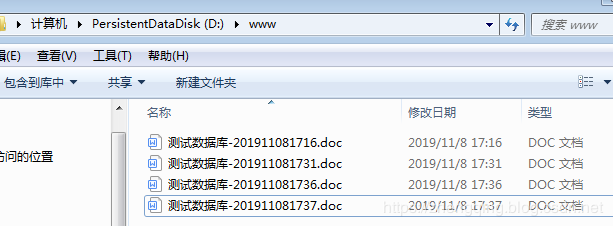
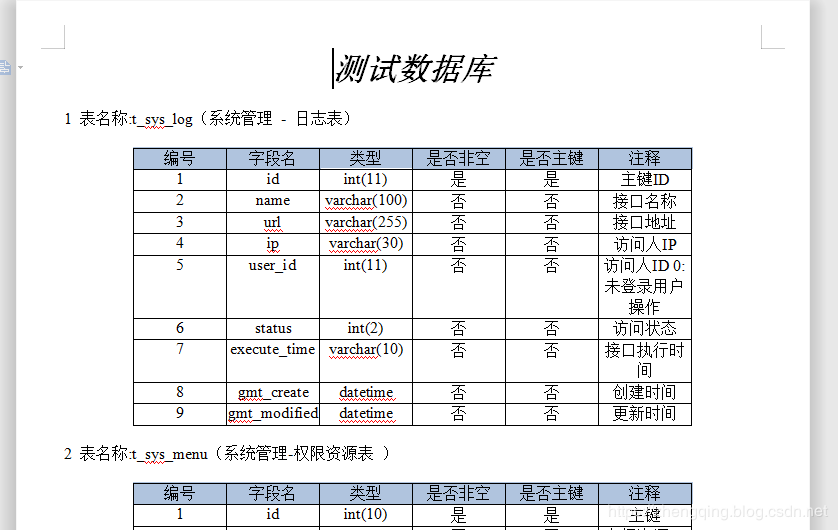
案例demo源码
https://gitee.com/zhengqingya/java-workspace
Java 导出数据库表信息生成Word文档的更多相关文章
- PHP将数据库数据批量生成word文档
<?php class word{ function start(){ ob_start(); echo '<html x ...
- FreemarkerJavaDemo【Android将表单数据生成Word文档的方案之一(基于freemarker2.3.28,只能java生成)】
版权声明:本文为HaiyuKing原创文章,转载请注明出处! 前言 这个方案只能在java中运行,无法在Android项目中运行.所以此方案是:APP将表单数据发送给后台,后台通过freemarker ...
- PoiDocxDemo【Android将表单数据生成Word文档的方案之二(基于Poi4.0.0),目前只能java生成】
版权声明:本文为HaiyuKing原创文章,转载请注明出处! 前言 这个是<PoiDemo[Android将表单数据生成Word文档的方案之二(基于Poi4.0.0)]>的扩展,上一篇是根 ...
- POI加dom4j将数据库的数据按一定格式生成word文档
一:需求:将从数据库查处来的数据,生成word文档,并有固定的格式.(dom4j的jar包+poi的jar包) 二:解决:(1)先建立固定格式的word文档(2007版本以上),另存成为xml文件,作 ...
- PowerDesigner将PDM导出生成WORD文档
PowerDesigner将PDM导出生成WORD文档 环境 PowerDesigner15 1.点击Report Temlates 制作模板 2.如果没有模板,单击New图标创建.有直接双击进入. ...
- PoiDemo【Android将表单数据生成Word文档的方案之二(基于Poi4.0.0)】
版权声明:本文为HaiyuKing原创文章,转载请注明出处! 前言 使用Poi实现android中根据模板文件生成Word文档的功能.这里的模板文件是doc文件.如果模板文件是docx文件的话,请阅读 ...
- java使用freemarker 生成word文档
java 生成word文档 最近需要做一个导出word的功能, 在网上搜了下, 有用POI,JXL,iText等jar生成一个word文件然后将数据写到该文件中,API非常繁琐而且拼出来的 ...
- Android根据word模板文档将表单数据生成word文档的方案整理
版权声明:本文为HaiyuKing原创文章,转载请注明出处! 前言 尝试的方案包括以下几种: freemarker 只能在java项目上运行,无法在Android项目上运行: 参考资料:<Fre ...
- Java Web项目中使用Freemarker生成Word文档
Web项目中生成Word文档的操作屡见不鲜.基于Java的解决方式也是非常多的,包含使用Jacob.Apache POI.Java2Word.iText等各种方式,事实上在从Office 2003開始 ...
随机推荐
- [Note] 使用Code Snippet简化编码
使用NewtonSoft.Json写实体类时大量格式一致的代码出现 ,这时可以使用Code snippet来加快编码速度 [JsonProperty(PropertyName = "mess ...
- JAVA错误提示:The operation is not applicable to the current selection.Select a field which is not declared as type variable or a type that declares such fields.
平时没怎么注意,今天用Eclipse自动生成Set Get方法时提示错误,错误信息如下: The operation is not applicable to the current selectio ...
- 模拟telnet协议C语言客户端程序
首先要了解telnet协议,一下两篇blog给了我初步的思路 https://www.cnblogs.com/liang-ling/p/5833489.html 这篇有比较基础的介绍 以及IAC命令含 ...
- 从零学习基于Python的RobotFramework自动化
从零学习基于Python的RobotFramework自动化 一. Python基础 1) 版本差异 版本 编码 语法 其他 2.X ASCII try: raise Type ...
- CentOS 7 的 systemctl 命令
Centos 7.* 使用 Systemd 进行系统初始化,因此,Centos 7.* 中我们可以使用 systemctl 管理系统中的服务. systemctl 管理的服务均包含了一个以 .serv ...
- django rest framework1
内容回顾: 1.开发模式 - 普通开发方式(前后端放在一起写) - 前后端分离 2.后端开发 为前端提供URL(API/接口的开发) 注:永远返回HttpResponse 3.Django FBV.C ...
- 题解:2018级算法第二次上机 Zexal的竞赛
题目描述: 样例: 实现解释: 一道需要一点思考的动态规划题目 知识点:动态规划,数据记录 首先将题目描述调整:分别输入不同分数的题目总分(便于后续计算),当获得了i分数的总分后无法获得i-1和i+1 ...
- Python基础库之jieba库的使用(第三方中文词汇函数库)
各位学python的朋友,是否也曾遇到过这样的问题,举个例子如下: “I am proud of my motherland” 如果我们需要提取中间的单词要走如何做? 自然是调用string中的spl ...
- 重载operator new delete函数
可以重载global的operator new delete 函数,细节如下: MyNewDelete.h #pragma once #include <stdlib.h> #includ ...
- CentOS 7 单机安装Redis Cluster(3主3从)
首先,本篇要基于单实例的安装,你的机器上已经有一个Redishttps://gper.club/articles/7e7e7f7ff7g5egc4g6b 为了节省机器,我们直接把6个Redis实例安装 ...