
Tornado(1)
概述
Tornado 是 FriendFeed 使用的可扩展的非阻塞式 web 服务器及其相关工具的开源版本。这个 Web 框架看起来有些像web.py 或者 Google 的 webapp,不过为了能有效利用非阻塞式服务器环境,这个 Web 框架还包含了一些相关的有用工具 和优化。
Tornado 和现在的主流 Web 服务器框架(包括大多数 Python 的框架)有着明显的区别:它是非阻塞式服务器,而且速度相当快。得利于其 非阻塞的方式和对 epoll 的运用,Tornado 每秒可以处理数以千计的连接,这意味着对于实时 Web 服务来说,Tornado 是一个理想的 Web 框架。我们开发这个 Web 服务器的主要目的就是为了处理 FriendFeed 的实时功能 ——在 FriendFeed 的应用里每一个活动用户都会保持着一个服务器连接。(关于如何扩容 服务器,以处理数以千计的客户端的连接的问题,请参阅 C10K problem。)
下载安装:
|
1
2
3
4
|
pip3 install tornado源码安装https://pypi.python.org/packages/source/t/tornado/tornado-4.3.tar.gz |
总结:

总结:

首先可以把多个socket放在一个列表中,循环监听

1.对于tornado异步非阻塞条件:

由tornado帮客户端再一次发一个【IO】请求,才能有异步非阻塞

2.实现原理:

创建好服务端后,监听自己的socket,有客户端链接时,再加上监听客户端的socket,帮客户端发送请求时,会相当于在创建一个客户端socket(服务端socket是帮用户要请求的,如百度),

那么此时的监听的列表 [ 自己的sk,客户端的sk,帮客户端创建的sk]

3.tornado是使用了一个Future对象,来存储每一个帮客户端发送的请求的状态,以及请求的返回值:


视图Handler里面的yeild的就是一个Future对象,这个对象里面存是帮这个客户端发送请求的状态及返回值,(实例化的时候会把这个客户端对应的回调函数传进去,保证了每一个客户端请求回来的结果可以真确的交给相对应的回调函数)

4.tornado中把每一个客户端来的请求生成的Future对象,存在一个列表中,然后死循环这个列表,监听每一个Future对象里面的状态(self.done,该值默认为False,),当请求结果回来时,就会自动修改这个状态(在函数中self.set_result())设置了self.done=True,当这个状态发送变化时,就去那个监听sk的列表中,取出对应的那个客户端的sk,把值返回回去。
框架使用
一、快速上手
|
1
2
3
4
5
6
7
8
9
10
11
12
13
14
15
16
17
18
19
|
#!/usr/bin/env python# -*- coding:utf-8 -*- import tornado.ioloopimport tornado.web class MainHandler(tornado.web.RequestHandler): def get(self): self.write("Hello, world") application = tornado.web.Application([ (r"/index", MainHandler),]) if __name__ == "__main__": application.listen(8888) tornado.ioloop.IOLoop.instance().start() |
执行过程:
- 第一步:执行脚本,监听 8888 端口
- 第二步:浏览器客户端访问 /index --> http://127.0.0.1:8888/index
- 第三步:服务器接受请求,并交由对应的类处理该请求
- 第四步:类接受到请求之后,根据请求方式(post / get / delete ...)的不同调用并执行相应的方法
- 第五步:方法返回值的字符串内容发送浏览器
#!/usr/bin/env python
# -*- coding:utf-8 -*-
#!/usr/bin/env python
# -*- coding:utf-8 -*- import tornado.ioloop
import tornado.web
from tornado import httpclient
from tornado.web import asynchronous
from tornado import gen import uimodules as md
import uimethods as mt class MainHandler(tornado.web.RequestHandler):
@asynchronous
@gen.coroutine
def get(self):
print 'start get '
http = httpclient.AsyncHTTPClient()
http.fetch("http://127.0.0.1:8008/post/", self.callback)
self.write('end')</span><span style="color: #0000ff;">def</span><span style="color: #000000;"> callback(self, response):
</span><span style="color: #0000ff;">print</span><span style="color: #000000;"> response.body
settings = {
'template_path': 'template',
'static_path': 'static',
'static_url_prefix': '/static/',
'ui_methods': mt,
'ui_modules': md,
}application = tornado.web.Application([
(r"/index", MainHandler),
], **settings)if name == "main":
application.listen(8009)
tornado.ioloop.IOLoop.instance().start()
异步非阻塞示例
二、路由系统
路由系统其实就是 url 和 类 的对应关系,这里不同于其他框架,其他很多框架均是 url 对应 函数,Tornado中每个url对应的是一个类。
|
1
2
3
4
5
6
7
8
9
10
11
12
13
14
15
16
17
18
19
20
21
22
23
24
25
26
27
28
29
30
31
|
#!/usr/bin/env python# -*- coding:utf-8 -*- import tornado.ioloopimport tornado.web class MainHandler(tornado.web.RequestHandler): def get(self): self.write("Hello, world") class StoryHandler(tornado.web.RequestHandler): def get(self, story_id): self.write("You requested the story " + story_id) class BuyHandler(tornado.web.RequestHandler): def get(self): self.write("buy.wupeiqi.com/index") application = tornado.web.Application([ (r"/index", MainHandler), (r"/story/([0-9]+)", StoryHandler),]) application.add_handlers('buy.wupeiqi.com$', [ (r'/index',BuyHandler),]) if __name__ == "__main__": application.listen(80) tornado.ioloop.IOLoop.instance().start() |
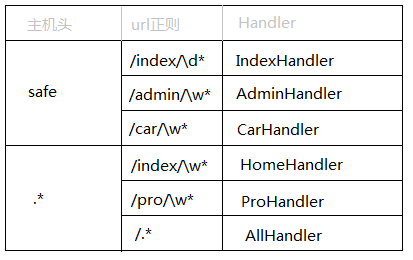
Tornado中原生支持二级域名的路由,如:
三、模板引擎
Tornao中的模板语言和django中类似,模板引擎将模板文件载入内存,然后将数据嵌入其中,最终获取到一个完整的字符串,再将字符串返回给请求者。
Tornado 的模板支持“控制语句”和“表达语句”,控制语句是使用 {% 和 %} 包起来的 例如 {% if len(items) > 2 %}。表达语句是使用 {{ 和 }} 包起来的,例如 {{ items[0] }}。
控制语句和对应的 Python 语句的格式基本完全相同。我们支持 if、for、while 和 try,这些语句逻辑结束的位置需要用 {% end %} 做标记。还通过 extends 和 block 语句实现了模板继承。这些在 template 模块 的代码文档中有着详细的描述。
注:在使用模板前需要在setting中设置模板路径:"template_path" : "tpl"
1、基本使用
#!/usr/bin/env python

# -*- coding:utf-8 -*-

import tornado.ioloop


import tornado.web

class MainHandler(tornado.web.RequestHandler):


def get(self):


self.render("index.html", list_info = [11,22,33])

application = tornado.web.Application([


(r"/index", MainHandler),


])

if name == "main":


application.listen(8888)


tornado.ioloop.IOLoop.instance().start()
app.py
<!DOCTYPE html>
<html>
<head>
<meta http-equiv="Content-Type" content="text/html; charset=UTF-8"/>
<title>老男孩</title>
<link href="{{static_url("css/common.css")}}" rel="stylesheet" />
</head>
<body><div>
<ul><span style="color: #000000;">
{</span>% <span style="color: #0000ff;">for</span> item <span style="color: #0000ff;">in</span> list_info %<span style="color: #000000;">}
</span><li>{{item}}</li><span style="color: #000000;">
{</span>% end %<span style="color: #000000;">}
</span></ul>
</div> <script src=<span style="color: #800000;">"</span><span style="color: #800000;">{{static_url(</span><span style="color: #800000;">"</span>js/jquery-1.8.2.min.js<span style="color: #800000;">"</span><span style="color: #800000;">)}}</span><span style="color: #800000;">"</span>></script>
</body>
</html>
index.html
在模板中默认提供了一些函数、字段、类以供模板使用:

escape: tornado.escape.xhtml_escape 的別名


xhtml_escape: tornado.escape.xhtml_escape 的別名


url_escape: tornado.escape.url_escape 的別名


json_encode: tornado.escape.json_encode 的別名


squeeze: tornado.escape.squeeze 的別名


linkify: tornado.escape.linkify 的別名


datetime: Python 的 datetime 模组


handler: 当前的 RequestHandler 对象


request: handler.request 的別名


current_user: handler.current_user 的別名


locale: handler.locale 的別名


_: handler.locale.translate 的別名


static_url: for handler.static_url 的別名


xsrf_form_html: handler.xsrf_form_html 的別名
其他方法
2、母版
<!DOCTYPE html>
<html>
<head>
<meta http-equiv="Content-Type" content="text/html; charset=UTF-8"/>
<title>老男孩</title>
<link href="{{static_url("css/common.css")}}" rel="stylesheet" />
{% block CSS %}{% end %}
</head>
<body><span style="color: #0000ff;"><</span><span style="color: #800000;">div </span><span style="color: #ff0000;">class</span><span style="color: #0000ff;">="pg-header"</span><span style="color: #0000ff;">></span> <span style="color: #0000ff;"></</span><span style="color: #800000;">div</span><span style="color: #0000ff;">></span><span style="color: #000000;"> {% block RenderBody %}{% end %} </span><span style="color: #0000ff;"><</span><span style="color: #800000;">script </span><span style="color: #ff0000;">src</span><span style="color: #0000ff;">="{{static_url("</span><span style="color: #ff0000;">js/jquery-1.8.2.min.js")}}"</span><span style="color: #0000ff;">></</span><span style="color: #800000;">script</span><span style="color: #0000ff;">></span><span style="color: #000000;"> {% block JavaScript %}{% end %}
</body>
</html>
layout.html
{% extends 'layout.html'%}
{% block CSS %}
<link href="{{static_url("css/index.css")}}" rel="stylesheet" />
{% end %}
{% block RenderBody %}
<h1>Index</h1>
<span style="color: #0000ff;"><</span><span style="color: #800000;">ul</span><span style="color: #0000ff;">></span><span style="color: #000000;">
{% for item in li %}
</span><span style="color: #0000ff;"><</span><span style="color: #800000;">li</span><span style="color: #0000ff;">></span>{{item}}<span style="color: #0000ff;"></</span><span style="color: #800000;">li</span><span style="color: #0000ff;">></span><span style="color: #000000;">
{% end %}
</span><span style="color: #0000ff;"></</span><span style="color: #800000;">ul</span><span style="color: #0000ff;">></span><span style="color: #000000;">
{% end %}
{% block JavaScript %}
{% end %}
index.html
3、导入
<div>

    <ul>

        <li>1024</li>

        <li>42区</li>

    </ul>

</div>
header.html
<!DOCTYPE html>
<html>
<head>
<meta http-equiv="Content-Type" content="text/html; charset=UTF-8"/>
<title>老男孩</title>
<link href="{{static_url("css/common.css")}}" rel="stylesheet" />
</head>
<body><span style="color: #0000ff;"><</span><span style="color: #800000;">div </span><span style="color: #ff0000;">class</span><span style="color: #0000ff;">="pg-header"</span><span style="color: #0000ff;">></span><span style="color: #000000;">
{% include 'header.html' %}
</span><span style="color: #0000ff;"></</span><span style="color: #800000;">div</span><span style="color: #0000ff;">></span> <span style="color: #0000ff;"><</span><span style="color: #800000;">script </span><span style="color: #ff0000;">src</span><span style="color: #0000ff;">="{{static_url("</span><span style="color: #ff0000;">js/jquery-1.8.2.min.js")}}"</span><span style="color: #0000ff;">></</span><span style="color: #800000;">script</span><span style="color: #0000ff;">></span>
</body>
</html>
index.html
4、自定义UIMethod以UIModule
a. 定义
# uimethods.py

def tab(self):


return 'UIMethod'
uimethods.py
#!/usr/bin/env python
# -*- coding:utf-8 -*-
from tornado.web import UIModule
from tornado import escape class custom(UIModule):</span><span style="color: #0000ff;">def</span> render(self, *args, **<span style="color: #000000;">kwargs):
</span><span style="color: #0000ff;">return</span> escape.xhtml_escape(<span style="color: #800000;">'</span><span style="color: #800000;"><h1>wupeiqi</h1></span><span style="color: #800000;">'</span><span style="color: #000000;">)
</span><span style="color: #008000;">#</span><span style="color: #008000;">return escape.xhtml_escape('<h1>wupeiqi</h1>')</span></pre>
uimodules.py
b. 注册
#!/usr/bin/env python

# -*- coding:utf-8 -*-

#!/usr/bin/env python

# -*- coding:utf-8 -*-

import tornado.ioloop


import tornado.web


from tornado.escape import linkify


import uimodules as md


import uimethods as mt

class MainHandler(tornado.web.RequestHandler):


def get(self):


self.render('index.html')

settings = {


'template_path': 'template',


'static_path': 'static',


'static_url_prefix': '/static/',


'ui_methods': mt,


'ui_modules': md,


}

application = tornado.web.Application([


(r"/index", MainHandler),


], **settings)

if name == "main":


application.listen(8009)


tornado.ioloop.IOLoop.instance().start()
c. 使用
<!DOCTYPE html>

<html>

<head lang="en">

    <meta charset="UTF-8">

    <title></title>

    <link href="{{static_url("commons.css")}}" rel="stylesheet" />

</head>

<body>

    <h1>hello</h1>

    {% module custom(123) %}

    {{ tab() }}

</body>
四、静态文件
对于静态文件,可以配置静态文件的目录和前段使用时的前缀,并且Tornaodo还支持静态文件缓存。
#!/usr/bin/env python

# -*- coding:utf-8 -*-

import tornado.ioloop


import tornado.web

class MainHandler(tornado.web.RequestHandler):


def get(self):


self.render('home/index.html')

settings = {


'template_path': 'template',


'static_path': 'static',


'static_url_prefix': '/static/',


}

application = tornado.web.Application([


(r"/index", MainHandler),


], **settings)

if name == "main":


application.listen(80)


tornado.ioloop.IOLoop.instance().start()
app.py
<!DOCTYPE html>

<html>

<head lang="en">

    <meta charset="UTF-8">

    <title></title>

    <link href="{{static_url("commons.css")}}" rel="stylesheet" />

</head>

<body>

    <h1>hello</h1>

</body>

</html>
index.html
注:静态文件缓存的实现
def get_content_version(cls, abspath):
"""Returns a version string for the resource at the given path.This class method may be overridden by subclasses. The
default implementation is a hash of the file's contents. .. versionadded:: 3.1
</span><span style="color: #800000;">"""</span><span style="color: #000000;">
data </span>=<span style="color: #000000;"> cls.get_content(abspath)
hasher </span>=<span style="color: #000000;"> hashlib.md5()
</span><span style="color: #0000ff;">if</span><span style="color: #000000;"> isinstance(data, bytes):
hasher.update(data)
</span><span style="color: #0000ff;">else</span><span style="color: #000000;">:
</span><span style="color: #0000ff;">for</span> chunk <span style="color: #0000ff;">in</span><span style="color: #000000;"> data:
hasher.update(chunk)
</span><span style="color: #0000ff;">return</span> hasher.hexdigest()</pre>
五、cookie
Tornado中可以对cookie进行操作,并且还可以对cookie进行签名以放置伪造。
1、基本操作
class MainHandler(tornado.web.RequestHandler):

    def get(self):

        if not self.get_cookie("mycookie"):

            self.set_cookie("mycookie", "myvalue")

            self.write("Your cookie was not set yet!")

        else:

            self.write("Your cookie was set!")
2、加密cookie(签名)
Cookie 很容易被恶意的客户端伪造。加入你想在 cookie 中保存当前登陆用户的 id 之类的信息,你需要对 cookie 作签名以防止伪造。Tornado 通过 set_secure_cookie 和 get_secure_cookie 方法直接支持了这种功能。 要使用这些方法,你需要在创建应用时提供一个密钥,名字为 cookie_secret。 你可以把它作为一个关键词参数传入应用的设置中:
class MainHandler(tornado.web.RequestHandler):

    def get(self):

        if not self.get_secure_cookie("mycookie"):

            self.set_secure_cookie("mycookie", "myvalue")

            self.write("Your cookie was not set yet!")

        else:

            self.write("Your cookie was set!")

application = tornado.web.Application([


(r"/", MainHandler),


], cookie_secret="61oETzKXQAGaYdkL5gEmGeJJFuYh7EQnp2XdTP1o/Vo=")
def _create_signature_v1(secret, *parts):
hash = hmac.new(utf8(secret), digestmod=hashlib.sha1)
for part in parts:
hash.update(utf8(part))
return utf8(hash.hexdigest()) # 加密
def _create_signature_v2(secret, s):
hash = hmac.new(utf8(secret), digestmod=hashlib.sha256)
hash.update(utf8(s))
return utf8(hash.hexdigest()) def create_signed_value(secret, name, value, version=None, clock=None,
key_version=None):
if version is None:
version = DEFAULT_SIGNED_VALUE_VERSION
if clock is None:
clock = time.timetimestamp </span>=<span style="color: #000000;"> utf8(str(int(clock())))
value </span>=<span style="color: #000000;"> base64.b64encode(utf8(value))
</span><span style="color: #0000ff;">if</span> version == 1<span style="color: #000000;">:
signature </span>=<span style="color: #000000;"> _create_signature_v1(secret, name, value, timestamp)
value </span>= b<span style="color: #800000;">"</span><span style="color: #800000;">|</span><span style="color: #800000;">"</span><span style="color: #000000;">.join([value, timestamp, signature])
</span><span style="color: #0000ff;">return</span><span style="color: #000000;"> value
</span><span style="color: #0000ff;">elif</span> version == 2<span style="color: #000000;">:
</span><span style="color: #008000;">#</span><span style="color: #008000;"> The v2 format consists of a version number and a series of</span>
<span style="color: #008000;">#</span><span style="color: #008000;"> length-prefixed fields "%d:%s", the last of which is a</span>
<span style="color: #008000;">#</span><span style="color: #008000;"> signature, all separated by pipes. All numbers are in</span>
<span style="color: #008000;">#</span><span style="color: #008000;"> decimal format with no leading zeros. The signature is an</span>
<span style="color: #008000;">#</span><span style="color: #008000;"> HMAC-SHA256 of the whole string up to that point, including</span>
<span style="color: #008000;">#</span><span style="color: #008000;"> the final pipe.</span>
<span style="color: #008000;">#
# The fields are:
# - format version (i.e. 2; no length prefix)
# - key version (integer, default is 0)
# - timestamp (integer seconds since epoch)
# - name (not encoded; assumed to be ~alphanumeric)
# - value (base64-encoded)
# - signature (hex-encoded; no length prefix)
def format_field(s):
return utf8("%d:" % len(s)) + utf8(s)
to_sign = b"|".join([
b"",
format_field(str(key_version or 0)),
format_field(timestamp),
format_field(name),
format_field(value),
b''])</span><span style="color: #0000ff;">if</span><span style="color: #000000;"> isinstance(secret, dict):
</span><span style="color: #0000ff;">assert</span> key_version <span style="color: #0000ff;">is</span> <span style="color: #0000ff;">not</span> None, <span style="color: #800000;">'</span><span style="color: #800000;">Key version must be set when sign key dict is used</span><span style="color: #800000;">'</span>
<span style="color: #0000ff;">assert</span> version >= 2, <span style="color: #800000;">'</span><span style="color: #800000;">Version must be at least 2 for key version support</span><span style="color: #800000;">'</span><span style="color: #000000;">
secret </span>=<span style="color: #000000;"> secret[key_version] signature </span>=<span style="color: #000000;"> _create_signature_v2(secret, to_sign)
</span><span style="color: #0000ff;">return</span> to_sign +<span style="color: #000000;"> signature
</span><span style="color: #0000ff;">else</span><span style="color: #000000;">:
</span><span style="color: #0000ff;">raise</span> ValueError(<span style="color: #800000;">"</span><span style="color: #800000;">Unsupported version %d</span><span style="color: #800000;">"</span> %<span style="color: #000000;"> version)
# 解密
def _decode_signed_value_v1(secret, name, value, max_age_days, clock):
parts = utf8(value).split(b"|")
if len(parts) != 3:
return None
signature = _create_signature_v1(secret, name, parts[0], parts[1])
if not _time_independent_equals(parts[2], signature):
gen_log.warning("Invalid cookie signature %r", value)
return None
timestamp = int(parts[1])
if timestamp < clock() - max_age_days * 86400:
gen_log.warning("Expired cookie %r", value)
return None
if timestamp > clock() + 31 * 86400:
# _cookie_signature does not hash a delimiter between the
# parts of the cookie, so an attacker could transfer trailing
# digits from the payload to the timestamp without altering the
# signature. For backwards compatibility, sanity-check timestamp
# here instead of modifying _cookie_signature.
gen_log.warning("Cookie timestamp in future; possible tampering %r",
value)
return None
if parts[1].startswith(b""):
gen_log.warning("Tampered cookie %r", value)
return None
try:
return base64.b64decode(parts[0])
except Exception:
return Nonedef _decode_fields_v2(value):
def _consume_field(s):
length, _, rest = s.partition(b':')
n = int(length)
field_value = rest[:n]
# In python 3, indexing bytes returns small integers; we must
# use a slice to get a byte string as in python 2.
if rest[n:n + 1] != b'|':
raise ValueError("malformed v2 signed value field")
rest = rest[n + 1:]
return field_value, restrest </span>= value[2:] <span style="color: #008000;">#</span><span style="color: #008000;"> remove version number</span>
key_version, rest =<span style="color: #000000;"> _consume_field(rest)
timestamp, rest </span>=<span style="color: #000000;"> _consume_field(rest)
name_field, rest </span>=<span style="color: #000000;"> _consume_field(rest)
value_field, passed_sig </span>=<span style="color: #000000;"> _consume_field(rest)
</span><span style="color: #0000ff;">return</span><span style="color: #000000;"> int(key_version), timestamp, name_field, value_field, passed_sig
def _decode_signed_value_v2(secret, name, value, max_age_days, clock):
try:
key_version, timestamp, name_field, value_field, passed_sig = _decode_fields_v2(value)
except ValueError:
return None
signed_string = value[:-len(passed_sig)]</span><span style="color: #0000ff;">if</span><span style="color: #000000;"> isinstance(secret, dict):
</span><span style="color: #0000ff;">try</span><span style="color: #000000;">:
secret </span>=<span style="color: #000000;"> secret[key_version]
</span><span style="color: #0000ff;">except</span><span style="color: #000000;"> KeyError:
</span><span style="color: #0000ff;">return</span><span style="color: #000000;"> None expected_sig </span>=<span style="color: #000000;"> _create_signature_v2(secret, signed_string)
</span><span style="color: #0000ff;">if</span> <span style="color: #0000ff;">not</span><span style="color: #000000;"> _time_independent_equals(passed_sig, expected_sig):
</span><span style="color: #0000ff;">return</span><span style="color: #000000;"> None
</span><span style="color: #0000ff;">if</span> name_field !=<span style="color: #000000;"> utf8(name):
</span><span style="color: #0000ff;">return</span><span style="color: #000000;"> None
timestamp </span>=<span style="color: #000000;"> int(timestamp)
</span><span style="color: #0000ff;">if</span> timestamp < clock() - max_age_days * 86400<span style="color: #000000;">:
</span><span style="color: #008000;">#</span><span style="color: #008000;"> The signature has expired.</span>
<span style="color: #0000ff;">return</span><span style="color: #000000;"> None
</span><span style="color: #0000ff;">try</span><span style="color: #000000;">:
</span><span style="color: #0000ff;">return</span><span style="color: #000000;"> base64.b64decode(value_field)
</span><span style="color: #0000ff;">except</span><span style="color: #000000;"> Exception:
</span><span style="color: #0000ff;">return</span><span style="color: #000000;"> None
def get_signature_key_version(value):
value = utf8(value)
version = _get_version(value)
if version < 2:
return None
try:
key_version, _, _, _, _ = _decode_fields_v2(value)
except ValueError:
return None</span><span style="color: #0000ff;">return</span> key_version</pre>
内部算法
签名Cookie的本质是:
写cookie过程:
- 将值进行base64加密
- 对除值以外的内容进行签名,哈希算法(无法逆向解析)
- 拼接 签名 + 加密值
读cookie过程:
- 读取 签名 + 加密值
- 对签名进行验证
- base64解密,获取值内容
注:许多API验证机制和安全cookie的实现机制相同。
#!/usr/bin/env python
# -*- coding:utf-8 -*- import tornado.ioloop
import tornado.web class MainHandler(tornado.web.RequestHandler):</span><span style="color: #0000ff;">def</span><span style="color: #000000;"> get(self):
login_user </span>= self.get_secure_cookie(<span style="color: #800000;">"</span><span style="color: #800000;">login_user</span><span style="color: #800000;">"</span><span style="color: #000000;">, None)
</span><span style="color: #0000ff;">if</span><span style="color: #000000;"> login_user:
self.write(login_user)
</span><span style="color: #0000ff;">else</span><span style="color: #000000;">:
self.redirect(</span><span style="color: #800000;">'</span><span style="color: #800000;">/login</span><span style="color: #800000;">'</span><span style="color: #000000;">)
class LoginHandler(tornado.web.RequestHandler):
def get(self):
self.current_user()self.render(</span><span style="color: #800000;">'</span><span style="color: #800000;">login.html</span><span style="color: #800000;">'</span>, **{<span style="color: #800000;">'</span><span style="color: #800000;">status</span><span style="color: #800000;">'</span>: <span style="color: #800000;">''</span><span style="color: #000000;">}) </span><span style="color: #0000ff;">def</span> post(self, *args, **<span style="color: #000000;">kwargs): username </span>= self.get_argument(<span style="color: #800000;">'</span><span style="color: #800000;">name</span><span style="color: #800000;">'</span><span style="color: #000000;">)
password </span>= self.get_argument(<span style="color: #800000;">'</span><span style="color: #800000;">pwd</span><span style="color: #800000;">'</span><span style="color: #000000;">)
</span><span style="color: #0000ff;">if</span> username == <span style="color: #800000;">'</span><span style="color: #800000;">wupeiqi</span><span style="color: #800000;">'</span> <span style="color: #0000ff;">and</span> password == <span style="color: #800000;">'</span><span style="color: #800000;">123</span><span style="color: #800000;">'</span><span style="color: #000000;">:
self.set_secure_cookie(</span><span style="color: #800000;">'</span><span style="color: #800000;">login_user</span><span style="color: #800000;">'</span>, <span style="color: #800000;">'</span><span style="color: #800000;">武沛齐</span><span style="color: #800000;">'</span><span style="color: #000000;">)
self.redirect(</span><span style="color: #800000;">'</span><span style="color: #800000;">/</span><span style="color: #800000;">'</span><span style="color: #000000;">)
</span><span style="color: #0000ff;">else</span><span style="color: #000000;">:
self.render(</span><span style="color: #800000;">'</span><span style="color: #800000;">login.html</span><span style="color: #800000;">'</span>, **{<span style="color: #800000;">'</span><span style="color: #800000;">status</span><span style="color: #800000;">'</span>: <span style="color: #800000;">'</span><span style="color: #800000;">用户名或密码错误</span><span style="color: #800000;">'</span><span style="color: #000000;">})
settings = {
'template_path': 'template',
'static_path': 'static',
'static_url_prefix': '/static/',
'cookie_secret': 'aiuasdhflashjdfoiuashdfiuh'
}application = tornado.web.Application([
(r"/index", MainHandler),
(r"/login", LoginHandler),
], **settings)if name == "main":
application.listen(8888)
tornado.ioloop.IOLoop.instance().start()
基于Cookie实现用户验证-Demo
#!/usr/bin/env python
# -*- coding:utf-8 -*- import tornado.ioloop
import tornado.web class BaseHandler(tornado.web.RequestHandler):</span><span style="color: #0000ff;">def</span><span style="color: #000000;"> get_current_user(self):
</span><span style="color: #0000ff;">return</span> self.get_secure_cookie(<span style="color: #800000;">"</span><span style="color: #800000;">login_user</span><span style="color: #800000;">"</span><span style="color: #000000;">)
class MainHandler(BaseHandler):
@tornado.web.authenticated
</span><span style="color: #0000ff;">def</span><span style="color: #000000;"> get(self):
login_user </span>=<span style="color: #000000;"> self.current_user
self.write(login_user)
class LoginHandler(tornado.web.RequestHandler):
def get(self):
self.current_user()self.render(</span><span style="color: #800000;">'</span><span style="color: #800000;">login.html</span><span style="color: #800000;">'</span>, **{<span style="color: #800000;">'</span><span style="color: #800000;">status</span><span style="color: #800000;">'</span>: <span style="color: #800000;">''</span><span style="color: #000000;">}) </span><span style="color: #0000ff;">def</span> post(self, *args, **<span style="color: #000000;">kwargs): username </span>= self.get_argument(<span style="color: #800000;">'</span><span style="color: #800000;">name</span><span style="color: #800000;">'</span><span style="color: #000000;">)
password </span>= self.get_argument(<span style="color: #800000;">'</span><span style="color: #800000;">pwd</span><span style="color: #800000;">'</span><span style="color: #000000;">)
</span><span style="color: #0000ff;">if</span> username == <span style="color: #800000;">'</span><span style="color: #800000;">wupeiqi</span><span style="color: #800000;">'</span> <span style="color: #0000ff;">and</span> password == <span style="color: #800000;">'</span><span style="color: #800000;">123</span><span style="color: #800000;">'</span><span style="color: #000000;">:
self.set_secure_cookie(</span><span style="color: #800000;">'</span><span style="color: #800000;">login_user</span><span style="color: #800000;">'</span>, <span style="color: #800000;">'</span><span style="color: #800000;">武沛齐</span><span style="color: #800000;">'</span><span style="color: #000000;">)
self.redirect(</span><span style="color: #800000;">'</span><span style="color: #800000;">/</span><span style="color: #800000;">'</span><span style="color: #000000;">)
</span><span style="color: #0000ff;">else</span><span style="color: #000000;">:
self.render(</span><span style="color: #800000;">'</span><span style="color: #800000;">login.html</span><span style="color: #800000;">'</span>, **{<span style="color: #800000;">'</span><span style="color: #800000;">status</span><span style="color: #800000;">'</span>: <span style="color: #800000;">'</span><span style="color: #800000;">用户名或密码错误</span><span style="color: #800000;">'</span><span style="color: #000000;">})
settings = {
'template_path': 'template',
'static_path': 'static',
'static_url_prefix': '/static/',
'cookie_secret': 'aiuasdhflashjdfoiuashdfiuh',
'login_url': '/login'
}application = tornado.web.Application([
(r"/index", MainHandler),
(r"/login", LoginHandler),
], **settings)if name == "main":
application.listen(8888)
tornado.ioloop.IOLoop.instance().start()
基于签名Cookie实现用户验证-Demo
3、JavaScript操作Cookie
由于Cookie保存在浏览器端,所以在浏览器端也可以使用JavaScript来操作Cookie。
|
1
2
3
4
5
6
7
8
9
|
/*设置cookie,指定秒数过期 */function setCookie(name,value,expires){ var temp = []; var current_date = new Date(); current_date.setSeconds(current_date.getSeconds() + 5); document.cookie = name + "= "+ value +";expires=" + current_date.toUTCString();} |
对于参数:
- domain 指定域名下的cookie
- path 域名下指定url中的cookie
- secure https使用
注:jQuery中也有指定的插件 jQuery Cookie 专门用于操作cookie,猛击这里
六、CSRF
Tornado中的夸张请求伪造和Django中的相似,跨站伪造请求(Cross-site request forgery)
settings = {

    "xsrf_cookies": True,

}

application = tornado.web.Application([

    (r"/", MainHandler),

    (r"/login", LoginHandler),

], **settings)
配置
<form action="/new_message" method="post">

  {{ xsrf_form_html() }}

  <input type="text" name="message"/>

  <input type="submit" value="Post"/>

</form>
使用 - 普通表单
function getCookie(name) {

    var r = document.cookie.match("\\b" + name + "=([^;]*)\\b");

    return r ? r[1] : undefined;

}

jQuery.postJSON = function(url, args, callback) {


args._xsrf = getCookie("_xsrf");


$.ajax({url: url, data: $.param(args), dataType: "text", type: "POST",


success: function(response) {


callback(eval("(" + response + ")"));


}});


};
使用 - AJAX
注:Ajax使用时,本质上就是去获取本地的cookie,携带cookie再来发送请求
七、上传文件
1、Form表单上传
<!DOCTYPE html>

<html>

<head>

    <meta http-equiv="Content-Type" content="text/html; charset=UTF-8"/>

    <title>上传文件</title>

</head>

<body>

    <form id="my_form" name="form" action="/index" method="POST"  enctype="multipart/form-data" >

        <input name="fff" id="my_file"  type="file" />

        <input type="submit" value="提交"  />

    </form>

</body>

</html>
HTML
#!/usr/bin/env python
# -*- coding:utf-8 -*- import tornado.ioloop
import tornado.web class MainHandler(tornado.web.RequestHandler):
def get(self):self.render(</span><span style="color: #800000;">'</span><span style="color: #800000;">index.html</span><span style="color: #800000;">'</span><span style="color: #000000;">) </span><span style="color: #0000ff;">def</span> post(self, *args, **<span style="color: #000000;">kwargs):
file_metas </span>= self.request.files[<span style="color: #800000;">"</span><span style="color: #800000;">fff</span><span style="color: #800000;">"</span><span style="color: #000000;">]
</span><span style="color: #008000;">#</span><span style="color: #008000;"> print(file_metas)</span>
<span style="color: #0000ff;">for</span> meta <span style="color: #0000ff;">in</span><span style="color: #000000;"> file_metas:
file_name </span>= meta[<span style="color: #800000;">'</span><span style="color: #800000;">filename</span><span style="color: #800000;">'</span><span style="color: #000000;">]
with open(file_name,</span><span style="color: #800000;">'</span><span style="color: #800000;">wb</span><span style="color: #800000;">'</span><span style="color: #000000;">) as up:
up.write(meta[</span><span style="color: #800000;">'</span><span style="color: #800000;">body</span><span style="color: #800000;">'</span><span style="color: #000000;">])
settings = {
'template_path': 'template',
}application = tornado.web.Application([
(r"/index", MainHandler),
], **settings)if name == "main":
application.listen(8000)
tornado.ioloop.IOLoop.instance().start()
Python
2、AJAX上传
<!DOCTYPE html>
<html>
<head lang="en">
<meta charset="UTF-8">
<title></title>
</head>
<body>
<input type="file" id="img" />
<input type="button" onclick="UploadFile();" />
<script>
function UploadFile(){
var fileObj = document.getElementById("img").files[0];var form </span>=<span style="color: #000000;"> new FormData();
form.append(</span><span style="color: #800000;">"</span><span style="color: #800000;">k1</span><span style="color: #800000;">"</span>, <span style="color: #800000;">"</span><span style="color: #800000;">v1</span><span style="color: #800000;">"</span><span style="color: #000000;">);
form.append(</span><span style="color: #800000;">"</span><span style="color: #800000;">fff</span><span style="color: #800000;">"</span><span style="color: #000000;">, fileObj); var xhr </span>=<span style="color: #000000;"> new XMLHttpRequest();
xhr.open(</span><span style="color: #800000;">"</span><span style="color: #800000;">post</span><span style="color: #800000;">"</span>, <span style="color: #800000;">'</span><span style="color: #800000;">/index</span><span style="color: #800000;">'</span><span style="color: #000000;">, true);
xhr.send(form);
}
</span></script>
</body>
</html>
HTML - XMLHttpRequest
<!DOCTYPE html>
<html>
<head lang="en">
<meta charset="UTF-8">
<title></title>
</head>
<body>
<input type="file" id="img" />
<input type="button" onclick="UploadFile();" />
<script>
function UploadFile(){
var fileObj = $("#img")[0].files[0];
var form = new FormData();
form.append("k1", "v1");
form.append("fff", fileObj);$.ajax({
type:</span><span style="color: #800000;">'</span><span style="color: #800000;">POST</span><span style="color: #800000;">'</span><span style="color: #000000;">,
url: </span><span style="color: #800000;">'</span><span style="color: #800000;">/index</span><span style="color: #800000;">'</span><span style="color: #000000;">,
data: form,
processData: false, </span>// tell jQuery <span style="color: #0000ff;">not</span><span style="color: #000000;"> to process the data
contentType: false, </span>// tell jQuery <span style="color: #0000ff;">not</span><span style="color: #000000;"> to set contentType
success: function(arg){
console.log(arg);
}
})
}
</span></script>
</body>
</html>
HTML - jQuery
<!DOCTYPE html>
<html>
<head lang="en">
<meta charset="UTF-8">
<title></title>
</head>
<body>
<form id="my_form" name="form" action="/index" method="POST" enctype="multipart/form-data" >
<div id="main">
<input name="fff" id="my_file" type="file" />
<input type="button" name="action" value="Upload" onclick="redirect()"/>
<iframe id='my_iframe' name='my_iframe' src="" class="hide"></iframe>
</div>
</form><script><span style="color: #000000;">
function redirect(){
document.getElementById(</span><span style="color: #800000;">'</span><span style="color: #800000;">my_iframe</span><span style="color: #800000;">'</span>).onload =<span style="color: #000000;"> Testt;
document.getElementById(</span><span style="color: #800000;">'</span><span style="color: #800000;">my_form</span><span style="color: #800000;">'</span>).target = <span style="color: #800000;">'</span><span style="color: #800000;">my_iframe</span><span style="color: #800000;">'</span><span style="color: #000000;">;
document.getElementById(</span><span style="color: #800000;">'</span><span style="color: #800000;">my_form</span><span style="color: #800000;">'</span><span style="color: #000000;">).submit(); } function Testt(ths){
var t </span>= $(<span style="color: #800000;">"</span><span style="color: #800000;">#my_iframe</span><span style="color: #800000;">"</span>).contents().find(<span style="color: #800000;">"</span><span style="color: #800000;">body</span><span style="color: #800000;">"</span><span style="color: #000000;">).text();
console.log(t);
}
</span></script>
</body>
</html>
HTML - iframe
#!/usr/bin/env python
# -*- coding:utf-8 -*- import tornado.ioloop
import tornado.web class MainHandler(tornado.web.RequestHandler):
def get(self):self.render(</span><span style="color: #800000;">'</span><span style="color: #800000;">index.html</span><span style="color: #800000;">'</span><span style="color: #000000;">) </span><span style="color: #0000ff;">def</span> post(self, *args, **<span style="color: #000000;">kwargs):
file_metas </span>= self.request.files[<span style="color: #800000;">"</span><span style="color: #800000;">fff</span><span style="color: #800000;">"</span><span style="color: #000000;">]
</span><span style="color: #008000;">#</span><span style="color: #008000;"> print(file_metas)</span>
<span style="color: #0000ff;">for</span> meta <span style="color: #0000ff;">in</span><span style="color: #000000;"> file_metas:
file_name </span>= meta[<span style="color: #800000;">'</span><span style="color: #800000;">filename</span><span style="color: #800000;">'</span><span style="color: #000000;">]
with open(file_name,</span><span style="color: #800000;">'</span><span style="color: #800000;">wb</span><span style="color: #800000;">'</span><span style="color: #000000;">) as up:
up.write(meta[</span><span style="color: #800000;">'</span><span style="color: #800000;">body</span><span style="color: #800000;">'</span><span style="color: #000000;">])
settings = {
'template_path': 'template',
}application = tornado.web.Application([
(r"/index", MainHandler),
], **settings)if name == "main":
application.listen(8000)
tornado.ioloop.IOLoop.instance().start()
Python
<script type="text/javascript">$(document).ready(function () { $(</span><span style="color: #800000;">"</span><span style="color: #800000;">#formsubmit</span><span style="color: #800000;">"</span><span style="color: #000000;">).click(function () { var iframe </span>= $(<span style="color: #800000;">'</span><span style="color: #800000;"><iframe name="postiframe" id="postiframe" style="display: none"></iframe></span><span style="color: #800000;">'</span><span style="color: #000000;">); $(</span><span style="color: #800000;">"</span><span style="color: #800000;">body</span><span style="color: #800000;">"</span><span style="color: #000000;">).append(iframe); var form </span>= $(<span style="color: #800000;">'</span><span style="color: #800000;">#theuploadform</span><span style="color: #800000;">'</span><span style="color: #000000;">);
form.attr(</span><span style="color: #800000;">"</span><span style="color: #800000;">action</span><span style="color: #800000;">"</span>, <span style="color: #800000;">"</span><span style="color: #800000;">/upload.aspx</span><span style="color: #800000;">"</span><span style="color: #000000;">);
form.attr(</span><span style="color: #800000;">"</span><span style="color: #800000;">method</span><span style="color: #800000;">"</span>, <span style="color: #800000;">"</span><span style="color: #800000;">post</span><span style="color: #800000;">"</span><span style="color: #000000;">); form.attr(</span><span style="color: #800000;">"</span><span style="color: #800000;">encoding</span><span style="color: #800000;">"</span>, <span style="color: #800000;">"</span><span style="color: #800000;">multipart/form-data</span><span style="color: #800000;">"</span><span style="color: #000000;">);
form.attr(</span><span style="color: #800000;">"</span><span style="color: #800000;">enctype</span><span style="color: #800000;">"</span>, <span style="color: #800000;">"</span><span style="color: #800000;">multipart/form-data</span><span style="color: #800000;">"</span><span style="color: #000000;">); form.attr(</span><span style="color: #800000;">"</span><span style="color: #800000;">target</span><span style="color: #800000;">"</span>, <span style="color: #800000;">"</span><span style="color: #800000;">postiframe</span><span style="color: #800000;">"</span><span style="color: #000000;">);
form.attr(</span><span style="color: #800000;">"</span><span style="color: #800000;">file</span><span style="color: #800000;">"</span>, $(<span style="color: #800000;">'</span><span style="color: #800000;">#userfile</span><span style="color: #800000;">'</span><span style="color: #000000;">).val());
form.submit(); $(</span><span style="color: #800000;">"</span><span style="color: #800000;">#postiframe</span><span style="color: #800000;">"</span><span style="color: #000000;">).load(function () {
iframeContents </span>=<span style="color: #000000;"> this.contentWindow.document.body.innerHTML;
$(</span><span style="color: #800000;">"</span><span style="color: #800000;">#textarea</span><span style="color: #800000;">"</span><span style="color: #000000;">).html(iframeContents);
}); </span><span style="color: #0000ff;">return</span><span style="color: #000000;"> false; }); });
</script>
<form id="theuploadform">
<input id="userfile" name="userfile" size="" type="file" />
<input id="formsubmit" type="submit" value="Send File" />
</form><div id="textarea">
</div>
扩展:基于iframe实现Ajax上传示例
 $('#upload_iframe').load(function(){

                    var iframeContents = this.contentWindow.document.body.innerText;

                    iframeContents = JSON.parse(iframeContents);
            })</span></pre>
function bindChangeAvatar1() {

            $('#avatarImg').change(function () {

                var file_obj = $(this)[0].files[0];

                $('#prevViewImg')[0].src = window.URL.createObjectURL(file_obj)

            })

        }
    function bindChangeAvatar2() {

        $(</span><span style="color: #800000;">'</span><span style="color: #800000;">#avatarImg</span><span style="color: #800000;">'</span><span style="color: #000000;">).change(function () {

            var file_obj </span>=<span style="color: #000000;"> $(this)[0].files[0];

            var reader </span>=<span style="color: #000000;"> new FileReader();

            reader.readAsDataURL(file_obj);

            reader.onload </span>=<span style="color: #000000;"> function (e) {

                $(</span><span style="color: #800000;">'</span><span style="color: #800000;">#previewImg</span><span style="color: #800000;">'</span>)[0].src =<span style="color: #000000;"> this.result;

            };

        })

    }

    function bindChangeAvatar3() {

        $(</span><span style="color: #800000;">'</span><span style="color: #800000;">#avatarImg</span><span style="color: #800000;">'</span><span style="color: #000000;">).change(function () {

            var file_obj </span>=<span style="color: #000000;"> $(this)[0].files[0];

            var form </span>=<span style="color: #000000;"> new FormData();

            form.add(</span><span style="color: #800000;">'</span><span style="color: #800000;">img_upload</span><span style="color: #800000;">'</span><span style="color: #000000;">, file_obj);

            $.ajax({

                url: </span><span style="color: #800000;">''</span><span style="color: #000000;">,

                data: form,

                processData: false,  </span>// tell jQuery <span style="color: #0000ff;">not</span><span style="color: #000000;"> to process the data

                contentType: false,  </span>// tell jQuery <span style="color: #0000ff;">not</span><span style="color: #000000;"> to set contentType

                success: function (arg) {

                }

            })

        })

    }

    function bindChangeAvatar4() {

        $(</span><span style="color: #800000;">'</span><span style="color: #800000;">#avatarImg</span><span style="color: #800000;">'</span><span style="color: #000000;">).change(function () {

            $(this).parent().submit();

            $(</span><span style="color: #800000;">'</span><span style="color: #800000;">#upload_iframe</span><span style="color: #800000;">'</span><span style="color: #000000;">).load(function () {

                var iframeContents </span>=<span style="color: #000000;"> this.contentWindow.document.body.innerText;

                iframeContents </span>=<span style="color: #000000;"> JSON.parse(iframeContents);

                </span><span style="color: #0000ff;">if</span><span style="color: #000000;"> (iframeContents.status) {

                    $(</span><span style="color: #800000;">'</span><span style="color: #800000;">#previewImg</span><span style="color: #800000;">'</span>).attr(<span style="color: #800000;">'</span><span style="color: #800000;">src</span><span style="color: #800000;">'</span>, <span style="color: #800000;">'</span><span style="color: #800000;">/</span><span style="color: #800000;">'</span> +<span style="color: #000000;"> iframeContents.data);

                }

            })

        })

    }</span></pre>
其他
八、验证码
验证码原理在于后台自动创建一张带有随机内容的图片,然后将内容通过img标签输出到页面。
安装图像处理模块:
|
1
|
pip3 install pillow |
示例截图:

验证码Demo源码下载:猛击这里
九、异步非阻塞
1、基本使用
装饰器 + Future 从而实现Tornado的异步非阻塞
|
1
2
3
4
5
6
7
8
9
10
11
12
13
14
|
class AsyncHandler(tornado.web.RequestHandler): @gen.coroutine def get(self): future = Future() future.add_done_callback(self.doing) yield future # 或 # tornado.ioloop.IOLoop.current().add_future(future,self.doing) # yield future def doing(self,*args, **kwargs): self.write('async') self.finish() |
当发送GET请求时,由于方法被@gen.coroutine装饰且yield 一个 Future对象,那么Tornado会等待,等待用户向future对象中放置数据或者发送信号,如果获取到数据或信号之后,就开始执行doing方法。
异步非阻塞体现在当在Tornaod等待用户向future对象中放置数据时,还可以处理其他请求。
注意:在等待用户向future对象中放置数据或信号时,此连接是不断开的。
2、同步阻塞和异步非阻塞对比
class SyncHandler(tornado.web.RequestHandler):</span><span style="color: #0000ff;">def</span><span style="color: #000000;"> get(self):
self.doing()
self.write(</span><span style="color: #800000;">'</span><span style="color: #800000;">sync</span><span style="color: #800000;">'</span><span style="color: #000000;">) </span><span style="color: #0000ff;">def</span><span style="color: #000000;"> doing(self):
time.sleep(</span>10)</pre>
同步阻塞
class AsyncHandler(tornado.web.RequestHandler):
@gen.coroutine
def get(self):
future = Future()
tornado.ioloop.IOLoop.current().add_timeout(time.time() + 5, self.doing)
yield future</span><span style="color: #0000ff;">def</span> doing(self, *args, **<span style="color: #000000;">kwargs):
self.write(</span><span style="color: #800000;">'</span><span style="color: #800000;">async</span><span style="color: #800000;">'</span><span style="color: #000000;">)
self.finish()</span></pre>
异步非阻塞
3、httpclient类库
Tornado提供了httpclient类库用于发送Http请求,其配合Tornado的异步非阻塞使用。
|
1
2
3
4
5
6
7
8
9
10
11
12
13
14
15
16
17
18
19
20
21
22
23
24
25
26
27
28
29
30
31
32
33
34
35
36
37
38
39
|
#!/usr/bin/env python# -*- coding:utf-8 -*-import tornado.webfrom tornado import genfrom tornado import httpclient# 方式一:class AsyncHandler(tornado.web.RequestHandler): @gen.coroutine def get(self, *args, **kwargs): print('进入') http = httpclient.AsyncHTTPClient() data = yield http.fetch("http://www.google.com") print('完事',data) self.finish('6666')# 方式二:# class AsyncHandler(tornado.web.RequestHandler):# @gen.coroutine# def get(self):# print('进入')# http = httpclient.AsyncHTTPClient()# yield http.fetch("http://www.google.com", self.done)# # def done(self, response):# print('完事')# self.finish('666')application = tornado.web.Application([ (r"/async", AsyncHandler),])if __name__ == "__main__": application.listen(8888) tornado.ioloop.IOLoop.instance().start() |
#!/usr/bin/env python
# -*- coding:utf-8 -*-
"""
需要先安装支持异步操作Mysql的类库:
Tornado-MySQL: https://github.com/PyMySQL/Tornado-MySQL#installationpip3 install Tornado-MySQL
"""
import tornado.web
from tornado import genimport tornado_mysql
from tornado_mysql import poolsPOOL = pools.Pool(
dict(host='127.0.0.1', port=3306, user='root', passwd='', db='cmdb'),
max_idle_connections=1,
max_recycle_sec=3)@gen.coroutine
def get_user_by_conn_pool(user):
cur = yield POOL.execute("SELECT SLEEP(%s)", (user,))
row = cur.fetchone()
raise gen.Return(row)@gen.coroutine
def get_user(user):
conn = yield tornado_mysql.connect(host='127.0.0.1', port=3306, user='root', passwd='', db='cmdb',
charset='utf8')
cur = conn.cursor()
# yield cur.execute("SELECT name,email FROM web_models_userprofile where name=%s", (user,))
yield cur.execute("select sleep(10)")
row = cur.fetchone()
cur.close()
conn.close()
raise gen.Return(row)class LoginHandler(tornado.web.RequestHandler):
def get(self, *args, **kwargs):
self.render('login.html')@gen.coroutine
</span><span style="color: #0000ff;">def</span> post(self, *args, **<span style="color: #000000;">kwargs):
user </span>= self.get_argument(<span style="color: #800000;">'</span><span style="color: #800000;">user</span><span style="color: #800000;">'</span><span style="color: #000000;">)
data </span>= <span style="color: #0000ff;">yield</span><span style="color: #000000;"> gen.Task(get_user, user)
</span><span style="color: #0000ff;">if</span><span style="color: #000000;"> data:
</span><span style="color: #0000ff;">print</span><span style="color: #000000;">(data)
self.redirect(</span><span style="color: #800000;">'</span><span style="color: #800000;">http://www.oldboyedu.com</span><span style="color: #800000;">'</span><span style="color: #000000;">)
</span><span style="color: #0000ff;">else</span><span style="color: #000000;">:
self.render(</span><span style="color: #800000;">'</span><span style="color: #800000;">login.html</span><span style="color: #800000;">'</span><span style="color: #000000;">)
application = tornado.web.Application([
(r"/login", LoginHandler),
])if name == "main":
application.listen(8888)
tornado.ioloop.IOLoop.instance().start()
基于异步非阻塞和Tornado-MySQL实现用户登录示例
自定义Web组件
一、Session
1、面向对象基础
面向对象中通过索引的方式访问对象,需要内部实现 __getitem__ 、__delitem__、__setitem__方法
|
1
2
3
4
5
6
7
8
9
10
11
12
13
14
15
16
17
18
19
20
|
#!/usr/bin/env python# -*- coding:utf-8 -*- class Foo(object): def __getitem__(self, key): print '__getitem__',key def __setitem__(self, key, value): print '__setitem__',key,value def __delitem__(self, key): print '__delitem__',key obj = Foo()result = obj['k1']#obj['k2'] = 'wupeiqi'#del obj['k1'] |
2、Tornado扩展
Tornado框架中,默认执行Handler的get/post等方法之前默认会执行 initialize方法,所以可以通过自定义的方式使得所有请求在处理前执行操作...
|
1
2
3
4
5
6
7
8
9
10
11
12
13
14
15
16
17
|
class BaseHandler(tornado.web.RequestHandler): def initialize(self): self.xxoo = "wupeiqi" class MainHandler(BaseHandler): def get(self): print(self.xxoo) self.write('index')class IndexHandler(BaseHandler): def get(self): print(self.xxoo) self.write('index') |
3、session
session其实就是定义在服务器端用于保存用户回话的容器,其必须依赖cookie才能实现。
#!/usr/bin/env python
# -*- coding:utf-8 -*-
import config
from hashlib import sha1
import os
import time create_session_id = lambda: sha1(bytes('%s%s' % (os.urandom(16), time.time()), encoding='utf-8')).hexdigest() class SessionFactory:@staticmethod
</span><span style="color: #0000ff;">def</span><span style="color: #000000;"> get_session_obj(handler):
obj </span>=<span style="color: #000000;"> None </span><span style="color: #0000ff;">if</span> config.SESSION_TYPE == <span style="color: #800000;">"</span><span style="color: #800000;">cache</span><span style="color: #800000;">"</span><span style="color: #000000;">:
obj </span>=<span style="color: #000000;"> CacheSession(handler)
</span><span style="color: #0000ff;">elif</span> config.SESSION_TYPE == <span style="color: #800000;">"</span><span style="color: #800000;">memcached</span><span style="color: #800000;">"</span><span style="color: #000000;">:
obj </span>=<span style="color: #000000;"> MemcachedSession(handler)
</span><span style="color: #0000ff;">elif</span> config.SESSION_TYPE == <span style="color: #800000;">"</span><span style="color: #800000;">redis</span><span style="color: #800000;">"</span><span style="color: #000000;">:
obj </span>=<span style="color: #000000;"> RedisSession(handler)
</span><span style="color: #0000ff;">return</span><span style="color: #000000;"> obj
class CacheSession:
session_container = {}
session_id = "sessionId"<span style="color: #0000ff;">def</span> <span style="color: #800080;">__init__</span><span style="color: #000000;">(self, handler):
self.handler </span>=<span style="color: #000000;"> handler
client_random_str </span>=<span style="color: #000000;"> handler.get_cookie(CacheSession.session_id, None)
</span><span style="color: #0000ff;">if</span> client_random_str <span style="color: #0000ff;">and</span> client_random_str <span style="color: #0000ff;">in</span><span style="color: #000000;"> CacheSession.session_container:
self.random_str </span>=<span style="color: #000000;"> client_random_str
</span><span style="color: #0000ff;">else</span><span style="color: #000000;">:
self.random_str </span>=<span style="color: #000000;"> create_session_id()
CacheSession.session_container[self.random_str] </span>=<span style="color: #000000;"> {} expires_time </span>= time.time() +<span style="color: #000000;"> config.SESSION_EXPIRES
handler.set_cookie(CacheSession.session_id, self.random_str, expires</span>=<span style="color: #000000;">expires_time) </span><span style="color: #0000ff;">def</span> <span style="color: #800080;">__getitem__</span><span style="color: #000000;">(self, key):
ret </span>=<span style="color: #000000;"> CacheSession.session_container[self.random_str].get(key, None)
</span><span style="color: #0000ff;">return</span><span style="color: #000000;"> ret </span><span style="color: #0000ff;">def</span> <span style="color: #800080;">__setitem__</span><span style="color: #000000;">(self, key, value):
CacheSession.session_container[self.random_str][key] </span>=<span style="color: #000000;"> value </span><span style="color: #0000ff;">def</span> <span style="color: #800080;">__delitem__</span><span style="color: #000000;">(self, key):
</span><span style="color: #0000ff;">if</span> key <span style="color: #0000ff;">in</span><span style="color: #000000;"> CacheSession.session_container[self.random_str]:
</span><span style="color: #0000ff;">del</span><span style="color: #000000;"> CacheSession.session_container[self.random_str][key]
class RedisSession:
def init(self, handler):
passclass MemcachedSession:
def init(self, handler):
pass
自定义Session
4、分布式Session
#!/usr/bin/env python
#coding:utf-8 import sys
import math
from bisect import bisect if sys.version_info >= (2, 5):
import hashlib
md5_constructor = hashlib.md5
else:
import md5
md5_constructor = md5.new class HashRing(object):
"""一致性哈希"""<span style="color: #0000ff;">def</span> <span style="color: #800080;">__init__</span><span style="color: #000000;">(self,nodes):
</span><span style="color: #800000;">'''</span><span style="color: #800000;">初始化
nodes : 初始化的节点,其中包含节点已经节点对应的权重
默认每一个节点有32个虚拟节点
对于权重,通过多创建虚拟节点来实现
如:nodes = [
{'host':'127.0.0.1:8000','weight':1},
{'host':'127.0.0.1:8001','weight':2},
{'host':'127.0.0.1:8002','weight':1},
]
</span><span style="color: #800000;">'''</span><span style="color: #000000;"> self.ring </span>=<span style="color: #000000;"> dict()
self._sorted_keys </span>=<span style="color: #000000;"> [] self.total_weight </span>=<span style="color: #000000;"> 0 self.</span><span style="color: #800080;">__generate_circle</span><span style="color: #000000;">(nodes) </span><span style="color: #0000ff;">def</span> <span style="color: #800080;">__generate_circle</span><span style="color: #000000;">(self,nodes):
</span><span style="color: #0000ff;">for</span> node_info <span style="color: #0000ff;">in</span><span style="color: #000000;"> nodes:
self.total_weight </span>+= node_info.get(<span style="color: #800000;">'</span><span style="color: #800000;">weight</span><span style="color: #800000;">'</span>,1<span style="color: #000000;">) </span><span style="color: #0000ff;">for</span> node_info <span style="color: #0000ff;">in</span><span style="color: #000000;"> nodes:
weight </span>= node_info.get(<span style="color: #800000;">'</span><span style="color: #800000;">weight</span><span style="color: #800000;">'</span>,1<span style="color: #000000;">)
node </span>= node_info.get(<span style="color: #800000;">'</span><span style="color: #800000;">host</span><span style="color: #800000;">'</span><span style="color: #000000;">,None) virtual_node_count </span>= math.floor((32*len(nodes)*weight) /<span style="color: #000000;"> self.total_weight)
</span><span style="color: #0000ff;">for</span> i <span style="color: #0000ff;">in</span><span style="color: #000000;"> xrange(0,int(virtual_node_count)):
key </span>= self.gen_key_thirty_two( <span style="color: #800000;">'</span><span style="color: #800000;">%s-%s</span><span style="color: #800000;">'</span> %<span style="color: #000000;"> (node, i) )
</span><span style="color: #0000ff;">if</span> self._sorted_keys.<span style="color: #800080;">__contains__</span><span style="color: #000000;">(key):
</span><span style="color: #0000ff;">raise</span> Exception(<span style="color: #800000;">'</span><span style="color: #800000;">该节点已经存在.</span><span style="color: #800000;">'</span><span style="color: #000000;">)
self.ring[key] </span>=<span style="color: #000000;"> node
self._sorted_keys.append(key) </span><span style="color: #0000ff;">def</span><span style="color: #000000;"> add_node(self,node):
</span><span style="color: #800000;">'''</span><span style="color: #800000;"> 新建节点
node : 要添加的节点,格式为:{'host':'127.0.0.1:8002','weight':1},其中第一个元素表示节点,第二个元素表示该节点的权重。
</span><span style="color: #800000;">'''</span><span style="color: #000000;">
node </span>= node.get(<span style="color: #800000;">'</span><span style="color: #800000;">host</span><span style="color: #800000;">'</span><span style="color: #000000;">,None)
</span><span style="color: #0000ff;">if</span> <span style="color: #0000ff;">not</span><span style="color: #000000;"> node:
</span><span style="color: #0000ff;">raise</span> Exception(<span style="color: #800000;">'</span><span style="color: #800000;">节点的地址不能为空.</span><span style="color: #800000;">'</span><span style="color: #000000;">) weight </span>= node.get(<span style="color: #800000;">'</span><span style="color: #800000;">weight</span><span style="color: #800000;">'</span>,1<span style="color: #000000;">) self.total_weight </span>+=<span style="color: #000000;"> weight
nodes_count </span>= len(self._sorted_keys) + 1<span style="color: #000000;"> virtual_node_count </span>= math.floor((32 * nodes_count * weight) /<span style="color: #000000;"> self.total_weight)
</span><span style="color: #0000ff;">for</span> i <span style="color: #0000ff;">in</span><span style="color: #000000;"> xrange(0,int(virtual_node_count)):
key </span>= self.gen_key_thirty_two( <span style="color: #800000;">'</span><span style="color: #800000;">%s-%s</span><span style="color: #800000;">'</span> %<span style="color: #000000;"> (node, i) )
</span><span style="color: #0000ff;">if</span> self._sorted_keys.<span style="color: #800080;">__contains__</span><span style="color: #000000;">(key):
</span><span style="color: #0000ff;">raise</span> Exception(<span style="color: #800000;">'</span><span style="color: #800000;">该节点已经存在.</span><span style="color: #800000;">'</span><span style="color: #000000;">)
self.ring[key] </span>=<span style="color: #000000;"> node
self._sorted_keys.append(key) </span><span style="color: #0000ff;">def</span><span style="color: #000000;"> remove_node(self,node):
</span><span style="color: #800000;">'''</span><span style="color: #800000;"> 移除节点
node : 要移除的节点 '127.0.0.1:8000'
</span><span style="color: #800000;">'''</span>
<span style="color: #0000ff;">for</span> key,value <span style="color: #0000ff;">in</span><span style="color: #000000;"> self.ring.items():
</span><span style="color: #0000ff;">if</span> value ==<span style="color: #000000;"> node:
</span><span style="color: #0000ff;">del</span><span style="color: #000000;"> self.ring[key]
self._sorted_keys.remove(key) </span><span style="color: #0000ff;">def</span><span style="color: #000000;"> get_node(self,string_key):
</span><span style="color: #800000;">'''</span><span style="color: #800000;">获取 string_key 所在的节点</span><span style="color: #800000;">'''</span><span style="color: #000000;">
pos </span>=<span style="color: #000000;"> self.get_node_pos(string_key)
</span><span style="color: #0000ff;">if</span> pos <span style="color: #0000ff;">is</span><span style="color: #000000;"> None:
</span><span style="color: #0000ff;">return</span><span style="color: #000000;"> None
</span><span style="color: #0000ff;">return</span> self.ring[ self._sorted_keys[pos]].split(<span style="color: #800000;">'</span><span style="color: #800000;">:</span><span style="color: #800000;">'</span><span style="color: #000000;">) </span><span style="color: #0000ff;">def</span><span style="color: #000000;"> get_node_pos(self,string_key):
</span><span style="color: #800000;">'''</span><span style="color: #800000;">获取 string_key 所在的节点的索引</span><span style="color: #800000;">'''</span>
<span style="color: #0000ff;">if</span> <span style="color: #0000ff;">not</span><span style="color: #000000;"> self.ring:
</span><span style="color: #0000ff;">return</span><span style="color: #000000;"> None key </span>=<span style="color: #000000;"> self.gen_key_thirty_two(string_key)
nodes </span>=<span style="color: #000000;"> self._sorted_keys
pos </span>=<span style="color: #000000;"> bisect(nodes, key)
</span><span style="color: #0000ff;">return</span><span style="color: #000000;"> pos </span><span style="color: #0000ff;">def</span><span style="color: #000000;"> gen_key_thirty_two(self, key): m </span>=<span style="color: #000000;"> md5_constructor()
m.update(key)
</span><span style="color: #0000ff;">return</span> long(m.hexdigest(), 16<span style="color: #000000;">) </span><span style="color: #0000ff;">def</span><span style="color: #000000;"> gen_key_sixteen(self,key): b_key </span>= self.<span style="color: #800080;">__hash_digest</span><span style="color: #000000;">(key)
</span><span style="color: #0000ff;">return</span> self.<span style="color: #800080;">__hash_val</span>(b_key, <span style="color: #0000ff;">lambda</span><span style="color: #000000;"> x: x) </span><span style="color: #0000ff;">def</span> <span style="color: #800080;">__hash_val</span><span style="color: #000000;">(self, b_key, entry_fn):
</span><span style="color: #0000ff;">return</span> (( b_key[entry_fn(3)] << 24)|(b_key[entry_fn(2)] << 16)|(b_key[entry_fn(1)] << 8)|<span style="color: #000000;"> b_key[entry_fn(0)] ) </span><span style="color: #0000ff;">def</span> <span style="color: #800080;">__hash_digest</span><span style="color: #000000;">(self, key):
m </span>=<span style="color: #000000;"> md5_constructor()
m.update(key)
</span><span style="color: #0000ff;">return</span><span style="color: #000000;"> map(ord, m.digest())
"""
nodes = [
{'host':'127.0.0.1:8000','weight':1},
{'host':'127.0.0.1:8001','weight':2},
{'host':'127.0.0.1:8002','weight':1},
]ring = HashRing(nodes)
result = ring.get_node('98708798709870987098709879087')
print result"""
一致性哈西
from hashlib import sha1
import os, time create_session_id = lambda: sha1('%s%s' % (os.urandom(16), time.time())).hexdigest() class Session(object):session_id </span>= <span style="color: #800000;">"</span><span style="color: #800000;">__sessionId__</span><span style="color: #800000;">"</span> <span style="color: #0000ff;">def</span> <span style="color: #800080;">__init__</span><span style="color: #000000;">(self, request):
session_value </span>=<span style="color: #000000;"> request.get_cookie(Session.session_id)
</span><span style="color: #0000ff;">if</span> <span style="color: #0000ff;">not</span><span style="color: #000000;"> session_value:
self._id </span>=<span style="color: #000000;"> create_session_id()
</span><span style="color: #0000ff;">else</span><span style="color: #000000;">:
self._id </span>=<span style="color: #000000;"> session_value
request.set_cookie(Session.session_id, self._id) </span><span style="color: #0000ff;">def</span> <span style="color: #800080;">__getitem__</span><span style="color: #000000;">(self, key):
</span><span style="color: #008000;">#</span><span style="color: #008000;"> 根据 self._id ,在一致性哈西中找到其对应的服务器IP</span>
<span style="color: #008000;">#</span><span style="color: #008000;"> 找到相对应的redis服务器,如: r = redis.StrictRedis(host='localhost', port=6379, db=0)</span>
<span style="color: #008000;">#</span><span style="color: #008000;"> 使用python redis api 链接</span>
<span style="color: #008000;">#</span><span style="color: #008000;"> 获取数据,即:</span>
<span style="color: #008000;">#</span><span style="color: #008000;"> return self._redis.hget(self._id, name)</span> <span style="color: #0000ff;">def</span> <span style="color: #800080;">__setitem__</span><span style="color: #000000;">(self, key, value):
</span><span style="color: #008000;">#</span><span style="color: #008000;"> 根据 self._id ,在一致性哈西中找到其对应的服务器IP</span>
<span style="color: #008000;">#</span><span style="color: #008000;"> 使用python redis api 链接</span>
<span style="color: #008000;">#</span><span style="color: #008000;"> 设置session</span>
<span style="color: #008000;">#</span><span style="color: #008000;"> self._redis.hset(self._id, name, value)</span> <span style="color: #0000ff;">def</span> <span style="color: #800080;">__delitem__</span><span style="color: #000000;">(self, key):
</span><span style="color: #008000;">#</span><span style="color: #008000;"> 根据 self._id 找到相对应的redis服务器</span>
<span style="color: #008000;">#</span><span style="color: #008000;"> 使用python redis api 链接</span>
<span style="color: #008000;">#</span><span style="color: #008000;"> 删除,即:</span>
<span style="color: #0000ff;">return</span> self._redis.hdel(self._id, name)</pre>
session
二、表单验证
在Web程序中往往包含大量的表单验证的工作,如:判断输入是否为空,是否符合规则。
<!DOCTYPE html>
<html>
<head lang="en">
<meta charset="UTF-8">
<title></title>
<link href="{{static_url("commons.css")}}" rel="stylesheet" />
</head>
<body>
<h1>hello</h1>
<form action="/index" method="post"><p>hostname: <input type=<span style="color: #800000;">"</span><span style="color: #800000;">text</span><span style="color: #800000;">"</span> name=<span style="color: #800000;">"</span><span style="color: #800000;">host</span><span style="color: #800000;">"</span> /> </p>
<p>ip: <input type=<span style="color: #800000;">"</span><span style="color: #800000;">text</span><span style="color: #800000;">"</span> name=<span style="color: #800000;">"</span><span style="color: #800000;">ip</span><span style="color: #800000;">"</span> /> </p>
<p>port: <input type=<span style="color: #800000;">"</span><span style="color: #800000;">text</span><span style="color: #800000;">"</span> name=<span style="color: #800000;">"</span><span style="color: #800000;">port</span><span style="color: #800000;">"</span> /> </p>
<p>phone: <input type=<span style="color: #800000;">"</span><span style="color: #800000;">text</span><span style="color: #800000;">"</span> name=<span style="color: #800000;">"</span><span style="color: #800000;">phone</span><span style="color: #800000;">"</span> /> </p>
<input type=<span style="color: #800000;">"</span><span style="color: #800000;">submit</span><span style="color: #800000;">"</span> />
</form>
</body>
</html>
HTML
#!/usr/bin/env python
# -*- coding:utf-8 -*- import tornado.ioloop
import tornado.web
from hashlib import sha1
import os, time
import re class MainForm(object):
def init(self):
self.host = "(.*)"
self.ip = "^(25[0-5]|2[0-4]\d|[0-1]?\d?\d)(.(25[0-5]|2[0-4]\d|[0-1]?\d?\d)){3}\(</span><span style="color: #800000;">"</span><span style="color: #000000;">
self.port </span>= <span style="color: #800000;">'</span><span style="color: #800000;">(\d+)</span><span style="color: #800000;">'</span><span style="color: #000000;">
self.phone </span>= <span style="color: #800000;">'</span><span style="color: #800000;">^1[3|4|5|8][0-9]\d{8}\)'<span style="color: #0000ff;">def</span><span style="color: #000000;"> check_valid(self, request):
form_dict </span>= self.<span style="color: #800080;">__dict__</span>
<span style="color: #0000ff;">for</span> key, regular <span style="color: #0000ff;">in</span><span style="color: #000000;"> form_dict.items():
post_value </span>=<span style="color: #000000;"> request.get_argument(key)
</span><span style="color: #008000;">#</span><span style="color: #008000;"> 让提交的数据 和 定义的正则表达式进行匹配</span>
ret =<span style="color: #000000;"> re.match(regular, post_value)
</span><span style="color: #0000ff;">print</span><span style="color: #000000;"> key,ret,post_value
class MainHandler(tornado.web.RequestHandler):
def get(self):
self.render('index.html')
def post(self, *args, **kwargs):
obj = MainForm()
result = obj.check_valid(self)
self.write('ok')settings = {
'template_path': 'template',
'static_path': 'static',
'static_url_prefix': '/static/',
'cookie_secret': 'aiuasdhflashjdfoiuashdfiuh',
'login_url': '/login'
}application = tornado.web.Application([
(r"/index", MainHandler),
], **settings)if name == "main":
application.listen(8888)
tornado.ioloop.IOLoop.instance().start()
Python
由于验证规则可以代码重用,所以可以如此定义:
#!/usr/bin/env python
# -*- coding:utf-8 -*- import tornado.ioloop
import tornado.web
import re class Field(object):</span><span style="color: #0000ff;">def</span> <span style="color: #800080;">__init__</span><span style="color: #000000;">(self, error_msg_dict, required):
self.id_valid </span>=<span style="color: #000000;"> False
self.value </span>=<span style="color: #000000;"> None
self.error </span>=<span style="color: #000000;"> None
self.name </span>=<span style="color: #000000;"> None
self.error_msg </span>=<span style="color: #000000;"> error_msg_dict
self.required </span>=<span style="color: #000000;"> required </span><span style="color: #0000ff;">def</span><span style="color: #000000;"> match(self, name, value):
self.name </span>=<span style="color: #000000;"> name </span><span style="color: #0000ff;">if</span> <span style="color: #0000ff;">not</span><span style="color: #000000;"> self.required:
self.id_valid </span>=<span style="color: #000000;"> True
self.value </span>=<span style="color: #000000;"> value
</span><span style="color: #0000ff;">else</span><span style="color: #000000;">:
</span><span style="color: #0000ff;">if</span> <span style="color: #0000ff;">not</span><span style="color: #000000;"> value:
</span><span style="color: #0000ff;">if</span> self.error_msg.get(<span style="color: #800000;">'</span><span style="color: #800000;">required</span><span style="color: #800000;">'</span><span style="color: #000000;">, None):
self.error </span>= self.error_msg[<span style="color: #800000;">'</span><span style="color: #800000;">required</span><span style="color: #800000;">'</span><span style="color: #000000;">]
</span><span style="color: #0000ff;">else</span><span style="color: #000000;">:
self.error </span>= <span style="color: #800000;">"</span><span style="color: #800000;">%s is required</span><span style="color: #800000;">"</span> %<span style="color: #000000;"> name
</span><span style="color: #0000ff;">else</span><span style="color: #000000;">:
ret </span>=<span style="color: #000000;"> re.match(self.REGULAR, value)
</span><span style="color: #0000ff;">if</span><span style="color: #000000;"> ret:
self.id_valid </span>=<span style="color: #000000;"> True
self.value </span>=<span style="color: #000000;"> ret.group()
</span><span style="color: #0000ff;">else</span><span style="color: #000000;">:
</span><span style="color: #0000ff;">if</span> self.error_msg.get(<span style="color: #800000;">'</span><span style="color: #800000;">valid</span><span style="color: #800000;">'</span><span style="color: #000000;">, None):
self.error </span>= self.error_msg[<span style="color: #800000;">'</span><span style="color: #800000;">valid</span><span style="color: #800000;">'</span><span style="color: #000000;">]
</span><span style="color: #0000ff;">else</span><span style="color: #000000;">:
self.error </span>= <span style="color: #800000;">"</span><span style="color: #800000;">%s is invalid</span><span style="color: #800000;">"</span> %<span style="color: #000000;"> name
class IPField(Field):
REGULAR = "^(25[0-5]|2[0-4]\d|[0-1]?\d?\d)(.(25[0-5]|2[0-4]\d|[0-1]?\d?\d)){3}$"<span style="color: #0000ff;">def</span> <span style="color: #800080;">__init__</span>(self, error_msg_dict=None, required=<span style="color: #000000;">True): error_msg </span>= {} <span style="color: #008000;">#</span><span style="color: #008000;"> {'required': 'IP不能为空', 'valid': 'IP格式错误'}</span>
<span style="color: #0000ff;">if</span><span style="color: #000000;"> error_msg_dict:
error_msg.update(error_msg_dict) super(IPField, self).</span><span style="color: #800080;">__init__</span>(error_msg_dict=error_msg, required=<span style="color: #000000;">required)
class IntegerField(Field):
REGULAR = "^\d+$"<span style="color: #0000ff;">def</span> <span style="color: #800080;">__init__</span>(self, error_msg_dict=None, required=<span style="color: #000000;">True):
error_msg </span>= {<span style="color: #800000;">'</span><span style="color: #800000;">required</span><span style="color: #800000;">'</span>: <span style="color: #800000;">'</span><span style="color: #800000;">数字不能为空</span><span style="color: #800000;">'</span>, <span style="color: #800000;">'</span><span style="color: #800000;">valid</span><span style="color: #800000;">'</span>: <span style="color: #800000;">'</span><span style="color: #800000;">数字格式错误</span><span style="color: #800000;">'</span><span style="color: #000000;">}
</span><span style="color: #0000ff;">if</span><span style="color: #000000;"> error_msg_dict:
error_msg.update(error_msg_dict) super(IntegerField, self).</span><span style="color: #800080;">__init__</span>(error_msg_dict=error_msg, required=<span style="color: #000000;">required)
class CheckBoxField(Field):
</span><span style="color: #0000ff;">def</span> <span style="color: #800080;">__init__</span>(self, error_msg_dict=None, required=<span style="color: #000000;">True):
error_msg </span>= {} <span style="color: #008000;">#</span><span style="color: #008000;"> {'required': 'IP不能为空', 'valid': 'IP格式错误'}</span>
<span style="color: #0000ff;">if</span><span style="color: #000000;"> error_msg_dict:
error_msg.update(error_msg_dict) super(CheckBoxField, self).</span><span style="color: #800080;">__init__</span>(error_msg_dict=error_msg, required=<span style="color: #000000;">required) </span><span style="color: #0000ff;">def</span><span style="color: #000000;"> match(self, name, value):
self.name </span>=<span style="color: #000000;"> name </span><span style="color: #0000ff;">if</span> <span style="color: #0000ff;">not</span><span style="color: #000000;"> self.required:
self.id_valid </span>=<span style="color: #000000;"> True
self.value </span>=<span style="color: #000000;"> value
</span><span style="color: #0000ff;">else</span><span style="color: #000000;">:
</span><span style="color: #0000ff;">if</span> <span style="color: #0000ff;">not</span><span style="color: #000000;"> value:
</span><span style="color: #0000ff;">if</span> self.error_msg.get(<span style="color: #800000;">'</span><span style="color: #800000;">required</span><span style="color: #800000;">'</span><span style="color: #000000;">, None):
self.error </span>= self.error_msg[<span style="color: #800000;">'</span><span style="color: #800000;">required</span><span style="color: #800000;">'</span><span style="color: #000000;">]
</span><span style="color: #0000ff;">else</span><span style="color: #000000;">:
self.error </span>= <span style="color: #800000;">"</span><span style="color: #800000;">%s is required</span><span style="color: #800000;">"</span> %<span style="color: #000000;"> name
</span><span style="color: #0000ff;">else</span><span style="color: #000000;">:
</span><span style="color: #0000ff;">if</span><span style="color: #000000;"> isinstance(name, list):
self.id_valid </span>=<span style="color: #000000;"> True
self.value </span>=<span style="color: #000000;"> value
</span><span style="color: #0000ff;">else</span><span style="color: #000000;">:
</span><span style="color: #0000ff;">if</span> self.error_msg.get(<span style="color: #800000;">'</span><span style="color: #800000;">valid</span><span style="color: #800000;">'</span><span style="color: #000000;">, None):
self.error </span>= self.error_msg[<span style="color: #800000;">'</span><span style="color: #800000;">valid</span><span style="color: #800000;">'</span><span style="color: #000000;">]
</span><span style="color: #0000ff;">else</span><span style="color: #000000;">:
self.error </span>= <span style="color: #800000;">"</span><span style="color: #800000;">%s is invalid</span><span style="color: #800000;">"</span> %<span style="color: #000000;"> name
class FileField(Field):
REGULAR = "^(\w+.pdf)|(\w+.mp3)|(\w+.py)$"<span style="color: #0000ff;">def</span> <span style="color: #800080;">__init__</span>(self, error_msg_dict=None, required=<span style="color: #000000;">True):
error_msg </span>= {} <span style="color: #008000;">#</span><span style="color: #008000;"> {'required': '数字不能为空', 'valid': '数字格式错误'}</span>
<span style="color: #0000ff;">if</span><span style="color: #000000;"> error_msg_dict:
error_msg.update(error_msg_dict) super(FileField, self).</span><span style="color: #800080;">__init__</span>(error_msg_dict=error_msg, required=<span style="color: #000000;">required) </span><span style="color: #0000ff;">def</span><span style="color: #000000;"> match(self, name, value):
self.name </span>=<span style="color: #000000;"> name
self.value </span>=<span style="color: #000000;"> []
</span><span style="color: #0000ff;">if</span> <span style="color: #0000ff;">not</span><span style="color: #000000;"> self.required:
self.id_valid </span>=<span style="color: #000000;"> True
self.value </span>=<span style="color: #000000;"> value
</span><span style="color: #0000ff;">else</span><span style="color: #000000;">:
</span><span style="color: #0000ff;">if</span> <span style="color: #0000ff;">not</span><span style="color: #000000;"> value:
</span><span style="color: #0000ff;">if</span> self.error_msg.get(<span style="color: #800000;">'</span><span style="color: #800000;">required</span><span style="color: #800000;">'</span><span style="color: #000000;">, None):
self.error </span>= self.error_msg[<span style="color: #800000;">'</span><span style="color: #800000;">required</span><span style="color: #800000;">'</span><span style="color: #000000;">]
</span><span style="color: #0000ff;">else</span><span style="color: #000000;">:
self.error </span>= <span style="color: #800000;">"</span><span style="color: #800000;">%s is required</span><span style="color: #800000;">"</span> %<span style="color: #000000;"> name
</span><span style="color: #0000ff;">else</span><span style="color: #000000;">:
m </span>=<span style="color: #000000;"> re.compile(self.REGULAR)
</span><span style="color: #0000ff;">if</span><span style="color: #000000;"> isinstance(value, list):
</span><span style="color: #0000ff;">for</span> file_name <span style="color: #0000ff;">in</span><span style="color: #000000;"> value:
r </span>=<span style="color: #000000;"> m.match(file_name)
</span><span style="color: #0000ff;">if</span><span style="color: #000000;"> r:
self.value.append(r.group())
self.id_valid </span>=<span style="color: #000000;"> True
</span><span style="color: #0000ff;">else</span><span style="color: #000000;">:
self.id_valid </span>=<span style="color: #000000;"> False
</span><span style="color: #0000ff;">if</span> self.error_msg.get(<span style="color: #800000;">'</span><span style="color: #800000;">valid</span><span style="color: #800000;">'</span><span style="color: #000000;">, None):
self.error </span>= self.error_msg[<span style="color: #800000;">'</span><span style="color: #800000;">valid</span><span style="color: #800000;">'</span><span style="color: #000000;">]
</span><span style="color: #0000ff;">else</span><span style="color: #000000;">:
self.error </span>= <span style="color: #800000;">"</span><span style="color: #800000;">%s is invalid</span><span style="color: #800000;">"</span> %<span style="color: #000000;"> name
</span><span style="color: #0000ff;">break</span>
<span style="color: #0000ff;">else</span><span style="color: #000000;">:
</span><span style="color: #0000ff;">if</span> self.error_msg.get(<span style="color: #800000;">'</span><span style="color: #800000;">valid</span><span style="color: #800000;">'</span><span style="color: #000000;">, None):
self.error </span>= self.error_msg[<span style="color: #800000;">'</span><span style="color: #800000;">valid</span><span style="color: #800000;">'</span><span style="color: #000000;">]
</span><span style="color: #0000ff;">else</span><span style="color: #000000;">:
self.error </span>= <span style="color: #800000;">"</span><span style="color: #800000;">%s is invalid</span><span style="color: #800000;">"</span> %<span style="color: #000000;"> name </span><span style="color: #0000ff;">def</span> save(self, request, upload_path=<span style="color: #800000;">""</span><span style="color: #000000;">): file_metas </span>=<span style="color: #000000;"> request.files[self.name]
</span><span style="color: #0000ff;">for</span> meta <span style="color: #0000ff;">in</span><span style="color: #000000;"> file_metas:
file_name </span>= meta[<span style="color: #800000;">'</span><span style="color: #800000;">filename</span><span style="color: #800000;">'</span><span style="color: #000000;">]
with open(file_name,</span><span style="color: #800000;">'</span><span style="color: #800000;">wb</span><span style="color: #800000;">'</span><span style="color: #000000;">) as up:
up.write(meta[</span><span style="color: #800000;">'</span><span style="color: #800000;">body</span><span style="color: #800000;">'</span><span style="color: #000000;">])
class Form(object):
</span><span style="color: #0000ff;">def</span> <span style="color: #800080;">__init__</span><span style="color: #000000;">(self):
self.value_dict </span>=<span style="color: #000000;"> {}
self.error_dict </span>=<span style="color: #000000;"> {}
self.valid_status </span>=<span style="color: #000000;"> True </span><span style="color: #0000ff;">def</span> validate(self, request, depth=10, pre_key=<span style="color: #800000;">""</span><span style="color: #000000;">): self.initialize()
self.</span><span style="color: #800080;">__valid</span><span style="color: #000000;">(self, request, depth, pre_key) </span><span style="color: #0000ff;">def</span><span style="color: #000000;"> initialize(self):
</span><span style="color: #0000ff;">pass</span> <span style="color: #0000ff;">def</span> <span style="color: #800080;">__valid</span><span style="color: #000000;">(self, form_obj, request, depth, pre_key):
</span><span style="color: #800000;">"""</span><span style="color: #800000;">
验证用户表单请求的数据
:param form_obj: Form对象(Form派生类的对象)
:param request: Http请求上下文(用于从请求中获取用户提交的值)
:param depth: 对Form内容的深度的支持
:param pre_key: Html中name属性值的前缀(多层Form时,内部递归时设置,无需理会)
:return: 是否验证通过,True:验证成功;False:验证失败
</span><span style="color: #800000;">"""</span><span style="color: #000000;"> depth </span>-= 1
<span style="color: #0000ff;">if</span> depth <<span style="color: #000000;"> 0:
</span><span style="color: #0000ff;">return</span><span style="color: #000000;"> None
form_field_dict </span>= form_obj.<span style="color: #800080;">__dict__</span>
<span style="color: #0000ff;">for</span> key, field_obj <span style="color: #0000ff;">in</span><span style="color: #000000;"> form_field_dict.items():
</span><span style="color: #0000ff;">print</span><span style="color: #000000;"> key,field_obj
</span><span style="color: #0000ff;">if</span> isinstance(field_obj, Form) <span style="color: #0000ff;">or</span><span style="color: #000000;"> isinstance(field_obj, Field):
</span><span style="color: #0000ff;">if</span><span style="color: #000000;"> isinstance(field_obj, Form):
</span><span style="color: #008000;">#</span><span style="color: #008000;"> 获取以key开头的所有的值,以参数的形式传至</span>
self.<span style="color: #800080;">__valid</span><span style="color: #000000;">(field_obj, request, depth, key)
</span><span style="color: #0000ff;">continue</span>
<span style="color: #0000ff;">if</span><span style="color: #000000;"> pre_key:
key </span>= <span style="color: #800000;">"</span><span style="color: #800000;">%s.%s</span><span style="color: #800000;">"</span> %<span style="color: #000000;"> (pre_key, key) </span><span style="color: #0000ff;">if</span><span style="color: #000000;"> isinstance(field_obj, CheckBoxField):
post_value </span>=<span style="color: #000000;"> request.get_arguments(key, None)
</span><span style="color: #0000ff;">elif</span><span style="color: #000000;"> isinstance(field_obj, FileField):
post_value </span>=<span style="color: #000000;"> []
file_list </span>=<span style="color: #000000;"> request.request.files.get(key, None)
</span><span style="color: #0000ff;">for</span> file_item <span style="color: #0000ff;">in</span><span style="color: #000000;"> file_list:
post_value.append(file_item[</span><span style="color: #800000;">'</span><span style="color: #800000;">filename</span><span style="color: #800000;">'</span><span style="color: #000000;">])
</span><span style="color: #0000ff;">else</span><span style="color: #000000;">:
post_value </span>=<span style="color: #000000;"> request.get_argument(key, None) </span><span style="color: #0000ff;">print</span><span style="color: #000000;"> post_value
</span><span style="color: #008000;">#</span><span style="color: #008000;"> 让提交的数据 和 定义的正则表达式进行匹配</span>
field_obj.match(key, post_value)
if field_obj.id_valid:
self.value_dict[key] = field_obj.value
else:
self.error_dict[key] = field_obj.error
self.valid_status = Falseclass ListForm(object):
def init(self, form_type):
self.form_type = form_type
self.valid_status = True
self.value_dict = {}
self.error_dict = {}</span><span style="color: #0000ff;">def</span><span style="color: #000000;"> validate(self, request):
name_list </span>= request.request.arguments.keys() +<span style="color: #000000;"> request.request.files.keys()
index </span>=<span style="color: #000000;"> 0
flag </span>=<span style="color: #000000;"> False
</span><span style="color: #0000ff;">while</span><span style="color: #000000;"> True:
pre_key </span>= <span style="color: #800000;">"</span><span style="color: #800000;">[%d]</span><span style="color: #800000;">"</span> %<span style="color: #000000;"> index
</span><span style="color: #0000ff;">for</span> name <span style="color: #0000ff;">in</span><span style="color: #000000;"> name_list:
</span><span style="color: #0000ff;">if</span><span style="color: #000000;"> name.startswith(pre_key):
flag </span>=<span style="color: #000000;"> True
</span><span style="color: #0000ff;">break</span>
<span style="color: #0000ff;">if</span><span style="color: #000000;"> flag:
form_obj </span>=<span style="color: #000000;"> self.form_type()
form_obj.validate(request, depth</span>=10, pre_key=<span style="color: #800000;">"</span><span style="color: #800000;">[%d]</span><span style="color: #800000;">"</span> %<span style="color: #000000;"> index)
</span><span style="color: #0000ff;">if</span><span style="color: #000000;"> form_obj.valid_status:
self.value_dict[index] </span>=<span style="color: #000000;"> form_obj.value_dict
</span><span style="color: #0000ff;">else</span><span style="color: #000000;">:
self.error_dict[index] </span>=<span style="color: #000000;"> form_obj.error_dict
self.valid_status </span>=<span style="color: #000000;"> False
</span><span style="color: #0000ff;">else</span><span style="color: #000000;">:
</span><span style="color: #0000ff;">break</span><span style="color: #000000;"> index </span>+= 1<span style="color: #000000;">
flag </span>=<span style="color: #000000;"> False
class MainForm(Form):
</span><span style="color: #0000ff;">def</span> <span style="color: #800080;">__init__</span><span style="color: #000000;">(self):
</span><span style="color: #008000;">#</span><span style="color: #008000;"> self.ip = IPField(required=True)</span>
<span style="color: #008000;">#</span><span style="color: #008000;"> self.port = IntegerField(required=True)</span>
<span style="color: #008000;">#</span><span style="color: #008000;"> self.new_ip = IPField(required=True)</span>
<span style="color: #008000;">#</span><span style="color: #008000;"> self.second = SecondForm()</span>
self.fff = FileField(required=<span style="color: #000000;">True)
super(MainForm, self).</span><span style="color: #800080;">__init__</span><span style="color: #000000;">()
#
class SecondForm(Form):
def init(self):
self.ip = IPField(required=True)
self.new_ip = IPField(required=True)
super(SecondForm, self).init()
class MainHandler(tornado.web.RequestHandler):
def get(self):
self.render('index.html')
def post(self, *args, **kwargs):
# for i in dir(self.request):
# print i
# print self.request.arguments
# print self.request.files
# print self.request.query
# name_list = self.request.arguments.keys() + self.request.files.keys()
# print name_list<span style="color: #008000;">#</span><span style="color: #008000;"> list_form = ListForm(MainForm)</span>
<span style="color: #008000;">#</span><span style="color: #008000;"> list_form.validate(self)</span>
<span style="color: #008000;">#
# print list_form.valid_status
# print list_form.value_dict
# print list_form.error_dict<span style="color: #008000;">#</span><span style="color: #008000;"> obj = MainForm()</span>
<span style="color: #008000;">#</span><span style="color: #008000;"> obj.validate(self)</span>
<span style="color: #008000;">#
# print "验证结果:", obj.valid_status
# print "符合验证结果:", obj.value_dict
# print "错误信息:"
# for key, item in obj.error_dict.items():
# print key,item
# print self.get_arguments('favor'),type(self.get_arguments('favor'))
# print self.get_argument('favor'),type(self.get_argument('favor'))
# print type(self.get_argument('fff')),self.get_argument('fff')
# print self.request.files
# obj = MainForm()
# obj.validate(self)
# print obj.valid_status
# print obj.value_dict
# print obj.error_dict
# print self.request,type(self.request)
# obj.fff.save(self.request)
# from tornado.httputil import HTTPServerRequest
# name_list = self.request.arguments.keys() + self.request.files.keys()
# print name_list
# print self.request.files,type(self.request.files)
# print len(self.request.files.get('fff'))<span style="color: #008000;">#</span><span style="color: #008000;"> obj = MainForm()</span>
<span style="color: #008000;">#</span><span style="color: #008000;"> obj.validate(self)</span>
<span style="color: #008000;">#</span><span style="color: #008000;"> print obj.valid_status</span>
<span style="color: #008000;">#</span><span style="color: #008000;"> print obj.value_dict</span>
<span style="color: #008000;">#</span><span style="color: #008000;"> print obj.error_dict</span>
<span style="color: #008000;">#</span><span style="color: #008000;"> obj.fff.save(self.request)</span>
self.write(<span style="color: #800000;">'</span><span style="color: #800000;">ok</span><span style="color: #800000;">'</span><span style="color: #000000;">)
settings = {
'template_path': 'template',
'static_path': 'static',
'static_url_prefix': '/static/',
'cookie_secret': 'aiuasdhflashjdfoiuashdfiuh',
'login_url': '/login'
}application = tornado.web.Application([
(r"/index", MainHandler),
], **settings)if name == "main":
application.listen(8888)
tornado.ioloop.IOLoop.instance().start()
Tornado(1)的更多相关文章
- Python(九)Tornado web 框架
一.简介 Tornado 是 FriendFeed 使用的可扩展的非阻塞式 web 服务器及其相关工具的开源版本.这个 Web 框架看起来有些像web.py 或者 Google 的 webapp,不过 ...
- 使用tornado,我们可以做什么?
以下介绍都是建立在python2.x的基础上面,tornado使用任意版本皆可. 如果我们需要对外提供一个http server(web api)/websocket server时,我们都可以使用t ...
- tornado session
[转]tornado入门 - session cookie 和session 的区别: 1.cookie数据存放在客户的浏览器上,session数据放在服务器上. 2.cookie不是很安全,别人可以 ...
- tornado template
若果使用Tornado进行web开发可能会用到模板功能,页面继承,嵌套... 多页应用模板的处理多半依赖后端(SPA就可以动态加载局部视图),就算是RESTfull的API设计,也不妨碍同时提供部分模 ...
- tornado上手
http://www.tornadoweb.org/en/stable/ http://www.cnblogs.com/fanweibin/p/5418697.html import tornado. ...
- tornado+sqlalchemy+celery,数据库连接消耗在哪里
随着公司业务的发展,网站的日活数也逐渐增多,以前只需要考虑将所需要的功能实现就行了,当日活越来越大的时候,就需要考虑对服务器的资源使用消耗情况有一个清楚的认知. 最近老是发现数据库的连接数如果 ...
- centos 6.7 搭建tornado + nginx + supervisor的方法(已经实践)
首先,本来不想写这篇博客了,但是我测试了很多网上的例子包括简书的,全不行,我总结原因是自己太笨,搞了俩个晚上,后来决定,自己还是写一篇记录下来,保证自己以后使用 环境: centos6.7 64 py ...
- tornado中将cookie值设置为json字符串
不熟悉,找了很久,能FQ的话, https://groups.google.com/forum/#!topic/python-tornado/9Y--NgwjP_w 2楼有解释. tornado.es ...
- tornado 异步调用系统命令和非阻塞线程池
项目中异步调用 ping 和 nmap 实现对目标 ip 和所在网关的探测 Subprocess.STREAM 不用担心进程返回数据过大造成的死锁, Subprocess.PIPE 会有这个问题. i ...
- 离线安装 Python 2.7, paramiko 和 tornado
无非就是离线安装, 步骤比较繁琐, 记录一下. 需求很简单, 一个离线安装的 Python, 能跑 tornado 和 paramiko 1. 离线安装 Python 2.7 .tgz cd Pyth ...
随机推荐
- .NET Core 3.0之深入源码理解Host(一)
写在前面 ASP .NET Core中的通用主机构建器是在v2.1中引入的,应用在启动时构建主机,主机作为一个对象用于封装应用资源以及应用程序启动和生存期管理.其主要功能包括配置初始化(包括加载配置以 ...
- Apply Grouping to List View Data 将分组应用于列表视图数据
This lesson will teach you how to apply grouping to List View data. For this purpose, you will group ...
- mongodb主备配置
前言:mongodb目前推荐的方式是副本集的方式实现,但是副本集需要三台服务器,目前配置为主备方式 假设你已经安装好了mongo,并配置好了响应的用户 下面修改mongodb.conf配置文件,开启认 ...
- SAP GUI Security notice
出现错误提示: Failed to load administrator rule file.Check your Installation. 原因: 电脑缺少MS XML4.0,导致SAP客户端无法 ...
- dedecmsV5.7 插入记录并返回刚插入数据的自增ID
//插入一条数据 $sql = "INSERT INTO `table_name` (`name`,age) VALUES ('小明','23')"; $dsql->SetQ ...
- katalon Studio之WebUi自动化测试视频教程持续更新
通知...通知...通知... 为了更好的把katalon Studio自动化测试工具推广给大家,最近在B站中开通了视频专栏,地址如下: https://www.bilibili.com/video/ ...
- Python生成requirements.txt方法
在查看别人的Python项目时,经常会看到一个requirements.txt文件,里面记录了当前程序的所有依赖包及版本号,其作用是用来在另一个环境上重新构建项目所需要的运行环境依赖. require ...
- 关于css里决定样式优先级的权重
最近学css样式,优先级有点繁琐,简单记录一下. css中的优先级规则为: 有!important的最优先: 其次权重高的优先: 权重相同则后定义优先,会覆盖前面的. 至于权重: #id 为100: ...
- java之Objects类
Objects类概述 在JDK7添加了一个Objects工具类,它提供了一些方法来操作对象,它由一些静态的实用方法组成,这些方法是null-save(空指针安全的)或null-tolerant(容忍空 ...
- (day68)Vue-CLI项目、页面跳转和传参、生命周期钩子
目录 一.Vue-CLI (一)环境搭建 (二)项目的创建 (三)项目目录结构 (四)Vue组件(.vue文件) (五)全局脚本文件main.js(项目入口) (六)Vue请求生命周期 二.页面跳转和 ...