
Qt for Android使用grpc探索
利用Qt在Android上使用grpc需要*.a的静态库,Windows上编译的lib库以及linux编译出来的.a,经过尝试,均无法链接成功。本文尝试使用NDK来编译Android版本的grpc静态库。
前言
Qt for Android上要使用grpc,需要用到对应Android架构的静态库文件,本文总结记录下在Ubuntu
准备工作
安装git:sudo apt install git
安装cmake:sudo apt install cmake
安装构建工具:sudo apt-get install build-essential autoconf libtool
下载Android NDK:android-ndk-r18b-linux-x86_64.zip
安装grpc:
$ mkdir git & cd git
$ git clone https://github.com/grpc/grpc
$ cd grpc
$ git submodule update --init
编译
环境:Ubuntu18.04
使用Android NDK交叉工具链编译:
$ cd ../ & mkdir grpc-build
$ vim compile.sh 输入以下脚本内容
#!/bin/sh
cd /home/yakong/git/grpc-build
export NDK_ROOT=/home/yakong/Downloads/android-ndk-r16b
cmake /home/yakong/git/grpc/\
-DCMAKE_TOOLCHAIN_FILE=${NDK_ROOT}/build/cmake/android.toolchain.cmake\
-DANDROID_ABI=armeabi-v7a\
-DANDROID_PLATFORM=android-24\
-DANDROID_STL=c++_static\
-DRUN_HAVE_STD_REGEX=0\
-DRUN_HAVE_POSIX_REGEX=0\
-DRUN_HAVE_STEADY_CLOCK=0\
-DCMAKE_BUILD_TYPE=Release
cmake --build . --target grpc++

$ chmod +x ./compile.sh
$ ./compile.sh
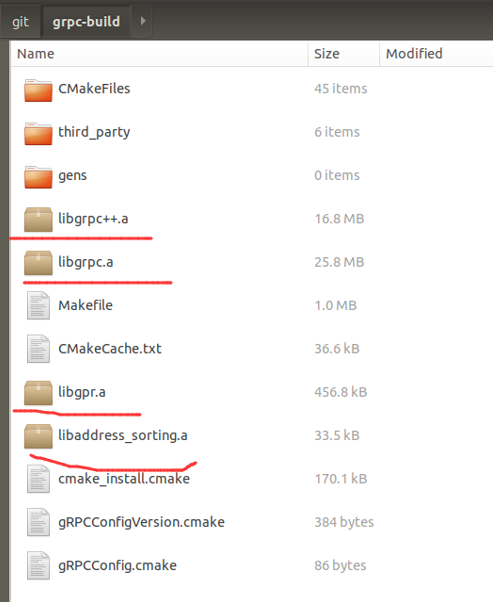
成功构建完成后,在grpc-build生成各*.a静态库文件
Qt for Android使用
环境:Windows10+Qt5.12.3+Android NDK r18b+华为荣耀9手机
新建QtgRPC-Server应用程序,链接好grpc以及第三方的protobuffer等静态库后,构建出现undefined reference to `rand/stderr/strtof`的链接错误,解决请看附录章节。
程序构建打包生成apk后,在Android设备上安装运行直接崩溃退出,提示Protocol Buffer版本不匹配错误,解决请看附录章节。
程序可以在Android真机上运行起来了,但是看日志显示好像?grpc服务没有启动起来,在应用程序输出窗口有以下红色错误(看不懂):


一波刚平,一波又起,真是一波接一波,继续打怪!但是,我直接运行Console服务端(QtgRPC-Server),以及Qt Widget客户端(grpc-client),结果显示可以通信,哈哈,上述红色日志部分不影响,最终运行的结果:
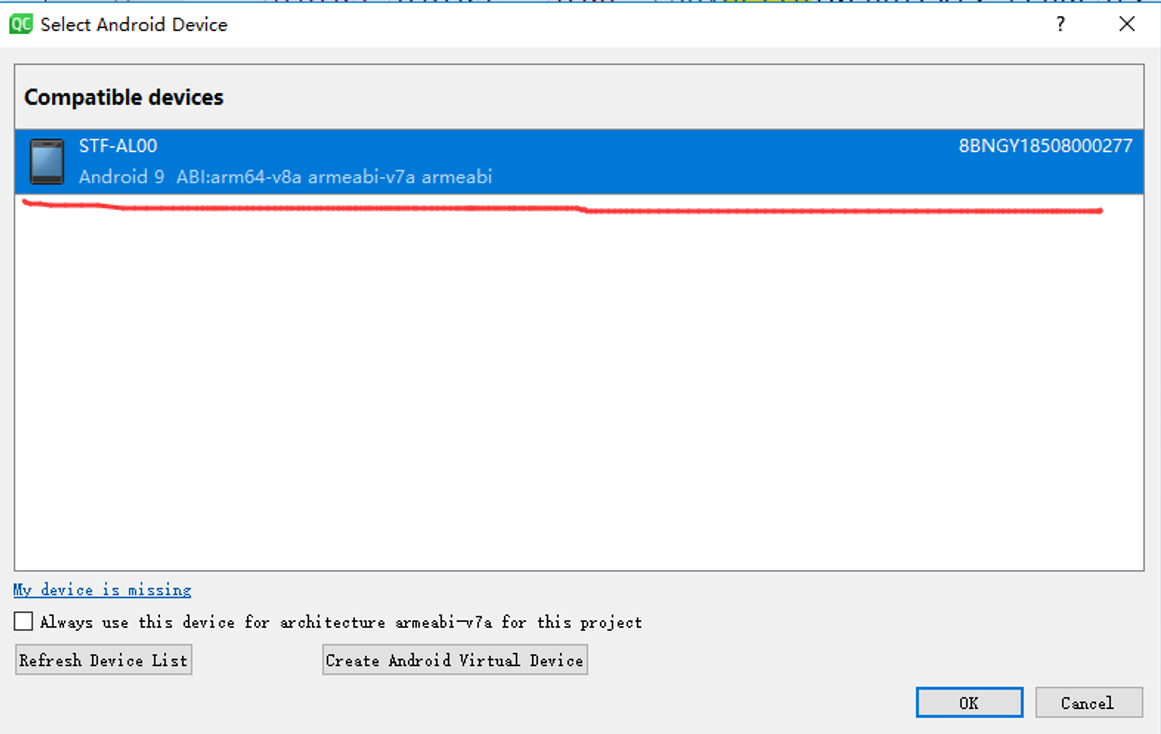
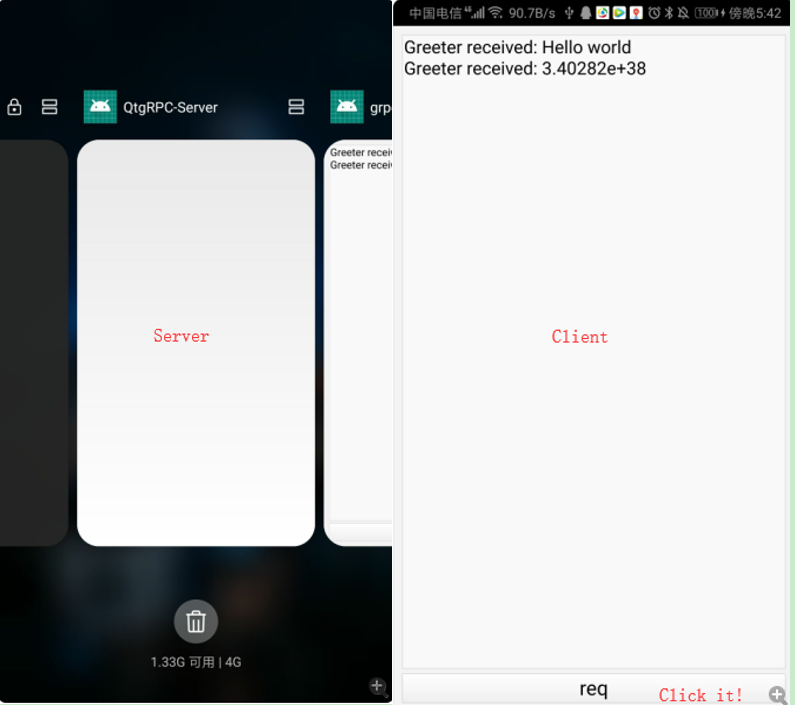
至此,基于Qt C++跨平台特性,Qt for Android调用grpc成功!
附录
1. /bin/sh: 1: go: not found错误
[ 15%] Generating err_data.c
/bin/sh: 1: go: not found
third_party/boringssl/crypto/err/CMakeFiles/err.dir/build.make:83: recipe for target 'third_party/boringssl/crypto/err/err_data.c' failed
make[3]: *** [third_party/boringssl/crypto/err/err_data.c] Error 127
make[3]: *** Deleting file 'third_party/boringssl/crypto/err/err_data.c'
CMakeFiles/Makefile2:3345: recipe for target 'third_party/boringssl/crypto/err/CMakeFiles/err.dir/all' failed
make[2]: *** [third_party/boringssl/crypto/err/CMakeFiles/err.dir/all] Error 2
CMakeFiles/Makefile2:1016: recipe for target 'CMakeFiles/grpc++.dir/rule' failed
make[1]: *** [CMakeFiles/grpc++.dir/rule] Error 2
Makefile:463: recipe for target 'grpc++' failed
make: *** [grpc++] Error 2
原因为缺少go编译环境
解决:sudo apt install golang
2. 查看*.a架构信息
yakong@ubuntu:~/git/grpc-build/third_party/protobuf$ ls
CMakeFiles lib Makefile protobuf.pc
cmake_install.cmake libprotobuf.a protobuf-lite.pc
yakong@ubuntu:~/git/grpc-build/third_party/protobuf$ file libprotobuf.a
libprotobuf.a: current ar archive
yakong@ubuntu:~/git/grpc-build/third_party/protobuf$ lipo -info libprotobuf.a
Command 'lipo' not found, did you mean:
command 'lilo' from deb lilo
Try: sudo apt install <deb name>
yakong@ubuntu:~/git/grpc-build/third_party/protobuf$ readelf -h libprotobuf.a | grep 'Class\|File\|Machine'
File: libprotobuf.a(any_lite.cc.o)
Class: ELF32
Machine: ARM
File: libprotobuf.a(arena.cc.o)
Class: ELF32
Machine: ARM
3. undefined reference to `rand/stderr/strtof`
Qt for Android中使用grpc出现链接错误:

该文章指出,在NDK15以后,标准IO设备:stderr 等都不被支持了~
仔细发现我使用的是r16b版本编译grpc,而Qt Creator中却使用的是r18b版本,版本确实不一致,有可能会造成影响。

然而,我将Qt Creator使用的ndk版本换成r16b,一样的错误:

我再次使用r18b版本的ndk在Ubuntu上进行grpc编译,还是出现类似错误:

对照错误出现的位置,修改grpc源码:
1) 将使用rand()的位置改为固定的之值,比如1(任意随机的整数值)
2) 将使用stderr的地方注释掉,不影响功能
3) 将strtof修改为strtod或使用低版本的ndk
之后重新编译,重新在Qt中加载使用,比较幸运,构建成功了~
附:NDK各版本下载
4. 运行错误:Protocol Buffer版本不匹配
This program requires version 3.9.0 of the Protocol Buffer runtime library, but the installed version is 3.8.0. Please update your library. If you compiled the program yourself, make sure that your headers are from the same version of Protocol Buffers as your link-time library.

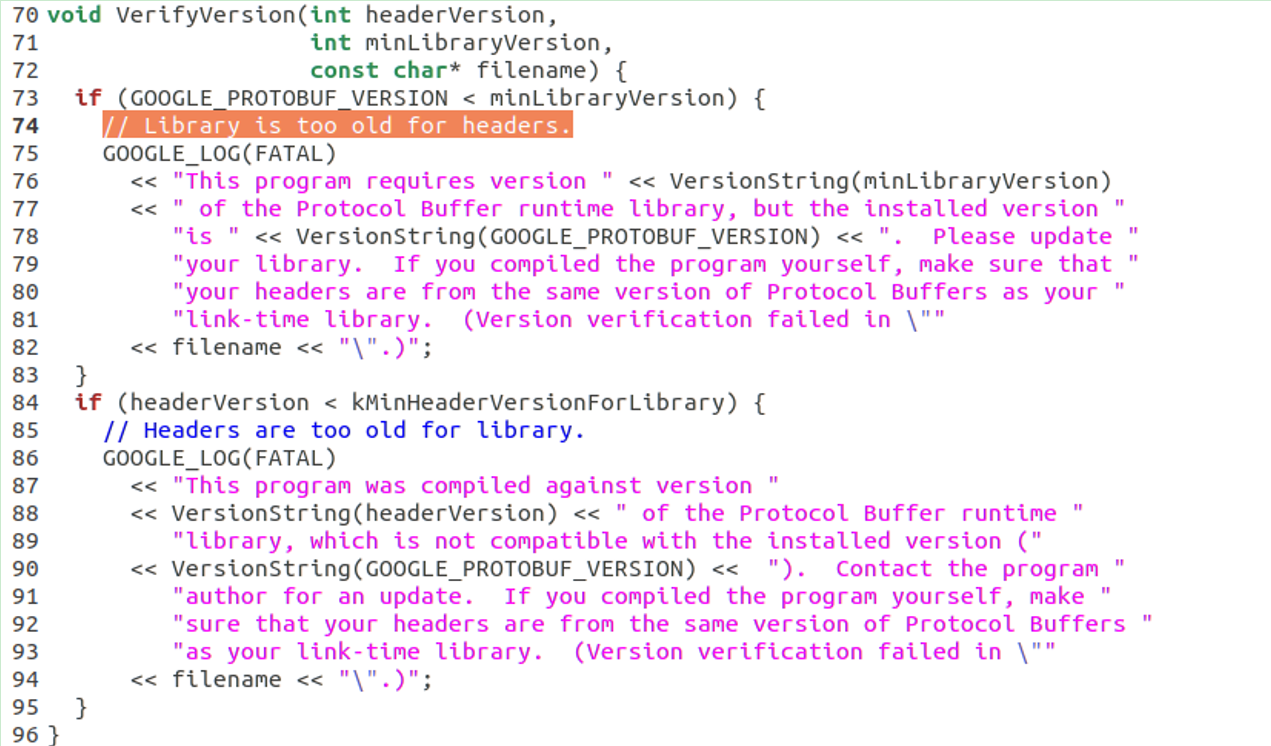
分析:我在Ubuntu中使用ndk编译grpc使用的protobuf版本为3.8.0,而我在qt for android中使用的protoc命令产生的*.pb.cc是3.9.0版本生成的。所以,希望*.pb.cc也由3.8.0版本的protobuf编译器来生成。
编译生成protobuf编译器:
$ ./grpc/third_party/protobuf
$./autogen.sh
$./configure
$ make // 耗时较长
$ [sudo] make install
执行protoc –version时出错:
protoc: error while loading shared libraries: libprotoc.so.19: cannot open shared object file: No such file or directory

该文章指出:protobuf的默认安装路径是/usr/local/lib,而/usr/local/lib 不在Ubuntu体系默认的 LD_LIBRARY_PATH 里,所以就找不到该lib
解决方法:
1.在/etc/ld.so.conf.d目录中创建文件libprotobuf.conf 写入内容:/usr/local/lib
2.输入命令重置内容生效:sudo ldconfig
这时,再运行protoc –version 就可以正常看到版本号了
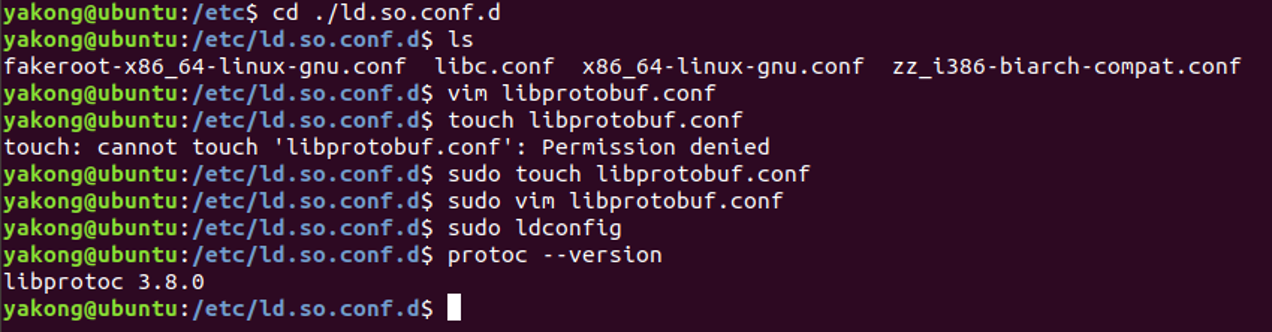
在grpc目录下执行:
$ make
报错了:zconf.h找不到
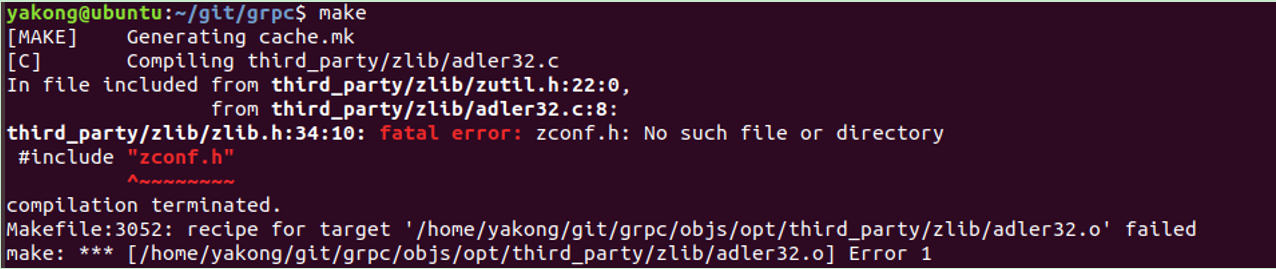
解决方法:sudo apt-get install zlib1g-dev
再次make, 编译漫长,耐心等待…
$ sudo make install
接着编译自带cpp例子helloworld:

将生成的helloworld.pb.h/cpp以及helloworld.grpc.pb.h/cpp拷贝在qt工程中使用,而且包含头文件也用同一套的,否则会出现“#error This file was generated by an older version of protoc which is ^”的错误:

这下构建成功后,运行,不会在运行时报protobuf版本不对导致崩溃了~
5. Qt工程pro文件设置
增加:DEFINES += _WIN32_WINNT=0x0600
增加包含路径和链接静态库路径:
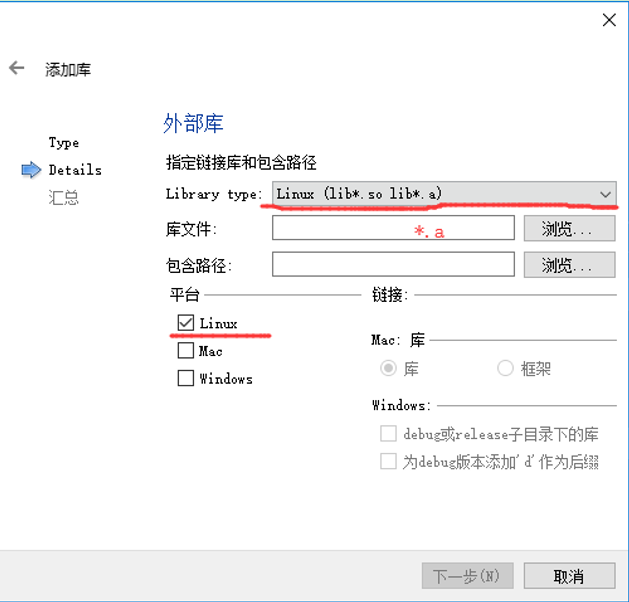
INCLUDEPATH += $$PWD/../../include
DEPENDPATH += $$PWD/../../include
unix:!macx: LIBS += -L$$PWD/../../grpc-build-r18b/ -lgrpc++
unix:!macx: PRE_TARGETDEPS += $$PWD/../../grpc-build-r18b/libgrpc++.a
unix:!macx: LIBS += -L$$PWD/../../grpc-build-r18b/ -lgrpc
unix:!macx: PRE_TARGETDEPS += $$PWD/../../grpc-build-r18b/libgrpc.a
unix:!macx: LIBS += -L$$PWD/../../grpc-build-r18b/ -lgpr
unix:!macx: PRE_TARGETDEPS += $$PWD/../../grpc-build-r18b/libgpr.a
unix:!macx: LIBS += -L$$PWD/../../grpc-build-r18b/ -laddress_sorting
unix:!macx: PRE_TARGETDEPS += $$PWD/../../grpc-build-r18b/libaddress_sorting.a
unix:!macx: LIBS += -L$$PWD/../../grpc-build-r18b/third_party/protobuf/ -lprotobuf
unix:!macx: PRE_TARGETDEPS += $$PWD/../../grpc-build-r18b/third_party/protobuf/libprotobuf.a
unix:!macx: LIBS += -L$$PWD/../../grpc-build-r18b/third_party/zlib/ -lz
unix:!macx: PRE_TARGETDEPS += $$PWD/../../grpc-build-r18b/third_party/zlib/libz.a
unix:!macx: LIBS += -L$$PWD/../../grpc-build-r18b/third_party/boringssl/ssl/ -lssl
unix:!macx: PRE_TARGETDEPS += $$PWD/../../grpc-build-r18b/third_party/boringssl/ssl/libssl.a
unix:!macx: LIBS += -L$$PWD/../../grpc-build-r18b/third_party/cares/cares/lib/ -lcares
unix:!macx: PRE_TARGETDEPS += $$PWD/../../grpc-build-r18b/third_party/cares/cares/lib/libcares.a
注意:其中include路径包含grpc的头文件以及protobuf的./src/google中的文件
6. Qt测试工程部分代码
|
1
2 3 4 5 6 7 8 9 10 11 12 13 14 15 16 17 18 19 20 21 22 23 24 25 26 27 |
syntax = "proto3";
option java_multiple_files = true; package helloworld; // The greeting service definition. // The request message containing the user's name. // The response message containing the greetings |
- 服务端QtgRPC-Server
|
1
2 3 4 5 6 7 8 9 10 11 12 13 14 15 16 17 18 19 20 21 22 23 24 25 26 27 28 29 30 31 32 33 34 35 36 37 38 39 40 41 42 43 44 45 46 47 48 49 50 51 52 53 54 55 56 57 58 59 |
#include <QCoreApplication>
#include <iostream> #include <grpc++/grpc++.h> using grpc::Server; // Logic and data behind the server's behavior. void RunServer() { ServerBuilder builder; // Wait for the server to shutdown. Note that some other thread must be int main(int argc, char *argv[]) RunServer(); |
- 客户端grpc-client
|
1
2 3 4 5 6 7 8 9 10 11 12 13 14 15 16 17 18 19 20 21 22 23 24 25 26 27 28 29 30 31 32 33 34 35 36 37 38 39 40 41 42 43 44 45 46 47 48 49 50 51 52 53 54 55 56 57 58 59 60 61 62 63 64 65 66 67 68 69 70 71 72 73 74 75 76 77 78 79 80 81 82 83 84 85 86 87 88 89 90 91 92 93 94 95 96 97 98 |
#ifndef WIDGET_H
#define WIDGET_H #include <QWidget> #include <iostream> #include <grpcpp/grpcpp.h> #include "helloworld.grpc.pb.h" using grpc::Channel; class GreeterClient { // Assembles the client's payload, sends it and presents the response back // Container for the data we expect from the server. // Context for the client. It could be used to convey extra information to // The actual RPC. // Act upon its status. float SayScore(const float score = std::numeric_limits<float>::max()) { // Container for the data we expect from the server. // Context for the client. It could be used to convey extra information to // The actual RPC. // Act upon its status. private: class QTextBrowser; public: private slots: private: #endif // WIDGET_H |
|
1
2 3 4 5 6 7 8 9 10 11 12 13 14 15 16 17 18 19 20 21 22 23 24 25 26 27 28 29 30 31 32 33 34 35 36 37 38 39 40 41 42 43 44 45 |
#include "Widget.h"
#include <QVBoxLayout> #include <QTextBrowser> #include <QPushButton> Widget::Widget(QWidget *parent) QVBoxLayout *layout = new QVBoxLayout(this); Widget::~Widget() } void Widget::req() float replyf= greeter.SayScore(); |
Qt for Android使用grpc探索的更多相关文章
- Qt for Android开发环境搭建及测试过程记录
最近学习了Qt的QML编程技术,感觉相较于以前的QtGUI来说更方便一些,使用QML可以将界面与业务逻辑解耦,便于开发. QML支持跨平台,包括支持Android平台,因此可以使用Qt的QML进行An ...
- Qt on Android 核心编程
Qt on Android 核心编程(最好看的Qt编程书!CSDN博主foruok倾力奉献!) 安晓辉 著 ISBN 978-7-121-24457-5 2015年1月出版 定价:65.00元 4 ...
- Qt on Android 蓝牙开发
版权声明:本文为MULTIBEANS ORG研发跟随文章,未经MLT ORG允许不得转载. 最近做项目,需要开发安卓应用,实现串口的收发,目测CH340G在安卓手机上非常麻烦,而且驱动都是Java版本 ...
- Qt for Android开发Android应用时的各种错误汇总(此片博文不成熟,请大家略过)
“Qt for Android真的很脆弱,项目能跑起来靠的是奇迹,跑不起来,各种报错才是正常...” 问题一:Qt for Android编译不过:make (e=2): 系统找不到指定的文件. 之前 ...
- Android开发艺术探索读书笔记——01 Activity的生命周期
http://www.cnblogs.com/csonezp/p/5121142.html 新买了一本书,<Android开发艺术探索>.这本书算是一本进阶书籍,适合有一定安卓开发基础,做 ...
- Qt for Android 打包 SQLite 数据库
Qt for Android 调用 SQLite 数据库时, 怎样将已经存在的数据库附加到 APK 中? 直接在你项目里面的Android源码的根目录下新建一个文件夹assets, 数据库就可以放里面 ...
- Android开发艺术探索笔记——View(二)
Android开发艺术探索笔记--View(二) View的事件分发机制 学习资料: 1.Understanding Android Input Touch Events System Framewo ...
- Android开发艺术探索笔记—— View(一)
Android开发艺术探索笔记 --View(一) View的基础知识 什么是View View是Android中所有控件的基类.是一种界面层控件的抽象. View的位置参数 参数名 获取方式 含义 ...
- android开发艺术探索
android开发艺术探索 百度任玉刚 http://blog.csdn.net/singwhatiwanna/article/details/46810527
随机推荐
- Linux 查找目录下大于*M的文件
1. 查找指定文件夹下等于1M的文件 find ./ -size 1M | wc -l 2. 查找指定文件夹下大于1M的文件 find ./target_path -size +1M | wc -l
- [视频教程] 最新版swoole安装和TASKS功能测试
今天我们来安装和测试一下php的多并发高性能网络通信扩展,这个扩展是使用C语音开发的,加载到PHP以后,在PHP的层面上实现了多并发异步通信,模拟了go语音的很多特性,极大的拓宽了PHP的应用场景. ...
- Centos7 环境安装初始化
安装系统 默认分区 磁盘分配(以20G为例): Boot分区:引导分区系统启动的必要核心文件,建议1G Var分区:存放log文件,不分则在/下,建议1G Home分区:存放用户数据,一般都比较大,建 ...
- xml的建模
xml建模的思路 1.分析需要被建模的文件中有那几个对象 2.每个对象拥有的行为以及属性 3.定义对象从小到大(从里到外) 4.通过23种的设计模式中的工厂模式,解析xml生产出指定对象 建模的好处 ...
- 2.Python爬虫入门_requests
#2019-11-23 #requests的api使用非常简单 import requests import time if __name__=='__main__': # get请求 url_get ...
- gn gen ninja
- 第36课 经典问题(下)----关于string的疑问
实例1: 下面的代码输出什么,为什么? #include <iostream> #include <string> using namespace std; int main( ...
- RabbitMQ学习笔记(二、RabbitMQ结构)
目录: RabbitMQ几大组件 交换器类型 RabbitMQ运行流程 RabbitMQ几大组件:(与RabbitMQ第一节中AMQP一样,不细说) 1.生产者.消费者.消息 2.Broker:简单的 ...
- Python IO 模式
IO 模式 对于 Linux 的 network IO: 一次 IO 访问(以read举例),数据会先被拷贝到操作系统内核的缓冲区中,然后才会从操作系统内核的缓冲区 copy 到应用程序的地址空间.所 ...
- linux 下安装 python ngix 项目发布流程
1.安装python #1.安装python3.7所需要的依赖包yum -y groupinstall "Development tools"yum -y install zlib ...