
[Pandas] 04 - Efficient I/O
SQLITE3接口 to Arrary
——从数据库加载数据到dataframe/numpy中。
调动 SQLITE3数据库
import sqlite3 as sq3

query = 'CREATE TABLE numbs (Date date, No1 real, No2 real)'

con = sq3.connect(path + 'numbs.db')

con.execute(query)

con.commit()
commit 命令
COMMIT 命令是用于把事务调用的更改保存到数据库中的事务命令。
COMMIT 命令把自上次 COMMIT 或 ROLLBACK 命令以来的所有事务保存到数据库
返回值处理
返回所有值,就用 fetchall()。
con.execute('SELECT * FROM numbs').fetchmany(10)

pointer = con.execute('SELECT * FROM numbs')

for i in range(3):

    print(pointer.fetchone())


Output:
-------------------------------------------------

('2017-11-18 11:18:51.443295', 0.12, 7.3)

('2017-11-18 11:18:51.466328', 0.9791, -0.01914)

('2017-11-18 11:18:51.466580', -0.88736, 0.19104)
保存到NumPy
第一步、通过初始化直接格式变换即可。
query = 'SELECT * FROM numbers WHERE No1 > 0 AND No2 < 0'

res = np.array( con.execute(query).fetchall() ).round(3)
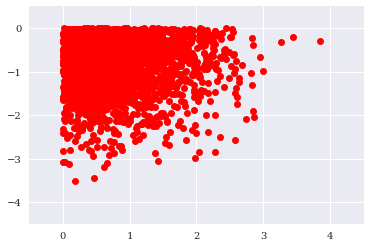
第二步、可视化数据 by resampling,也就是少取一些点。
res = res[::100]  # every 100th result

import matplotlib.pyplot as plt

%matplotlib inline

plt.plot(res[:, 0], res[:, 1], 'ro')

plt.grid(True);
plt.xlim(-0.5, 4.5);
plt.ylim(-4.5, 0.5)

# tag: scatter_query

# title: Plot of the query result

# size: 60
SQLITE3接口 to DataFrame
读取整个表
一张表通常内存可以搞定,全部读取也不是避讳的事情。
import sqlite3 as sq3

filename = path + 'numbs'

con = sq3.Connection(filename + '.db')

%time data = pd.read_sql('SELECT * FROM numbers', con)

data.head()
表操作
其实已经演变为 ndarray操作。
“与” 条件
%time data[(data['No1'] > 0) & (data['No2'] < 0)].head()
“或” 条件
%%time

res = data[['No1', 'No2']][((data['No1'] > 0.5) | (data['No1'] < -0.5))

                     & ((data['No2'] < -1) | (data['No2'] > 1))]
PyTable的快速I/O
HDF5数据库/文件标准。
"无压缩" 创建一个大表
表定义
import numpy as np

import tables as tb

import datetime as dt

import matplotlib.pyplot as plt

%matplotlib inline

filename = './data/tab.h5'

h5 = tb.open_file(filename, 'w')

# 有几行:多搞几行,弄一个大表

rows = 2000000

# 有几列

row_des = {

    'Date': tb.StringCol(26, pos=1),

    'No1': tb.IntCol(pos=2),

    'No2': tb.IntCol(pos=3),

    'No3': tb.Float64Col(pos=4),

    'No4': tb.Float64Col(pos=5)

}
创建表
filters = tb.Filters(complevel=0)  # no compression

tab = h5.create_table('/', 'ints_floats', row_des,

                      title='Integers and Floats',

                      expectedrows=rows, filters=filters)
新增数据
此时,表还在内存中,向这个表内添加数据。
(1) 一个关键的列表形式。
pointer = tab.row
(2) 生成随机数填充。
ran_int = np.random.randint(0, 10000, size=(rows, 2))

ran_flo = np.random.standard_normal((rows, 2)).round(5)
(3) 赋值给内存中的表。
传统策略,使用了繁琐的循环。
%%time

for i in range(rows):

    pointer['Date'] = dt.datetime.now()

    pointer['No1']  = ran_int[i, 0]

    pointer['No2']  = ran_int[i, 1]

    pointer['No3']  = ran_flo[i, 0]

    pointer['No4']  = ran_flo[i, 1]

    pointer.append()

      # this appends the data and

      # moves the pointer one row forward


tab.flush()   # 相当于SQLITE3中的commit命令
矩阵策略,省掉了循环。
%%time

sarray['Date'] = dt.datetime.now()

sarray['No1'] = ran_int[:, 0]

sarray['No2'] = ran_int[:, 1]

sarray['No3'] = ran_flo[:, 0]

sarray['No4'] = ran_flo[:, 1]
“压缩” 创建一个大表
创建压缩表
因rows中其实已经有了数据,所以创建的同时就同步写入文件。
filename = './data/tab.h5c'

h5c = tb.open_file(filename, 'w')

filters = tb.Filters(complevel=4, complib='blosc')

tabc = h5c.create_table('/', 'ints_floats', sarray,

                        title='Integers and Floats',

                      expectedrows=rows, filters=filters)
dnarray读取
读取内存数据,返回 numpy.ndarray。
%time arr_com = tabc.read()

h5c.close()
内存外计算
比如,处理一个若干GB的数组。
创建一个外存数组 EArray
filename = './data/array.h5'

h5 = tb.open_file(filename, 'w')

n = 100

ear = h5.create_earray(h5.root, 'ear',

                      atom=tb.Float64Atom(),

                      shape=(0, n))

%%time

rand = np.random.standard_normal((n, n))

for i in range(750):

    ear.append(rand)

ear.flush()

ear.size_on_disk  # 查看一下,这个E Array是个大数组
创建一个对应的 EArray
第一步、设置外存 workspace。
out = h5.create_earray(h5.root, 'out', atom=tb.Float64Atom(), shape=(0, n))
第二步、通过外存来计算ear大数组。
expr = tb.Expr('3 * sin(ear) + sqrt(abs(ear))')    # 这里是 import tables as tb 中的 Expr,而不是import numexpr as ne

  # the numerical expression as a string object

expr.set_output(out, append_mode=True)

  # target to store results is disk-based array

%time expr.eval()

# evaluation of the numerical expression

# and storage of results in disk-based array
第三步、从外存读入内存,传的自然是“变量“,而非”workspace"。
%time imarray = ear.read()

  # read whole array into memory
End.
[Pandas] 04 - Efficient I/O的更多相关文章
- Pandas | 04 Panel 面板
面板(Panel)是3D容器的数据.面板数据一词来源于计量经济学,部分源于名称:Pandas - pan(el)-da(ta)-s. 3轴(axis)这个名称旨在给出描述涉及面板数据的操作的一些语义. ...
- [AI] 深度数据 - Data
Data Engineering Data Pipeline Outline [DE] How to learn Big Data[了解大数据] [DE] Pipeline for Data Eng ...
- Ubuntu下安装python相关数据处理
01. Ubuntu下安装ipython sudo apt-get install ipython 02. Ubuntu下安装pip $ sudo apt-get install python-pip ...
- 数据分析04 /基于pandas的DateFrame进行股票分析、双均线策略制定
数据分析04 /基于pandas的DateFrame进行股票分析.双均线策略制定 目录 数据分析04 /基于pandas的DateFrame进行股票分析.双均线策略制定 需求1:对茅台股票分析 需求2 ...
- 04. Pandas 3| 数值计算与统计、合并连接去重分组透视表文件读取
1.数值计算和统计基础 常用数学.统计方法 数值计算和统计基础 基本参数:axis.skipna df.mean(axis=1,skipna=False) -->> axis=1是按行来 ...
- Ubuntu16.04下安装配置numpy,scipy,matplotlibm,pandas 以及sklearn+深度学习tensorflow配置+Keras2.0.6(非Anaconda环境)
1.ubuntu镜像源准备(防止下载过慢): 参考博文:http://www.cnblogs.com/top5/archive/2009/10/07/1578815.html 步骤如下: 首先,备份一 ...
- ubuntu16.04安装python3,numpy,pandas等量化计算库
ubunt安装python3 sudo add-apt-repository ppa:fkrull/deadsnakessudo apt-get updatesudo apt-get install ...
- Desktop Ubuntu 14.04LTS/16.04科学计算环境配置
Desktop Ubuntu 14.04LTS/16.04科学计算环境配置 计算机硬件配置 cpu i5 6代 内存容量 8G gpu GTX960 显存容量 2G(建议显存在4G以上,否则一些稍具规 ...
- pandas基础-Python3
未完 for examples: example 1: # Code based on Python 3.x # _*_ coding: utf-8 _*_ # __Author: "LEM ...
随机推荐
- C++标准库函数 end 的实现原理(非类型模板参数)
在刚开始学习<C++ Primer>的时候遇到了 end 函数,感觉很神奇,但又很迷惑:为什么能获得数组的尾后指针呢?编译器也不会在内存中申请一块空间放数组元素的个数啊!最近再一次遇到了 ...
- Numerical methods in enginering with python3 (1)
<> (1) Numpy 库 Numpy中的矩阵函数 np.diagonal(A) 返回由A中的主对角元素组成的一维矩阵 np.diagonal(A,1) 返回由A中的第一副对角元素组成的 ...
- Keras实例教程(2)
https://blog.csdn.net/baimafujinji/article/details/78385745
- 缓存系列-Redis入门教程
Redis是什么? Redis (REmote DIctionary Server)是一个开源(BSD许可),内存存储的数据结构服务器,可用作数据库,高速缓存和消息队列,是一个高性能的key-valu ...
- lua_基本语法
学习lua,首先应该了解热更新. 热更新:可以在不重新下载客户端的情况下更新软件内容.在使用软件过程中,我们经常会遇到这种情况:升级软件,没错,这就使用的是热更新. C#不能直接热更新,原因为:C#脚 ...
- Leetcode之二分法专题-153. 寻找旋转排序数组中的最小值(Find Minimum in Rotated Sorted Array)
Leetcode之二分法专题-153. 寻找旋转排序数组中的最小值(Find Minimum in Rotated Sorted Array) 假设按照升序排序的数组在预先未知的某个点上进行了旋转. ...
- 导航页的开发--手机web app开发笔记
好了,的所有的基础知识已经准备完毕了,现在开始制作引导页.这个引导页需要一个HTML文件,JS文件,一个CSS文件.在HBuilderX中根目录下添加“Guid.html”,在JS文件夹添加“myth ...
- MSIL实用指南-逻辑运算
逻辑运算有三种:与.或.非.实现它们可以用位运算指令And.Or.Not等三个指令.它们的使用方法和位运算一致. 完整的程序如下: using System; using System.Reflect ...
- leetcode9 Palindrome Number(按进阶要求)
题目描述 Determine whether an integer is a palindrome. An integer is a palindrome when it reads the same ...
- 从零开始搭建Java开发环境第二篇:如何在windows10里安装MySQL
1 下载安装包 1.1 压缩包 https://dev.mysql.com/downloads/mysql/ [外链图片转存失败(img-oesO8K09-1566652568838)(data:im ...