
Centos7下thinkphp5.0环境配置
首先把yum源修改为阿里的yum源,如果没有安装wget,先安装一个。(如果有请蹦过)
wget -O /etc/yum.repos.d/CentOS-Base.repo http://mirrors.aliyun.com/repo/Centos-7.repo
yum install wget -y
备份本地yum源
mv /etc/yum.repos.d/CentOS-Base.repo /etc/yum.repos.d/CentOS-Base.repo_bak
获取阿里yum源配置文件
wget -O /etc/yum.repos.d/CentOS-Base.repo http://mirrors.aliyun.com/repo/Centos-7.repo
安装epel源
yum install epel-release
安装环境
sudo rpm -Uvh http://nginx.org/packages/centos/7/noarch/RPMS/nginx-release-centos-7-0.el7.ngx.noarch.rpm

yum install php php-fpm php-mysql nginx mariadb-server php-gd* -y
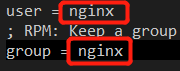
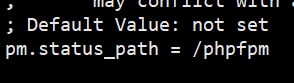
修改php-fpm文件
vi /etc/php-fpm.d/www.conf
启动服务
systemctl start php-fpm

systemctl start nginx
简单配置 数据库
systemctl start mariadb
mysql_secure_installation

Enter current password for root (enter for none): #初次运行直接回车

Set root password? [Y/n] #是否设置root用户密码,输入y并回车或直接回车

New password: #设置root用户的密码

Re-enter new password: # 再输入一次你设置的密码

Remove anonymous users? [Y/n] # 是否删除匿名用户,回车

Disallow root login remotely? [Y/n] #是否禁止root远程登录,回车,

Remove test database and access to it? [Y/n] # 是否删除test数据库,回车

Reload privilege tables now? [Y/n] # 是否重新加载权限表,回车
root 用户支持远程访问
grant all privileges on *.* to 'root'@'%' identified by '123456' with grant option;

flush privileges;
配置Nginx文件
新建配置文件
vi /etc/nginx/conf.d/www.a.com.conf
文件内容
server {

  listen 80;

  server_name www.a.com;

  set $root /var/www/myweb;

  #listen 443 ssl;

  #ssl_certificate *.pem;

  #ssl_certificate_key *.key;

  #ssl_session_timeout 5m;

  #ssl_ciphers ECDHE-RSA-AES128-GCM-SHA256:ECDHE:ECDH:AES:HIGH:!NULL:!aNULL:!MD5:!ADH:!RC4;

  #ssl_protocols TLSv1 TLSv1.1 TLSv1.2;

  #ssl_prefer_server_ciphers on;

  location ~ .*\.(gif|jpg|jpeg|bmp|png|ico|txt|js|css)$ {

    root $root;

    client_max_body_size 100M;

  }

  location / {

    index index.php;

    if (!-e $request_filename) {

      rewrite ^/(.*)$ /index.php/$1 last;

      break;

    }

    root $root;

    client_max_body_size 100M;

  }

  location ~ \.php/?.*$ {

    root $root;

    fastcgi_pass 127.0.0.1:9000;

    fastcgi_index index.php;

    include fastcgi_params;

    set $fastcgi_script_name2 $fastcgi_script_name;

    if ($fastcgi_script_name ~ "^(.+\.php)(/.+)$") {

      set $fastcgi_script_name2 $1;

      set $path_info $2;

    }

    fastcgi_param PATH_INFO $path_info;

    fastcgi_param SCRIPT_FILENAME $document_root$fastcgi_script_name2;

    fastcgi_param SCRIPT_NAME $fastcgi_script_name2;

    client_max_body_size 100M;

  }

   include /etc/nginx/mime.types;

    default_type application/octet-stream;

  }
重新加载配置文件
nginx -s relaod
Centos7下thinkphp5.0环境配置的更多相关文章
- Linux—CentOS7下python开发环境配置
CentOS7下python开发环境配置 上一篇博客讲了如何在Centos7下安装python3(https://www.cnblogs.com/zivli/p/9937608.html),这一次配置 ...
- 【Objective-C】Windows下Objective-C开发环境配置
[Objective-C]Windows下Objective-C开发环境配置 ftp://ftpmain.gnustep.org/pub/gnustep/binaries/windows/ 最近打 ...
- windows下spark开发环境配置
http://www.cnblogs.com/davidwang456/p/5032766.html windows下spark开发环境配置 --本篇随笔由同事葛同学提供. windows下spark ...
- windows下apache+https环境配置
windows下apache+https环境配置 转 https://www.cnblogs.com/sandaizi/p/7519370.html 1.修改配置文件conf/httpd.conf,去 ...
- 在CentOS7下的OpenStack中配置使用Spice协议
在CentOS7下的OpenStack中配置使用Spice协议 by 无若 1. 需要的包 在计算节点上 #yum install spice-html5 注意:使用yum安装spice-ht ...
- 联盛德 HLK-W806 (一): Ubuntu20.04下的开发环境配置, 编译和烧录说明
目录 联盛德 HLK-W806 (一): Ubuntu20.04下的开发环境配置, 编译和烧录说明 联盛德 HLK-W806 (二): Win10下的开发环境配置, 编译和烧录说明 联盛德 HLK-W ...
- CentOS7下RabbitMQ服务安装配置
参考文档: CentOS7下RabbitMQ服务安装配置 http://www.linuxidc.com/Linux/2016-03/129557.htm 在linux下安装配置rabbitMQ详细教 ...
- Metabase在Windows下的开发环境配置
Metabase在Windows下的开发环境配置 */--> pre.src {background-color: #292b2e; color: #b2b2b2;} Metabase在Wind ...
- deepin linux 下C开发环境配置
# deepin linux 下C开发环境配置 ## 前言-----------------------------deepin操作系统商店默认提供了 eclipse for c\c++但是系统没有提 ...
随机推荐
- 题解 Connect
传送门 各种骗分无果,特殊性质还手残写挂了-- 首先完全图上直接输出边权 \(\times (n-2)\) 就行了,然而我脑残乘的 \(n-1\) 看数据范围肯定是状压,但是压边肯定炸了,考虑压点 因 ...
- [1.1W字] 复习: CSS 9个背景属性&6种渐变函数, 学会可以手写实现AI中强大的"任意渐变"! #Archives009
Title/ CSS Background&Gradient完全指南 #Archives009 序: 关于 background 属性, 了解点CSS的人总会知道个大概. 但是你肯定多半还有点 ...
- windows下安装mysql5.6.47版本
详情转载地址:https://www.cnblogs.com/alan-lin/p/9966917.html
- linux 系统文件记录
proc系列 /proc/diskstats # 记录磁盘相关信息 http://ykrocku.github.io/blog/2014/04/11/diskstats/
- 5、二进制安装K8s 之 部署kube-scheduler
二进制安装K8s之部署kube-scheduler 1.创建配置文件 cat > /data/k8s/config/kube-scheduler.conf << EOF KUBE_S ...
- OGNL表达式入门
package com.scorpion.ognl; import java.util.ArrayList; import java.util.List; import ognl.Ognl; impo ...
- Java之Apache Commons-IO使用精讲
Commons IO是针对开发IO流功能的工具类库.主要包括六个区域: 工具类--使用静态方法执行共同任务输入--用于InputStream和Reader实现输出--用于OutputStream和Wr ...
- 面向对象之编写驱动程序--中断(linux系统、s3c6410开发板)
/*------------------------- *先申明下,本人是个菜鸟,刚开始接触驱动程序编写,交代下开发环境(主机系统redhat6.3,开发板ARM-s3c6410) 以watchdog ...
- Java String 综述(上篇)
摘要: Java 中的 String类 是我们日常开发中使用最为频繁的一个类,但要想真正掌握的这个类却不是一件容易的事情.笔者为了还原String类的真实全貌,先分为上.下两篇博文来综述Java中的S ...
- mzy git学习,分支以及分支合并(四)
git 鼓励大量使用分支:最后进行master和分支之间的合并 git branch git branch 查看当前有多少分支,并且将当前在使用的分支用*标注出来. [一定要注意git的分支有从属概念 ...