
Vue Router 常见问题(push报错、push重复路由刷新)
Vue Router 常见问题
用于记录工作遇到的Vue Router bug及常用方案
router.push报错,Avoided redundant navigation to current location: “/xxx”
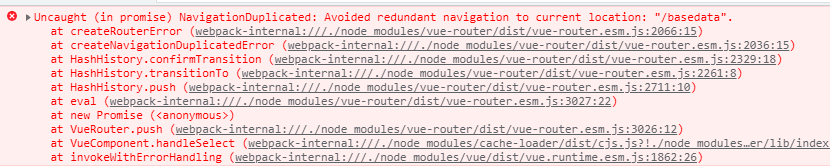
大意为 路由频繁点击导致路由重复,该报错对路由跳转功能没有任何影响
解决方案:重写push方法
将异常捕获就不会报错了
let routerPush = VueRouter.prototype.push;

VueRouter.prototype.push = function push(location) {

  return routerPush.call(this, location).catch(err => err)

}
重复点击路由 刷新页面效果
在重写VueRouter.prototype.push方法时,利用VueRouter的currentRoute对象中的fullpath属性与push函数的参数对比,判断是否为同一路由。如果是,使用一下方法完成页面刷新
方法一:window.location.reload()
问题在于会刷新整个页面,不是很推荐
let routerPush = VueRouter.prototype.push;

VueRouter.prototype.push = function push(location) {

  let history = this.currentRoute && this.currentRoute.fullPath;

  if (location === history) {

    window.location.reload(); //整个页面都刷新

  }

  return routerPush.call(this, location).catch(err => err)

}
方法二:v-if 控制router-view实现局部刷新
较为复杂,但是能够实现局部刷新
由于VueRouter.prototype.push中的this指向VueRouter实例

该实例中存在 "全局Vue实例"(main.js new Vue()生成的) 的引用属性 "app"(this.app)

于是,push函数里面就可以操作Vue实例了。
实现思维:
  vue实例使用provide注入一个 getRouterAlive 方法,返回当前vue实例中定义的状态变量 isRouterAlive

    再定义一个 reloadChild 方法,修改状态变量 isRouterAlive的值为false,dom更新后再改为true

  需要局部刷新的地方 inject 接受 getRouterAlive 这个方法,再在router-view 上绑定

    v-if="Object.prototype.toString.call(getRouterAlive) == '[object Function]' && getRouterAlive()"
实现代码:
main.js
// main.js

new Vue({

  router,

  store,

  render: h => h(App),

  provide() {

    return {

      getRouterAlive: this.getRouterAlive,

    }

  },

  data: {

    isRouterAlive: true

  },

  methods: {

    getRouterAlive() {

      return this.isRouterAlive;

    },

    reloadChild() {

      this.isRouterAlive = false;

      this.$nextTick(() => {

        this.isRouterAlive = true;

      })

    }

  }

}).$mount('#app')
router.js
// router/index.js

let routerPush = VueRouter.prototype.push;

VueRouter.prototype.push = function push(location) {

  let history = this.currentRoute && this.currentRoute.fullPath;

  if (location === history) {

    this.app.reloadChild && this.app.reloadChild();

  }

  return routerPush.call(this, location).catch(err => err)

}
局部刷新
// 局部刷新

...

<router-view v-if="Object.prototype.toString.call(getRouterAlive) == '[object Function]' && getRouterAlive()"></router-view>

...

inject: ["getRouterAlive"],

...
Vue Router 常见问题(push报错、push重复路由刷新)的更多相关文章
- 01-路由跳转 安装less this.$router.replace(path) 解决vue/cli3.0语法报错问题
2==解决vue2.0里面控制台包的一些语法错误. https://www.jianshu.com/p/5e0a1541418b 在build==>webpack.base.conf.j下注释掉 ...
- git push报错error: failed to push some refs to 'git@github.com'
git push报错error: failed to push some refs to 'git@github.com' $ git push -u origin master To git@git ...
- git push报错大文件,删除后重新commit依然报错
git push报错: github不能上传大文件,按道理删掉重新提交就行了 可是删掉后,git add -A,再git commit,再git push,依然报错 后来我想明白了 github上传时 ...
- 解决上传代码到GitHub报错Push rejected: Push to origin/master was rejected
最近在 push 代码到 github 时,IDEA报错 Push rejected: Push to origin/master was rejected 在网友找了一圈,发现都不是想要的答案 于是 ...
- vue init webpack nameXXX 报错问题:
vue新建demo项目报错如下: M:\lhhVueTest>vue init webpack L21_VueProject vue-cli · Failed to download repo ...
- vue 表单校验报错 "Error: please transfer a valid prop path to form item!"
vue 表单校验报错 "Error: please transfer a valid prop path to form item!" 原因:prop的内容和rules中定义的名称 ...
- vue中使用JSX报错,如何解决
Support for the experimental syntax 'jsx' isn't currently enabled (32:12): 30 | }, 31 | render() { & ...
- vue Blob 下载附件报错
vue Blob 下载附件报错,不妨试试: window.location.href=后台地址
- git push 报错 "Peer certificate cannot be authenticated with known CA certificates"
使用git push -u origin master 命令向远程仓库提交代码时报错:Peer certificate cannot be authenticated with known CA ce ...
随机推荐
- 本地yum源搭建
2021/07/15 1.挂载 # 创建挂载目录 mkdir /mnt/cdrom # 挂载 mount -t iso9660 /dev/cdrom /mnt/cdrom 2.修改 yum 源配置# ...
- android kotlin determine file type from bytes 根据文件内容识别文件类型,类似python的filetype
尝试了 URLConnection.guessContentTypeFromStream(ByteArrayInputStream(bytes)) 和 Tika().detect(bytes) 一个识 ...
- 洛谷P3768 简单的数学题解题报告
$$\begin{eqnarray}&\sum_{i=1}^{n}\sum_{j=1}^{n}ij\gcd(i,j)\\&\sum_{d=1}^{n}\sum_{i=1}^{n}\su ...
- weblogic漏洞分析之CVE-2017-10271
weblogic漏洞分析之CVE-2017-10271 一.环境搭建 1)配置docker 这里使用vulhub的环境:CVE-2017-10271 编辑docker-compose.yml文件,加入 ...
- 借助AWR报告分析解决oracleCPU过高的问题
原文地址:http://www.cnblogs.com/crystal-guoguo/p/4213458.html 简介:在oracle数据库中,有两个非常实用的自带监控工具EM(Enterprise ...
- 加入Erlang社区-指引
国内暂且没有发现较活跃.人气较高的论坛或者社区,偶然发现Erlang官网的Community页面描述了一个Slack交流平台,里面有众多异国他乡的大佬,感兴趣的.有技术疑问的都可以加入看看. 加入教程 ...
- Anaconda配置国内镜像源
1. 为conda配置(清华)镜像源 使用conda进行安装时,访问的是国外的网络,所以下载和安装包时会特别慢.我们需要更换到国内镜像源地址,这里我更换到国内的清华大学地址.(永久添加镜像) Wind ...
- 数据结构逆向分析-List
数据结构逆向分析-List 首先STL中的List就是一个链表,但是肯定C++用了很多封装,所以这里我们来一探究竟. 开始 首先先写一些简单的分析的源代码: #include<iostream& ...
- PHP设计模式之命令模式
命令模式,也称为动作或者事务模式,很多教材会用饭馆来举例.作为顾客的我们是命令的下达者,服务员是这个命令的接收者,菜单是这个实际的命令,而厨师是这个命令的执行者.那么,这个模式解决了什么呢?当你要修改 ...
- learn git(本地仓库)
#本地 在Windows上安装Git 在Windows上使用Git,可以从Git官网直接https://git-scm.com/downloads下载,然后按默认选项安装即可. 装完成后,在开始菜单里 ...