
SpringBoot目录文件结构总结(5)
1、目录
src/main/java :存放java代码
src/main/resources
static:存放静态文件,比如css、js、image(访问方式 http://localhost:8080/js/main.js)
templates:存放静态页面jsp,html,tpl
config:存放配置文件application.properties
resources:
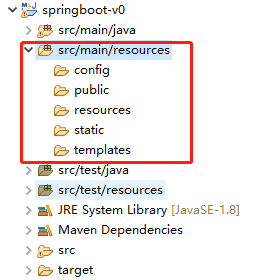
2、静态文件加载顺序:Spring Boot默认依次从:META/resources > resources >static >public > 如果存在访问的资源则返回,否则报错!
3、引入依赖 Thymeleaf
<!-- https://mvnrepository.com/artifact/org.springframework.boot/spring-boot-starter-thymeleaf -->
<dependency>
<groupId>org.springframework.boot</groupId>
<artifactId>spring-boot-starter-thymeleaf</artifactId>
</dependency>
新建controller映射过去,例如404错误页面
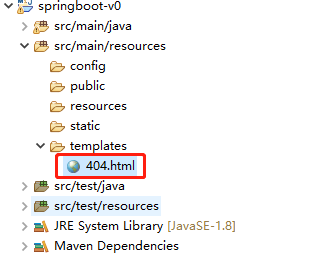
package cn.xiaobing.demo.controller;

import org.springframework.stereotype.Controller;

import org.springframework.web.bind.annotation.RequestMapping;

@Controller

public class FailController {

    @RequestMapping(value = "/v1/fail")

    public Object fail() {

        return "404";

    }

}
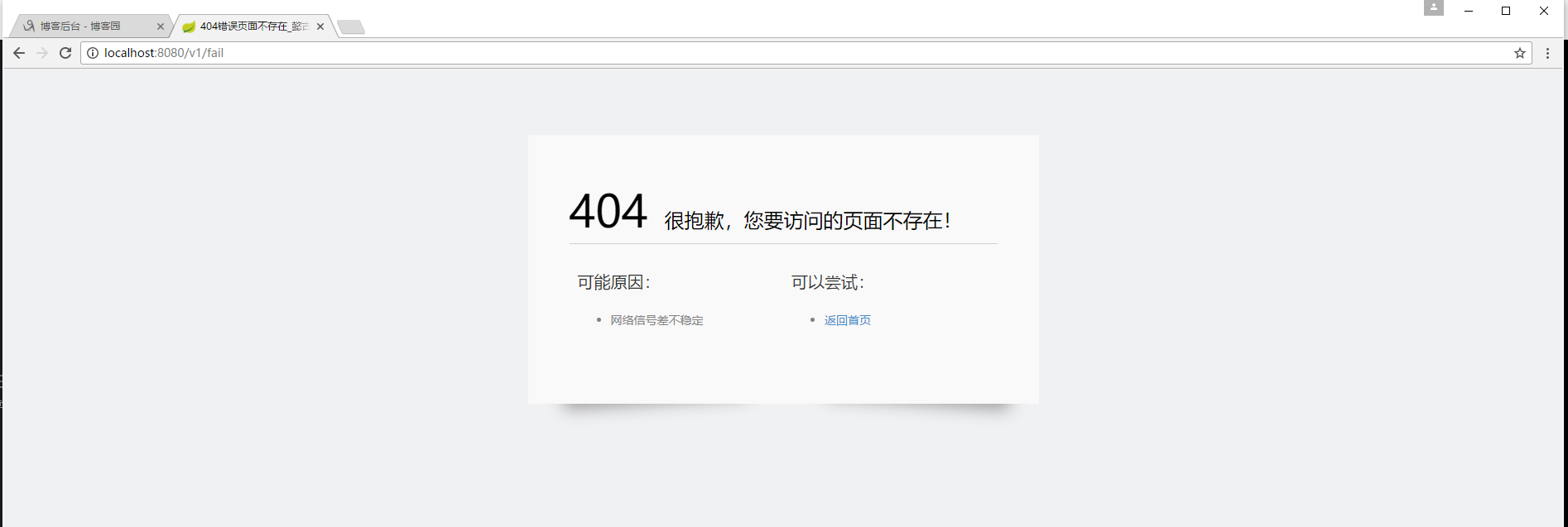
启动项目:

访问映射地址:
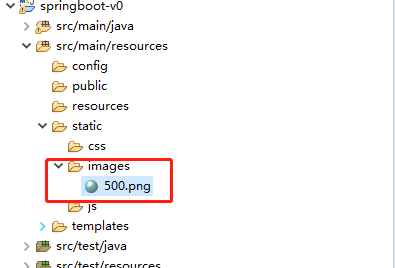
4、static:存放静态文件,比如css、js、image(访问方式 http://localhost:8080/image/500.png)
启动项目:

5、自定义路径访问如
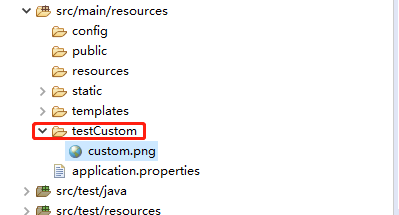
新建配置文件:application.properties
spring.resources.static-locations = classpath:/META-INF/resources/,classpath:/resources/,classpath:/static/,classpath:/public/,classpath:/testCustom/
启动项目:
  .   ____          _            __ _ _

 /\\ / ___'_ __ _ _(_)_ __  __ _ \ \ \ \

( ( )\___ | '_ | '_| | '_ \/ _` | \ \ \ \

 \\/  ___)| |_)| | | | | || (_| |  ) ) ) )

  '  |____| .__|_| |_|_| |_\__, | / / / /

 =========|_|==============|___/=/_/_/_/

 :: Spring Boot ::        (v2.0.1.RELEASE)
访问资源地址:

6、更多学习请spring官网查询
7、不足之处,后续补充!
SpringBoot目录文件结构总结(5)的更多相关文章
- wordpress目录文件结构说明
wordpress目录文件结构说明 wordpress目录文件结构说明. WordPress文件夹内,你会发现大量的代码文件和3个文件夹wp-admin wp-content wp-include ...
- java~springboot~目录索引
回到占占推荐博客索引 最近写了不过关于java,spring,微服务的相关文章,今天把它整理一下,方便大家学习与参考. java~springboot~目录索引 Java~关于开发工具和包包 Java ...
- springboot目录结构、重要配置文件、重要注解的详解
前面2篇博客已经带着大家搭建了springboot项目,并编写了持久化接口部署到tomcat下访问.这里我们一起补充下springboot的基本信息 一.springboot简单介绍 springbo ...
- Springboot目录结构分析
1 src/main/java 存储源码 2 src/main/resource 资源文件夹 (1)src/main/resource/static 用于存放静态资源,如css.js.图片.文件 ...
- WordPress目录文件结构详细说明
根目录 |-wp-admin | |-css | |-images | |-includes | |-js | |-maint | |-network | |-user |-wp-content | ...
- 2、SpringBoot接口Http协议开发实战8节课(1-6)
1.SpringBoot2.xHTTP请求配置讲解 简介:SpringBoot2.xHTTP请求注解讲解和简化注解配置技巧 1.@RestController and @RequestMapping是 ...
- 小D课堂【SpringBoot】接口Http协议开发实战
---恢复内容开始--- ====================2.SpringBoot接口Http协议开发实战 ============================= 1.SpringBoot ...
- 最新学习springboot 配置注解
一.概述 Spring Boot设计目的是用来简化新Spring应用的初始搭建以及开发过程.Spring Boot并不是对Spring功能上的增强,而是提供了一种快速使用Spring的方式. ...
- 零基础快速入门SpringBoot2.0 (一)
零基础快速入门SpringBoot2.0 (一) 一.SpringBoot2.x依赖环境和版本新特性说明 简介:讲解新版本依赖环境和springboot2新特性概述 1.依赖版本jdk8以上, Spr ...
随机推荐
- win10连接mysql提示:ERROR 1045 (28000): Access denied for user 'root'@'localhost' (using password: YES)
win10中cmd连接mysql提示:ERROR 1045 (28000): Access denied for user 'root'@'localhost' (using password: YE ...
- linux 上添加多个jdk
1. 首先将你需要上传的jdk 上传并解压 2.你可以自定义解压的路径 3. alternatives --install /usr/bin/java java /usr/java/jdk1.7.0_ ...
- 使用python3中的2to3.py执行数据迁移
1.在python默认安装的位置找到Tools\scripts 2.找到2to3.py 3.在所在文件夹shift+右键打开终端 4.执行命令python 2to3.py -w 需要做数据迁移的数据路 ...
- P5404-[CTS2019]重复【KMP,dp】
正题 题目链接:https://www.luogu.com.cn/problem/P5404 题目大意 给出一个字符串\(S\),然后求有多少个长度为\(m\)的串\(T\)满足.无限多个串\(T\) ...
- Wannafly挑战赛23F-计数【原根,矩阵树定理,拉格朗日插值】
正题 题目链接:https://ac.nowcoder.com/acm/contest/161/F 题目大意 给出\(n\)个点的一张图,求它的所有生成树中权值和为\(k\)的倍数的个数.输出答案对\ ...
- C语言数组的创建和使用
C语言数组的创建和使用 数组是一组相同类型元素的集合. 一维数组的创建及初始化 //创建int类型的数组 //直接创建:不对数组进行初始化 int arr1[10]; //最常用.好用的创建方式 in ...
- Kotlin基础入门之必知必会,查漏补缺来一手~~~
数据类型 Kotlin跟 java 相同,基本数据类型有八种 boolean,char,int,short,long,float,double,byte 类型 位宽 最小值 最大值 Short 16 ...
- VMware vSphere 7 Update 3 下载
请访问原文链接:https://sysin.org/blog/vmware-vsphere-7-u3/,查看最新版.原创作品,转载请保留出处. vSphere 7 Update 3 已经宣布可用,即将 ...
- html行内元素
定义 行内元素只占据它对应标签的边框所包含的空间,没有换行效果 div{ /* 定义行内元素*/ display:inline } 特点 多个元素可以横排显示 不支持宽高和上下margin 支持pad ...
- 洛谷4400 BlueMary的旅行(分层图+最大流)
qwq 首先,我们观察到题目中提到的每天只能乘坐一次航班的限制,很容易想到建分层图,也就是通过枚举天数,然后每天加入一层新的点. (然而我一开始想的却是erf) 考虑从小到大枚举天数,然后每次新建一层 ...