
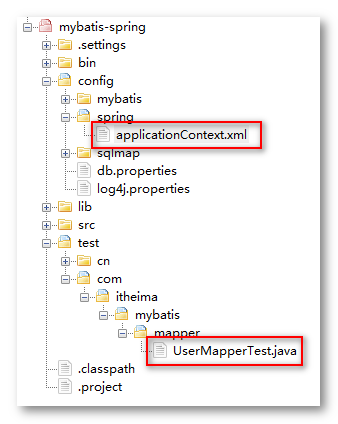
Mybatis+Spring整合后Mapper测试类编写
public class UserMapperTest {

private ApplicationContext applicationContext;

    @Before

    public void init() throws Exception {

        //初始化spring容器

        applicationContext = new ClassPathXmlApplicationContext("classpath:spring/applicationContext.xml");

    }

    @Test

    public void testDeleteByPrimaryKey() {

        fail("Not yet implemented");

    }

    @Test

    public void testInsert() {

        UserMapper userMapper = applicationContext.getBean(UserMapper.class);

        User user = new User();

        user.setUsername("武大郎");

        user.setSex("1");

        user.setBirthday(new Date());

        user.setAddress("河北清河县");

        userMapper.insert(user);

    }

    @Test

    public void testSelectByExample() {

        UserMapper userMapper = applicationContext.getBean(UserMapper.class);

        UserExample example = new UserExample();

        //Criteria criteria = example.createCriteria();

        //criteria.andUsernameLike("%张%");

        //执行查询

        List<User> list = userMapper.selectByExample(example);

        for (User user : list) {

            System.out.println(user);

        }

    }

    @Test

    public void testSelectByPrimaryKey() {

        UserMapper userMapper = applicationContext.getBean(UserMapper.class);

        User user = userMapper.selectByPrimaryKey(10);

        System.out.println(user);

    }

    @Test

    public void testUpdateByPrimaryKey() {

        fail("Not yet implemented");

    }

}
applicationContext.xml:
<?xml version="1.0" encoding="UTF-8"?>

<beans xmlns="http://www.springframework.org/schema/beans"

    xmlns:context="http://www.springframework.org/schema/context" xmlns:p="http://www.springframework.org/schema/p"

    xmlns:aop="http://www.springframework.org/schema/aop" xmlns:tx="http://www.springframework.org/schema/tx"

    xmlns:xsi="http://www.w3.org/2001/XMLSchema-instance"

    xsi:schemaLocation="http://www.springframework.org/schema/beans http://www.springframework.org/schema/beans/spring-beans-4.0.xsd

    http://www.springframework.org/schema/context http://www.springframework.org/schema/context/spring-context-4.0.xsd

    http://www.springframework.org/schema/aop http://www.springframework.org/schema/aop/spring-aop-4.0.xsd http://www.springframework.org/schema/tx http://www.springframework.org/schema/tx/spring-tx-4.0.xsd

    http://www.springframework.org/schema/util http://www.springframework.org/schema/util/spring-util-4.0.xsd">

    <!-- 加载配置文件 -->

    <context:property-placeholder location="classpath:db.properties" />

    <!-- 数据库连接池 -->

    <bean id="dataSource" class="org.apache.commons.dbcp.BasicDataSource"

        destroy-method="close">

        <property name="driverClassName" value="${jdbc.driver}" />

        <property name="url" value="${jdbc.url}" />

        <property name="username" value="${jdbc.username}" />

        <property name="password" value="${jdbc.password}" />

        <property name="maxActive" value="10" />

        <property name="maxIdle" value="5" />

    </bean>

    <!-- sqlSessonFactory的配置 -->

    <bean id="sqlSessionFactory" class="org.mybatis.spring.SqlSessionFactoryBean">

        <!-- 配置数据库连接池 -->

        <property name="dataSource" ref="dataSource"></property>

        <!-- 加载配置文件 -->

        <property name="configLocation" value="classpath:mybatis/SqlMapConfig.xml"></property>

    </bean>

    <!-- 传统dao的配置方法 -->

    <bean id="userDaoImpl" class="cn.itheima.mybatis.dao.impl.UserDaoImpl">

        <!-- 注入sqlSessionFactory -->

        <property name="sqlSessionFactory" ref="sqlSessionFactory"/>

    </bean>

    <!-- mapper代理形式dao的配置 -->

    <!-- 第一种方法,配置代理对象 -->

    <!-- <bean id="userMapper" class="org.mybatis.spring.mapper.MapperFactoryBean">

        设置代理的mapper接口

        <property name="mapperInterface" value="cn.itheima.mybatis.mapper.UserMapper"></property>

        注入sqlSessionFactory

        <property name="sqlSessionFactory" ref="sqlSessionFactory"/>

    </bean> -->

    <!-- 配置包扫描器 -->

    <bean class="org.mybatis.spring.mapper.MapperScannerConfigurer">

        <!-- 配置要扫描的包 ,如果扫描多个包使用半角逗号分隔-->

        <!-- <property name="basePackage" value="cn.itheima.mybatis.mapper,com.itheima.mybatis.mapper"/> -->

        <property name="basePackage" value="com.itheima.mybatis.mapper"/>

    </bean>

</beans>
Mybatis+Spring整合后Mapper测试类编写的更多相关文章
- MyBatis Spring整合配置映射接口类与映射xml文件
本文转自http://blog.csdn.net/zht666/article/details/38706083 Spring整合MyBatis使用到了mybatis-spring,在配置mybati ...
- 通过模拟Mybatis动态代理生成Mapper代理类,讲解Mybatis核心原理
本文将通过模拟Mybatis动态代理生成Mapper代理类,讲解Mybatis原理 1.平常我们是如何使用Mapper的 先写一个简单的UserMapper,它包含一个全表查询的方法,代码如下 pub ...
- IntelliJ IDEA 2017版 SpringBoot测试类编写
SpringBoot的测试类编写Demo 源码见 https://github.com/liushaoye/baseone.git
- 解决spring mybatis 整合后mapper接口注入失败
spring整合mybatis,在dao层我们只写一个接口,配置相应的*mapper.xml文件, 报如下错误: org.springframework.beans.factory.Unsatisfi ...
- Mybatis 和Spring整合之mapper代理开发
F:\1ziliao\mybatis\代码 1.1 SqlMapConfig.xml <?xml version="1.0" encoding="UTF-8&quo ...
- SpringMVC+Mybatis+Spring整合
Maven引入需要的JAR包 pom.xml <properties> <!-- spring版本号 --> <spring.version>4.0.2.RELEA ...
- springMVC+MyBatis+Spring 整合(3)
spring mvc 与mybatis 的整合. 加入配置文件: spring-mybaits.xml <?xml version="1.0" encoding=" ...
- Mybatis——Spring整合
一.引入依赖 Spring的相关jar包 mybatis-3.4.1.jar mybatis-spring-1.3.0.jar mysql-connector-java-5.1.37-bin.jar ...
- springMVC+mybatis+spring整合案例
1.web.xml a:配置spring监听,使web容器在启动时加载spring的applicationContext.xml <listener> <listener-class ...
随机推荐
- 冒泡排序 最好O(n)平均O(n^2) 选择排序O(n2) 插入排序O(n2)
LOWB 三人组 分清有序区跟无序区 冒泡排序 思路: 首先,列表每两个相邻的数,如果前边的比后边的大,那么交换和两个数.... 冒泡排序优化 如果一趟没有发生任何交换 那么证明列表已经是有序的了 i ...
- VS2015应用NuGet
一.什么是Nuget Nuget是 ASP .NET Gallery 的一员.NuGet 是免费.开源的包管理开发工具,专注于在 .NET 应用开发过程中,简单地合并第三方的组件库. 当需要分享开发的 ...
- SQL BETWEEN 操作符
BETWEEN 操作符在 WHERE 子句中使用,作用是选取介于两个值之间的数据范围. BETWEEN 操作符 操作符 BETWEEN ... AND 会选取介于两个值之间的数据范围.这些值可以是数值 ...
- 5.04-requests_cookies
import requests # 请求数据url member_url = 'https://www.yaozh.com/member/' headers = { 'User-Agent': 'Mo ...
- 《程序员的自我修养》读书笔记——系统调用、API
系统调用 程序运行的时候,本身是没有权限访问多少系统资源的.系统资源有限,如果操作系统不进行控制,那么各个程序难免会产生冲突.线程操作系统都将可能产生冲突的系统资源保护起来,阻止程序直接访问. ...
- centos7下安装docker(18docker日志---docker logs)
在微服务架构中,由于容器的数量众多以及快速变化的特性使得记录日志和监控变得越来越重要,考虑到容器的短暂和不固定周期,当我们需要排查问题的时候容器可能不在了.因此,一套集中式的日志管理系统是生产环境中不 ...
- 在Ubuntu上安装Jenkins
先决条件 安装Java SDK sudo apt-get install openjdk-8-jdk # sudo apt-get install openjdk-7-jdk 早些系统可以安装 第1步 ...
- echarts 中国地图实现 省、市、区县三级联动,省级下钻、市级下钻
每天学习一点点 编程PDF电子书.视频教程免费下载:http://www.shitanlife.com/code 效果如下图: 每天学习一点点 编程PDF电子书.视频教程免费下载:http://www ...
- 【移动端】meta使用
<!doctype html> <html> <head> <meta charset="utf-8"> <meta http ...
- linux命令之 tar
参数 -c 创建新归档 -d 比较归档和文件系统的差异 -r 追加文件到归档 -t 存档的内容列表 -x 提取归档所有文件 -C 改变解压目录 -f 使用归档文件或设备归档 -j bzip2 压缩 - ...