
通过jedis远程访问redis服务器
一.jedis简介
类似于mysql数据库,一般开发都需要通过代码去访问redis服务器,对于主流的开发语言,redis提供了访问的客户端接口。
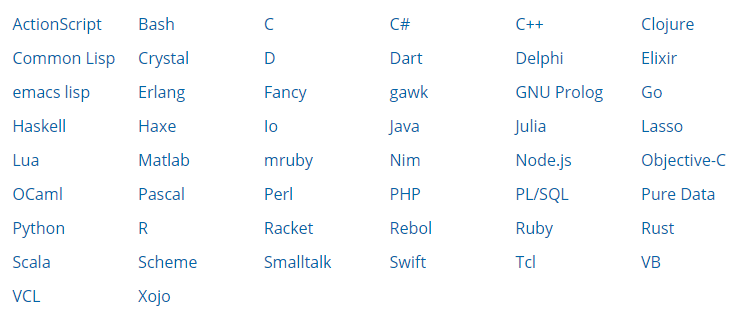
而对于Java而言,最常用的就是jedis了。
二.jedis访问redis服务器代码实现
1.创建Maven工程,添加jedis依赖如下:
<!--redis-->

    <dependency>

      <groupId>redis.clients</groupId>

      <artifactId>jedis</artifactId>

      <version>2.9.0</version>

    </dependency>

  </dependencies>
2.简单的代码测试
public class RedisTest {

    public static void main(String[] args) {

        Jedis jedis = new Jedis("192.168.2.132", 6379);  //创建客户端,1p和端口号

        jedis.set("name", "齐高相");

        String value = jedis.get("name");

         System.out.println(value);

         jedis.close(); //释放连接资源

    }

}
运行之后,会报错。
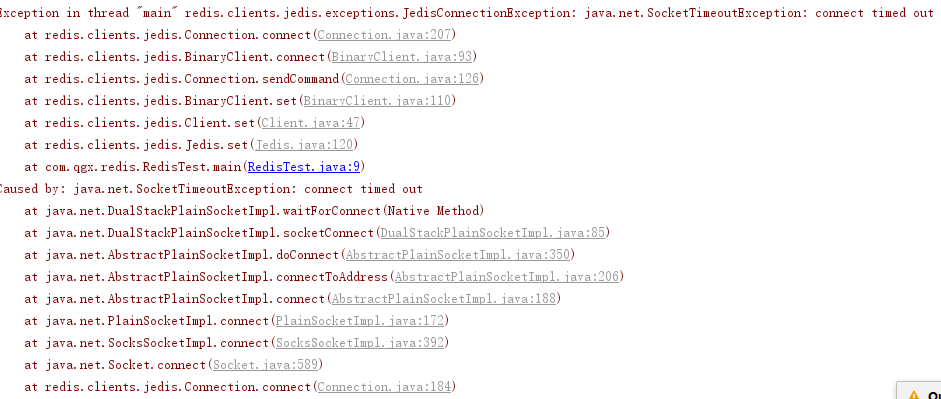
原因是redis在虚拟机上,默认只允许本机访问,
1.开放redis端口的防火墙
命令如下:

继续尝试运行,
Exception in thread "main" redis.clients.jedis.exceptions.JedisDataException: DENIED Redis is running in protected mode because protected mode is enabled, no bind address was specified, no authentication password is requested to clients. In this mode connections are only accepted from the loopback interface. If you want to connect from external computers to Redis you may adopt one of the following solutions: 1) Just disable protected mode sending the command 'CONFIG SET protected-mode no' from the loopback interface by connecting to Redis from the same host the server is running, however MAKE SURE Redis is not publicly accessible from internet if you do so. Use CONFIG REWRITE to make this change permanent. 2) Alternatively you can just disable the protected mode by editing the Redis configuration file, and setting the protected mode option to 'no', and then restarting the server. 3) If you started the server manually just for testing, restart it with the '--protected-mode no' option. 4) Setup a bind address or an authentication password. NOTE: You only need to do one of the above things in order for the server to start accepting connections from the outside.
at redis.clients.jedis.Protocol.processError(Protocol.java:127)
at redis.clients.jedis.Protocol.process(Protocol.java:161)
at redis.clients.jedis.Protocol.read(Protocol.java:215)
at redis.clients.jedis.Connection.readProtocolWithCheckingBroken(Connection.java:340)
at redis.clients.jedis.Connection.getStatusCodeReply(Connection.java:239)
at redis.clients.jedis.Jedis.set(Jedis.java:121)
at com.qgx.redis.RedisTest.main(RedisTest.java:9)
报错的意思是说redis在保护模式下运行,需要去掉保护。
去掉redis的自我保护
1.直接去掉自我保护(不推荐)
进入redis的配置文件
vi /usr/local/redis/redis.conf
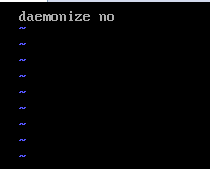
将daemonize yes改为no
第二种 设置redis的连接密码
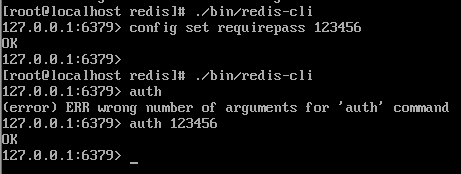
./bin/redis-cli
config set requirepass 123456 123456为访问密码
代码处需要认证密码。
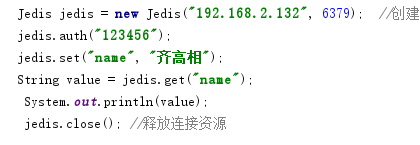
重新运行
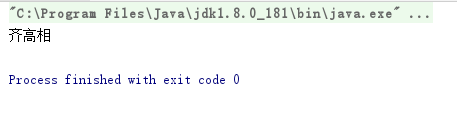
至此,远程访问成功!
通过jedis远程访问redis服务器的更多相关文章
- Redis服务器搭建/配置/及Jedis客户端的使用方法
摘要 Redis服务器搭建.常用参数含意说明.主从配置.以及使用Jedis客户端来操作Redis Redis服务器搭建 安装 在命令行执行下面的命令: $ wget http://download.r ...
- 外部服务器使用jedis操作redis数据库
使用maven获取jedis的包,我本来想去找jedis的jar包的,但是没找到. (maven) <dependency> <groupId>redis.client ...
- Redis服务器开启远程访问
重启 ps aux|grep redis root 32684 0.0 0.0 48452 6944 ? Ssl 21:27 0:00 ./redis-server *:6379 kill了这个进程 ...
- Spring + Jedis集成Redis(集群redis数据库)
前段时间说过单例redis数据库的方法,但是生成环境一般不会使用,基本上都是集群redis数据库,所以这里说说集群redis的代码. 1.pom.xml引入jar <!--Redis--> ...
- Java中使用Jedis操作Redis(转载)
整理 1.字符串 添加:set keyname value 查询:get keyname 拼接:append keyname value 删除:del keyname 添加多个: mset keyna ...
- (转)Java中使用Jedis操作Redis
转自http://www.cnblogs.com/liuling/p/2014-4-19-04.html 使用Java操作Redis需要jedis-2.1.0.jar,下载地址:http://file ...
- Java中使用Jedis操作Redis
使用Java操作Redis需要jedis-2.1.0.jar,下载地址:http://files.cnblogs.com/liuling/jedis-2.1.0.jar.zip 如果需要使用Redis ...
- 关于Jedis连接redis出现问题
环境说明: redis服务器系统:ubuntu ip 192.168.10.9 port 6379 两台电脑:一个作为专门的服务器,一个是开发环境,以下一顿操作皆基于开发环境. 就这样的简单的代码连接 ...
- Jedis操作Redis数据库
添加Maven依赖: <dependencies> <!-- 单元测试 --> <dependency> <groupId>junit</grou ...
随机推荐
- YOLOv3训练自己的数据
1. 下载预训练权重文件 YOLOv3使用在Imagenet上预训练好的模型参数(文件名称: darknet53.conv.74,大小76MB)基础上继续训练. darknet53.conv.74下 ...
- 测试那些事儿-Jmeter介绍及使用
Jmeter与LR有啥区别? Jmeter工具组成部分: 1.资源生成器:用于生成测试过程中服务器,负载机的资源代码.(LR中的VuGen) 2.用户运行器:通常是一个脚本运行引擎,根据脚本要求模拟指 ...
- 锚点的animate使用过程中定位不准确的问题小记
源码: $('html, body, .S').animate({ scrollTop: $('.a1').offset().top - 133}, { duration: 1500, easing: ...
- 前端开发模拟数据------webpack-api-mocker
应用场景: 在实际的项目开发过程中,一般都会进行前后端分离的开发模式,前端通过mock或者其他的插件模拟后台返回数据的功能.在常用的webpack构建工程项目中,通过和webpack-dev-serv ...
- The listener supports no services
问题描述 sql> lsnrctl start 提示: The listener supports no services The command completed successfully ...
- Ubuntu使用命令行打印文件
Ubuntu使用命令行打印文件 正文 环境: Ubuntu 16.04.3 LTS HP Deskjet InkAdvantage 4648 准备步骤 安装Common UNIX Printing S ...
- ubuntu 上安装node.js 的简单方法
一.安装 1.$ sudo apt-get install nodejs 2.$ sudo apt-get install npm 二.升级 1.升级npm命令如下: $ sudo npm i ...
- MySQL命令行登陆,远程登陆MySQL 的方法
https://www.cnblogs.com/lvk618/p/3522321.html 1.MySQL自带工具的存放路径: D:\Program Files\MySQL\MySQL Server ...
- 《大型网站系统与Java中间件实现》有感
头一次只用了一周的时间就看完一本书<大型网站系统与Java中间件实现>,这本书是关于设计方面的,提到了服务框架,消息中间件,数据访问层,以及如何解决应用之间的调用,解耦,以及应用和存储之间 ...
- Python控制台颜色
Python控制台颜色 格式:\033[显示方式;前景色;背景色m 说明: 前景色 背景色 颜色 30 40 黑色 31 41 红色 32 42 绿色 33 43 黃色 34 44 蓝色 35 45 ...