
给ubuntu设置静态ip —— How to set static IP Address in Ubuntu Server 16.04
原文: http://www.configserverfirewall.com/ubuntu-linux/ubuntu-set-static-ip-address/
-------------------------------------------------------------------------------------------------
How to set static IP Address in Ubuntu Server 16.04
It is really important to know how to configure static IP Address on Ubuntu Server, Because it is almost impossible to run a server without a static IP Address.
During the installation, Ubuntu Server by default configured to use dynamic IP Address. In this Tutorial we are going to learn how to set static IP Address in Ubuntu Server 16.04.
Following are the steps we are going to follow
- Check Available network interfaces on Ubuntu Server 16.04
- Add static IP Configuration to the network configuration file.
- Restart Ubuntu Networking Service.
Check Available Network Interfaces on Ubuntu Server
First of all you need to get the list of available network interfaces on your Ubuntu Server 16.04. We can use ip link show command to find available network interfaces on Ubuntu Linux.
ip link show
You should get the similar output as below screenshot shows.
 ip add command list Network Interfaces
As above image shows, Our Ubuntu Server has Ethernet interfaces called enp0s3. Next we'll set static IP address to the enp0s3 interface.
Set static IP Address to the network interface
For this example I am going configure enp0s3 Ethernet interfaces with following ip configuration
IP Address = 192.168.1.10
Network mask = 255.255.255.0
Default gateway = 192.168.1.1
DNS Server = 8.8.8.8 and 8.8.4.4
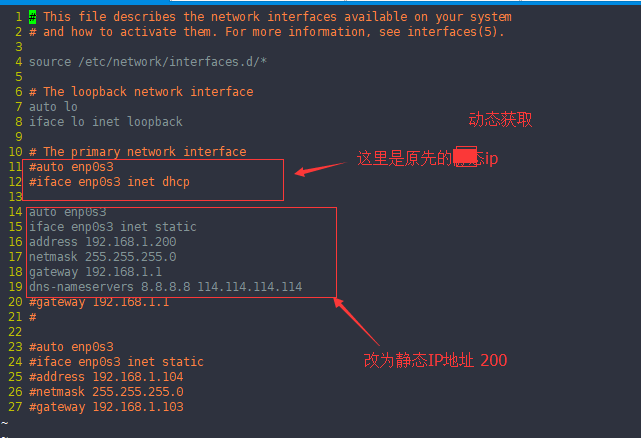
On Ubuntu server, in order to set static IP address we need to add IP configuration to the /etc/network/interfaces file. So open the /etc/network/interfaces file using a command line text editor (You can use vim or nano on Ubuntu Server).
vim /etc/network/interfaces
Then set static IP address as follows.
First line of configuration should be the word "auto" followed by the interface name (This brought up the network interface automatically when system boot or when networking restart).
auto enp0s3
The next line should specify whether to use static IP address or dhcp ip on the enp0s3 network interface. In our case it should be static.
auto enp0s3
iface enp0s3 inet static
Then add the static IP configuration as follows.
auto enp0s3
iface enp0s3 inet static
address 192.168.1.10
netmask 255.255.255.0
gateway 192.168.1.1
dns-nameservers 8.8.8.8 8.8.4.4
Restart Networking Service
After setting up IP Configuration, we need to restart Ubuntu networking service.
sudo ip addr flush enp0s3 && sudo systemctl restart networking.service
Verify the static IP configuration.
After restarting network, use ip add command to make sure that static ip address has been assigned to the network interface.
ip add

Then send ICMP request to a remote host to check the connectivity.
ping -c 4 google.com

Configure Multiple Network Interfaces
Same Way you can configure multiple network interface on ubuntu server using /etc/network/interfaces file.
Example
In the following example, I have set static IP Address on two network interfaces (enp0s3 and enp0s8).
auto enp0s3
iface enp0s3 inet static
address 192.168.1.10
netmask 255.255.255.0
gateway 192.168.1.1
dns-nameservers 8.8.8.8 8.8.4.4
auto enp0s8
iface enp0s8 inet static
address 192.168.0.100
netmask 255.255.255.0
*** Most important thing when configuring multiple interface is you cannot set multiple default gateways. Only one interface should configure with the default gateway. For other interfaces you should add default gateway using static routes.
Summary : Set Static IP Ubuntu Server 16.04
In this tutorial we learned how to set static ip address in Ubuntu server 16.04.
- Using ip link show command we identified the available network interface in our ubuntu server 16.04.
给ubuntu设置静态ip —— How to set static IP Address in Ubuntu Server 16.04的更多相关文章
- Ubuntu Server 16.04修改IP、DNS、hosts
本文记录下Ubuntu Server 16.04修改IP.DNS.hosts的方法 -------- 1. Ubuntu Server 16.04修改IP sudo vi /etc/network/i ...
- Ubuntu Server 16.04 安装MySQL并设置远程访问
Ubuntu Server 16.04 安装MySQL 1. 使用root账号 sudo apt-get install mysql-serversudo apt-get install mysql- ...
- 基于Ubuntu Server 16.04 LTS版本安装和部署Django之(三):设置上传文件夹权限(这里测试用完全共享)
基于Ubuntu Server 16.04 LTS版本安装和部署Django之(一):安装Python3-pip和Django 基于Ubuntu Server 16.04 LTS版本安装和部署Djan ...
- [原创]在HP DL380 G7服务器上部署基于Ubuntu Server 16.04 和 VirtualBox的云平台
对于一线开发人员来说,一提到虚拟机平台,往往会让人联想到在价格昂贵的服务器上部署VMware vSphere之类软件来实现. 笔者作为一个资深码农,也是一直梦寐着在自己家中打造一个真正的家庭私有云,秒 ...
- Ubuntu Server 16.04.1系统安装
一.Ubuntu Server 16.04.1系统安装 Ubuntu分为桌面版(desktop)和服务器版(Server),下面为大家介绍服务器版本Ubuntu Server 16.04.1的详细安装 ...
- 基于Ubuntu Server 16.04 LTS版本安装和部署Django之(五):测试项目
基于Ubuntu Server 16.04 LTS版本安装和部署Django之(一):安装Python3-pip和Django 基于Ubuntu Server 16.04 LTS版本安装和部署Djan ...
- 基于Ubuntu Server 16.04 LTS版本安装和部署Django之(四):安装MySQL数据库
基于Ubuntu Server 16.04 LTS版本安装和部署Django之(一):安装Python3-pip和Django 基于Ubuntu Server 16.04 LTS版本安装和部署Djan ...
- 基于Ubuntu Server 16.04 LTS版本安装和部署Django之(二):Apache安装和配置
基于Ubuntu Server 16.04 LTS版本安装和部署Django之(一):安装Python3-pip和Django 基于Ubuntu Server 16.04 LTS版本安装和部署Djan ...
- 从零到一,利用kubeadm在ubuntu server 16.04 64位系统离线安装kubernetes v1.10.0
说明 初步接触kubernets,记录学习过程 本教程目的利用kubeadm在ubuntu server 16.04 64位系统离线安装kubernets v1.10.0 环境信息 节点IP地址 角色 ...
随机推荐
- virtualbox测试k8s要注意的情况
想在virtualBox上测试k8s,遇到两个情况要注意.. 第一是flannel和dashborad起不起来,master都无法正常..这时可以想办法把Iptables,selinux,firewa ...
- AC日记——Sagheer, the Hausmeister codeforces 812b
812B - Sagheer, the Hausmeister 思路: 搜索: 代码: #include <cstdio> #include <cstring> #includ ...
- React Native - 5 ListView实现图文混排
首先在根目录下建一个images文件夹,准备好图片 准备datasource 准备图片资源 准备renderRow方法 记得要import相应的类,ListView, Image, Touchable ...
- css3之nth-child和nth-of-type的区别
之前一直开发的是兼容老版本的代码,所以很少用到有关c3里面的代码格式,今天就对于使用的c3选择器中nth-child和nth-of-type做一个区分.首先:1.nth-child(n):是选择父级元 ...
- ffmpeg测试程序
ffmpeg在编译安装后在源码目录运行make fate可以编译并运行测试程序.如果提示找不到ffmpeg的库用LD_LIBRARY_PATH指定一下库安装的目录.
- Team Service 编译项目并生成项目
第一步:生成GitHub帐号连接 在Service中选择Github 在弹出的GitHub连接中点击授权,即会弹出另一个窗口,输入Github的用户名及口令,即可授权. 第二步:创建Build定义 解 ...
- Python—HTTP处理Gzip压缩数据
HTTP 请求中包含Accept-encoding: gzip头信息可以告诉服务器,如果它有任何新数据要发送给我时,请以压缩的格式发送.如果服务器支持压缩,它将返回由 gzip 压缩的数据并且使用Co ...
- Codeforces Round #165 (Div. 1) Greenhouse Effect(DP)
Greenhouse Effect time limit per test 2 seconds memory limit per test 256 megabytes input standard i ...
- leetcode136 Single Number
题意:数组中每个数字都出现了两次,只有一个出现一次,找出这个数 思路:很明显不能从头到位遍历来找,首先是超时的原因,再次就是这样很没意思·····但是却没想到什么好办法,因为不了解按位异或(XOR). ...
- JCL: What is EXCP
JCL: What is EXCP ? EXCP stands for EXecute Channel Program. These are the I/O subsystem hardwar ...