
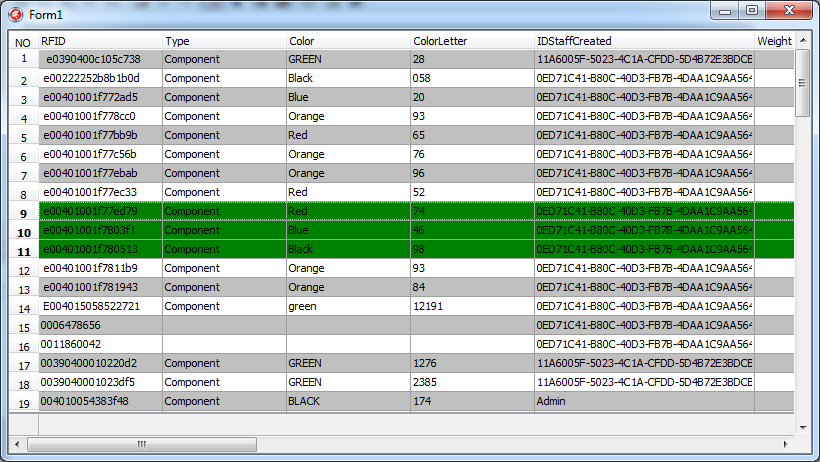
cxGrid 显示行号及行号列列名
cxGrid默认不显示行号,但是可以通过cxGrid1DBTableView1CustomDrawIndicatorCell事件来重绘行号
选中cxGrid1DBTableView1,在OnCustomDrawIndicatorCell事件中,输入以下代码:
|
1
2
3
4
5
6
|
procedure TForm1.cxGrid1DBTableView1CustomDrawIndicatorCell( Sender: TcxGridTableView; ACanvas: TcxCanvas; AViewInfo: TcxCustomGridIndicatorItemViewInfo; var ADone: Boolean);begin SetRowNumber(Sender, AviewInfo, ACanvas, ADone);//调用SetRowNumber函数,函数声明及实现见后end; |
SetRowNumber函数声明(注意函数声明的摆放位置,此处不在Form内):
|
1
2
|
procedure SetRowNumber(var Sender: TcxGridTableView; var AViewInfo: TcxCustomGridIndicatorItemViewInfo; ACanvas: TcxCanvas; var ADone: boolean); |
SetRowNumber函数实现代码:
|
1
2
3
4
5
6
7
8
9
10
11
12
13
14
15
16
17
18
19
20
21
22
23
24
25
26
27
28
29
30
31
32
33
34
35
36
37
38
39
40
41
42
43
44
45
46
47
48
49
50
|
procedure SetRowNumber(var Sender: TcxGridTableView; var AViewInfo: TcxCustomGridIndicatorItemViewInfo; ACanvas: TcxCanvas; var ADone: boolean);var AIndicatorViewInfo: TcxGridIndicatorRowItemViewInfo; ATextRect: TRect; AFont: TFont; AFontTextColor, AColor: TColor; procedure DrawIndicatorImage(ACanvas: TcxCanvas; const R: TRect; AKind: TcxIndicatorKind); var X, Y: Integer; begin if AKind = ikNone then Exit; X := (R.Left + R.Right - cxLookAndFeelPainters.cxIndicatorImages.Width); Y := (R.Top + R.Bottom - cxLookAndFeelPainters.cxIndicatorImages.Height) div 2; cxLookAndFeelPainters.cxIndicatorImages.Draw(ACanvas.Canvas, X, Y, Ord(AKind) - 1); end;begin try AFont := ACanvas.Font; AColor := clBtnFace; AFontTextColor := clWindowText; if (AViewInfo is TcxGridIndicatorHeaderItemViewInfo) then begin ATextRect := AViewInfo.Bounds; InflateRect(ATextRect, -1, -1); Sender.LookAndFeelPainter.DrawHeader(ACanvas, AViewInfo.Bounds, ATextRect, [], cxBordersAll, cxbsNormal, taCenter, TcxAlignmentVert.vaCenter, False, False, '序号', AFont, AFontTextColor, AColor); ADone := True; end; if not (AViewInfo is TcxGridIndicatorRowItemViewInfo) then Exit; ATextRect := AViewInfo.ContentBounds; AIndicatorViewInfo := AViewInfo as TcxGridIndicatorRowItemViewInfo; InflateRect(ATextRect, -1, -1); if Sender.DataController.RecordCount > 0 then begin if AIndicatorViewInfo.GridRecord.Selected then AFontTextColor := clRed else AFontTextColor := clWindowText; end; Sender.LookAndFeelPainter.DrawHeader(ACanvas, AViewInfo.ContentBounds, ATextRect, [], [bBottom, bLeft, bRight], cxbsNormal, taCenter, TcxAlignmentVert.vaCenter, False, False, IntToStr(AIndicatorViewInfo.GridRecord.Index + 1), AFont, AFontTextColor, AColor); ADone := True; except end; DrawIndicatorImage(ACanvas, ATextRect, AIndicatorViewInfo.IndicatorKind);end; |
最后将cxGrid1DBTableView1中的OptionView中的Indicator设为True, IndicatorWidth设为适合值即可。

cxGrid 显示行号及行号列列名的更多相关文章
- GridView 显示行号 设置行号列的宽度
/// <summary> /// GridView 显示行号 设置行号列的宽度 /// </summary> /// <param name="gv" ...
- APISpace 尾号限行API接口 免费好用
尾号限行是一种为了缓解城市交通压力而催生的交通制度,措施实施以后对城市交通拥堵起到缓解作用.每个地区的尾号限行规定都有所不同,具体的以当地的为准. 尾号限行API,提供已知所有执行限行政策的共计6 ...
- PyQt学习随笔:QTableWidget的visualRow、visualColumn、logicalRow、logicalColumn(可见行、逻辑行、可见列、逻辑列)相关概念及方法探究
老猿Python博文目录 专栏:使用PyQt开发图形界面Python应用 老猿Python博客地址 一.概念 关于逻辑行logicalRow.列logicalColumn和可见行visualRow.列 ...
- 帆软FineReport报表由于使用HTML显示后无法控制行高
问题:帆软FineReport报表由于使用HTML显示后无法控制行高. 原因:首先每行的第一个单元格是以HTML显示的,然后,数据库查询的数据集中,sql语句中包含这个代码:'<pre>' ...
- excel VBA正则匹配单元格符号,并按符号把单元格拆分行(这里是按第一列分行,分行是从活动单元格的行开始,分行前需要选择所有需要填充内容的列,否则需要后期手动填充)
Sub W() ' MsgBox "行数:" & Selection.Rows.Count Dim rows_count As Integer Dim ro ...
- linux 如何显示一个文件的某几行(中间几行)
linux 如何显示一个文件的某几行(中间几行) [一]从第3000行开始,显示1000行.即显示3000~3999行 cat filename | tail -n +3000 | head -n 1 ...
- Android设置TextView显示一行或多行
在listView的item中或者是特殊的业务需求中,会要求TextView的内容不完全显示,只有通过一个指定的操作后才显示所有的,比如说一个按钮或者是其它的什么控件. 要想实现这个效果并不难,只要控 ...
- miniui 给表格行添加监听事件的几种方法以及点击某列列名数据不能排序的问题
最近在使用miniui框架做开发,在做表格行的点击监听事件中发现了几个属性,都可以起到监听效果但是执行的结果却大有不同.好了废话不多说,直接上代码. <div id="pageGrid ...
- linux指定只显示(只打印)文件中的某几行(中间几行)
[一]从第3000行开始,显示1000行.即显示3000~3999行 cat filename | tail -n +3000 | head -n 1000 [二]显示1000行到3000行 cat ...
- 007_linux显示一个文件的某几行(中间几行)
<1>从第3000行开始,显示1000行.即显示3000~3999行 cat -n filename | tail -n +3000 | head -n 1000 cat -n anaco ...
随机推荐
- Drupal启动过程
Drupal整个启动过程共分为8个阶段: DRUPAL_BOOTSTRAP_CONFIGURATION:initialize configuration DRUPAL_BOOTSTRAP_PAGE_C ...
- CSS-常用媒体查询
width:视口宽度.height:视口高度.device-width:渲染表面的宽度(对我们来说,就是设备屏幕的宽度).device-height:渲染表面的高度(对我们来说,就是设备屏幕的高度). ...
- 关于new与=号创建对象的区别
(1)先定义一个名为str的对String类的对象引用变量:String str: (2)[在[栈]中查找有没有存放值为"abc"的地址,如果没有,则开辟一个存放字面值为" ...
- 【HTML5 WebSocket】WebSocket对象特性和方法
<HTML5 WebSocket权威指南>学习笔记&3 WebSocket方法的对象特性 1. WebSocket方法 a. send方法 send方法用于在WebSocket连接 ...
- Machine-wide Progress Telerik Fiddler installation has been found at ...Please, use that one or uninstall it ...
问题描述:无法安装Fiddle,提示已有Fiddle,但是却找不到. 打开Fiddle,提示“Machine-wide Progress Telerik Fiddler installation ha ...
- Java并发编程(三):并发模拟(工具和Java代码介绍)
并发模拟工具介绍 ① Postman : Http请求模拟工具 从图上我们可以看出,Postman模拟并发其实是分两步进行操作的.第一步:左边的窗口,在窗口中设置相关接口以及参数,点击运行进行第二步. ...
- 《MVC +EasyUI 》——表单的提交
之前用AJax给Controller传递參数,然后再调用服务端的方法对数据库进行更改,今天碰到一个新的方法,就是表单的提交.这样能够省去AJax穿參.当表单提交后.我们能够获取表单上控件中的值 ...
- linux下的几个cd命令
linux cd命令 cd data 进入到 data 目录 cd .. 返回上级文件夹 cd ~ 返回用户主文件夹 cd / 返回根文件夹
- Atitit 《摩奴法典》overivew 读后感 不是由国王 颁布的,而是 僧侣编制
Atitit <摩奴法典>overivew 读后感 不是由国王 颁布的,而是 僧侣编制 1. <摩奴法典>是印度最古老的一部法律文献.该法典不是由国王或立法机关制定颁布的,而是 ...
- iOS开发多线程篇 05 —GCD介绍
iOS开发多线程篇—GCD介绍 一.简单介绍 1.什么是GCD? 全称是Grand Central Dispatch,可译为“牛逼的中枢调度器” 纯C语言,提供了非常多强大的函数 2.GCD的优势 G ...