
cxGrid 显示行号及行号列列名
cxGrid默认不显示行号,但是可以通过cxGrid1DBTableView1CustomDrawIndicatorCell事件来重绘行号
选中cxGrid1DBTableView1,在OnCustomDrawIndicatorCell事件中,输入以下代码:
|
1
2
3
4
5
6
|
procedure TForm1.cxGrid1DBTableView1CustomDrawIndicatorCell( Sender: TcxGridTableView; ACanvas: TcxCanvas; AViewInfo: TcxCustomGridIndicatorItemViewInfo; var ADone: Boolean);begin SetRowNumber(Sender, AviewInfo, ACanvas, ADone);//调用SetRowNumber函数,函数声明及实现见后end; |
SetRowNumber函数声明(注意函数声明的摆放位置,此处不在Form内):
|
1
2
|
procedure SetRowNumber(var Sender: TcxGridTableView; var AViewInfo: TcxCustomGridIndicatorItemViewInfo; ACanvas: TcxCanvas; var ADone: boolean); |
SetRowNumber函数实现代码:
|
1
2
3
4
5
6
7
8
9
10
11
12
13
14
15
16
17
18
19
20
21
22
23
24
25
26
27
28
29
30
31
32
33
34
35
36
37
38
39
40
41
42
43
44
45
46
47
48
49
50
|
procedure SetRowNumber(var Sender: TcxGridTableView; var AViewInfo: TcxCustomGridIndicatorItemViewInfo; ACanvas: TcxCanvas; var ADone: boolean);var AIndicatorViewInfo: TcxGridIndicatorRowItemViewInfo; ATextRect: TRect; AFont: TFont; AFontTextColor, AColor: TColor; procedure DrawIndicatorImage(ACanvas: TcxCanvas; const R: TRect; AKind: TcxIndicatorKind); var X, Y: Integer; begin if AKind = ikNone then Exit; X := (R.Left + R.Right - cxLookAndFeelPainters.cxIndicatorImages.Width); Y := (R.Top + R.Bottom - cxLookAndFeelPainters.cxIndicatorImages.Height) div 2; cxLookAndFeelPainters.cxIndicatorImages.Draw(ACanvas.Canvas, X, Y, Ord(AKind) - 1); end;begin try AFont := ACanvas.Font; AColor := clBtnFace; AFontTextColor := clWindowText; if (AViewInfo is TcxGridIndicatorHeaderItemViewInfo) then begin ATextRect := AViewInfo.Bounds; InflateRect(ATextRect, -1, -1); Sender.LookAndFeelPainter.DrawHeader(ACanvas, AViewInfo.Bounds, ATextRect, [], cxBordersAll, cxbsNormal, taCenter, TcxAlignmentVert.vaCenter, False, False, '序号', AFont, AFontTextColor, AColor); ADone := True; end; if not (AViewInfo is TcxGridIndicatorRowItemViewInfo) then Exit; ATextRect := AViewInfo.ContentBounds; AIndicatorViewInfo := AViewInfo as TcxGridIndicatorRowItemViewInfo; InflateRect(ATextRect, -1, -1); if Sender.DataController.RecordCount > 0 then begin if AIndicatorViewInfo.GridRecord.Selected then AFontTextColor := clRed else AFontTextColor := clWindowText; end; Sender.LookAndFeelPainter.DrawHeader(ACanvas, AViewInfo.ContentBounds, ATextRect, [], [bBottom, bLeft, bRight], cxbsNormal, taCenter, TcxAlignmentVert.vaCenter, False, False, IntToStr(AIndicatorViewInfo.GridRecord.Index + 1), AFont, AFontTextColor, AColor); ADone := True; except end; DrawIndicatorImage(ACanvas, ATextRect, AIndicatorViewInfo.IndicatorKind);end; |
最后将cxGrid1DBTableView1中的OptionView中的Indicator设为True, IndicatorWidth设为适合值即可。

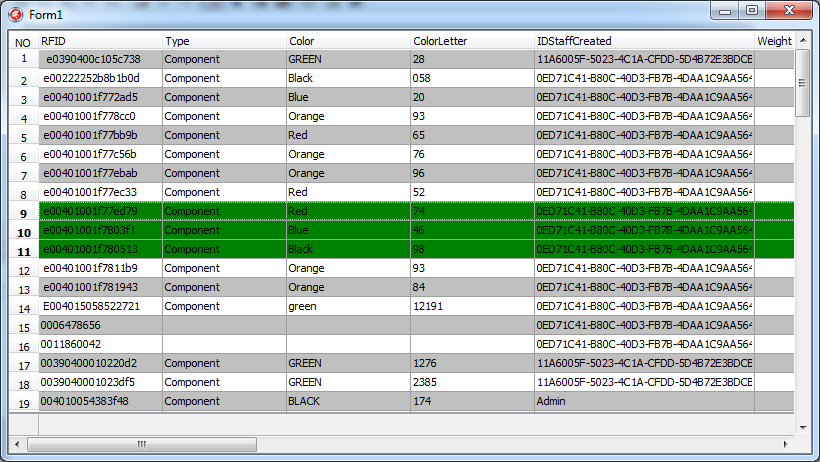
cxGrid 显示行号及行号列列名的更多相关文章
- GridView 显示行号 设置行号列的宽度
/// <summary> /// GridView 显示行号 设置行号列的宽度 /// </summary> /// <param name="gv" ...
- APISpace 尾号限行API接口 免费好用
尾号限行是一种为了缓解城市交通压力而催生的交通制度,措施实施以后对城市交通拥堵起到缓解作用.每个地区的尾号限行规定都有所不同,具体的以当地的为准. 尾号限行API,提供已知所有执行限行政策的共计6 ...
- PyQt学习随笔:QTableWidget的visualRow、visualColumn、logicalRow、logicalColumn(可见行、逻辑行、可见列、逻辑列)相关概念及方法探究
老猿Python博文目录 专栏:使用PyQt开发图形界面Python应用 老猿Python博客地址 一.概念 关于逻辑行logicalRow.列logicalColumn和可见行visualRow.列 ...
- 帆软FineReport报表由于使用HTML显示后无法控制行高
问题:帆软FineReport报表由于使用HTML显示后无法控制行高. 原因:首先每行的第一个单元格是以HTML显示的,然后,数据库查询的数据集中,sql语句中包含这个代码:'<pre>' ...
- excel VBA正则匹配单元格符号,并按符号把单元格拆分行(这里是按第一列分行,分行是从活动单元格的行开始,分行前需要选择所有需要填充内容的列,否则需要后期手动填充)
Sub W() ' MsgBox "行数:" & Selection.Rows.Count Dim rows_count As Integer Dim ro ...
- linux 如何显示一个文件的某几行(中间几行)
linux 如何显示一个文件的某几行(中间几行) [一]从第3000行开始,显示1000行.即显示3000~3999行 cat filename | tail -n +3000 | head -n 1 ...
- Android设置TextView显示一行或多行
在listView的item中或者是特殊的业务需求中,会要求TextView的内容不完全显示,只有通过一个指定的操作后才显示所有的,比如说一个按钮或者是其它的什么控件. 要想实现这个效果并不难,只要控 ...
- miniui 给表格行添加监听事件的几种方法以及点击某列列名数据不能排序的问题
最近在使用miniui框架做开发,在做表格行的点击监听事件中发现了几个属性,都可以起到监听效果但是执行的结果却大有不同.好了废话不多说,直接上代码. <div id="pageGrid ...
- linux指定只显示(只打印)文件中的某几行(中间几行)
[一]从第3000行开始,显示1000行.即显示3000~3999行 cat filename | tail -n +3000 | head -n 1000 [二]显示1000行到3000行 cat ...
- 007_linux显示一个文件的某几行(中间几行)
<1>从第3000行开始,显示1000行.即显示3000~3999行 cat -n filename | tail -n +3000 | head -n 1000 cat -n anaco ...
随机推荐
- 网站缓存技术(Redis、Memcached、Ehcache)
Redis 是什么? 通常而言目前的数据库分类有几种,包括 SQL/NSQL,,关系数据库,键值数据库等等等. 分类的标准也不一,Redis本质上也是一种键值数据库的,但它在保持键值数据库简单快捷特点 ...
- js 时间毫秒
1. "2014-08-18 00:00:00" 与 13位毫秒 互换 var oTime = { _format_13_time:function (str){ var tim ...
- Xcode中利用git源代码版本号控制
git是一个版本号控制系统,能够通过命令行来调用,也有专门的桌面软件.这里主要介绍在Xcode中怎样利用git来进行版本号的控制. 一.创建git源 从Xcode5開始引入了使用git的一些新特性.将 ...
- myeclipse中配置schemaLocation路径,实现xml文件自动提示
在开发中,XML的xsi:schemaLocation路径都是指向网络,但是这个网络地址有时候很不给力导致工程检验XML格式缓慢.所以有必要再myeclipse中配置本地xsd文件路径,以免每次校验都 ...
- unity, 不要试图用rigidbody.Sleep()停止rigidbody
如果想让rigidbody pause,用rigidbody.Sleep()是完全错误的办法.因为有很多情况都可能使一个处在sleep的rigidbody唤醒,所以调用rigidbody.Sleep( ...
- JS检查浏览器类型和版本号
先取得Navigator对象的userAgent属性的小写信息,之后依据正則表達式推断赋值. var Sys = {}; var ua = navigator.userAgent.toLowerCas ...
- firefox配置
Firefox23取消了一个很人性化的功能,就是在GUI界面中禁用JavaScript,对于这点我很不能理解!JavaScript是所有网页木马 的源头,防人之心不可无,FireFox就这么确信能防住 ...
- application/x-www-form-urlencoded和multipart/form-data的区别
在学习<form>元素时,enctype属性有三个值 enctype属性表格: 值 描述 application/x-www-form-urlencoded 在发送前编码所有字符(默认) ...
- cocoa pods 升级遇到的问题
1. cocoa pods 升级遇到的问题 运行 sudo gem update --system 报错 Updating rubygems-update ERROR: While executing ...
- Hadoop 2.0 编译问题小结
原文见 http://xiguada.org/hadoop-2-x-compile/ 这些问题是2013年初整理的,不过到目前为止,即使最新的hadoop2.0系列,编译总体上变化不大,因此还能适用. ...