
Androidannotation使用之@Rest获取资源及用户登录验证(一)
版权声明:本文为博主原创文章。未经博主同意不得转载。
https://blog.csdn.net/NUPTboyZHB/article/details/24384713
简介:
上一篇博文简单的介绍了一下AA(AndroidAnnotation)的简单使用,本博客简介Rest注解的使用。
官方站点介绍:https://github.com/excilys/androidannotations/wiki/Rest-API#rest
1.无需登录 ,直接通过post或者get获取
该方式和jquery中的ajax基本相似。本次实验,服务端就是用Struts+Spring+Hibernate开发的系统。下面用一个获取用户信息的样例说明:
package com.example.testaa;

import org.androidannotations.annotations.rest.Accept;

import org.androidannotations.annotations.rest.Post;

import org.androidannotations.annotations.rest.Rest;

import org.androidannotations.api.rest.MediaType;

import org.springframework.http.converter.StringHttpMessageConverter;

/*

 *@author: ZhengHaibo

 *web:     http://blog.csdn.net/nuptboyzhb

 *mail:    zhb931706659@126.com

 *2014-4-20  Nanjing,njupt,China

 */

@Rest(rootUrl = "http://192.168.0.104:8080/cbvr", converters = {StringHttpMessageConverter.class })

public interface UserService {

	@Post("/getUserInfoList.action")

	@Accept(MediaType.APPLICATION_JSON)

    String getUserInfoList();

}
2.须要登录后,才干获取到对应的信息。
如,当向server请求一个action的时候,server首先推断用户是否已经登录,假设没有登录,则直接跳转到登录页面。
也即是:你所请求的action被拦截。
凝视:服务端拦截器的写法可參见博文:http://blog.csdn.net/nupt123456789/article/details/18504615
下面以获取视频信息为例,也即是用户必须在登录的前提下。才干訪问。
/*

 * $filename: UserService.java,v $

 * $Date: 2014-4-20  $

 * Copyright (C) ZhengHaibo, Inc. All rights reserved.

 * This software is Made by Zhenghaibo.

 */

package com.example.testaa;

import org.androidannotations.annotations.rest.Post;

import org.androidannotations.annotations.rest.RequiresCookie;

import org.androidannotations.annotations.rest.Rest;

import org.androidannotations.annotations.rest.SetsCookie;

import org.springframework.http.converter.StringHttpMessageConverter;

/*

 *@author: ZhengHaibo

 *web:     http://blog.csdn.net/nuptboyzhb

 *mail:    zhb931706659@126.com

 *2014-4-20  Nanjing,njupt,China

 */

@Rest(rootUrl = "http://192.168.0.104:8080/cbvr", converters = {StringHttpMessageConverter.class })

public interface VideoService {

	/**

	 * 获取视频列表

	 * 必须传入一个JSESSIONID

	 * 也就是说。必须在登录的情况下才干够

	 * @param page

	 * @param rows

	 * @return

	 */

	@Post("/getVideoInfoList.action?

page={page}&rows={rows}")

	@RequiresCookie("JSESSIONID")

	String getVideoInfoList(int page,int rows);

	/**

	 * 登录系统,并将JSESSIONID

	 * 设置到cookie中

	 * @param username

	 * @param password

	 * @return

	 */

	@Post("/login.action?

username={username}&password={password}")

	@SetsCookie("JSESSIONID")

	String login(String username,String password);

}
最后,我们看一下MainActivity是怎么调用的。
package com.example.testaa;

import org.androidannotations.annotations.Background;

import org.androidannotations.annotations.Click;

import org.androidannotations.annotations.EActivity;

import org.androidannotations.annotations.UiThread;

import org.androidannotations.annotations.ViewById;

import org.androidannotations.annotations.rest.RestService;

import android.app.Activity;

import android.util.Log;

import android.widget.Button;

import android.widget.TextView;

/*

 *@author: ZhengHaibo

 *web:     http://blog.csdn.net/nuptboyzhb

 *mail:    zhb931706659@126.com

 *2014-4-15  Nanjing,njupt,China

 */

@EActivity(R.layout.activity_main)

public class MainActivity extends Activity {

	private static final String TAG="AAREST";

	@ViewById

	Button getUser;

	@ViewById

	Button getVideo;

	@ViewById

	TextView myTextView;

	@RestService

	UserService userService;

	@RestService

	VideoService videoService;

	/**

	 * 获取图像列表

	 */

	@Click

	void getUser() {

		getUserInBackground();

	}

	@Click

	void getVideo(){

		getVideoInBackground();

	}

	/**

	 * 获取Video视频列表

	 * 须要登录

	 */

	@Background

	void getVideoInBackground(){

		String string = videoService.login("admin", "admin");

		Log.d(TAG, string);

		String string2 = videoService.getVideoInfoList(1,5);

		Log.d(TAG, string2);

		displayTextView(string+string2);

	}

	/**

	 * 获取用户列表

	 * 无需登录

	 */

	@Background

	void getUserInBackground(){

		String string = userService.getUserInfoList();

		Log.d(TAG, string);

		displayTextView(string);

	}

	@UiThread

	void displayTextView(String string){

		myTextView.setText(string);

	}

}
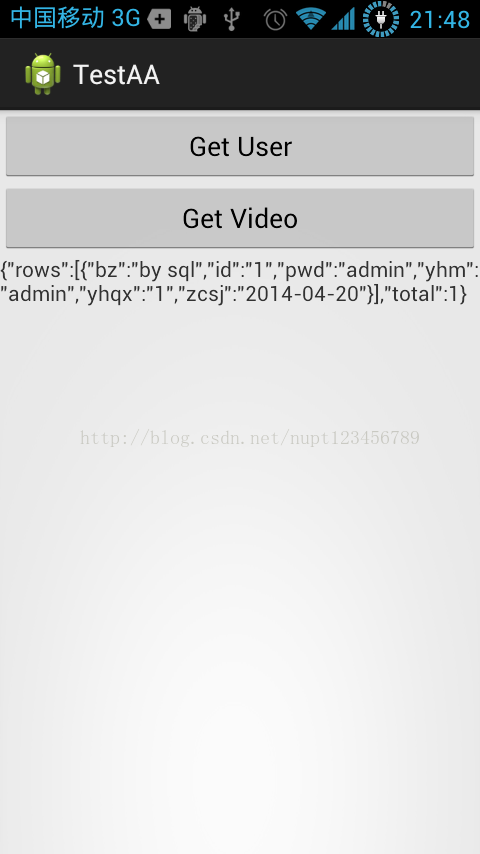
效果1:点击获取用户:
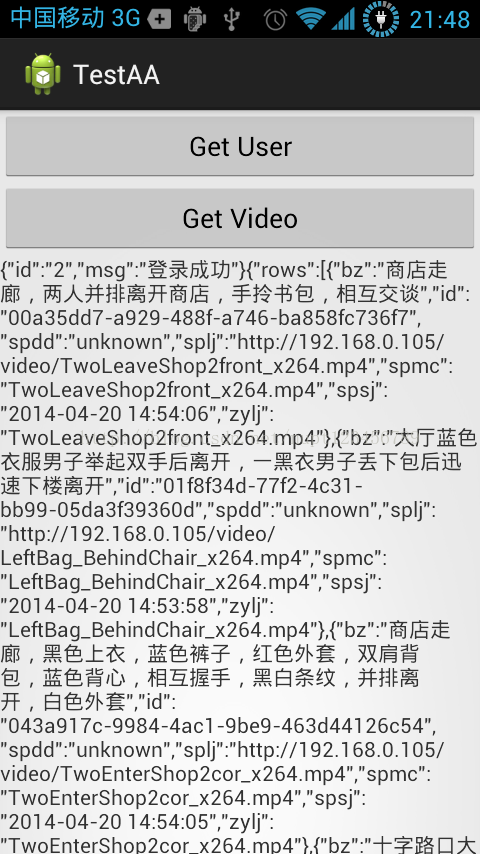
效果2:点击获取视频
思考:
以第二个获取视频信息为例:假设用户没有登录,结果会怎么样呢?我们把下列代码凝视掉:
String string = videoService.login("admin", "admin");然后。在点击获取视频button之后。页面例如以下:
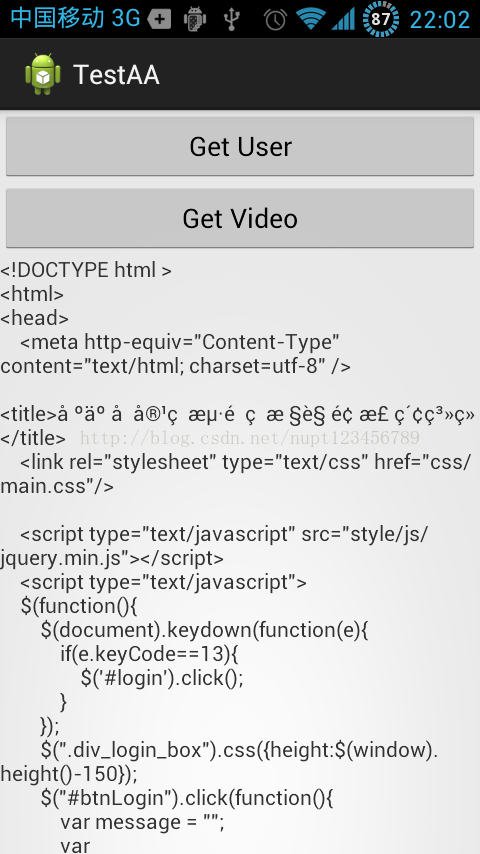
明显是一个跳转到首页之后的html代码。由此可见,我们必须先登录,并且在登录的方法前面。加入注解
@SetsCookie("JSESSIONID")可是。又有人会想,你为什么在SetCookie注解中加入“JSESSIONID”,而不是其它的值呢????事实上。刚開始我也不知道怎么回事,我就发现使用"session"登不上。因为server也是我发开的,我直接使用浏览器的时候,须要首先进入登录页面。然后在浏览器中訪问action。输入:http://localhost:8080/cbvr/getVideoInfoList.action?page=10&rows=1
此时,能够获取数据。在使用Chrome浏览器进行调试(F12),看到了訪问的时候,协议原来是这种:
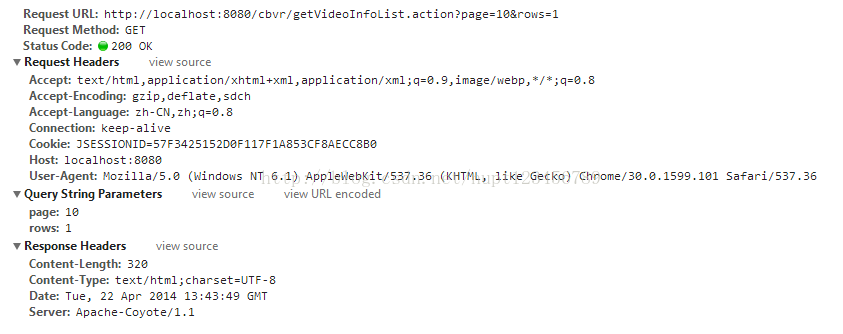
注意观察,在Request Headers中有一个Cookie选项。里面须要一个JSESSIONID的值,由此想到了加入Cookie相关的注解。问题得到解决。
整个项目下载:http://download.csdn.net/detail/nuptboyzhb/7242421
未经同意不得用于商业目的
Androidannotation使用之@Rest获取资源及用户登录验证(一)的更多相关文章
- android loginDemo +WebService用户登录验证
android loginDemo +WebService用户登录验证 本文是基于android4.0下的loginActivity Demo和android下的Webservice实现的.l ...
- Python程序练习1-模拟用户登录验证
1.功能简介 此程序模拟用户登录验证的过程,实现用户名输入.黑名单检测.用户有效性判别.密码输入及验证等.用户在3次以内输入正确密码登陆成功,连续输错3次密码登陆失败,且该用户名被记录在黑名单,黑名单 ...
- djangorestframework-jwt自带的认证视图进行用户登录验证源代码学习
Django REST framework JWT djangorestframework-jwt自带的认证视图进行用户登录验证源代码学习 SECRET_KEY = '1)q(f8jrz^edwtr2 ...
- cookie实现用户登录验证
cookie实现用户登录验证 1, INSTALLED_APPS中注册app03 2,在主程序中新建映射关系到app3的url中 from django.conf.urls import url,in ...
- python3 用户登录验证的小功能
用户登录验证,记录一下,还需要修改黑名单不合理 #!/usr/bin/env python3 ''' 需求:编写登录接口 1.输入用户名和密码 2.验证用户密码成功后输出欢迎消息 3.3次没有验证通过 ...
- 如何使用Django实现用户登录验证
最初开始搞用户登录验证的时候感觉没什么难的,不就是增删改查中的查询数据库么,但是还是遇到许多小问题,而且感觉在查询数据库的时候,要把前端的数据一条一条的进行比对,会导致我的代码很丑,而且方式很不智,所 ...
- 用javascript实现简单的用户登录验证
用javascript实现简单的用户登录验证 <!DOCTYPE html> <html lang="en"> <head> <meta ...
- django 从零开始 8 用户登录验证 待测
看文档 djang 自带一个用户登录验证的方法,不过有些看着懵逼,去网上找了一圈,发现很多都是照抄文档说明的,几乎没说啥原理 特别是 from django.contrib.auth import a ...
- Java初学者作业——编写Java程序,实现用户登录验证。
返回本章节 返回作业目录 需求说明: 编写Java程序,实现用户登录验证. 若用户名与密码输入正确,则提示"登录成功,欢迎回来!",若用户名与密码不匹配,则提示"用户名和 ...
随机推荐
- Exists/In/Any/All/Contains操作符
Exists/In/Any/All/Contains操作符 适用场景:用于判断集合中元素,进一步缩小范围. Any 说明:用于判断集合中是否有元素满足某一条件:不延迟.(若条件为空,则集合只要不为空就 ...
- Query performance optimization of Vertica
Don't fetch any data that you don't need,or don't fetch any columns that you don't need. Because ret ...
- c#中的程序集
程序集:一些相关类的包,比如三层中Model层都是一些数据库表的实体类.我们所用到的类都是位于各个程序集中,若需要调用某个类,就必须引用其所在的程序集. 访问级别:程序集中的类有四种访问级别,int ...
- golang学习之生成代码文档
go doc 工具会从 Go 程序和包文件中提取顶级声明的首行注释以及每个对象的相关注释,并生成相关文档. 一般用法: go doc package 获取包的文档注释,例如:go doc fmt 会显 ...
- 微信小程序整理
目录 开发环境 目录结构 WXML组件 WXSS 数据绑定 条件渲染 列表渲染 模版 事件 引用 路由传参 API 实例TodoList 1.开发环境 开发工具下载(https://mp.weixin ...
- Elasticsearch全文检索工具入门
Elasticsearch全文检索工具入门: 1.下载对应系统版本的文件 elasticsearch-2.4.0.zip 1.1运行elasticsearch-2.4.0\elasticsearch- ...
- IDEA创建Maven项目和子模块
一.新建Project a. 新建项目,点击Create New Project b. 选择使用maven来新建项目 选择新建Maven模块(对IDEA来说是项目) 如果Project SDK那里没有 ...
- HTML5特效~3D立方体旋转
先欣赏一下该特效的最终效果 本文源码参考自http://www.cnblogs.com/ECJTUACM-873284962/进行一点点优化,下面是对此特效原理上的的剖析. 该特效是基于Css3的一些 ...
- css 样式表集合
说到前端不得不说一下css样式 css样式是用来装饰我们的html让整个页面显得更丰富多彩,所以我们要熟悉各种css样式,本人搜集了一下 供大家参考一下 字体属性:(font) 大小 {font-si ...
- Django—自定义分页
分页功能在每个网站都是必要的,对于分页来说,其实就是根据用户的输入计算出应该显示在页面上的数据在数据库表中的起始位置. 确定分页需求: 1. 每页显示的数据条数 2. 每页显示页号链接数 3. 上一页 ...