
$用python-docx模块读写word文档
工作中会遇到需要读取一个有几百页的word文档并从中整理出一些信息的需求,比如产品的API文档一般是word格式的。几百页的文档,如果手工一个个去处理,几乎是不可能的事情。这时就要找一个库写脚本去实现了,而本文要讲的python-docx库就能满足这个需求。
安装
pip install python-docx
写docx文件
示例代码:
# coding:utf-8

# 写word文档文件

import sys

from docx import Document

from docx.shared import Inches

def main():

    reload(sys)

    sys.setdefaultencoding('utf-8')

    # 创建文档对象

    document = Document()

    # 设置文档标题,中文要用unicode字符串

    document.add_heading(u'我的一个新文档',0)

    # 往文档中添加段落

    p = document.add_paragraph('This is a paragraph having some ')

    p.add_run('bold ').bold = True

    p.add_run('and some ')

    p.add_run('italic.').italic = True

    # 添加一级标题

    document.add_heading(u'一级标题, level = 1',level = 1)

    document.add_paragraph('Intense quote',style = 'IntenseQuote')

    # 添加无序列表

    document.add_paragraph('first item in unordered list',style = 'ListBullet')

    # 添加有序列表

    document.add_paragraph('first item in ordered list',style = 'ListNumber')

    document.add_paragraph('second item in ordered list',style = 'ListNumber')

    document.add_paragraph('third item in ordered list',style = 'ListNumber')

    # 添加图片,并指定宽度

    document.add_picture('e:/docs/pic.png',width = Inches(1.25))

    # 添加表格: 1行3列

    table = document.add_table(rows = 1,cols = 3)

    # 获取第一行的单元格列表对象

    hdr_cells = table.rows[0].cells

    # 为每一个单元格赋值

    # 注:值都要为字符串类型

    hdr_cells[0].text = 'Name'

    hdr_cells[1].text = 'Age'

    hdr_cells[2].text = 'Tel'

    # 为表格添加一行

    new_cells = table.add_row().cells

    new_cells[0].text = 'Tom'

    new_cells[1].text = '19'

    new_cells[2].text = '12345678'

    # 添加分页符

    document.add_page_break()

    # 往新的一页中添加段落

    p = document.add_paragraph('This is a paragraph in new page.')

    # 保存文档

    document.save('e:/docs/demo1.docx')

if __name__ == '__main__':

    main()
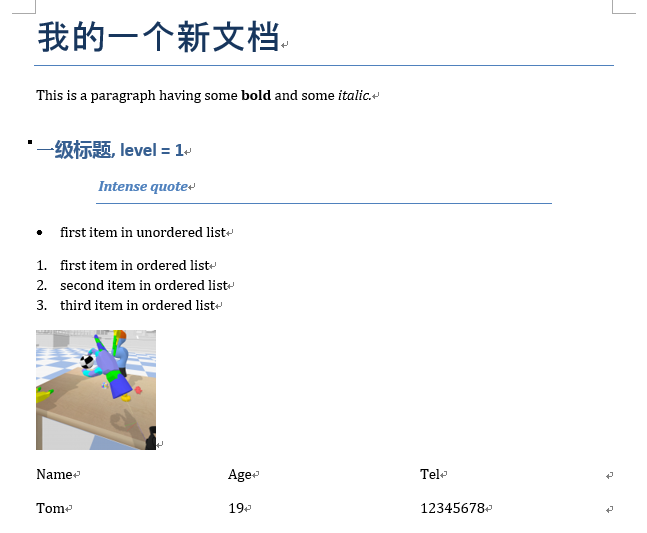
执行以上代码会在'e:/docs/'路径下产生一个demo1.docx文件,其内容如下:
读docx文件
示例代码:
# coding:utf-8

# 读取已有的word文档

import sys

from docx import Document

def main():

    reload(sys)

    sys.setdefaultencoding('utf-8')

    # 创建文档对象

    document = Document('e:/docs/demo2.docx')

    # 读取文档中所有的段落列表

    ps = document.paragraphs

    # 每个段落有两个属性:style和text

    ps_detail = [(x.text,x.style.name) for x in ps]

    with open('out.tmp','w+') as fout:

        fout.write('')

    # 读取段落并写入一个文件

    with open('out.tmp','a+') as fout:

        for p in ps_detail:

            fout.write(p[0] + '\t' + p[1] + '\n\n')

    # 读取文档中的所有段落的列表

    tables = document.tables

    # 遍历table,并将所有单元格内容写入文件中

    with open('out.tmp','a+') as fout:

        for table in tables:

            for row in table.rows:

                for cell in row.cells:

                    fout.write(cell.text + '\t')

                fout.write('\n')

if __name__ == '__main__':

    main()
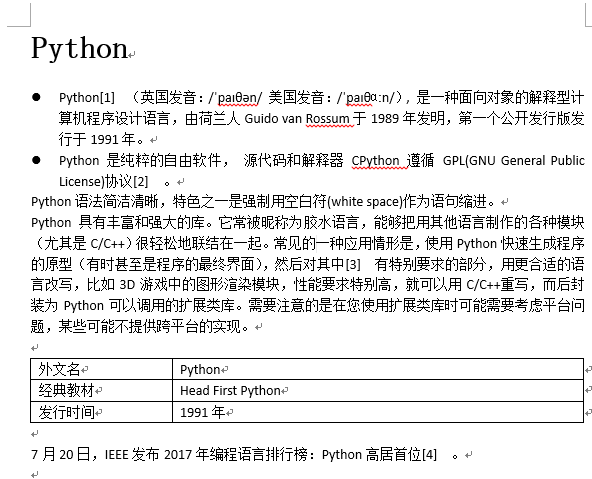
假如在'e:/docs/'路径下有一个demo2.docx文档,其内如如下:
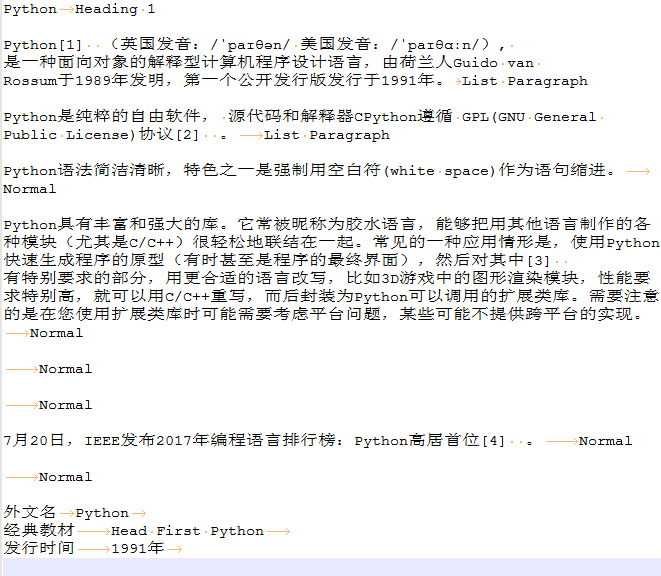
执行上面脚本后,输出的out.tmp文件的内容如下:
注意事项
- 如果段落中是有超链接的,那么段落对象是读取不出来超链接的文本的,需要把超链接先转换成普通文本,方法:全选word文档的所有内容,按快捷键Ctrl+Shift+F9即可。
遇到的问题
用pyinstaller打包时的一个问题
用pyinstaller工具(用法详见:python打包工具pyinstaller的用法)把使用到python-docx库的脚本打包成exe可执行文件后,双击运行生成的exe文件,报错:
docx.opc.exceptions.PackageNotFoundError: Package not found at 'C:\Users\ADMINI~1.PC-\AppData\Local\Temp\_MEI49~1\docx\templates\default.docx'
经过在stackoverflow上搜索,发现有人遇到过类似的问题(问题链接:cx_freeze and docx - problems when freezing),经过尝试,该问题的第二个回答可以解决这个问题:
I had the same problem and managed to get around it by doing the following. First, I located the default.docx file in the site-packages. Then, I copied it in the same directory as my .py file. I also start the .docx file with Document() which has a docx=... flag, to which I assigned the value: os.path.join(os.getcwd(), 'default.docx') and now it looks like doc = Document(docx=os.path.join(os.getcwd(), 'default.docx')). The final step was to include the file in the freezing process. Et voilà! So far I have no problem.
大概的解决步骤是这样的:
- 找到python-docx包安装路径下的一个名为
default.docx的文件,我是通过everything这个强大的搜索工具全局搜索找到这个文件的,它在我本地所在的路径是:E:\code\env\.env\Lib\site-packages\docx\templates - 把找到的default.docx文件复制到我的py脚本文件所在的目录下。
- 修改脚本中创建Document对象的方式:
从原来的创建方式:
document = Document()
修改为:
import os

document = Document(docx=os.path.join(os.getcwd(), 'default.docx'))
- 再次用pyinstaller工具打包脚本为exe文件
- 把default.docx文件复制到与生成的exe文件相同的路径下,再次运行exe文件,顺利运行通过,没有再出现之前的报错,问题得到解决。
随机推荐
- VIM配置入门
原文链接: http://www.ruanyifeng.com/blog/2018/09/vimrc.html 个人增加了两张收集来的图.
- bootstrap随笔点击增加
ht5: <div class="form-group"><label class="col-sm-2 control-label&qu ...
- PHP编程经常容易记乱的知识
PHP经常容易记乱的知识 1.echo和print的区别 PHP中echo和print的功能基本相同(输出),但是两者之间还是有细微差别的.echo输出后没有返回值,但print有返回值,当其执行失败 ...
- IOS开发之——企业版IDP的申请及“In House”发布
本文转载至 http://blog.csdn.net/pjk1129/article/details/7572183 企业版IDP的申请及“In House”发布 原贴地址:http://blog.c ...
- Http服务器实现文件上传与下载(三)
一.引言 在前2章的内容基本上已经讲解了整个的大致流程.在设计Http服务器时,我设计为四层的结构,最底层是网络传输层,就是socket编程.接着一层是请求和响应层,叫做Request和Respons ...
- 1.0_搭建PHP服务器环境的步骤
a,下载安装一款静态web服务器,ex:HTTPD,IIS; b,下载安装PHP引擎: c,在静态服务器配置一下,声明PHP引擎的存在. 注意,以上三步可以用xampp套件来完成. 启动Apache, ...
- hihocoder 1040(矩形判断)
题目链接:传送门 题目大意:给你四条线段,判断能否围成一个面积大于0的矩形,能输出YES,不能输出NO 题目思路: 合法的四条线段应该满足 1.应该必须有四个不同的点 2.线段斜率分为两组,组内 ...
- windows安装oracle11g
windows上安装oracle11g 1.下载Oracle 11g R2 for Windows的版本 下载地址:https://www.oracle.com/technetwork/datab ...
- 选项卡jQuery(ele).each()
$("li").each(index){ $(this).mouseover(fucntion(){ $("div.contentin" ...
- OC处理.Net Json时间格式
通过服务器收到的json时间格式是/Date(xxxxxxxxxxxxx+xxxx)/,其中前半部分是自1970年的millionSecs,后半部是时区,我们需要对齐进行转换. 解决方式有两种,第一种 ...