
使用supervisor管理后台进程
在linux中supervisor是用来管理后台进程的,是一个用python写的进程管理工具,可以让宕机的进程重启。这里我们大概讲一下用他来管理uWSGI。
一.安装supervisor
1.python2下的安装
supervisor不支持python3,所以你安装可以使用自带的python2安装,但是自带的python2没有安装pip
(1)要安装pip,首先要安装setuptools
wget https://pypi.python.org/packages/ff/d4/209f4939c49e31f5524fa0027bf1c8ec3107abaf7c61fdaad704a648c281/setuptools-21.0.0.tar.gz#md5=81964fdb89534118707742e6d1a1ddb4

tar xvf setuptools-21.0.0.tar.gz            //解压文件

cd setuptools-21.0.0

python setup.py install
(2)安装pip
wget https://pypi.python.org/packages/11/b6/abcb525026a4be042b486df43905d6893fb04f05aac21c32c638e939e447/pip-9.0.1.tar.gz

tar xvf pip-9.0.1.tar.gz

cd pip-9.0.1

python setup.py install
(3)安装supervisor
pip install supervisor
2.python3下的安装
默认的pip安装的只支持python2,当然手动安装新版就支持python3了
pip install git+https://github.com/Supervisor/supervisor
二.配置supervisor
生成 supervisor 默认配置文件,放在 /etc/supervisord.conf 路径中(如果出现echo_supervisord_conf: command not **found** 则可能需要输入全路径,使用find / -name supervisor*找到路径):
echo_supervisord_conf > /etc/supervisord.conf
修改配置文件
# 修改配置文件

vi /etc/supervisord.conf

# 加入以下配置信息在最下面

[include]

files = /etc/supervisord.d/*.conf   # /etc/supervisord.d/下所有conf结尾的

[inet_http_server]

port=127.0.0.1:9001  # 端口号

username=user  # web登录名

password=123  # 登录密码
配置文件详情
 [unix_http_server]

 file=/tmp/supervisor.sock   ; UNIX socket 文件,supervisorctl 会使用

 ;chmod=0700                 ; socket 文件的 mode,默认是 0700

 ;chown=nobody:nogroup       ; socket 文件的 owner,格式: uid:gid

 ;username=user              ; default is no username (open server)

 ;password=123               ; default is no password (open server)

 ;[inet_http_server]         ; HTTP 服务器,提供 web 管理界面

 ;port=127.0.0.1:9001        ; Web 管理后台运行的 IP 和端口,如果开放到公网,需要注意安全性

 ;username=user              ; 登录管理后台的用户名

 ;password=123               ; 登录管理后台的密码

 [supervisord]

 logfile=/tmp/supervisord.log ; 日志文件,默认是 $CWD/supervisord.log

 logfile_maxbytes=50MB        ; 日志文件大小,超出会 rotate,默认 50MB

 logfile_backups=10           ; 日志文件保留备份数量默认 10

 loglevel=info                ; 日志级别,默认 info,其它: debug,warn,trace

 pidfile=/tmp/supervisord.pid ; pid 文件

 nodaemon=false               ; 是否在前台启动,默认是 false,即以 daemon 的方式启动

 minfds=1024                  ; 可以打开的文件描述符的最小值,默认 1024

 minprocs=200                 ; 可以打开的进程数的最小值,默认 200

 ; the below section must remain in the config file for RPC

 ; (supervisorctl/web interface) to work, additional interfaces may be

 ; added by defining them in separate rpcinterface: sections

 [rpcinterface:supervisor]

 supervisor.rpcinterface_factory = supervisor.rpcinterface:make_main_rpcinterface

 [supervisorctl]

 serverurl=unix:///tmp/supervisor.sock ; 通过 UNIX socket 连接 supervisord,路径与 unix_http_server 部分的 file 一致

 ;serverurl=http://127.0.0.1:9001 ; 通过 HTTP 的方式连接 supervisord

 ;包含其他的配置文件

 [include]

 files = relative/directory/*.ini    ; 可以是 *.conf 或 *.ini
启动supervisor
supervisord -c /etc/supervisord.conf
再启动的时候可能会报错,Error: Another program is already listening on a port that one of our HTTP servers is configured to use. Shut this program down first before starting supervisord。
解决的是方式:
unlink /tmp/supervisor.sock
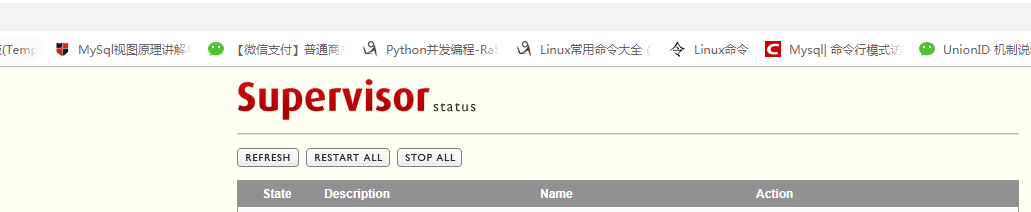
通过http://ip:9001/访问web界面,账户名密码就是你配置的,效果如下
三.加入监控程序
新建管理的监控文件夹,每个程序设置配置文件,达到隔离的效果
mkdir /etc/supervisord.d/
在/etc/supervisor.d/目录下面加入需要管理的程序
vi /etc/supervisor.d/orange_web.conf  # 新建一个管理程序

# 程序的名字,在supervisor中可以用这个名字来管理该程序,随便起

[program:orange_web]

# 指定运行用户

user = root

# 启动程序的命令uwsgi启动命令

command = uwsgi --ini /var/www/script/uwsgi.ini

# 项目的目录

directory = /var/www/orange_web

# 开始的时候等待多少秒

startsecs = 0

# 停止的时候等待多少秒

stopwaitsecs = 0

# 设置改程序是否虽supervisor的启动而启动

autorstart = true

# 程序挂了是否需要重新将其启动

autorestart = true

# 是否将程序错误信息重定向到文件

redirect_stderr=true

# 输出的log文件位置

stdout_logfile = /var/www/script/supervisord.log

# 输出的错误文件位置

stderr_logfile = /var/www/script/supervisord.err

[supervisord]

# log的级别

loglevel = info
重新启动supervisord
supervisorctl reload # 重启
重新访问supervisor管理界面
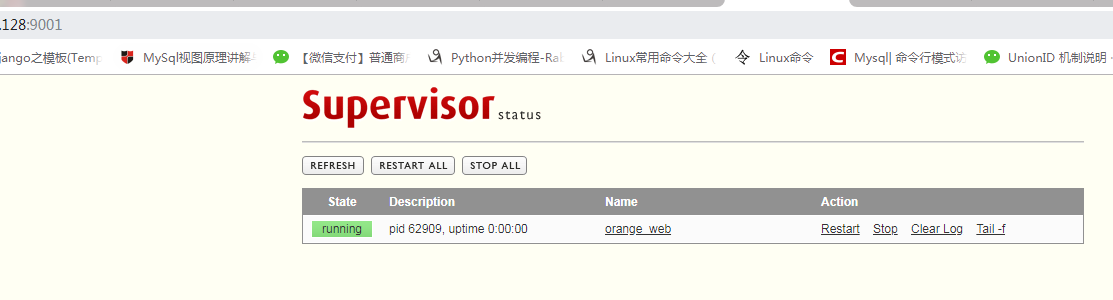
在这里就安装配置成功了,哈哈哈就可以去跟周围的女同学装逼了。。
四.supervisor常用命令
supervisorctl start programXX  # 启动进程programXX

supervisorctl stop programXX  # 停止进程programXX

supervisorctl restart programXX  # 重启进程programXX

supervisorctl stop groupworker  # 停止所有名为groupworker这个分组的进程(start,restart都可用)

supervisorctl stop all  # 停止所有进程(start,restart都可用,但是都不会载入最新的配置文件)

supervisorctl reload  # 载入最新的配置文件,重载进程
参考链接:
Django+uWSGI+Nginx部署 https://www.cnblogs.com/zzqit/p/10103303.html
https://www.jianshu.com/p/23762bd086e1
使用supervisor管理后台进程的更多相关文章
- ubuntu supervisor管理uwsgi+nginx
一.概述 superviosr是一个Linux/Unix系统上的进程监控工具,他/她upervisor是一个Python开发的通用的进程管理程序,可以管理和监控Linux上面的进程,能将一个普通的命令 ...
- Supervisor 管理后台守护进程
Supervisor 管理后台守护进程 参考原文如下: http://codinn.com/people/brant/notes/110948/ 做了一些注释 +++++++++++引用开始+++++ ...
- 如何使用supervisor管理你的应用
1.前言 Supervisor(http://supervisord.org/)是用Python开发的一个client/server服务,是UNIX-like系统下的一个进程管理工具,不支持Windo ...
- Supervisor管理进程
Supervisor管理进程 转载 2016年04月14日 18:26:45 标签: supervisord 28344 Supervisor重新加载配置启动新的进程 liaojie 发布于 1年前, ...
- 配置supervisor管理beego应用
一.golang.beego等环境安装与配置 二.supervisor安装 github项目地址:https://github.com/Supervisor/supervisor 克隆项目:git c ...
- supervisor管理进程工具配置
Supervisor(http://supervisord.org/)是用Python开发的一个client/server服务,是Linux/Unix系统下的一个进程管理工具,不支持Windows系统 ...
- Supervisor 管理进程,Cloud Insight 监控进程,完美!
Supervisor 是由 Python 语言编写.基于 linux 操作系统的一款服务器管理工具,用于监控服务器的运行,发现问题能立即自动预警及自动重启等. Cloud Insight 是一款次世代 ...
- supervisor管理进程 superlance对进程状态报警
supervisor介绍 首先,介绍一下supervisor.Supervisor(http://supervisord.org/)是用Python开发的一个client/server服务,是Linu ...
- 使用Supervisor管理Linux进程
使用Supervisor管理Linux进程 简介 Supervisor是一个C/S系统,它可以在类UNIX系统上控制系统进程,由python编写,提供了大量的功能来实现对进程的管理. 安装 sudo ...
随机推荐
- LightOJ 1161 - Extreme GCD 容斥
题意:给你n个数[4,10000],问在其中任意选四个其GCD值为1的情况有几种. 思路:GCD为1的情况很简单 即各个数没有相同的质因数,所以求所有出现过的质因数次数再容斥一下-- 很可惜是错的,因 ...
- Item 12 考虑实现Comparable接口
1.Comparable接口,用来做什么. 2.判定类实现的Comparable接口是否正确的方法. 3.不要扩展一个已经实现了Comparable接口的类来增加用于比较的值组件. 1.Com ...
- 2018 Multi-University Training Contest 1-1002 -Balanced Sequence(括号匹配+贪心)
题目链接:http://acm.hdu.edu.cn/showproblem.php?pid=6299 题目: 题意:t组数据,每组数据给你一个n表示给你n个括号串,这n个括号串之间进行组合,求能够匹 ...
- new操作符(翻译自mozilla.org)
翻译自:https://developer.mozilla.org/en-US/docs/Web/JavaScript/Reference/Operators/new new操作符可以实例化一个用户自 ...
- js刷新页面方法 -- (转)
1,reload 方法,该方法强迫浏览器刷新当前页面. 语法:location.reload([bForceGet]) 参数: bForceGet, 可选参数, 默认为 false,从客户端缓存里 ...
- Python 语言使用中遇到的问题汇总
1.python中的传值和传引用 和其他语言不一样,传递参数的时候,python不允许程序员选择采用传值还是传引用.Python参数传递采用的肯定是“传对象引用”的方式.实际上,这种方式相当于传值和传 ...
- 初识费用流 模板(spfa+slf优化) 餐巾计划问题
今天学习了最小费用最大流,是网络流算法之一.可以对于一个每条边有一个容量和一个费用(即每单位流的消耗)的图指定一个源点和汇点,求在从源点到汇点的流量最大的前提下的最小费用. 这里讲一种最基础也是最好掌 ...
- Django 1.10中文文档-第一个应用Part4-表单和通用视图
本教程接Part3开始.继续网页投票应用程序,并将重点介绍简单的表单处理和精简代码. 一个简单表单 更新一下在上一个教程中编写的投票详细页面的模板polls/detail.html,让它包含一个HTM ...
- [Leetcode Week17]Copy List with Random Pointer
Copy List with Random Pointer 题解 原创文章,拒绝转载 题目来源:https://leetcode.com/problems/copy-list-with-random- ...
- Optimizing subroutine calls based on architecture level of called subroutine
A technique is provided for generating stubs. A processing circuit receives a call to a called funct ...