
rest_framework之访问频率控制
一 自定义频率控制类
class MyThrottle():

    visitor_dic = {}

    def __init__(self):

        self.history = None

    def allow_request(self, request, view):

        '''

            {'ip1':[时间1 ,时间2],

            'ip2':[时间1, ],

            }

           #(1)取出访问者ip

            # (2)判断当前ip不在访问字典里,添加进去,并且直接返回True,表示第一次访问,在字典里,继续往下走

            # (3)循环判断当前ip的列表,有值,并且当前时间减去列表的最后一个时间大于60s,把这种数据pop掉,这样列表中只有60s以内的访问时间,

            # (4)判断,当列表小于3,说明一分钟以内访问不足三次,把当前时间插入到列表第一个位置,返回True,顺利通过

            # (5)当大于等于3,说明一分钟内访问超过三次,返回False验证失败

        '''

        # Meta:请求所有的东西的字典

        # 拿出ip地址

        ip = request.META.get('REMOTE_ADDR')

        # 不在字典中,说明是第一次访问

        ctime = time.time()

        if ip not in self.visitor_dic:

            self.visitor_dic[ip] = [ctime, ]

            return True

        # 根据当前访问者ip,取出访问的时间列表

        history = self.visitor_dic[ip]

        self.history = history

        while history and ctime - history[-1] > 60:

            history.pop()

        if len(history) < 3:

            # 把当前时间放到第0个位置上

            history.insert(0, ctime)

            return True

        return False

    def wait(self):

        # 剩余时间

        ctime = time.time()

        return 60 - (ctime - self.history[-1])
二 内置频率控制
在app中新建一个文件,来放相关组件:
from rest_framework.throttling import SimpleRateThrottle

class VisitThrottle(SimpleRateThrottle):

    scope = 'hhh'

    def get_cache_key(self, request, view):

        return self.get_ident(request)
在settings中配置访问:
REST_FRAMEWORK = {

    'DEFAULT_THROTTLE_RATES':{

        'hhh':'3/m'

    }

}
在视图函数中:(局部配置)
throttle_classes = [MyThrottles,]
错误信息提示转换为中文:
class Course(APIView):

    authentication_classes = [TokenAuth, ]

    permission_classes = [UserPermission, ]

    throttle_classes = [MyThrottles,]

    def get(self, request):

        return HttpResponse('get')

    def post(self, request):

        return HttpResponse('post')

    def throttled(self, request, wait):

        from rest_framework.exceptions import Throttled

        class MyThrottled(Throttled):

            default_detail = '傻逼啊'

            extra_detail_singular = '还有 {wait} second.'

            extra_detail_plural = '出了 {wait} seconds.'

        raise MyThrottled(wait)
其他
内置频率限制类:
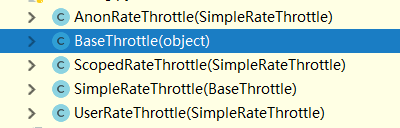
BaseThrottle是所有类的基类:方法:def get_ident(self, request)获取标识,其实就是获取ip,自定义的需要继承它
AnonRateThrottle:未登录用户ip限制,需要配合auth模块用
SimpleRateThrottle:重写此方法,可以实现频率现在,不需要咱们手写上面自定义的逻辑
UserRateThrottle:登录用户频率限制,这个得配合auth模块来用
ScopedRateThrottle:应用在局部视图上的(忽略)
内置频率全局配置:
REST_FRAMEWORK = {

    'DEFAULT_THROTTLE_CLASSES':['app01.utils.VisitThrottle',],

    'DEFAULT_THROTTLE_RATES':{

        'hhh':'3/m'

    }

}
rest_framework之访问频率控制的更多相关文章
- nginx 访问频率控制
Nginx访问频率控制 HTTP服务器的吞吐率(单位时间吞吐量)通常有一个上限,尤其是普通配置的机器,在带宽够的情况下,用压测工具经常能把服务器压出翔,为了线上环境稳定性,防止恶意攻击影响到其他用户, ...
- openresty开发系列37--nginx-lua-redis实现访问频率控制
openresty开发系列37--nginx-lua-redis实现访问频率控制 一)需求背景 在高并发场景下为了防止某个访问ip访问的频率过高,有时候会需要控制用户的访问频次在openresty中, ...
- Django REST framework 内置访问频率控制
对匿名用户采用 IP 控制访问频率,对登录用户采用 用户名 控制访问频率. from rest_framework.throttling import SimpleRateThrottle class ...
- Django rest-framework框架-访问频率控制
第一版: from rest_frameworkclass VisitThrottle(object): def __init__(self): self.history = None def all ...
- DRF之访问权限控制和访问频率控制(节流)
权限控制 前言 用户验证用户权限,根据不同访问权限控制对不同内容的访问. 建议了解视图.token验证的内容. 使用流程 自定义访问权限类,继承BasePermission,重写has_permiss ...
- WebApi接口访问频率控制的实现
关于限流的文章,博客园内还是有挺多的.本文做了一个基于Filter限流的例子,算是对WebApiThrottle使用的一个具体的实例. 实现方法: 1.使用Nuget,对WebAPI项目添加WebAp ...
- django基于中间件的IP访问频率控制
一.中间件的代码 注意:成功时返回的是None,那样才会走视图层,返回httpresponse就直接出去了 import time from django.utils.deprecation impo ...
- 四、django rest_framework源码之频率控制剖析
1 绪言 权限判定之后的下一个环节是访问频率控制,本篇我们分析访问频率控制部分源码. 2 源码分析 访问频率控制在dispatch方法中的initial方法调用check_throttles方法开始. ...
- rest_framework 节流功能(访问频率)
访问记录 = { 身份证号: [ :: ,::, ::] } #:: ,::,:: ,::, #:: #[::, ::, ::] #访问记录 = { 用户IP: [...] } import time ...
随机推荐
- 227. Mock Hanoi Tower by Stacks【easy】
In the classic problem of Towers of Hanoi, you have 3 towers and N disks of different sizes which ca ...
- JS根据时间内容分组代码
let newArr = []; res.data.data.forEach((address, i) => { let index = -1; let newDates = Date.pars ...
- 数据泵导出oracle 10g数据库
首先连接sqlplus: sqlplus /nolog conn system/manager (或者连接其他用户) 1.创建whboa目录,用于存放导出的dmp文件(需要提前手动创建目录“E:\or ...
- django 模板报错
"Requested setting TEMPLATE_DEBUG, but settings are not configured. You must either define the ...
- zabbix 源码安装
操作系统:CentOS IP地址:192.168.21.127 Web环境:Nginx+MySQL+PHP zabbix版本:Zabbix 2.2 LTS 备注:Linux下安装zabbix需要有LA ...
- 【BZOJ】2982: combination(lucas定理+乘法逆元)
http://www.lydsy.com/JudgeOnline/problem.php?id=2982 少加了特判n<m return 0就wa了QAQ lucas定理:C(n, m)%p=( ...
- SQL Server跨server之间訪问
在两个server都须要启用Ad Hoc Distributed Queries: EXEC sp_configure 'show advanced options', 1 RECONFIGURE E ...
- 并发容器J.U.C --组件FutureTask、ForkJoin、BlockingQueue
FutureTask FutureTask是J.U.C中的类,是一个可删除的异步计算类.这个类提供了Future接口的的基本实现,使用相关方法启动和取消计算,查询计算是否完成,并检索计算结果.只有在计 ...
- iOS-UISearchBar去掉边线
解决办法: UISearchBar 去除边线 属性search.searchBarStyle = minimal 即可
- 【IDEA】IDEA使用教程+技巧
一.Intellij IDEA 中文教程 · GitBook https://legacy.gitbook.com/book/dancon/intellij-idea/details 注:一般来说参考 ...