
maven filter不起作用
遇到的一个坑, spring boot + maven maven fileter没有起作用。spring boot把默认占位符改了
参考:https://blog.csdn.net/mn960mn/article/details/78834875
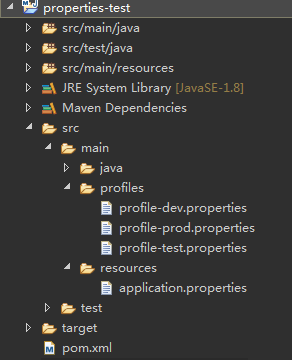
其中,pom.xml的内容如下:
- <project xmlns="http://maven.apache.org/POM/4.0.0" xmlns:xsi="http://www.w3.org/2001/XMLSchema-instance"
- xsi:schemaLocation="http://maven.apache.org/POM/4.0.0 http://maven.apache.org/xsd/maven-4.0.0.xsd">
- <modelVersion>4.0.0</modelVersion>
- <groupId>com.pp.test</groupId>
- <artifactId>properties-test</artifactId>
- <version>0.0.1-SNAPSHOT</version>
- <packaging>jar</packaging>
- <name>properties-test</name>
- <url>http://maven.apache.org</url>
- <parent>
- <groupId>org.springframework.boot</groupId>
- <artifactId>spring-boot-starter-parent</artifactId>
- <version>1.5.9.RELEASE</version>
- </parent>
- <properties>
- <project.build.sourceEncoding>UTF-8</project.build.sourceEncoding>
- <maven.compiler.source>1.8</maven.compiler.source>
- <maven.compiler.target>1.8</maven.compiler.target>
- <java.version>1.8</java.version>
- </properties>
- <dependencies>
- <dependency>
- <groupId>org.springframework.boot</groupId>
- <artifactId>spring-boot-starter-web</artifactId>
- </dependency>
- </dependencies>
- <build>
- <filters>
- <filter>src/main/profiles/profile-${profiles.active}.properties</filter>
- </filters>
- <resources>
- <resource>
- <filtering>true</filtering>
- <directory>src/main/resources</directory>
- </resource>
- </resources>
- </build>
- <profiles>
- <profile>
- <id>dev</id>
- <properties>
- <profiles.active>dev</profiles.active>
- </properties>
- <activation>
- <activeByDefault>true</activeByDefault>
- </activation>
- </profile>
- <profile>
- <id>test</id>
- <properties>
- <profiles.active>test</profiles.active>
- </properties>
- </profile>
- <profile>
- <id>prod</id>
- <properties>
- <profiles.active>prod</profiles.active>
- </properties>
- </profile>
- </profiles>
- </project>
application.properties 文件内容:
- jdbc.driverClassName=${jdbc.driverClassName}
- jdbc.url=${jdbc.url}
- jdbc.username=${jdbc.username}
- jdbc.password=${jdbc.password}
profile-dev.properties 文件内容:
- jdbc.driverClassName=com.mysql.jdbc.Driver
- jdbc.url=jdbc:mysql:///db_users
- jdbc.username=root
- jdbc.password=root
启动应用,报错了,错误如下:
- Caused by: java.lang.IllegalArgumentException: Circular placeholder reference 'jdbc.url' in property definitions
- at org.springframework.util.PropertyPlaceholderHelper.parseStringValue(PropertyPlaceholderHelper.java:141) ~[spring-core-4.3.13.RELEASE.jar:4.3.13.RELEASE]
- at org.springframework.util.PropertyPlaceholderHelper.parseStringValue(PropertyPlaceholderHelper.java:162) ~[spring-core-4.3.13.RELEASE.jar:4.3.13.RELEASE]
- at org.springframework.util.PropertyPlaceholderHelper.replacePlaceholders(PropertyPlaceholderHelper.java:126) ~[spring-core-4.3.13.RELEASE.jar:4.3.13.RELEASE]
- at org.springframework.core.env.AbstractPropertyResolver.doResolvePlaceholders(AbstractPropertyResolver.java:236) ~[spring-core-4.3.13.RELEASE.jar:4.3.13.RELEASE]
- at org.springframework.core.env.AbstractPropertyResolver.resolveRequiredPlaceholders(AbstractPropertyResolver.java:210) ~[spring-core-4.3.13.RELEASE.jar:4.3.13.RELEASE]
- at org.springframework.core.env.AbstractPropertyResolver.resolveNestedPlaceholders(AbstractPropertyResolver.java:227) ~[spring-core-4.3.13.RELEASE.jar:4.3.13.RELEASE]
- at org.springframework.core.env.PropertySourcesPropertyResolver.getProperty(PropertySourcesPropertyResolver.java:84) ~[spring-core-4.3.13.RELEASE.jar:4.3.13.RELEASE]
- at org.springframework.core.env.PropertySourcesPropertyResolver.getProperty(PropertySourcesPropertyResolver.java:61) ~[spring-core-4.3.13.RELEASE.jar:4.3.13.RELEASE]
- at org.springframework.core.env.AbstractEnvironment.getProperty(AbstractEnvironment.java:527) ~[spring-core-4.3.13.RELEASE.jar:4.3.13.RELEASE]
- at org.springframework.context.support.PropertySourcesPlaceholderConfigurer$1.getProperty(PropertySourcesPlaceholderConfigurer.java:132) ~[spring-context-4.3.13.RELEASE.jar:4.3.13.RELEASE]
- at org.springframework.context.support.PropertySourcesPlaceholderConfigurer$1.getProperty(PropertySourcesPlaceholderConfigurer.java:129) ~[spring-context-4.3.13.RELEASE.jar:4.3.13.RELEASE]
- at org.springframework.core.env.PropertySourcesPropertyResolver.getProperty(PropertySourcesPropertyResolver.java:81) ~[spring-core-4.3.13.RELEASE.jar:4.3.13.RELEASE]
- at org.springframework.core.env.PropertySourcesPropertyResolver.getPropertyAsRawString(PropertySourcesPropertyResolver.java:71) ~[spring-core-4.3.13.RELEASE.jar:4.3.13.RELEASE]
- at org.springframework.core.env.AbstractPropertyResolver$1.resolvePlaceholder(AbstractPropertyResolver.java:239) ~[spring-core-4.3.13.RELEASE.jar:4.3.13.RELEASE]
- at org.springframework.util.PropertyPlaceholderHelper.parseStringValue(PropertyPlaceholderHelper.java:147) ~[spring-core-4.3.13.RELEASE.jar:4.3.13.RELEASE]
- at org.springframework.util.PropertyPlaceholderHelper.replacePlaceholders(PropertyPlaceholderHelper.java:126) ~[spring-core-4.3.13.RELEASE.jar:4.3.13.RELEASE]
- at org.springframework.core.env.AbstractPropertyResolver.doResolvePlaceholders(AbstractPropertyResolver.java:236) ~[spring-core-4.3.13.RELEASE.jar:4.3.13.RELEASE]
- at org.springframework.core.env.AbstractPropertyResolver.resolveRequiredPlaceholders(AbstractPropertyResolver.java:210) ~[spring-core-4.3.13.RELEASE.jar:4.3.13.RELEASE]
- at org.springframework.context.support.PropertySourcesPlaceholderConfigurer$2.resolveStringValue(PropertySourcesPlaceholderConfigurer.java:172) ~[spring-context-4.3.13.RELEASE.jar:4.3.13.RELEASE]
- at org.springframework.beans.factory.support.AbstractBeanFactory.resolveEmbeddedValue(AbstractBeanFactory.java:831) ~[spring-beans-4.3.13.RELEASE.jar:4.3.13.RELEASE]
- at org.springframework.beans.factory.support.DefaultListableBeanFactory.doResolveDependency(DefaultListableBeanFactory.java:1086) ~[spring-beans-4.3.13.RELEASE.jar:4.3.13.RELEASE]
- at org.springframework.beans.factory.support.DefaultListableBeanFactory.resolveDependency(DefaultListableBeanFactory.java:1066) ~[spring-beans-4.3.13.RELEASE.jar:4.3.13.RELEASE]
- at org.springframework.beans.factory.annotation.AutowiredAnnotationBeanPostProcessor$AutowiredFieldElement.inject(AutowiredAnnotationBeanPostProcessor.java:585) ~[spring-beans-4.3.13.RELEASE.jar:4.3.13.RELEASE]
- at org.springframework.beans.factory.annotation.InjectionMetadata.inject(InjectionMetadata.java:88) ~[spring-beans-4.3.13.RELEASE.jar:4.3.13.RELEASE]
- at org.springframework.beans.factory.annotation.AutowiredAnnotationBeanPostProcessor.postProcessPropertyValues(AutowiredAnnotationBeanPostProcessor.java:366) ~[spring-beans-4.3.13.RELEASE.jar:4.3.13.RELEASE]
- ... 17 common frames omitted
报这个错误的原因是,maven的filtering没有起作用,没有把占位符给替换掉。(大家可以执行mvn clean package,看看打包后的jar里面的application.properties文件,是否有替换占位符)
filtering无效的原因是,pom.xml继承了spring boot的依赖
- <parent>
- <groupId>org.springframework.boot</groupId>
- <artifactId>spring-boot-starter-parent</artifactId>
- <version>1.5.9.RELEASE</version>
- </parent>
点开这个依赖的pom.xml,我们发现
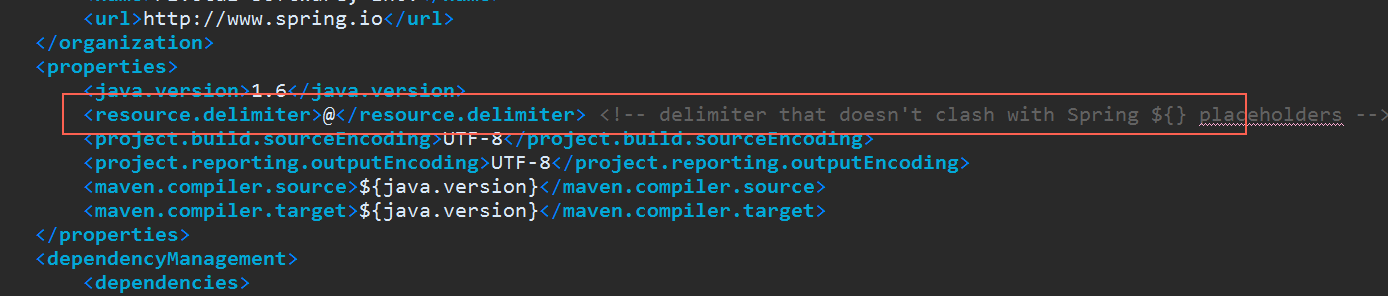
spring boot把默认的占位符号${}改成了@
找到原因了,那怎么解决就很简单了。
方法一:
在pom.xml里面添加如下内容
- <properties>
- <resource.delimiter>${}</resource.delimiter>
- </properties>
方法二:
application.properties里面不用${},改成@
- jdbc.driverClassName=@jdbc.driverClassName@
- jdbc.url=@jdbc.url@
- jdbc.username=@jdbc.username@
- jdbc.password=@jdbc.password@
方法三:
pom.xml不继承spring-boot-starter-parent,dependency里面配置全部的依赖和版本号(继承了之后,很多依赖不用写version)
方法四:
把
- <parent>
- <groupId>org.springframework.boot</groupId>
- <artifactId>spring-boot-starter-parent</artifactId>
- <version>1.5.9.RELEASE</version>
- </parent>
改成
- <dependencyManagement>
- <dependencies>
- <dependency>
- <groupId>org.springframework.boot</groupId>
- <artifactId>spring-boot-starter-web</artifactId>
- <version>1.5.9.RELEASE</version>
- <type>pom</type>
- <scope>import</scope>
- </dependency>
- </dependencies>
- </dependencyManagement>
maven filter不起作用的更多相关文章
- maven filter插件只替换了部分变量问题
maven filter简介 maven的resources插件,有一个filter的作用,能够在打包的时候,从特定文件里读取key-value对,替换配置文件中的占位符变量.很多线上线下有不同环境的 ...
- Maven Filter与Profile隔离生产环境与开发环境
Maven Filter与Profile隔离生产环境与开发环境 在不同的开发阶段,我们一般用到不同的环境,开发阶段使用开发环境的一套东西,测试环境使用测试环境的东西,可能有多个测试环境,生产环境使用的 ...
- maven filter 乱码,MalformedByteSequenceException: Invalid byte 3 of 3-byte UTF-8 sequence.
<plugins> <plugin> <groupId>org.apache.maven.plugins</groupId> <artifactI ...
- 用 maven filter 管理不同环境的配置文件
使用 maven profile 一个项目可以部署在不同的环境当中,maven 的 profile 针对不同的环境指定各自的编译方法.在 pom.xml 的 profile 中,可以根据不同的环境定制 ...
- Maven介绍,包括作用、核心概念、用法、常用命令、扩展及配置
由浅入深,主要介绍maven的用途.核心概念(Pom.Repositories.Artifact.Build Lifecycle.Goal).用法(Archetype意义及创建各种项目).maven常 ...
- org.springframework.web.filter.DelegatingFilterProxy的作用
一.类结构 DelegatingFilterProxy类继承GenericFilterBean,间接实现了Filter,故而该类属于一个过滤器.那么就会有实现Filter中init.doFilter. ...
- spring security 4 filter 顺序及作用
Spring Security 有两个作用:认证和授权 一.Srping security 4 filter 别名及顺序 spring security 4 标准filter别名和顺序,因为经常要用就 ...
- [转]Maven介绍,包括作用、核心概念、用法、常用命令、扩展及配置
转自:http://www.trinea.cn/android/maven/ 两年半前写的关于Maven的介绍,现在看来都还是不错的,自己转下.写博客的一大好处就是方便自己以后查阅,自己总结的总是最靠 ...
- Maven 的classifier的作用
直接看一个例子,maven中要引入json包,于是使用了 <dependency> <groupId>net.sf.json-lib</groupId> <a ...
随机推荐
- [ActionScript 3.0] 判断XML属性是否存在
在as3中判断xml节点是否存在以及判断xml某节点是否存在某属性可用下面方法: if(xml.hasOwnProperty("frameRate")){ trace(" ...
- JSON与XML比较
1. 定义介绍 1.1 XML定义 扩展标记语言 (Extensible Markup Language, XML) ,用于标记电子文件使其具有结构性的标记语言,可以用来标记数据.定义数据类型,是一种 ...
- ubuntu下面的某些软件安装
1. python 下面的mysql驱动:不是在pip里面安装,执行下面命令 apt-get install python-mysqldb
- if else 和 or 的新用法
a = 1b = 2c = a if a > b else b print(c)print(id(c))print(id(b)) 条件为真返回前面的为假返回后面的 a = 0 b = 2 c = ...
- 虚拟立方体调用非共享维度的时候需要指定cubeName,否则Schema无效
但是,即使把非共享维度放上去,会出现一种情况. 一旦放入资产负债的非公共维度进去后,报表的度量值只能出现资产负债的度量值,不能出现损益的度量值了!
- Eclipse中的常见设置
本文将移到下面的博客维护: 新的博客网址 当新建一个workspace时,习惯做下面的设置: 1. 在eclipse中,默认的Text file encoding是GBK(操作系统是中文简体):如果操 ...
- Springboot第一篇:框架了解与搭建
在上一章,我讲解了React+node+express相应的框架搭建,一个项目只有一个前端框架够么,当然不够啦!!! 所以这节我们就来讲后台springboot框架的搭建和相关原理吧~~~版本(2.1 ...
- java email
package email; import java.io.File;import java.util.Date;import java.util.Properties; import javax.a ...
- Fiddler模拟发送post请求
fiddler在进行接口测试时,会模拟post请求,发送不同的请求参数,返回不同的结果,今天我们就来分享一下,怎么用Fiddler工具模拟post请求: 打开Fiddler工具,在右侧点击“compo ...
- ADT安装Genymotion的eclipse插件安装及错误解决办法
接触安卓开发也有很长一段时间了,但是一直使用的真机测试程序,因为感觉android模拟器实在是太不方便,运行慢,而且经常出错.最近听人介绍说Genymotion这款Android模拟器相当不错,于是打 ...