
maven filter不起作用
遇到的一个坑, spring boot + maven maven fileter没有起作用。spring boot把默认占位符改了
参考:https://blog.csdn.net/mn960mn/article/details/78834875
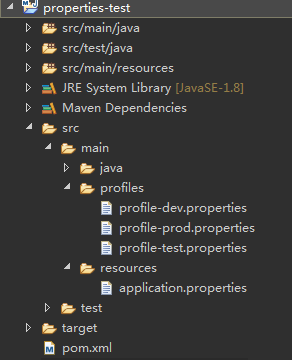
其中,pom.xml的内容如下:
- <project xmlns="http://maven.apache.org/POM/4.0.0" xmlns:xsi="http://www.w3.org/2001/XMLSchema-instance"
- xsi:schemaLocation="http://maven.apache.org/POM/4.0.0 http://maven.apache.org/xsd/maven-4.0.0.xsd">
- <modelVersion>4.0.0</modelVersion>
- <groupId>com.pp.test</groupId>
- <artifactId>properties-test</artifactId>
- <version>0.0.1-SNAPSHOT</version>
- <packaging>jar</packaging>
- <name>properties-test</name>
- <url>http://maven.apache.org</url>
- <parent>
- <groupId>org.springframework.boot</groupId>
- <artifactId>spring-boot-starter-parent</artifactId>
- <version>1.5.9.RELEASE</version>
- </parent>
- <properties>
- <project.build.sourceEncoding>UTF-8</project.build.sourceEncoding>
- <maven.compiler.source>1.8</maven.compiler.source>
- <maven.compiler.target>1.8</maven.compiler.target>
- <java.version>1.8</java.version>
- </properties>
- <dependencies>
- <dependency>
- <groupId>org.springframework.boot</groupId>
- <artifactId>spring-boot-starter-web</artifactId>
- </dependency>
- </dependencies>
- <build>
- <filters>
- <filter>src/main/profiles/profile-${profiles.active}.properties</filter>
- </filters>
- <resources>
- <resource>
- <filtering>true</filtering>
- <directory>src/main/resources</directory>
- </resource>
- </resources>
- </build>
- <profiles>
- <profile>
- <id>dev</id>
- <properties>
- <profiles.active>dev</profiles.active>
- </properties>
- <activation>
- <activeByDefault>true</activeByDefault>
- </activation>
- </profile>
- <profile>
- <id>test</id>
- <properties>
- <profiles.active>test</profiles.active>
- </properties>
- </profile>
- <profile>
- <id>prod</id>
- <properties>
- <profiles.active>prod</profiles.active>
- </properties>
- </profile>
- </profiles>
- </project>
application.properties 文件内容:
- jdbc.driverClassName=${jdbc.driverClassName}
- jdbc.url=${jdbc.url}
- jdbc.username=${jdbc.username}
- jdbc.password=${jdbc.password}
profile-dev.properties 文件内容:
- jdbc.driverClassName=com.mysql.jdbc.Driver
- jdbc.url=jdbc:mysql:///db_users
- jdbc.username=root
- jdbc.password=root
启动应用,报错了,错误如下:
- Caused by: java.lang.IllegalArgumentException: Circular placeholder reference 'jdbc.url' in property definitions
- at org.springframework.util.PropertyPlaceholderHelper.parseStringValue(PropertyPlaceholderHelper.java:141) ~[spring-core-4.3.13.RELEASE.jar:4.3.13.RELEASE]
- at org.springframework.util.PropertyPlaceholderHelper.parseStringValue(PropertyPlaceholderHelper.java:162) ~[spring-core-4.3.13.RELEASE.jar:4.3.13.RELEASE]
- at org.springframework.util.PropertyPlaceholderHelper.replacePlaceholders(PropertyPlaceholderHelper.java:126) ~[spring-core-4.3.13.RELEASE.jar:4.3.13.RELEASE]
- at org.springframework.core.env.AbstractPropertyResolver.doResolvePlaceholders(AbstractPropertyResolver.java:236) ~[spring-core-4.3.13.RELEASE.jar:4.3.13.RELEASE]
- at org.springframework.core.env.AbstractPropertyResolver.resolveRequiredPlaceholders(AbstractPropertyResolver.java:210) ~[spring-core-4.3.13.RELEASE.jar:4.3.13.RELEASE]
- at org.springframework.core.env.AbstractPropertyResolver.resolveNestedPlaceholders(AbstractPropertyResolver.java:227) ~[spring-core-4.3.13.RELEASE.jar:4.3.13.RELEASE]
- at org.springframework.core.env.PropertySourcesPropertyResolver.getProperty(PropertySourcesPropertyResolver.java:84) ~[spring-core-4.3.13.RELEASE.jar:4.3.13.RELEASE]
- at org.springframework.core.env.PropertySourcesPropertyResolver.getProperty(PropertySourcesPropertyResolver.java:61) ~[spring-core-4.3.13.RELEASE.jar:4.3.13.RELEASE]
- at org.springframework.core.env.AbstractEnvironment.getProperty(AbstractEnvironment.java:527) ~[spring-core-4.3.13.RELEASE.jar:4.3.13.RELEASE]
- at org.springframework.context.support.PropertySourcesPlaceholderConfigurer$1.getProperty(PropertySourcesPlaceholderConfigurer.java:132) ~[spring-context-4.3.13.RELEASE.jar:4.3.13.RELEASE]
- at org.springframework.context.support.PropertySourcesPlaceholderConfigurer$1.getProperty(PropertySourcesPlaceholderConfigurer.java:129) ~[spring-context-4.3.13.RELEASE.jar:4.3.13.RELEASE]
- at org.springframework.core.env.PropertySourcesPropertyResolver.getProperty(PropertySourcesPropertyResolver.java:81) ~[spring-core-4.3.13.RELEASE.jar:4.3.13.RELEASE]
- at org.springframework.core.env.PropertySourcesPropertyResolver.getPropertyAsRawString(PropertySourcesPropertyResolver.java:71) ~[spring-core-4.3.13.RELEASE.jar:4.3.13.RELEASE]
- at org.springframework.core.env.AbstractPropertyResolver$1.resolvePlaceholder(AbstractPropertyResolver.java:239) ~[spring-core-4.3.13.RELEASE.jar:4.3.13.RELEASE]
- at org.springframework.util.PropertyPlaceholderHelper.parseStringValue(PropertyPlaceholderHelper.java:147) ~[spring-core-4.3.13.RELEASE.jar:4.3.13.RELEASE]
- at org.springframework.util.PropertyPlaceholderHelper.replacePlaceholders(PropertyPlaceholderHelper.java:126) ~[spring-core-4.3.13.RELEASE.jar:4.3.13.RELEASE]
- at org.springframework.core.env.AbstractPropertyResolver.doResolvePlaceholders(AbstractPropertyResolver.java:236) ~[spring-core-4.3.13.RELEASE.jar:4.3.13.RELEASE]
- at org.springframework.core.env.AbstractPropertyResolver.resolveRequiredPlaceholders(AbstractPropertyResolver.java:210) ~[spring-core-4.3.13.RELEASE.jar:4.3.13.RELEASE]
- at org.springframework.context.support.PropertySourcesPlaceholderConfigurer$2.resolveStringValue(PropertySourcesPlaceholderConfigurer.java:172) ~[spring-context-4.3.13.RELEASE.jar:4.3.13.RELEASE]
- at org.springframework.beans.factory.support.AbstractBeanFactory.resolveEmbeddedValue(AbstractBeanFactory.java:831) ~[spring-beans-4.3.13.RELEASE.jar:4.3.13.RELEASE]
- at org.springframework.beans.factory.support.DefaultListableBeanFactory.doResolveDependency(DefaultListableBeanFactory.java:1086) ~[spring-beans-4.3.13.RELEASE.jar:4.3.13.RELEASE]
- at org.springframework.beans.factory.support.DefaultListableBeanFactory.resolveDependency(DefaultListableBeanFactory.java:1066) ~[spring-beans-4.3.13.RELEASE.jar:4.3.13.RELEASE]
- at org.springframework.beans.factory.annotation.AutowiredAnnotationBeanPostProcessor$AutowiredFieldElement.inject(AutowiredAnnotationBeanPostProcessor.java:585) ~[spring-beans-4.3.13.RELEASE.jar:4.3.13.RELEASE]
- at org.springframework.beans.factory.annotation.InjectionMetadata.inject(InjectionMetadata.java:88) ~[spring-beans-4.3.13.RELEASE.jar:4.3.13.RELEASE]
- at org.springframework.beans.factory.annotation.AutowiredAnnotationBeanPostProcessor.postProcessPropertyValues(AutowiredAnnotationBeanPostProcessor.java:366) ~[spring-beans-4.3.13.RELEASE.jar:4.3.13.RELEASE]
- ... 17 common frames omitted
报这个错误的原因是,maven的filtering没有起作用,没有把占位符给替换掉。(大家可以执行mvn clean package,看看打包后的jar里面的application.properties文件,是否有替换占位符)
filtering无效的原因是,pom.xml继承了spring boot的依赖
- <parent>
- <groupId>org.springframework.boot</groupId>
- <artifactId>spring-boot-starter-parent</artifactId>
- <version>1.5.9.RELEASE</version>
- </parent>
点开这个依赖的pom.xml,我们发现
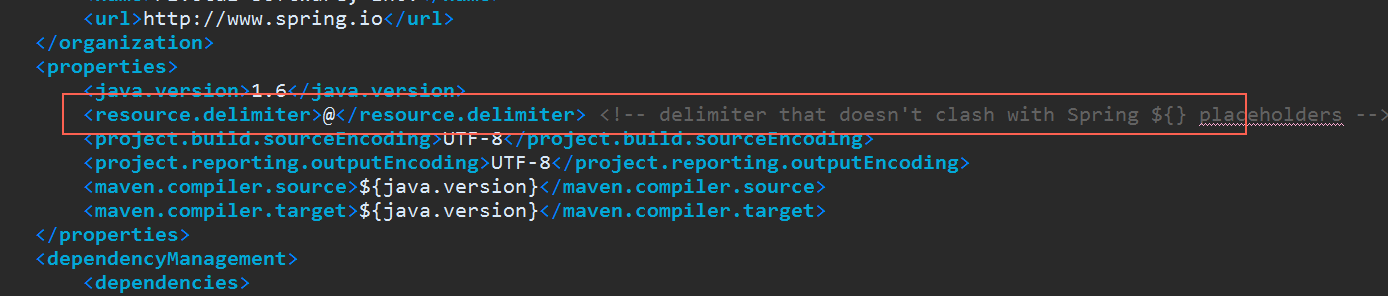
spring boot把默认的占位符号${}改成了@
找到原因了,那怎么解决就很简单了。
方法一:
在pom.xml里面添加如下内容
- <properties>
- <resource.delimiter>${}</resource.delimiter>
- </properties>
方法二:
application.properties里面不用${},改成@
- jdbc.driverClassName=@jdbc.driverClassName@
- jdbc.url=@jdbc.url@
- jdbc.username=@jdbc.username@
- jdbc.password=@jdbc.password@
方法三:
pom.xml不继承spring-boot-starter-parent,dependency里面配置全部的依赖和版本号(继承了之后,很多依赖不用写version)
方法四:
把
- <parent>
- <groupId>org.springframework.boot</groupId>
- <artifactId>spring-boot-starter-parent</artifactId>
- <version>1.5.9.RELEASE</version>
- </parent>
改成
- <dependencyManagement>
- <dependencies>
- <dependency>
- <groupId>org.springframework.boot</groupId>
- <artifactId>spring-boot-starter-web</artifactId>
- <version>1.5.9.RELEASE</version>
- <type>pom</type>
- <scope>import</scope>
- </dependency>
- </dependencies>
- </dependencyManagement>
maven filter不起作用的更多相关文章
- maven filter插件只替换了部分变量问题
maven filter简介 maven的resources插件,有一个filter的作用,能够在打包的时候,从特定文件里读取key-value对,替换配置文件中的占位符变量.很多线上线下有不同环境的 ...
- Maven Filter与Profile隔离生产环境与开发环境
Maven Filter与Profile隔离生产环境与开发环境 在不同的开发阶段,我们一般用到不同的环境,开发阶段使用开发环境的一套东西,测试环境使用测试环境的东西,可能有多个测试环境,生产环境使用的 ...
- maven filter 乱码,MalformedByteSequenceException: Invalid byte 3 of 3-byte UTF-8 sequence.
<plugins> <plugin> <groupId>org.apache.maven.plugins</groupId> <artifactI ...
- 用 maven filter 管理不同环境的配置文件
使用 maven profile 一个项目可以部署在不同的环境当中,maven 的 profile 针对不同的环境指定各自的编译方法.在 pom.xml 的 profile 中,可以根据不同的环境定制 ...
- Maven介绍,包括作用、核心概念、用法、常用命令、扩展及配置
由浅入深,主要介绍maven的用途.核心概念(Pom.Repositories.Artifact.Build Lifecycle.Goal).用法(Archetype意义及创建各种项目).maven常 ...
- org.springframework.web.filter.DelegatingFilterProxy的作用
一.类结构 DelegatingFilterProxy类继承GenericFilterBean,间接实现了Filter,故而该类属于一个过滤器.那么就会有实现Filter中init.doFilter. ...
- spring security 4 filter 顺序及作用
Spring Security 有两个作用:认证和授权 一.Srping security 4 filter 别名及顺序 spring security 4 标准filter别名和顺序,因为经常要用就 ...
- [转]Maven介绍,包括作用、核心概念、用法、常用命令、扩展及配置
转自:http://www.trinea.cn/android/maven/ 两年半前写的关于Maven的介绍,现在看来都还是不错的,自己转下.写博客的一大好处就是方便自己以后查阅,自己总结的总是最靠 ...
- Maven 的classifier的作用
直接看一个例子,maven中要引入json包,于是使用了 <dependency> <groupId>net.sf.json-lib</groupId> <a ...
随机推荐
- linux设置ip别名
修改文件 # vi /etc/hosts 添加地址和别名 192.168.222.126 s1 ##前面是机器ip,后面是别名 测试 [root@bogon /]# ping s1 PING s1 ( ...
- selenium自动加载Flash
当我们在定位的时候,有时候会碰到Flash问题导致无法定位到元素 通过下面的代码就能解决问题 参考:https://blog.csdn.net/qq_37913997/article/details/ ...
- ssh访问流程
SSH是英文Secure Shell的简写形式.通过使用SSH,你可以把所有传输的数据进行加密,这样"中间人"这种攻击方式就不可能实现了,而且也能够防止DNS欺骗和IP欺骗.使用S ...
- Mongo限制规则
文章翻译自来源:http://docs.mongodb.org/manual/reference/limits/#limit-bson-document-size 一.BSON 文档 1.BSON文档 ...
- javax.jms.JMSException: Could not connect to broker URL: tcp://localhost:61616. Reason: java.net.ConnectException: Connection timed out: connect
本地测试向服务器中ActiveMQ添加队列数据,报错连接超时 解决: 查看服务器端口号是否存在,(最好是0.0.0.0格式的,虽然暂时还不知道为啥得这个格式) 通过telnet测试该端口不通(6161 ...
- linux中ls命令使用选项
ls:英文全名:List即列表的意思 -a 列出目录下的所有文件,包括以 . 开头的隐含文件.-b 把文件名中不可输出的字符用反斜杠加字符编号(就象在C语言里一样)的形式列出.-c 输出文件的 i 节 ...
- 主流服务器虚拟化技术简单使用——Xen(一)
Tips:因为博客园网页布局的原因,部分图片显示不清晰,可以放大网页查看清晰图片. 如果系统使用物理机,需要在BIOS里面开启Intel VT-x(或AMD-V),如果是VMware workstat ...
- Golang开发环境搭建
1.下载golang安装包: 下载地址:https://golang.google.cn/dl/ 2.安装Eclipse 下载goclipse 插件 3.配置 Go 的编译器 4.写代码. packa ...
- 大数据平台-修改主机名及ssh免密码登录
一.查看服务器初始配置: 1.总核数 = 物理CPU个数 X 每颗物理CPU的核数 2.总逻辑CPU数 = 物理CPU个数 X 每颗物理CPU的核数 X 超线程数 # 查看物理CPU个数cat /pr ...
- B: Break Prime
题目描述 给定一个素数,试判断能否将该素数写为b3−a3 的形式,a,b皆为非负整数. 输入 多组输入 每行一个素数P (2≤P≤1015) 输出 若可以分解输出a,b(a<b) ,不能输出 ...