
AndroidStudio运行时出现错误:Instant Run requires 'Tools | Android | Enable ADB integration' to be enabled
本来想调出MMDS,没想到报出这个错误:
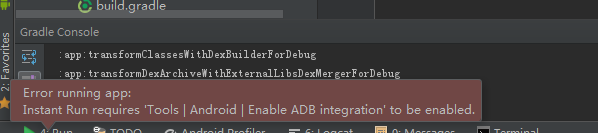
最后发现原来是自己选Android Device Monitor不小心把Enable ADB Integration前面的√去掉了。点击工具栏中的Tools,选中Android,最后点击Enable ADB Integration,使其前面出现✔号就OK了,
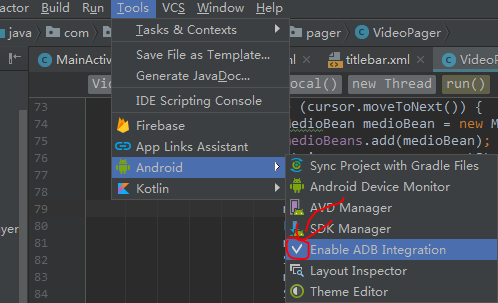
原因:
这个是由于Android Studio2.0新版本中的Instant Run (即时运行)引起的,什么是即时运行呢?
Instant Run in Android Studio 2.0 allows you to quickly make changes to your app code while your app is running on an Android device or Android Emulator. Instead of waiting for your entire app to rebuild and redeploy after each code change, Android Studio 2.0 will try to incrementally build and push only the incremental code or resource change. Depending on the code changes you make, you can see the results of your change in under a second. By simply updating your app to use the latest Gradle plugin ( '
com.android.tools.build:gradle:2.0.0-beta2’ ), you can take advantage of this time saving features with no other modifications to your code.
它可以快速的更改运行在Android虚拟机中的APP,也就是说在Android虚拟机中的app还在运行的时候,就可以直接改变它的内部代码
开发者可以不用再等待整个应用程序重建以及每次代码更改后重新部署
简单来说就是改了代码后,点击即时运行,模拟器上的应用不需要重启就可以直接呈现出我们修改后的代码效果!
AndroidStudio运行时出现错误:Instant Run requires 'Tools | Android | Enable ADB integration' to be enabled的更多相关文章
- Instant Run requires 'Tools | Android | Enable ADB integration' to be enabled.
更新了最新的Android Studio预览版之后,运行程序.发现弹出了一个Error Instant Run requires 'Tools | Android | Enable ADB integ ...
- 1.运行Android Studio,一直提示:Error running app: Instant Run requires 'Tools | Android | Enable ADB integration' to be enabled.
1.解决问题办法:菜单栏,Tools -> Adnroid -> enable ADB integration勾上 2.暂时性的解决方案:在Android Studio中的:Prefere ...
- Error running app: Instant Run requires 'Tools | Android | Enable ADB integration' to be enabled.解决办法
刚刚更新AS到2.0版本,然后导入Api Demos的时候出现了这个错误. 解决办法:在AS的菜单栏,Tools->Android ->Enable ADB integration 勾选就 ...
- Android 运行时报错Error running app: Instant Run requires 'Tools | Android | Enable ADB integration' to be enabled. 的解决办法
解决方法:在菜单栏,Tools->Android->Enable ADB integration勾选就可以了.
- Error running app: Instant Run requires 'Tools | Android | Enable ADB integration' to be enabled.
废了半天劲才解决... 就三步:菜单栏,Tools -> Adnroid -> enable ADB integration
- 关于Android Studio 3.2 运行应用时提示 “Instant Run requires that the platform corresponding to your target device (Android 7.0 (Nougat)) is installed.” 的说明
点击"Run",运行App后,Android Studio显示如图1-1界面: 图1-1 这是因为你连接的外部设备(比如Android手机或AVD)的SDK版本在你的电脑上没有安装 ...
- docker 运行时常见错误
docker 运行时常见错误 (1) Cannot connect to the Docker daemon at unix:///var/run/docker.sock. [root@localho ...
- Erlang运行时的错误
Erlang运行时发生错误时,会返回一些错误信息,理解这些信息,对于学好.用好Erlang来说是必要. Erlang中的运行错误包括:badarg, badarith, badmatch, funct ...
- adb错误:Failed to execute android command 'adb devices'.
好吧,我是用的phonegap3.0开发的,很简单,安装的时候一句phonegap run android –device就可以了(-device参数非必要,我是为了不跑模拟器,加上此参数限制只跑到设 ...
随机推荐
- 基础篇:6.5)形位公差-基本规则 Basic Rules
本章目的:述说形位公差的基本规则 1.代表规则的修正符号与使用情况: 使用情况举例: 2 有关术语 为了明确线性尺寸公差与形位公差之间关系,对尺寸术语将作进一步论述与定义. //无需强记,但希望现有 ...
- Python之人工智能(一)
是不是看到标题感觉很高大上?其实就是人工智障啦hhh~,本篇文档是典型的标题党,虽然是人工智能,但是没有算法,只是站在巨人的肩膀上而已. 好了,步入正题.此篇是人工智能应用的重点,只用现成的技术不做底 ...
- 使用maven构建多模块项目_记录
参照孤傲苍狼的博客:https://www.cnblogs.com/xdp-gacl/p/4242221.html 备注:博客中的生成语句,适用于maven3.0.5以上,若为3.0.5以下,则将cr ...
- WebViewJavascriptBridge详细使用 iOS与H5交互的方案
WebViewJavascriptBridge详细使用 源网址: https://www.cnblogs.com/jiang-xiao-yan/p/5345755.html 前言 WebView ...
- (转)linux shell 数字计算详解
代码中免不了要进行各种数据计算.抛开科学计算不提,普通的计算占地,百分比,同比,环比等需求就很常见.linux shell中进行数字计算,主要有如下几种方式: 1.bc bc是比较常用的linux计算 ...
- selenium+Python(定位 单选、复选框,多层定位)
1.定位一组元素webdriver 可以很方便的使用 findElement 方法来定位某个特定的对象,不过有时候我们却需要定位一组对象,这时候就需要使用 findElements 方法.定位一组对象 ...
- android volley 发送 POST 请求
Map<String, String> params = new HashMap<String, String>(); params.put("fromUser&qu ...
- git笔记(三)
详细输出日志 git log --pretty=raw 查看id类型 git cat-file -t fe4c git cat-file -t b36bf6 git cat-file -t b08 ...
- git 学习之什么是版本库
什么是版本库? 我们一般把版本库也叫仓库(repository),其实我们可以简单的把它看成一个目录,只不过目录里面的文件都会由 Git 进行管理,当我们对文件进行修改.删除.Git 都可以对其进行跟 ...
- HTML页面中嵌入SVG
HTML页面中嵌入SVG的几种方式 你有N种理由使用SVG在页面中展示图像,如它的矢量特性.广泛的浏览器支持.比JPEG和PNG更小的体积.可用CSS设置外观.使用DOM API操作以及各种可用的SV ...