
UI基础之UITableViewController相关
1> 设置类型为Group
- (instancetype)initWithStyle:(UITableViewStyle)style

{

    return [super initWithStyle:UITableViewStyleGrouped];

}
2> 设置每组cell之间的间距
// 每组头部高度

self.tableView.sectionHeaderHeight = ;

// 每组底部高度

self.tableView.sectionFooterHeight = ;
3> 设置cell的分隔线
// 去掉分隔线
self.tableView.separatorStyle = UITableViewCellSeparatorStyleNone;
/*--  设置cell分隔线为全屏  --*/

// 方案一

// 在iOS7之后,tableView会有自己的内边距

// 将内边距清空

self.tableView.separatorInset = UIEdgeInsetsZero;

// 在iOS8之后,系统会在每一个控件自动布局时添加默认的内边距

// 清空cell的内边距:考虑重复利用,所以在awakeFromNib中设置一次就可以了

- (void)awakeFromNib

{

    self.layoutMargins = UIEdgeInsetsZero;

}

// 方案二

// 了解tableView底层实现,通过设置cell的frame实现

// 取消cell分隔线

self.tableView.separatorStyle = UITableViewCellSeparatorStyleNone;

// 设置tableView的背景色

self.tableView.backgroundColor = [UIColor lightGrayColor];

// 在自定义cell中重写setFrame方法

- (void)setFrame:(CGRect)frame

{

    frame.size.height -= ;

    [super setFrame:frame];

}
4> 设置tableView的弹簧效果
// 取消弹簧效果

self.tableView.bounces = NO;
5> 设置cell选中时的背景颜色
UIView *backgroundV = [[UIView alloc] initWithFrame:cell.bounds];

backgroundV.backgroundColor = [UIColor whiteColor];

cell.selectedBackgroundView = backgroundV;
6> 设置带箭头的cell样式
cell.accessoryType = UITableViewCellAccessoryDisclosureIndicator;
7> 设置cell文字的字体和颜色
cell.textLabel.font = [UIFont systemFontOfSize:15.0];

cell.textLabel.textColor = [UIColor darkGrayColor];
8> 设置cell中的富文本
NSMutableDictionary *attDict = [NSMutableDictionary dictionary];

attDict[NSFontAttributeName] = [UIFont boldSystemFontOfSize:20.0];

attDict[NSForegroundColorAttributeName] = [UIColor whiteColor];

NSAttributedString *attText = [[NSAttributedString alloc] initWithString:@"安全退出" attributes:attDict];

cell.textLabel.attributedText = attText;
9> 设置cell文字居中
cell.textLabel.textAlignment = NSTextAlignmentCenter;
10> 当tableView为UITableViewStylePlain时,隐藏多余的cell
self.tableView.tableFooterView = [[UIView alloc] initWithFrame:CGRectZero];
11> 设置tableView的headerView
    UITableViewHeaderFooterView *headerView = [[UITableViewHeaderFooterView alloc] initWithFrame:CGRectMake(, , SCREEN_WIDTH, )];

    headerView.contentView.backgroundColor = [UIColor redColor];

    self.tableView.tableHeaderView = headerView;
使用TableView时遇到的坑:
1> [TableView] Setting the background color on UITableViewHeaderFooterView has been deprecated. Please set a custom UIView with your desired background color to the backgroundView property instead.
翻译:不赞成在UITableViewHeaderFooterView上设置背景色。请改为将具有所需背景色的自定义UIView设置为backgroundview属性。
解决方案:使用xib时,添加一个View控件,设置View的背景色。
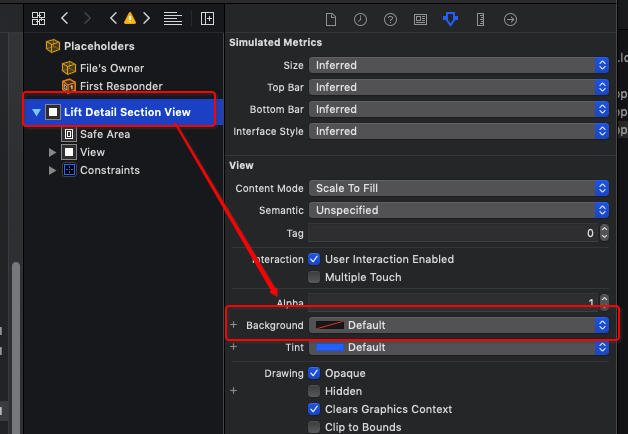

2>[Warning] Warning once only: Detected a case where constraints ambiguously suggest a height of zero for a tableview cell's content view. We're considering the collapse unintentional and using standard height instead.
翻译:[警告]仅警告一次:检测到一种情况,其中约束模糊地建议TableView单元格的内容视图的高度为零。我们考虑的是无意的坍塌,而是使用标准高度。
解决方案:
- (CGFloat)tableView:(UITableView *)tableView heightForRowAtIndexPath:(NSIndexPath *)indexPath {

    return ;

}
UI基础之UITableViewController相关的更多相关文章
- UI基础之UITextField相关
UITextField *textF = [[UITextField alloc] init]; 1.字体相关 textF.text = @"文本框文字"; textF.textC ...
- UI基础之UIButton相关
UIButton *btn = [UIButton buttonWithType:UIButtonTypeCustom]; 1.按钮透明效果 btn.alpha = 0.8; 2.按钮圆角处理 btn ...
- Android UI基础之五大布局
Android UI基础之五大布局 Android的界面是有布局和组件协同完成的,布局好比是建筑里的框架,而组件则相当于建筑里的砖瓦.组件按照布局的要求依次排列,就组成了用户所看见的界面.Andro ...
- iOS开发UI基础—手写控件,frame,center和bounds属性
iOS开发UI基础—手写控件,frame,center和bounds属性 一.手写控件 1.手写控件的步骤 (1)使用相应的控件类创建控件对象 (2)设置该控件的各种属性 (3)添加控件到视图中 (4 ...
- 背水一战 Windows 10 (76) - 控件(控件基类): Control - 基础知识, 焦点相关, 运行时获取 ControlTemplate 和 DataTemplate 中的元素
[源码下载] 背水一战 Windows 10 (76) - 控件(控件基类): Control - 基础知识, 焦点相关, 运行时获取 ControlTemplate 和 DataTemplate 中 ...
- 转发-UI基础教程 – 原生App切图的那些事儿
UI基础教程 – 原生App切图的那些事儿 转发:http://www.shejidaren.com/app-ui-cut-and-slice.html 移动APP切图是UI设计必须学会的一项技能,切 ...
- Android UI基础教程 目录
从csdn下载了这本英文版的书之后,又去京东搞了一个中文目录下来.对照着看. 话说,这本书绝对超值.有money的童鞋看完英文版记得去买中文版的~~ Android UI基础教程完整英文版 pdf+源 ...
- UI基础UIButton
UI基础UIButton 前面写了UIWindow.UIViewController,那些都是一些框架,框架需要填充上具体的view才能组成我们的应用,移动应用开发中UI占了很大一部分,最基础的UI实 ...
- UI基础UIWindow、UIView
UI基础UIWindow.UIView 在PC中,应用程序多是使用视窗的形式显示内容,手机应用也不例外,手机应用中要在屏幕上显示内容首先要创建一个窗口承载内容,iOS应用中使用UIWindow.UIV ...
随机推荐
- 通过JDBC进行简单的增删改查(以MySQL为例)
目录 前言:什么是JDBC 一.准备工作(一):MySQL安装配置和基础学习 二.准备工作(二):下载数据库对应的jar包并导入 三.JDBC基本操作 (1)定义记录的类(可选) (2)连接的获取 ( ...
- 【英语魔法俱乐部——读书笔记】 2 中级句型-复句&合句(Complex Sentences、Compound Sentences)
[英语魔法俱乐部——读书笔记] 2 中级句型-复句&合句(Complex Sentences.Compound Sentences):(2.1)名词从句.(2.2)副词从句.(2.3)关系从句 ...
- Python 无限循环
import threading import time class CountDownTimer(threading.Thread): def __init__(self, seconds, act ...
- python之路-Day6
time & datetime模块 #_*_coding:utf-8_*_ __author__ = 'Alex Li' import time # print(time.clock()) # ...
- hihoCoder #1199 : Tower Defense Game ——(树型dp)
题目链接:https://hihocoder.com/problemset/problem/1199. 题意:一棵以1为根的树,每个点有一个p值和q值,到这个点需要当前分数大于等于p,然后消耗掉(p- ...
- DataRow[]与DataTable的转换代码【精炼】
Day_20170106 代码记录 //DataTable查询出DataRow[] DataRow[] drs = AllSysModuleDs.Tables[].Select(string.Form ...
- Elasticsearch mapping
//设置mapping Put: http://192.168.1.102:9200/indexName { "settings": { , }, "mappings&q ...
- C# 科学计数法转换成数字
/// <summary> /// 判断输入的数是否是科学计数法.如果是的话,就会将其换算成整数并且返回,否则就返回false. /// </summary> /// < ...
- Erp中的ATP和CTP是什么?两者有什么区别?
可用量承诺(Available to Promise,ATP),是一种库存匹配模型,意在最大限度地利用库存产品对客户订单需求做出及时和准确的反应,缩短交货提前期.降低库存水准: 可用生产能力承诺(Ca ...
- [题解]vijos & codevs 能量项链
a { text-decoration: none; font-family: "comic sans ms" } .math { color: gray; font-family ...