
UI基础之UITableViewController相关
1> 设置类型为Group
- (instancetype)initWithStyle:(UITableViewStyle)style

{

    return [super initWithStyle:UITableViewStyleGrouped];

}
2> 设置每组cell之间的间距
// 每组头部高度

self.tableView.sectionHeaderHeight = ;

// 每组底部高度

self.tableView.sectionFooterHeight = ;
3> 设置cell的分隔线
// 去掉分隔线
self.tableView.separatorStyle = UITableViewCellSeparatorStyleNone;
/*--  设置cell分隔线为全屏  --*/

// 方案一

// 在iOS7之后,tableView会有自己的内边距

// 将内边距清空

self.tableView.separatorInset = UIEdgeInsetsZero;

// 在iOS8之后,系统会在每一个控件自动布局时添加默认的内边距

// 清空cell的内边距:考虑重复利用,所以在awakeFromNib中设置一次就可以了

- (void)awakeFromNib

{

    self.layoutMargins = UIEdgeInsetsZero;

}

// 方案二

// 了解tableView底层实现,通过设置cell的frame实现

// 取消cell分隔线

self.tableView.separatorStyle = UITableViewCellSeparatorStyleNone;

// 设置tableView的背景色

self.tableView.backgroundColor = [UIColor lightGrayColor];

// 在自定义cell中重写setFrame方法

- (void)setFrame:(CGRect)frame

{

    frame.size.height -= ;

    [super setFrame:frame];

}
4> 设置tableView的弹簧效果
// 取消弹簧效果

self.tableView.bounces = NO;
5> 设置cell选中时的背景颜色
UIView *backgroundV = [[UIView alloc] initWithFrame:cell.bounds];

backgroundV.backgroundColor = [UIColor whiteColor];

cell.selectedBackgroundView = backgroundV;
6> 设置带箭头的cell样式
cell.accessoryType = UITableViewCellAccessoryDisclosureIndicator;
7> 设置cell文字的字体和颜色
cell.textLabel.font = [UIFont systemFontOfSize:15.0];

cell.textLabel.textColor = [UIColor darkGrayColor];
8> 设置cell中的富文本
NSMutableDictionary *attDict = [NSMutableDictionary dictionary];

attDict[NSFontAttributeName] = [UIFont boldSystemFontOfSize:20.0];

attDict[NSForegroundColorAttributeName] = [UIColor whiteColor];

NSAttributedString *attText = [[NSAttributedString alloc] initWithString:@"安全退出" attributes:attDict];

cell.textLabel.attributedText = attText;
9> 设置cell文字居中
cell.textLabel.textAlignment = NSTextAlignmentCenter;
10> 当tableView为UITableViewStylePlain时,隐藏多余的cell
self.tableView.tableFooterView = [[UIView alloc] initWithFrame:CGRectZero];
11> 设置tableView的headerView
    UITableViewHeaderFooterView *headerView = [[UITableViewHeaderFooterView alloc] initWithFrame:CGRectMake(, , SCREEN_WIDTH, )];

    headerView.contentView.backgroundColor = [UIColor redColor];

    self.tableView.tableHeaderView = headerView;
使用TableView时遇到的坑:
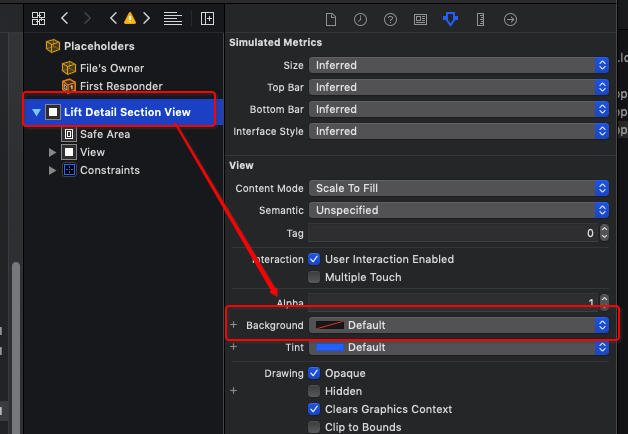
1> [TableView] Setting the background color on UITableViewHeaderFooterView has been deprecated. Please set a custom UIView with your desired background color to the backgroundView property instead.
翻译:不赞成在UITableViewHeaderFooterView上设置背景色。请改为将具有所需背景色的自定义UIView设置为backgroundview属性。
解决方案:使用xib时,添加一个View控件,设置View的背景色。

2>[Warning] Warning once only: Detected a case where constraints ambiguously suggest a height of zero for a tableview cell's content view. We're considering the collapse unintentional and using standard height instead.
翻译:[警告]仅警告一次:检测到一种情况,其中约束模糊地建议TableView单元格的内容视图的高度为零。我们考虑的是无意的坍塌,而是使用标准高度。
解决方案:
- (CGFloat)tableView:(UITableView *)tableView heightForRowAtIndexPath:(NSIndexPath *)indexPath {

    return ;

}
UI基础之UITableViewController相关的更多相关文章
- UI基础之UITextField相关
UITextField *textF = [[UITextField alloc] init]; 1.字体相关 textF.text = @"文本框文字"; textF.textC ...
- UI基础之UIButton相关
UIButton *btn = [UIButton buttonWithType:UIButtonTypeCustom]; 1.按钮透明效果 btn.alpha = 0.8; 2.按钮圆角处理 btn ...
- Android UI基础之五大布局
Android UI基础之五大布局 Android的界面是有布局和组件协同完成的,布局好比是建筑里的框架,而组件则相当于建筑里的砖瓦.组件按照布局的要求依次排列,就组成了用户所看见的界面.Andro ...
- iOS开发UI基础—手写控件,frame,center和bounds属性
iOS开发UI基础—手写控件,frame,center和bounds属性 一.手写控件 1.手写控件的步骤 (1)使用相应的控件类创建控件对象 (2)设置该控件的各种属性 (3)添加控件到视图中 (4 ...
- 背水一战 Windows 10 (76) - 控件(控件基类): Control - 基础知识, 焦点相关, 运行时获取 ControlTemplate 和 DataTemplate 中的元素
[源码下载] 背水一战 Windows 10 (76) - 控件(控件基类): Control - 基础知识, 焦点相关, 运行时获取 ControlTemplate 和 DataTemplate 中 ...
- 转发-UI基础教程 – 原生App切图的那些事儿
UI基础教程 – 原生App切图的那些事儿 转发:http://www.shejidaren.com/app-ui-cut-and-slice.html 移动APP切图是UI设计必须学会的一项技能,切 ...
- Android UI基础教程 目录
从csdn下载了这本英文版的书之后,又去京东搞了一个中文目录下来.对照着看. 话说,这本书绝对超值.有money的童鞋看完英文版记得去买中文版的~~ Android UI基础教程完整英文版 pdf+源 ...
- UI基础UIButton
UI基础UIButton 前面写了UIWindow.UIViewController,那些都是一些框架,框架需要填充上具体的view才能组成我们的应用,移动应用开发中UI占了很大一部分,最基础的UI实 ...
- UI基础UIWindow、UIView
UI基础UIWindow.UIView 在PC中,应用程序多是使用视窗的形式显示内容,手机应用也不例外,手机应用中要在屏幕上显示内容首先要创建一个窗口承载内容,iOS应用中使用UIWindow.UIV ...
随机推荐
- SQL Server执行计划的理解
详细看:http://www.cnblogs.com/kissdodog/p/3160560.html 自己总结: 扫描Scan:逐行遍历数据. 查找Seek:根据查询条件,定位到索引的局部位置,然后 ...
- 贼溜的更新Android-SDK的方法(亲测很好用)
启动 Android SDK Manager ,打开主界面,依次选择「Tools」.「Options...」,弹出『Android SDK Manager - Settings』窗口:在『Androi ...
- asp.net LINQ实现数据分页
using System; using System.Collections.Generic; using System.Linq; using System.Web; using System.We ...
- UI设计趋势:渐变设计风格重新回归主流
在扁平化设计刚刚兴起之时,渐变是设计师们避之不及的设计手法,然而今天它已经正式回归.几乎是在一夜之间,无数的网站开始使用渐变色. 从背景到图片上的色彩叠加,包括UI元素上所遮盖的色彩,所有的这一切都表 ...
- lua面试基础知识
1.lua中八种基础类型:nil(空),boolean(布尔),number(数字),string(字符串),userdata(自定义类型),function(函数),thread(线程),table ...
- 微信小程序 wx.getUserInfo 解密 C# 代码
花了6小时,弄出来的代码.网上的是PHP代码 public static string DecodeUserInfo(string raw, string signature,string encry ...
- keepalived+nginx高可用负载均衡环境搭建
上篇说道keepalived的环境搭建,本来keepalived结合lvs更有优势,但是也可以结合nginx来使用.下面接着说下nginx的环境搭建 环境信息: nginx(master) 192. ...
- IE6/IE7/IE8兼容H5标签
可以使用html5shiv(html5shiv主要解决HTML5提出的新元素不被IE6-8识别,这些新元素不能作为父节点包裹子元素,并且不能应用CSS样式)来解决 <!--[if lt IE 9 ...
- Java调用第三方dll文件的使用方法 System.load()或System.loadLibrary()
Java调用第三方dll文件的使用方法 public class OtherAdapter { static { //System.loadLibrary("Connector") ...
- Sum All Primes
function sumPrimes(num) { //return num; var arr = []; var ifPrime = function(num){ if(num < 2){ r ...