
ios之UITableViewController(二) tableView的编辑模式
tableView的编辑模式
表视图可以进入编辑模式,当进入编辑模式就可以进行删除、插入、移动单元等操作
效果图:
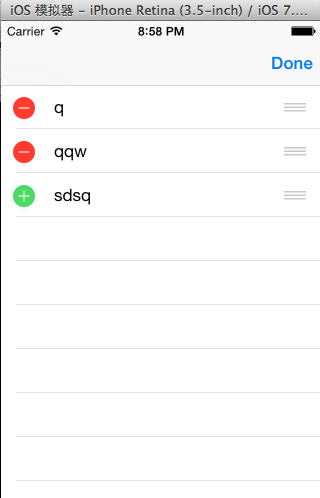
让表视图进入编辑模式,进入编辑模式的方法有两种,一种是使用导航栏的edit
按钮,另一种是设置tableView的editing属性进入编辑模式。
最后通过实现UITableViewDataSource协议的方法实现单元格的删除、插入和移动
1,在viewDidLoad方法里面指定导航栏的右按钮为edit按钮
self.navigationItem.rightBarButtonItem =self.editButtonItem;
2,另一种进入编辑模式的方式是修改tableView的editing属性
该属性是一个BOOL类型,默认值是NO,这里给导航栏添加一个左按钮,通过点击左按钮修改editing属性的值
进入和退出编辑模式
- (void)editTableView:(UIBarButtonItem *)button
{
//修改editing属性的值,进入或退出编辑模式
[self.tableView setEditing:!self.tableView.editinganimated:YES];
if(self.tableView.editing){
button.title = @"完成";
}
else{
button.title = @"编辑";
}
}
实现删除和插入行
两方法一响应
方法一:那些行进入编辑模式
- (BOOL)tableView:(UITableView *)tableView canEditRowAtIndexPath:(NSIndexPath *)indexPath
{
return YES;
}
方法二:进入编辑模式的cell是删除还是增加
-(UITableViewCellEditingStyle)tableView:(UITableView *)tableView editingStyleForRowAtIndexPath:(NSIndexPath *)indexPath
{
return UITableViewCellEditingStyleDelete;
}
注意:这个方法里一般返回两种类型,还有一中默认类型
删除:UITableViewCellEditingStyleDelete
增加:UITableViewCellEditingStyleInsert
响应:点击当点击delete后执行的删除过程
-(void)tableView:(UITableView *)tableView commitEditingStyle:(UITableViewCellEditingStyle)editingStyle forRowAtIndexPath:(NSIndexPath *)indexPath
{
//删除数据源里的数据
[self.array removeObjectAtIndex:indexPath.row];
//再删除tableView中对应的行
[tableView deleteRowsAtIndexPaths:@[indexPath] withRowAnimation:UITableViewRowAnimationFade];
}
注意:先除数据源里的数据,删除tableView中对应的行
实现移动行
当tableView进入编辑模式之后,默认每一行都是可以移动,每一行尾部有一个图标
为三行灰色横线的按钮,就是表示该行可以移动
一方法一响应
方法一:那些cell可以移动
-(BOOL)tableView:(UITableView *)tableView
canMoveRowAtIndexPath:(NSIndexPath *)indexPath
{
return YES;
}
响应:移动的具体操作
- (void)tableView:(UITableView *)tableView
moveRowAtIndexPath:(NSIndexPath *)fromIndexPath
toIndexPath:(NSIndexPath *)toIndexPath
{
TRStudent *stu=self.array[fromIndexPath.row];
[self.array removeObjectAtIndex:fromIndexPath.row];
[self.array insertObject:stuatIndex:toIndexPath.row];
}
案例
AppDelegate.h
#import <UIKit/UIKit.h>
@interface AppDelegate : UIResponder <UIApplicationDelegate>
@property (strong, nonatomic) UIWindow *window;
@end
AppDelegate.m
#import "AppDelegate.h"
#import"TRStudent.h"
#import "TRTableViewController.h"
@implementation AppDelegate
- (BOOL)application:(UIApplication *)application didFinishLaunchingWithOptions:(NSDictionary *)launchOptions
{
self.window = [[UIWindow alloc] initWithFrame:[[UIScreen mainScreen] bounds]];
// Override point for customization after application launch.
self.window.backgroundColor = [UIColor whiteColor];
TRTableViewController *tr1=[[TRTableViewController alloc] initWithNibName:@"TRTableViewController" bundle:nil];
UINavigationController *navi=[[UINavigationController alloc] initWithRootViewController:tr1];
self.window.rootViewController=navi;
[self.window makeKeyAndVisible];
return YES;
}
@end
TRTableViewController.h
#import <UIKit/UIKit.h>
@interface TRTableViewController : UITableViewController
@property(nonatomic,strong) NSMutableArray *array;
@end
TRTableViewController.m
#import "TRTableViewController.h"
#import "TRStudent.h"
@interface TRTableViewController ()
@end
@implementation TRTableViewController
-(id)initWithNibName:(NSString *)nibNameOrNil bundle:(NSBundle *)nibBundleOrNil
{
return self=[super initWithNibName:nibNameOrNil bundle:nibBundleOrNil];
}
- (void)viewDidLoad
{
[super viewDidLoad];
self.array=[TRStudent getarray];
self.navigationItem.rightBarButtonItem=self.editButtonItem;
}
//有多少分区
- (NSInteger)numberOfSectionsInTableView:(UITableView *)tableView
{
return 1;
}
//有多少个cell单元
- (NSInteger)tableView:(UITableView *)tableView numberOfRowsInSection:(NSInteger)section
{
return self.array.count;
}
//cell单元
- (UITableViewCell *)tableView:(UITableView *)tableView cellForRowAtIndexPath:(NSIndexPath *)indexPath
{
UITableViewCell *cell = [tableView dequeueReusableCellWithIdentifier:@"cell"];
if(cell==nil)
{
cell=[[UITableViewCell alloc] initWithStyle:UITableViewCellStyleValue1 reuseIdentifier:@"cell"];
}
TRStudent *stu=self.array[indexPath.row];
cell.textLabel.text=stu.name;
return cell;
}
//那些行进入编辑模式,根据你的需求自行设置,我这里设置的全部
- (BOOL)tableView:(UITableView *)tableView canEditRowAtIndexPath:(NSIndexPath *)indexPath
{
return YES;
}
//进入编辑模式的cell是删除还是增加
//自行设置,我这里设置的是最后一个cell单元是增加,其他是删除
-(UITableViewCellEditingStyle)tableView:(UITableView *)tableView
editingStyleForRowAtIndexPath:(NSIndexPath *)indexPath
{
if(indexPath.row==self.array.count-1)
return UITableViewCellEditingStyleInsert;
return UITableViewCellEditingStyleDelete;
}
//点击当点击delete后执行的删除增加过程
- (void)tableView:(UITableView *)tableView commitEditingStyle:(UITableViewCellEditingStyle)editingStyle forRowAtIndexPath:(NSIndexPath *)indexPath
{
if (editingStyle == UITableViewCellEditingStyleDelete) {
[self.array removeObjectAtIndex:indexPath.row];
[tableView deleteRowsAtIndexPaths:@[indexPath] withRowAnimation:UITableViewRowAnimationFade];
} else if (editingStyle == UITableViewCellEditingStyleInsert) {
TRStudent *str2=[[TRStudent alloc] init];
str2.name=@"qwer";
str2.name=@"124456";
[self.array addObject:str2];
NSIndexPath *insetindexpath=[NSIndexPath indexPathForRow:self.array.count-1 inSection:0];
[tableView insertRowsAtIndexPaths:@[insetindexpath] withRowAnimation:UITableViewRowAnimationAutomatic];
}
}
//那些cell可移动
-(BOOL)tableView:(UITableView *)tableView
canMoveRowAtIndexPath:(NSIndexPath *)indexPath
{
return YES;
}
//移动
- (void)tableView:(UITableView *)tableView
moveRowAtIndexPath:(NSIndexPath *)fromIndexPath
toIndexPath:(NSIndexPath *)toIndexPath
{
TRStudent *stu=self.array[fromIndexPath.row];
[self.array removeObjectAtIndex:fromIndexPath.row];
[self.array insertObject:stuatIndex:toIndexPath.row];
}
@end
TRStudent.h
#import <Foundation/Foundation.h>
@interface TRStudent : NSObject
@property(nonatomic,strong) NSString *name;
@property(nonatomic,strong) NSString *phone;
+(NSMutableArray *)getarray;
@end
TRStudent.m
#import "TRStudent.h"
@implementation TRStudent
+(NSMutableArray *)getarray
{
TRStudent *stu1=[[TRStudent alloc] init];
stu1.name=@"q";
stu1.phone=@"12345";
TRStudent *stu2=[[TRStudent alloc] init];
stu2.name=@"qqw";
stu2.phone=@"12345";
TRStudent *stu3=[[TRStudent alloc] init];
stu3.name=@"sdsq";
stu3.phone=@"12345";
NSMutableArray *mut=[[NSMutableArray alloc] init];
[mut addObject:stu1];
[mut addObject:stu2];
[mut addObject:stu3];
return mut;
}
@end
ios之UITableViewController(二) tableView的编辑模式的更多相关文章
- iOS UIKit:TableView之编辑模式(3)
一般table view有编辑模式和正常模式,当table view进入编辑模式时,会在row的左边显示编辑和重排控件,如图 42所示的编辑模式时的控件布局:左边的editing control有表 ...
- 07-UIKit(tableview的编辑模式、accessoryView)
目录: 一.tableview的编辑模式-增删改查 二.不使用继承创建tableview 三.accessoryView辅助视图 回到顶部 一.tableview的编辑模式-增删改查 [1-conta ...
- IOS开发学习笔记032-UITableView 的编辑模式
UITableView 的三种编辑模式 1.删除 2.排序 3.添加 进入编辑模式,需要设置一个参数 - (IBAction)remove:(UIBarButtonItem *)sender { NS ...
- IOS第七天(6:UiTableView编辑模式, 拖动位置 ,滑动删除)
**********UiTableView编辑模式, 拖动位置 ,滑动删除 #import "HMViewController.h" @interface HMViewContro ...
- ios 继承UITableViewController,更改tableview样式
// 继承UITableViewController,更改tableview样式 - (instancetype)initWithStyle:(UITableViewStyle)style { ret ...
- iOS开发UI篇-tableView在编辑状态下的批量操作(多选)
先看下效果图 直接上代码 #import "MyController.h" @interface MyController () { UIButton *button; } @pr ...
- iOS 中UITableViewController 中tableView 会被状态栏覆盖的问题
解决办法在 生命周期函数viewDidAppear中设置即可 - (void)viewDidAppear:(BOOL)animated { self.tableView.frame = CGRectM ...
- IOS第13天(3,私人通讯录,登陆状态数据存储,数据缓存, cell的滑动删除,进入编辑模式,单个位置刷新 )
*****联系人的界面的优化 HMContactsTableViewController.m #import "HMContactsTableViewController.h" # ...
- UITableView编辑模式大全解
1.UITableView 的编辑模式 进入编辑模式 代码体现 // 设置 editing 属性 tableView?.editing = true // 这个设置的时候是有动画效果的 tableVi ...
随机推荐
- Codeforces Round #181 (Div. 2) C. Beautiful Numbers 排列组合 暴力
C. Beautiful Numbers 题目连接: http://www.codeforces.com/contest/300/problem/C Description Vitaly is a v ...
- Codeforces Good Bye 2015 D. New Year and Ancient Prophecy 后缀数组 树状数组 dp
D. New Year and Ancient Prophecy 题目连接: http://www.codeforces.com/contest/611/problem/C Description L ...
- Android集成支付宝接口 实现在线支付
手机的在线支付,被认为是2012年最看好的功能,我个人认为这也是移动互联网较传统互联网将会大放光彩的一个功能. 人人有手机,人人携带手机,花钱买东西,不再需要取钱付现,不再需要回家上网银,想买什么,扫 ...
- dom4j生成、解析xml
/** * 创建xml * @param obj 泛型对象 * @param entityPropertys 泛型对象的List集合 * @param Encode XML自定义编码类型 * @par ...
- 安装linux系统并配置那点事
安装完成后,将看到如下控制台: 输入以上安装信息中所填写的用户名(user),随后输入密码(user),即可登录 Ubuntu. 随时可使用 Ctrl + Alt 快捷键可离开虚拟机. 3 配置 Ub ...
- 剑指 offer set 6 打印从 1 到 N 的所有数
总结 1. 求全排列的变形题, 有些隐晦, 没看出来
- [Tips]解决HG之waiting for lock on repository
# Symptom 在tortoiseHg中commit或者Sync change的时候,总是出现下面的错误: waiting for lock on repository ... # Solutio ...
- LeetCode24 Swap Nodes in Pairs
题意: Given a linked list, swap every two adjacent nodes and return its head. For example,Given 1-> ...
- L - Fabled Rooks(中途相遇法和贪心)
Problem F: Fabled Rooks We would like to place n rooks, 1 ≤ n ≤ 5000, on a n×n board subject to the ...
- Inversions
There are N integers (1<=N<=65537) A1, A2,.. AN (0<=Ai<=10^9). You need to find amount o ...