
ios之UITableViewController(二) tableView的编辑模式
tableView的编辑模式
表视图可以进入编辑模式,当进入编辑模式就可以进行删除、插入、移动单元等操作
效果图:
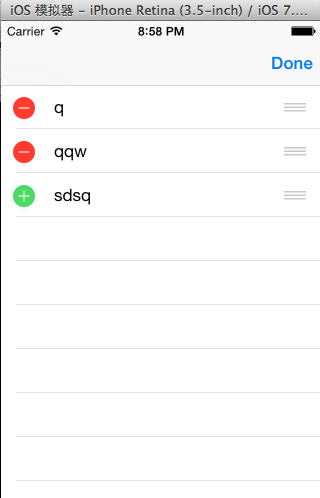
让表视图进入编辑模式,进入编辑模式的方法有两种,一种是使用导航栏的edit
按钮,另一种是设置tableView的editing属性进入编辑模式。
最后通过实现UITableViewDataSource协议的方法实现单元格的删除、插入和移动
1,在viewDidLoad方法里面指定导航栏的右按钮为edit按钮
self.navigationItem.rightBarButtonItem =self.editButtonItem;
2,另一种进入编辑模式的方式是修改tableView的editing属性
该属性是一个BOOL类型,默认值是NO,这里给导航栏添加一个左按钮,通过点击左按钮修改editing属性的值
进入和退出编辑模式
- (void)editTableView:(UIBarButtonItem *)button
{
//修改editing属性的值,进入或退出编辑模式
[self.tableView setEditing:!self.tableView.editinganimated:YES];
if(self.tableView.editing){
button.title = @"完成";
}
else{
button.title = @"编辑";
}
}
实现删除和插入行
两方法一响应
方法一:那些行进入编辑模式
- (BOOL)tableView:(UITableView *)tableView canEditRowAtIndexPath:(NSIndexPath *)indexPath
{
return YES;
}
方法二:进入编辑模式的cell是删除还是增加
-(UITableViewCellEditingStyle)tableView:(UITableView *)tableView editingStyleForRowAtIndexPath:(NSIndexPath *)indexPath
{
return UITableViewCellEditingStyleDelete;
}
注意:这个方法里一般返回两种类型,还有一中默认类型
删除:UITableViewCellEditingStyleDelete
增加:UITableViewCellEditingStyleInsert
响应:点击当点击delete后执行的删除过程
-(void)tableView:(UITableView *)tableView commitEditingStyle:(UITableViewCellEditingStyle)editingStyle forRowAtIndexPath:(NSIndexPath *)indexPath
{
//删除数据源里的数据
[self.array removeObjectAtIndex:indexPath.row];
//再删除tableView中对应的行
[tableView deleteRowsAtIndexPaths:@[indexPath] withRowAnimation:UITableViewRowAnimationFade];
}
注意:先除数据源里的数据,删除tableView中对应的行
实现移动行
当tableView进入编辑模式之后,默认每一行都是可以移动,每一行尾部有一个图标
为三行灰色横线的按钮,就是表示该行可以移动
一方法一响应
方法一:那些cell可以移动
-(BOOL)tableView:(UITableView *)tableView
canMoveRowAtIndexPath:(NSIndexPath *)indexPath
{
return YES;
}
响应:移动的具体操作
- (void)tableView:(UITableView *)tableView
moveRowAtIndexPath:(NSIndexPath *)fromIndexPath
toIndexPath:(NSIndexPath *)toIndexPath
{
TRStudent *stu=self.array[fromIndexPath.row];
[self.array removeObjectAtIndex:fromIndexPath.row];
[self.array insertObject:stuatIndex:toIndexPath.row];
}
案例
AppDelegate.h
#import <UIKit/UIKit.h>
@interface AppDelegate : UIResponder <UIApplicationDelegate>
@property (strong, nonatomic) UIWindow *window;
@end
AppDelegate.m
#import "AppDelegate.h"
#import"TRStudent.h"
#import "TRTableViewController.h"
@implementation AppDelegate
- (BOOL)application:(UIApplication *)application didFinishLaunchingWithOptions:(NSDictionary *)launchOptions
{
self.window = [[UIWindow alloc] initWithFrame:[[UIScreen mainScreen] bounds]];
// Override point for customization after application launch.
self.window.backgroundColor = [UIColor whiteColor];
TRTableViewController *tr1=[[TRTableViewController alloc] initWithNibName:@"TRTableViewController" bundle:nil];
UINavigationController *navi=[[UINavigationController alloc] initWithRootViewController:tr1];
self.window.rootViewController=navi;
[self.window makeKeyAndVisible];
return YES;
}
@end
TRTableViewController.h
#import <UIKit/UIKit.h>
@interface TRTableViewController : UITableViewController
@property(nonatomic,strong) NSMutableArray *array;
@end
TRTableViewController.m
#import "TRTableViewController.h"
#import "TRStudent.h"
@interface TRTableViewController ()
@end
@implementation TRTableViewController
-(id)initWithNibName:(NSString *)nibNameOrNil bundle:(NSBundle *)nibBundleOrNil
{
return self=[super initWithNibName:nibNameOrNil bundle:nibBundleOrNil];
}
- (void)viewDidLoad
{
[super viewDidLoad];
self.array=[TRStudent getarray];
self.navigationItem.rightBarButtonItem=self.editButtonItem;
}
//有多少分区
- (NSInteger)numberOfSectionsInTableView:(UITableView *)tableView
{
return 1;
}
//有多少个cell单元
- (NSInteger)tableView:(UITableView *)tableView numberOfRowsInSection:(NSInteger)section
{
return self.array.count;
}
//cell单元
- (UITableViewCell *)tableView:(UITableView *)tableView cellForRowAtIndexPath:(NSIndexPath *)indexPath
{
UITableViewCell *cell = [tableView dequeueReusableCellWithIdentifier:@"cell"];
if(cell==nil)
{
cell=[[UITableViewCell alloc] initWithStyle:UITableViewCellStyleValue1 reuseIdentifier:@"cell"];
}
TRStudent *stu=self.array[indexPath.row];
cell.textLabel.text=stu.name;
return cell;
}
//那些行进入编辑模式,根据你的需求自行设置,我这里设置的全部
- (BOOL)tableView:(UITableView *)tableView canEditRowAtIndexPath:(NSIndexPath *)indexPath
{
return YES;
}
//进入编辑模式的cell是删除还是增加
//自行设置,我这里设置的是最后一个cell单元是增加,其他是删除
-(UITableViewCellEditingStyle)tableView:(UITableView *)tableView
editingStyleForRowAtIndexPath:(NSIndexPath *)indexPath
{
if(indexPath.row==self.array.count-1)
return UITableViewCellEditingStyleInsert;
return UITableViewCellEditingStyleDelete;
}
//点击当点击delete后执行的删除增加过程
- (void)tableView:(UITableView *)tableView commitEditingStyle:(UITableViewCellEditingStyle)editingStyle forRowAtIndexPath:(NSIndexPath *)indexPath
{
if (editingStyle == UITableViewCellEditingStyleDelete) {
[self.array removeObjectAtIndex:indexPath.row];
[tableView deleteRowsAtIndexPaths:@[indexPath] withRowAnimation:UITableViewRowAnimationFade];
} else if (editingStyle == UITableViewCellEditingStyleInsert) {
TRStudent *str2=[[TRStudent alloc] init];
str2.name=@"qwer";
str2.name=@"124456";
[self.array addObject:str2];
NSIndexPath *insetindexpath=[NSIndexPath indexPathForRow:self.array.count-1 inSection:0];
[tableView insertRowsAtIndexPaths:@[insetindexpath] withRowAnimation:UITableViewRowAnimationAutomatic];
}
}
//那些cell可移动
-(BOOL)tableView:(UITableView *)tableView
canMoveRowAtIndexPath:(NSIndexPath *)indexPath
{
return YES;
}
//移动
- (void)tableView:(UITableView *)tableView
moveRowAtIndexPath:(NSIndexPath *)fromIndexPath
toIndexPath:(NSIndexPath *)toIndexPath
{
TRStudent *stu=self.array[fromIndexPath.row];
[self.array removeObjectAtIndex:fromIndexPath.row];
[self.array insertObject:stuatIndex:toIndexPath.row];
}
@end
TRStudent.h
#import <Foundation/Foundation.h>
@interface TRStudent : NSObject
@property(nonatomic,strong) NSString *name;
@property(nonatomic,strong) NSString *phone;
+(NSMutableArray *)getarray;
@end
TRStudent.m
#import "TRStudent.h"
@implementation TRStudent
+(NSMutableArray *)getarray
{
TRStudent *stu1=[[TRStudent alloc] init];
stu1.name=@"q";
stu1.phone=@"12345";
TRStudent *stu2=[[TRStudent alloc] init];
stu2.name=@"qqw";
stu2.phone=@"12345";
TRStudent *stu3=[[TRStudent alloc] init];
stu3.name=@"sdsq";
stu3.phone=@"12345";
NSMutableArray *mut=[[NSMutableArray alloc] init];
[mut addObject:stu1];
[mut addObject:stu2];
[mut addObject:stu3];
return mut;
}
@end
ios之UITableViewController(二) tableView的编辑模式的更多相关文章
- iOS UIKit:TableView之编辑模式(3)
一般table view有编辑模式和正常模式,当table view进入编辑模式时,会在row的左边显示编辑和重排控件,如图 42所示的编辑模式时的控件布局:左边的editing control有表 ...
- 07-UIKit(tableview的编辑模式、accessoryView)
目录: 一.tableview的编辑模式-增删改查 二.不使用继承创建tableview 三.accessoryView辅助视图 回到顶部 一.tableview的编辑模式-增删改查 [1-conta ...
- IOS开发学习笔记032-UITableView 的编辑模式
UITableView 的三种编辑模式 1.删除 2.排序 3.添加 进入编辑模式,需要设置一个参数 - (IBAction)remove:(UIBarButtonItem *)sender { NS ...
- IOS第七天(6:UiTableView编辑模式, 拖动位置 ,滑动删除)
**********UiTableView编辑模式, 拖动位置 ,滑动删除 #import "HMViewController.h" @interface HMViewContro ...
- ios 继承UITableViewController,更改tableview样式
// 继承UITableViewController,更改tableview样式 - (instancetype)initWithStyle:(UITableViewStyle)style { ret ...
- iOS开发UI篇-tableView在编辑状态下的批量操作(多选)
先看下效果图 直接上代码 #import "MyController.h" @interface MyController () { UIButton *button; } @pr ...
- iOS 中UITableViewController 中tableView 会被状态栏覆盖的问题
解决办法在 生命周期函数viewDidAppear中设置即可 - (void)viewDidAppear:(BOOL)animated { self.tableView.frame = CGRectM ...
- IOS第13天(3,私人通讯录,登陆状态数据存储,数据缓存, cell的滑动删除,进入编辑模式,单个位置刷新 )
*****联系人的界面的优化 HMContactsTableViewController.m #import "HMContactsTableViewController.h" # ...
- UITableView编辑模式大全解
1.UITableView 的编辑模式 进入编辑模式 代码体现 // 设置 editing 属性 tableView?.editing = true // 这个设置的时候是有动画效果的 tableVi ...
随机推荐
- birt 批改导出的文件名【转】
birt 修改导出的文件名 birt 修改导出的文件名分两种实现方法, 第一种:修改 web.xml 中 配置的 BIRT_FILENAME_GENERATOR_CLASS <!-- Filen ...
- C# 网络通信大小端转换类
本篇文章主要介绍了"C# 网络通信大小端转换类" using System;namespace Framework.NetPackage.Common { /// <summ ...
- Android基本控件之listView(三)<用ListView实现分页加载>
我们之前讨论了ListView的基本使用方法和ListView的优化 今天我们再来讨论一个关于ListView的一个新的东西~就是分页加载.那么什么是分页加载呢?简单点说,就是"下拉刷新&q ...
- C++面向对象设计
一. 组合(复合),继承,委托 1.composition(组合)has-a 1.1 组合举例:(Adapter 设计模式) 关系: 利用deque功能实现所有queue功能 template < ...
- Python练习题 026:求100以内的素数
[Python练习题 026] 求100以内的素数. ------------------------------------------------- 奇怪,求解素数的题,之前不是做过了吗?难道是想 ...
- How do you render tooltip on disabled HTML Button
This idea's based on the following (x)html: <form><fieldset><buttondisabledtitle=&quo ...
- 2dx解析cocosbuilder中使用layer时的缺陷
2dx解析cocosbuilder中使用layer时的缺陷 cocos2d-x 3.7 cocosbuilder中的layer通常会用到触摸属性: 但是在2dx解析布局文件的时候,却很多属性都没解析: ...
- c++的输入流基础知识
cin是istream类的对象,它从标准输入设备获取数据,程序中的变量通过流提取符“>>”从流中提取数据.从流中提取数据时通常跳过输入流中的空白符 只有在输入完数据并按回车后,该行数据 ...
- PHP 中mysql如何实现事务提交?
事务就是指对数据库的多次修改,要么全部成功,要么全部失败,不能出现部分修改成功,部分修改失败的情况. PHP下操作mysql数据库要实现事务提交,需注意以下方面: 1, 数据库表存储引擎类型设置为in ...
- 深入理解HTTPS通讯原理
一.HTTPS简介 HTTPS(Hyper Text Transfer Protocol over Secure Socket Layer),简单来讲就是加了安全的HTTP,即HTTP+SSL:我们知 ...