
CXF之七 传输文件
Java代码通过org.springframework.data.mongodb.core.MongoTemplate对MongoDB的CRUD的操作,如果要实现复杂的条件查询,需要通过Query类来实现。
一、Query类的使用说明
query查询语句的实现的方式有两种:
1.1、通过org.springframework.data.mongodb.core.query
构造函数
Query (Criteria criteria)
接受的参数是org.springframework.data.mongodb.core.query.Criteria
org.springframework.data.mongodb.core.query.Criteria:
Criteria是标准查询的接口,可以引用静态的Criteria.where的把多个条件组合在一起,就可以轻松地将多个方法标准和查询连接起来,方便我们操作查询语句。
例如: 查询条件onumber="002"
new Query(Criteria.where("onumber").is("002"))
多个条件组合查询时:
例如:onumber="002" and cname="zcy"
new Query(Criteria.where("onumber").is("002").and("cname").is("zcy"))
例如:onumber="002" or cname="zcy"
new Query(newCriteria().orOperator(Criteria.where("onumber").is("002"),Criteria.where("cname").is("zcy")))
我们通过Criteria的and方法,把这个条件组合一起查询
Criteria提供了很多方法,我们这边先介绍基本文档的查询操作符,对于数组文档或者内嵌文档的操作符,我们下一篇在介绍。
|
Criteria |
Mongodb |
说明 |
|
Criteria and (String key) |
$and |
并且 |
|
Criteria andOperator (Criteria… criteria) |
$and |
并且 |
|
Criteria orOperator (Criteria… criteria) |
$or |
或者 |
|
Criteria gt (Object o) |
$gt |
大于 |
|
Criteria gte (Object o) |
$gte |
大于等于 |
|
Criteria in (Object… o) |
$in |
包含 |
|
Criteria is (Object o) |
$is |
等于 |
|
Criteria lt (Object o) |
$lt |
小于 |
|
Criteria lte (Object o) |
$lte |
小等于 |
|
Criteria nin (Object… o) |
$nin |
不包含 |
|
。。。。。。。。。。。。。。 |
||
1.2、子类 org.springframework.data.mongodb.core.query.BasicQuery
构造方法
BasicQuery(DBObject queryObject)

BasicQuery(DBObject queryObject, DBObject fieldsObject)

BasicQuery(java.lang.String query)

BasicQuery(java.lang.String query, java.lang.String fields)
DBObject就是转换成JSON格式,提供了我们回顾一下,MongoDB查询时,
db.collection.find(query,projection),query类型是document,所以,我们想使用JSON字符串查询时,我们使用DBObject创建查询实例。

DBObject是接口,提供了几个子类,

我们比较经常使用的比较底层子类,扩展了自己的方法和继承父类,所以功能会比较多。
A. BasicDBObject
public class BasicDBObject extends BasicBSONObject implements DBObject, Bson {
例如:查询条件onumber="002"
DBObject obj = new BasicDBObject();

obj.put( "onumber","002" );
相当于
db.collect.find({"onumber":"002"})
B. BasicDBList
public class BasicDBList extends BasicBSONList implements DBObject {
BasicDBList可以存放多个BasicDBObject条件
例如:我们查询onumber=002 OR cname=zcy1
BasicDBList basicDBList=new BasicDBList();

basicDBList.add(new BasicDBObject("onumber","002"));

basicDBList.add(new BasicDBObject("cname","zcy1"));

DBObjectobj =new BasicDBObject();

obj.put("$or", basicDBList);

Query query=new BasicQuery(obj);
相当于
db.orders.find({$or:[{"onumber":"002"},{"cname":"zcy1"}]})
basicDBList.add方法是添加一个文档的查询条件
C. com.mongodb. QueryBuilder
QueryBuilder默认构造函数,是初始化BasicDBObject,QueryBuilder多个方法标准和查询连接起来,方便我们操作查询语句。跟Criteria是标准查询的接口一样,
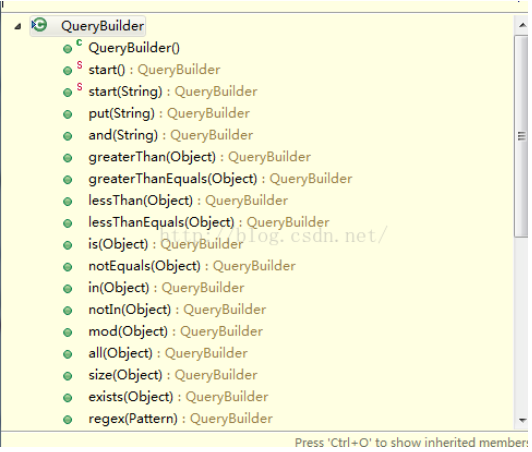
QueryBuilder和BasicDBObject配合使用
QueryBuilder帮我们实现了 $and等操作符,我们查看部分的源代码:QueryBuilder部分的源代码:
1.3、Query使用示例
Query query = new Query();

        //搜索条件

        if(null!=conditions.getAgentId()){

          query.addCriteria(Criteria.where("agentId").is(conditions.getAgentId()));

        }

        if(null!=conditions.getOrderId()){

          query.addCriteria(Criteria.where("orderId").is(conditions.getOrderId()));

        }

        if(null!=conditions.getOrderStatus()){

          query.addCriteria(Criteria.where("orderStatus").is(conditions.getOrderStatus()));

        }

        if(null!=conditions.getAgentMemberId()){

          query.addCriteria(Criteria.where("agentMemberId").is(conditions.getAgentMemberId()));

        }

        if(null!=conditions.getCustomerMemberId()){

          query.addCriteria(Criteria.where("customerMemberId").is(conditions.getCustomerMemberId()));

        }

        if(null!=conditions.getPending()){

          query.addCriteria(Criteria.where("orderStatus").is(0).orOperator(Criteria.where("orderStatus").is(1)));

        }

        // 排序

        query.with(new Sort(new Order(Direction.DESC, "createTime")));

        query.with(new Sort(new Order(Direction.ASC, "memberId")));

        // 翻页

        PageCondition pageCondition = new PageCondition(pageNo, pageSize, "");

        return memberDao.pageQuery(query, pageCondition); //翻页场景

        //不翻页

        //return memberDao.query(query, "");//第二个参数是国家码,sprit17里可以传""
二、find查询时指定返回的需要的字段
org.springframework.data.mongodb.core.query.BasicQuery提供了
BasicQuery查询语句可以指定返回字段,构造函数
BasicQuery(DBObject queryObject, DBObject fieldsObject)
fieldsObject 这个字段可以指定返回字段
fieldsObject.put(key,value)
key:字段
value:
说明:
1或者true表示返回字段
0或者false表示不返回该字段
_id:默认就是1,没指定返回该字段时,默认会返回,除非设置为0是,就不会返回该字段。
指定返回字段,有时文档字段多并数据大时,我们指定返回我们需要的字段,这样既节省传输数据量,减少了内存消耗,提高了性能,在数据大时,性能很明显的。
示例:
        //查询条件

        queryBuilder.or(new BasicDBObject("memberName", memberNames.get(1)),

                new BasicDBObject("createTime", memberNames.get(2)));

        queryBuilder.or(new BasicDBObject("createTime", "002"), new BasicDBObject("createTime", "zcy1"));

        //返回字段列表

        BasicDBObject fieldsObject = new BasicDBObject();

        fieldsObject.put("onumber", 1);

        fieldsObject.put("cname", 1);

        Query query = new BasicQuery(queryBuilder.get(), fieldsObject);

        // 翻页

        PageCondition pageCondition = new PageCondition(pageNo, pageSize, "");

        return pageQuery(query, pageCondition);
三、翻页的性能问题
目前我们使用的是query.with(pc.getPageable()),看源码其实就是最常见的分页采用的是skip+limit这种组合方式,
    public Query with(Pageable pageable) {

        if (pageable == null) {

            return this;

        }

        this.limit = pageable.getPageSize();

        this.skip = pageable.getOffset();

        return with(pageable.getSort());

    }
skip+limit这种组合方式,这种方式对付小数据倒也可以,但是对付上几百上千万的大数据,只能力不从心,skip如果跳过大量的数据会很慢,并且会越查越慢。
//

const list = db.getCollection('sent_logs').count({

    field_1: 'wx5dacee99764a8af5'

}).skip(200).limit(10);
针对这一情况,可以通过条件查询+排序+限制返回记录,即 边查询,边排序,排序之后,抽取上一页中的最后一条记录,作为当前分页的查询条件,从而避免了skip效率低下的问题。
db.getCollection('sent_logs').find({

    field_1: 'wx5dacee99764a8af5',

    key1:{$gt: '#上一条记录的排序值#'}

}).limit(20)
不过在项目使用过程中,发现后面的数据基本没有用,所以用了一个阉割版的办法,如果条目数大于特定值 比如5000条,则只返回前5000条,否则返回全部,即只能查看前5000条;
再想看更多结果的话 就得用缩小插叙范围来解决了:
//代码大概看下意思就行了

const total_count = 5000;

const list = db.getCollection('sent_logs').find({

    field_1: 'wx5dacee99764a8af5'

}).skip(5000).limit(1);

if (list.length === 0) {

    total_count = db.getCollection('sent_logs').count({

        field_1: 'wx5dacee99764a8af5'

    })

}
这个方法虽然多了一次数据库查询,但是对于几十万往上的查询结果分页来说,提升的性能还是很客观的。
2. 模糊匹配
2.1比较
> $gt , >= $gte, < $lt, <= $lte, != $ne
> db.tianyc02.find()
{ "_id" : ObjectId("50ea6eba12729d90ce6e3423"), "name" : "xttt", "age" : 111 }
{ "_id" : ObjectId("50ea6eba12729d90ce6e3424"), "name" : "xttt", "age" : 222 }
{ "_id" : ObjectId("50ea6b6f12729d90ce6e341b"), "name" : "xtt", "age" : 11 }
{ "_id" : ObjectId("50ea6b7312729d90ce6e341c"), "name" : "xtt", "age" : 22 }
> db.tianyc02.find({age:{$lt:100}})
{ "_id" : ObjectId("50ea6b6f12729d90ce6e341b"), "name" : "xtt", "age" : 11 }
{ "_id" : ObjectId("50ea6b7312729d90ce6e341c"), "name" : "xtt", "age" : 22 }
> db.tianyc02.find({age:{$lt:100,$gt:20}})
{ "_id" : ObjectId("50ea6b7312729d90ce6e341c"), "name" : "xtt", "age" : 22 }
> db.tianyc02.find({age:{$ne:11}})
{ "_id" : ObjectId("50ea6eba12729d90ce6e3423"), "name" : "xttt", "age" : 111 }
{ "_id" : ObjectId("50ea6eba12729d90ce6e3424"), "name" : "xttt", "age" : 222 }
{ "_id" : ObjectId("50ea6b7312729d90ce6e341c"), "name" : "xtt", "age" : 22 }
2.2 $in & $nin
> db.tianyc02.find()
{ "_id" : ObjectId("50ea6eba12729d90ce6e3423"), "name" : "xttt", "age" : 111 }
{ "_id" : ObjectId("50ea6eba12729d90ce6e3424"), "name" : "xttt", "age" : 222 }
{ "_id" : ObjectId("50ea6b6f12729d90ce6e341b"), "name" : "xtt", "age" : 11 }
{ "_id" : ObjectId("50ea6b7312729d90ce6e341c"), "name" : "xtt", "age" : 22 }
> db.tianyc02.find({age:{$in:[11,22]}})
{ "_id" : ObjectId("50ea6b6f12729d90ce6e341b"), "name" : "xtt", "age" : 11 }
{ "_id" : ObjectId("50ea6b7312729d90ce6e341c"), "name" : "xtt", "age" : 22 }
> db.tianyc02.find({age:{$nin:[11,22]}})
{ "_id" : ObjectId("50ea6eba12729d90ce6e3423"), "name" : "xttt", "age" : 111 }
{ "_id" : ObjectId("50ea6eba12729d90ce6e3424"), "name" : "xttt", "age" : 222 }
2.3 $or
> db.tianyc02.find({$or:[{age:11},{age:22}]})
{ "_id" : ObjectId("50ea6b6f12729d90ce6e341b"), "name" : "xtt", "age" : 11 }
{ "_id" : ObjectId("50ea6b7312729d90ce6e341c"), "name" : "xtt", "age" : 22 }
> db.tianyc02.find({$or:[{age:11},{name:'xttt'}]})
{ "_id" : ObjectId("50ea6eba12729d90ce6e3423"), "name" : "xttt", "age" : 111 }
{ "_id" : ObjectId("50ea6eba12729d90ce6e3424"), "name" : "xttt", "age" : 222 }
{ "_id" : ObjectId("50ea6b6f12729d90ce6e341b"), "name" : "xtt", "age" : 11 }
2.4 $not
> db.tianyc02.find({age:{$mod:[11,0]}})
{ "_id" : ObjectId("50ea6b6f12729d90ce6e341b"), "name" : "xtt", "age" : 11 }
{ "_id" : ObjectId("50ea6b7312729d90ce6e341c"), "name" : "xtt", "age" : 22 }
> db.tianyc02.find({age:{$not:{$mod:[11,0]}}})
{ "_id" : ObjectId("50ea6eba12729d90ce6e3423"), "name" : "xttt", "age" : 111 }
{ "_id" : ObjectId("50ea6eba12729d90ce6e3424"), "name" : "xttt", "age" : 222 }
$mod会将查询的值除以第一个给定的值,若余数等于第二个给定的值,则返回该结果。
$not与正则表达式联合使用时极为有效,用来查找那些与特定模式不匹配的文档。
CXF之七 传输文件的更多相关文章
- 利用scp传输文件
在linux下一般用scp这个命令来通过ssh传输文件. 从服务器上下载文件 scp username@servername:/path/filename /var/www/local_dir(本地目 ...
- mac与windows通过ftp传输文件
1.两个系统相互传文件,比较通用的方式是用QQ,两台电脑一台各登陆一个qq,发文件就行了,在同一个网段时,qq会自动转换为按局域网的方式传输. 2.本人不愿安装qq,以ftp方式进行传输,先在wndo ...
- 使用SecureCRT在远程主机和本地之间传输文件
终于弄明白怎样在SecureCRT的shell里用命令上传下载文件.SecureCRT记住密码的功能容易设置,于是偶这懒人,后来习惯了用 SecureCRT,但其上传文件功能偶一直没弄明白过.之前一直 ...
- python起的 simpleHTTPServer服务传输文件
python起的 simpleHTTPServer服务传输文件 经同事的介绍,在Linux上传输文件的一种特别方便的方法: python -m SimpleHTTPServer [端口] 端口不填 默 ...
- 利用SSH传输文件
在linux下一般用scp这个命令来通过ssh传输文件. 1.从服务器上下载文件scp username@servername:/path/filename /var/www/local_dir(本地 ...
- Ubuntu 16.04 安装ftp服务器传输文件
最近在搞深度学习,老师比较宝贝他的服务器,要求我以后负责管理服务器.往后所有要使用服务器的人都必须向我申请账号,然后只允许客户端访问,使用文件传输软件传输文件.像我这样一个linux菜逼,这种要求不是 ...
- Servlet学习三——传输文件
最先在考虑传输文件时,想通过java写一个文件上传案例,传给Servlet,Servlet再保存至数据库中,但苦于一直没找到实例,听说Flex有实际的例子,就直接用Flex例子来测试了.本文的顺序为: ...
- ssh传输文件
在linux下一般用scp这个命令来通过ssh传输文件. 1.从服务器上下载文件scp username@servername:/path/filename /var/www/local_dir(本地 ...
- golang 远程传输文件
概述 之前有一篇介绍如何使用 golang 通过SSH协议来执行远程命令:golang 执行远程命令 同样,通过SSH协议也可以使用 golang 来远程传输文件. 除了 SSH 的库,为了传输文件, ...
随机推荐
- jfinal想用到中大型项目中的项目经验分享
jfinal 用在大项目中更加方便实用,节省无数的开发时间,代码量相对 SSH 减少 75% 至 90%,对于项目结构来说,简单提以下几点: 1:先分大模块,大模块内部可以根据划分的model分成子包 ...
- mysql小记--基础知识
一.事务 事务是由一组SQL语句组成的逻辑处理单元. 事务的特征ACID,即原子性.一致性.隔离性和持久性. 原子性(Atomicity)事务作为整体执行,操作要么全部执行.要么全部不执行. 一致性( ...
- ADO.NET入门教程(三) 连接字符串,你小觑了吗?
出处:http://www.cnblogs.com/liuhaorain/archive/2012/02/12/2347914.html 摘要 ADO.NET强大的优势在于对不同的数据源提供一致的访问 ...
- highcharts 结合phantomjs纯后台生成图片系列二之php2
上篇文章中介绍了phantomjs的使用场景,方法. 本篇文章详细介绍使用php,highcharts 结合phantomjs纯后台生成图片.包含一步步详细的php代码 一.highcharts 结合 ...
- android rabbitMQ
http://www.cnblogs.com/wufawei/archive/2012/03/31/2427823.html http://www.raywenderlich.com/5527/get ...
- Android开发之通过反射获取到挂断电话的API
Android开发黑名单工具类,需要用到挂断电话的API,但是该API处于隐藏状态,需要通过反射得到该方法.. 步骤: 1.通过当前类获取到ServiceManager的字节码 Class< ? ...
- windows2003 iis6.0站点打不开,找不到服务器或 DNS 错误。
最近服务器经常出现打不开网站的现象,有时出现在上午,有时出现在中午,几乎天天都会出现一次,出现问题时,无论是回收程序池还是重启IIS或者关闭其它一些可能有影响的服务,都不能解决问题.网站打不开时,有如 ...
- 1128. Partition into Groups(图着色bfs)
1128 写的dfs貌似不太对 bfs重写 用bfs将图进行黑白染色 如果有超过一个与自己颜色相同的点 就把该点存入栈中 最后处理栈中的点 判断此点是否合法 不合法 取反 取反后再判断相邻点是否合法 ...
- struts2 获取前台表单的值?? 原理??
struts2中,在ACTION中申明一个变量 private string 变量名:然后设置变量名 的get/set方法: 在运行的时候struts2会自动获取. 比如:jsp 页面中有个文本框&l ...
- hdu4576 概率dp n^2的矩阵
这个题目看网上好多题解都是直接O(n*m)卡过.我是这么做的. 对于m次操作,统计每个w的次数.然后对每个w做矩阵乘法. 这样直接做矩阵乘法是会TLE的. 又由于这里的矩阵很特殊,一次乘法可以降维成O ...