
WCF 学习总结2 -- 配置WCF
前面一篇文章《WCF 学习总结1 -- 简单实例》一股脑儿展示了几种WCF部署方式,其中配置文件(App.config/Web.config)都是IDE自动生成,省去了我们不少功夫。现在回过头来看看IDE提供的Wcf Service Library项目模板中的默认服务端配置文件——App.config里面究竟有什么秘密。
服务端的配置文件主要是对services、bindings、behaviors的配置。在默认的App.config中,使用的是WCF Framework定义好的wsHttpBinding默认配置,所以看不到binding配置节。

配置节展开如下图:
BTW: "元数据端点”通过WS-MetadataExchange帮我们实现了对服务的描述,提供了WSDL,启动Host之后我们可以通过http://localhost:8732/Design_Time_Addresses/WcfServiceLib/Service1/?wsdl 查看到公开的服务描述。
配置节展开如下图: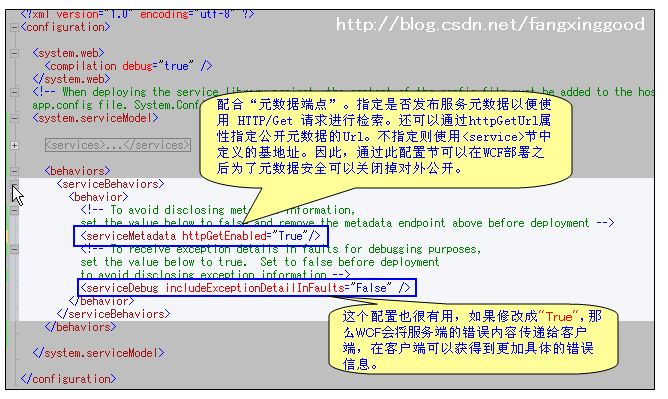
关于WCF中的地址和绑定,需要补充一下。
WCF中支持的传输协议包括HTTP、TCP、Peer network(对等网)、IPC(基于命名管道的内部进程通信)以及MSMQ(微软消息队列),每个协议对应一个地址类型:
- HTTP地址:http://localhost:8080/
- TCP地址: net.tcp://localhost:8080/
- IPC地址: net.pipe://localhost/ (适用于跨进程,不能使用于不同机器间)
- MSMQ地址: net.msmq://localhost/
- 对等网地址: net.p2p://localhost/
WCF中提供的绑定有:
- BasicHttpBinding: 最简单的绑定类型,通常用于 Web Services。使用 HTTP 协议,Text/XML 编码方式。
- WSHttpBinding: 比 BasicHttpBinding 更加安全,通常用于 non-duplex 服务通讯。
- WSDualHttpBinding: 和 WSHttpBinding 相比,它支持 duplex 类型的服务。
- WSFederationHttpBinding: 支持 WS-Federation 安全通讯协议。
- NetTcpBinding: 效率最高,安全的跨机器通讯方式。
- NetNamedPipeBinding: 安全、可靠、高效的单机服务通讯方式。
- NetMsmqBinding: 使用消息队列在不同机器间进行通讯。
- NetPeerTcpBinding: 使用 P2P 协议在多机器间通讯。
- MsmqIntegrationBinding: 使用现有的消息队列系统进行跨机器通讯。如 MSMQ。
------ 弱弱的分隔线 -----
OK,有了上面的基础,就让WCF风暴来的猛烈些吧。做一个多服务,多端点的示例。

1.WcfServiceLib 代码:
- [ServiceContract]
- public interface IService
- {
- [OperationContract]
- string GetMessage();
- }
- public class Service1 : IService
- {
- public string GetMessage()
- {
- var address = OperationContext.Current.Channel.LocalAddress.ToString();
- return string.Format("From Server1: Hello Client at [{0}]", address);
- }
- }
- public class Service2 : IService
- {
- public string GetMessage()
- {
- var address = OperationContext.Current.Channel.LocalAddress.ToString();
- return string.Format("来自 Service2: 好 Client at [{0}]", address);
- }
- }
2.WcfConsoleHost 代码:
- static void Main(string[] args)
- {
- ServiceHost host1 = new ServiceHost(typeof(WcfServiceLib.Service1));
- host1.Open();
- Console.WriteLine("Server1 Opened!");
- ServiceHost host2 = new ServiceHost(typeof(WcfServiceLib.Service2));
- host2.Open();
- Console.WriteLine("Server2 Opened!");
- Console.Read();
- }
3.服务端配置文件:
- <?xml version="1.0" encoding="utf-8" ?>
- <configuration>
- <system.web>
- <compilation debug="true" />
- </system.web>
- <system.serviceModel>
- <services>
- <service name="WcfServiceLib.Service1">
- <host>
- <baseAddresses>
- <add baseAddress = "http://localhost:9999/WcfStudy3/Service1" />
- <add baseAddress = "net.tcp://localhost:8888/WcfStudy3/Service1" />
- </baseAddresses>
- </host>
- <endpoint address ="serviceEN_1" binding="wsHttpBinding" contract="WcfServiceLib.IService" />
- <endpoint address ="serviceEN_2" binding="mexTcpBinding" contract="WcfServiceLib.IService" />
- <endpoint address="mex" binding="mexHttpBinding" contract="IMetadataExchange"/>
- </service>
- <service name="WcfServiceLib.Service2">
- <host>
- <baseAddresses>
- <add baseAddress = "http://localhost:9999/WcfStudy3/Service2" />
- <add baseAddress = "net.tcp://localhost:8888/WcfStudy3/Service2" />
- </baseAddresses>
- </host>
- <endpoint address ="serviceCH_1" binding="wsHttpBinding" contract="WcfServiceLib.IService" />
- <endpoint address ="serviceCH_2" binding="mexTcpBinding" contract="WcfServiceLib.IService" />
- <endpoint address="mex" binding="mexHttpBinding" contract="IMetadataExchange"/>
- </service>
- </services>
- <behaviors>
- <serviceBehaviors>
- <behavior>
- <serviceMetadata httpGetEnabled="True"/>
- <serviceDebug includeExceptionDetailInFaults="true" />
- </behavior>
- </serviceBehaviors>
- </behaviors>
- </system.serviceModel>
- </configuration>
4. 启动Host,在Client工程中添加Service Reference
因为有两个Service,所以要添加两次。
(1) WcfSvc1(Url:http://localhost:9999/WcfStudy3/Service1)
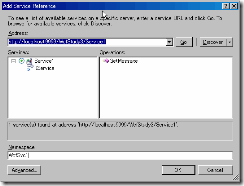
(2) WcfSvc2(Url:http://localhost:9999/WcfStudy3/Service2) 图略
5. 客户端配置文件: 配置节中,生成了4个Endpoint,分别对应服务端的4个Endpoint。通过
name属性区别。
- <client>
- <endpoint address="http://localhost:9999/WcfStudy3/Service1/serviceEN_1"
- binding="wsHttpBinding" bindingConfiguration="WSHttpBinding_IService"
- contract="WcfSvc1.IService" name="WSHttpBinding_IService">
- </endpoint>
- <endpoint address="net.tcp://localhost:8888/WcfStudy3/Service1/serviceEN_2"
- binding="netTcpBinding" bindingConfiguration="MetadataExchangeTcpBinding_IService"
- contract="WcfSvc1.IService" name="MetadataExchangeTcpBinding_IService" />
- <endpoint address="http://localhost:9999/WcfStudy3/Service2/serviceCH_1"
- binding="wsHttpBinding" bindingConfiguration="WSHttpBinding_IService1"
- contract="WcfSvc2.IService" name="WSHttpBinding_IService1">
- </endpoint>
- <endpoint address="net.tcp://localhost:8888/WcfStudy3/Service2/serviceCH_2"
- binding="netTcpBinding" bindingConfiguration="MetadataExchangeTcpBinding_IService1"
- contract="WcfSvc2.IService" name="MetadataExchangeTcpBinding_IService1" />
- </client>
6. 客户端代码:
- static void Main(string[] args)
- {
- Console.WriteLine("------------");
- WcfSvc1.ServiceClient client1_1 = new WcfSvc1.ServiceClient("WSHttpBinding_IService");
- Console.WriteLine(client1_1.GetMessage());
- Console.WriteLine("------------");
- WcfSvc1.ServiceClient client1_2 = new WcfSvc1.ServiceClient("MetadataExchangeTcpBinding_IService");
- Console.WriteLine(client1_2.GetMessage());
- Console.WriteLine("------------");
- WcfSvc2.ServiceClient client2_1 = new WcfSvc2.ServiceClient("WSHttpBinding_IService1");
- Console.WriteLine(client2_1.GetMessage());
- Console.WriteLine("------------");
- WcfSvc2.ServiceClient client2_2 = new WcfSvc2.ServiceClient("MetadataExchangeTcpBinding_IService1");
- Console.WriteLine(client2_2.GetMessage());
- Console.Read();
- }
7.运行结果:
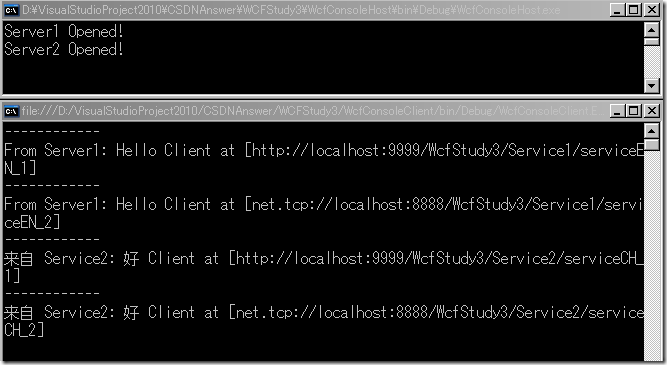
有人会问,那么生成完的配置文件都要一个个手动修改吗?答案当然不是,VS已经为我们准备了WCF配置工具:IDE > Tools > WCF Service Configuration Editor 。 关于工具的使用,大家可以看这里: http://www.rainsts.net/article.asp?id=441
上面的示例代码,请猛击这里下载。
WCF 学习总结2 -- 配置WCF的更多相关文章
- WCF学习第二篇:WCF 配置架构。这有助于对wcf配置的理解和记忆
使用 Windows Communication Foundation (WCF) 配置元素,您可以配置 WCF 服务和客户端应用程序. 可以使用配置编辑器工具 (SvcConfigEditor.ex ...
- WCF学习笔记(1)——Hello WCF
1.什么是WCF Windows Communication Foundation(WCF)是一个面向服务(SOA)的通讯框架,作为.NET Framework 3.0的重要组成部分于2006年正式发 ...
- WCF学习系列二---【WCF Interview Questions – Part 2 翻译系列】
http://www.topwcftutorials.net/2012/09/wcf-faqs-part2.html WCF Interview Questions – Part 2 This WCF ...
- WCF学习系列一【WCF Interview Questions-Part 1 翻译系列】
http://www.topwcftutorials.net/2012/08/wcf-faqs-part1.html WCF Interview Questions – Part 1 This WCF ...
- WCF学习系列三--【WCF Interview Questions – Part 3 翻译系列】
http://www.topwcftutorials.net/2012/10/wcf-faqs-part3.html WCF Interview Questions – Part 3 This WCF ...
- WCF学习系列四--【WCF Interview Questions – Part 4 翻译系列】
WCF Interview Questions – Part 4 This WCF service tutorial is part-4 in series of WCF Interview Qu ...
- [WCF学习笔记] 我的WCF之旅(1):创建一个简单的WCF程序
近日学习WCF,找了很多资料,终于找到了Artech这个不错的系列.希望能从中有所收获. 本文用于记录在学习和实践WCF过程中遇到的各种基础问题以及解决方法,以供日后回顾翻阅.可能这些问题都很基础,可 ...
- WCF学习——构建第二个WCF应用程序(五)
一.创建数据服务 1.在“解决方案资源管理器”中,使用鼠标左键选中“WcfService”项目,然后在菜单栏上,依次选择“项目”.“添加新项”. 2.在“添加新项”对话框中,选择“Web”节点,然后选 ...
- WCF学习——构建第二个WCF应用程序(六)
一.创建客户端应用程序 若要创建客户端应用程序,你将另外添加一个项目,添加对该项目的服务引用,配置数据源,并创建一个用户界面以显示服务中的数据.若要创建客户端应用程序,你将另外添加一个项目,添加对该项 ...
随机推荐
- PHP webserver 之 soap 生成wsdl文件
<?php /** * Copyright (c) , Braulio Jos?Solano Rojas * All rights reserved. * * Redistribution an ...
- Swift与Objective-C的对比
WWDC 2014上苹果再次惊世骇俗的推出了新的编程语言Swift 雨燕, 这个消息会前没有半点风声的走漏.消息发布当时,会场一片惊呼,相信全球看直播的码农们当时也感觉脑袋被敲了一记闷棍吧.于是熬夜学 ...
- 读书笔记汇总 --- 用Python写网络爬虫
本系列记录并分享:学习利用Python写网络爬虫的过程. 书目信息 Link 书名: 用Python写网络爬虫 作者: [澳]理查德 劳森(Richard Lawson) 原版名称: web scra ...
- 轻仿QQ音乐之音频歌词播放、锁屏歌词-b
先上效果图 歌词播放界面 音乐播放界面 锁屏歌词界面 一. 项目概述 前面内容实在是太基础..只想看知识点的同学可以直接跳到第三部分的干货 项目播放的mp3文件及lrc文件均来自QQ音乐 本文主要主要 ...
- 使用Yeoman搭建 AngularJS 应用 (10) —— 让我们搭建一个网页应用
原文地址:http://yeoman.io/codelab/write-unit-tests.html 对于不熟悉的Karma的人来说,这是JavaScript测试框架,这个Angular的生成器包含 ...
- OD之窗口界面
- CSRF攻击原理解析与对策研究
1.引言 跨站点请求伪造(Cross—Site Request Forgery).以下简称CSRF.是一种广泛存在的网站漏洞.Gmail.YouTube等著名网站都有过CSRF漏洞.甚至包 ...
- 论反馈信息如何推动 IT 运维团队进步?
我们还记得<快乐大本营>中经典游戏----快乐传真吗?游戏规则是:很多人站一排,只有第一个人才看到最准确的信息,用东西隔着,戴耳机,一一将从前一个人获得的信息传递下去,最后一个人说出推测的 ...
- printf在终端输出时改变颜色
在调试程序时,有时候要输出大量数据,如果让printf/fprintf改变输出数据的颜色,那观察数据就方便多了. 终端的字符颜色是用转义序列控制的,是文本模式下的系统显示功能,和具体的语言无关.转义序 ...
- Android 图片旋转(使用Matrix.setRotate方法)
imageView2 = (ImageView) findViewById(R.id.img2); Bitmap bitmap = BitmapFactory.decodeResource(getRe ...