
wuzhicms 模块开发
首先,模块开发需要了解五指cms的目录结构:
然后,我们需要新增加一个模块目录:
再app下面创建
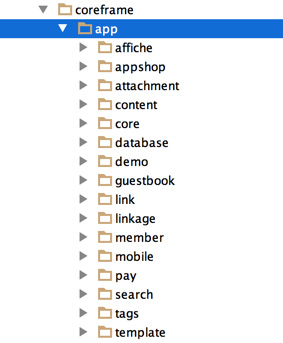
如:content
下面包含文件: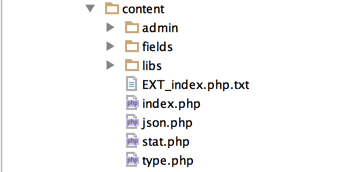
前台文件的创建:
看下 index.php 的内容:
<?php
// +----------------------------------------------------------------------
// | wuzhicms [ 五指互联网站内容管理系统 ]
// | Copyright (c) 2014-2015 http://www.wuzhicms.com All rights reserved.
// | Licensed ( http://www.wuzhicms.com/licenses/ )
// | Author: wangcanjia
// +----------------------------------------------------------------------
defined('IN_WZ') or exit('No direct script access allowed');
load_function('content','content');
/**
 * 网站首页
 */
class index{
    private $siteconfigs;
   public function __construct() {
        $this->siteconfigs = get_cache('siteconfigs');
        $this->db = load_class('db');
   }

    /**
     * 网站首页
     */
    public function index() {
        $isindex = 1;
        $siteconfigs = $this->siteconfigs;
        $seo_title = $siteconfigs['sitename'];
        $seo_keywords = $siteconfigs['seo_keywords'];
        $seo_description = $siteconfigs['seo_description'];
        $categorys = get_cache('category','content');
        include T('content','index',TPLID);
   }

    /**
     * 内容页面
     * url规则 /index.php?v=show&cid=24&id=79
     */
    public function show() {
        $siteconfigs = $this->siteconfigs;
        $id = isset($GLOBALS['id']) ? intval($GLOBALS['id']) : MSG(L('parameter_error'));
        $cid = isset($GLOBALS['cid']) ? intval($GLOBALS['cid']) : MSG(L('parameter_error'));
        $categorys = get_cache('category','content');
        //查询数据
        $category = get_cache('category_'.$cid,'content');
        $models = get_cache('model_content','model');

        $model_r = $models[$category['modelid']];
        $master_table = $model_r['master_table'];
        $data = $this->db->get_one($master_table,array('id'=>$id));
        if(!$data || $data['status']!=9) MSG('信息不存在或者未通过审核!');
        if($model_r['attr_table']) {
            $attr_table = $model_r['attr_table'];
            if($data['modelid']) {
                $modelid = $data['modelid'];
                $attr_table = $models[$modelid]['attr_table'];
            }
            $attrdata = $this->db->get_one($attr_table,array('id'=>$id));
            $data = array_merge($data,$attrdata);
        }

        require get_cache_path('content_format','model');
        $form_format = new form_format($model_r['modelid']);
        $data = $form_format->execute($data);
        foreach($data as $_key=>$_value) {
            $$_key = $_value['data'];
        }
        if($template) {
            $_template = $template;
        } elseif($category['show_template']) {
            $_template = $category['show_template'];
        } elseif($model_r['template']) {
            $_template = TPLID.':'.$model_r['template'];
        } else {
            $_template = TPLID.':show';
        }
        $styles = explode(':',$_template);
        $project_css = isset($styles[0]) ? $styles[0] : 'default';
        $_template = isset($styles[1]) ? $styles[1] : 'show';
        $elasticid = elasticid($cid);
        $seo_title = $title.'_'.$category['name'].'_'.$siteconfigs['sitename'];
        $seo_keywords = !empty($keywords) ? implode(',',$keywords) : '';
        $seo_description = $remark;
        //上一页
        $previous_page = $this->db->get_one($master_table,"`cid`= '$cid' AND `id`>'$id' AND `status`=9",'*',0,'id ASC');
        //下一页
        $next_page = $this->db->get_one($master_table,"`cid` = '$cid' AND `id`<'$id' AND `status`=9",'*',0,'id DESC');
        include T('content',$_template,$project_css);
    }

    /**
     * 栏目列表
     */
    public function listing() {
        $cid = isset($GLOBALS['cid']) ? intval($GLOBALS['cid']) : MSG(L('parameter_error'));
        //站点信息
        $siteconfigs = $this->siteconfigs;
        //栏目信息
        $categorys = get_cache('category','content');
        $category = get_cache('category_'.$cid,'content');
        //分页初始化
        $page = max(intval($GLOBALS['page']),1);
        //分页规则
        $urlrule = '';

        if($category['child']) {
            $_template = $category['category_template'];
        } else {
            $_template = $category['list_template'];
        }
        if(empty($_template))  $_template = TPLID.':list';
        $styles = explode(':',$_template);
        $project_css = isset($styles[0]) ? $styles[0] : 'default';
        $_template = isset($styles[1]) ? $styles[1] : 'show';
        $seo_title = $category['name'].'_'.$siteconfigs['sitename'];
        $seo_keywords = $category['seo_keywords'];
        $seo_description = $category['seo_description'];
        $elasticid = elasticid($cid);
        $model_r = get_cache('model_content','model');
        $master_table = $model_r[$category['modelid']]['master_table'];
        if($category['type']==1) {
            $r = $this->db->get_one($master_table,array('cid'=>$cid));
            if($r) {
                extract($r,EXTR_SKIP);
                if($attr_table = $model_r[$category['modelid']]['attr_table']) {
                    $r = $this->db->get_one($attr_table,array('id'=>$id));
                    extract($r,EXTR_SKIP);
                }
            }
        }
        include T('content',$_template,$project_css);
    }
}
?>
完整的访问路径:
http://www.wuzhicms.com/index.php?m=content&f=index&v=listing&cid=2
通过参数:m=content //模块名
f=index //文件名(控制器)
v=方法名(视图)
这个就是MCV架构。
后台文件的创建:
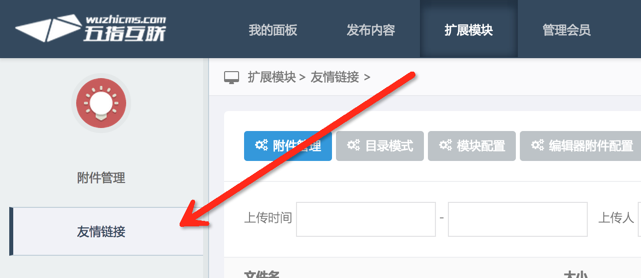
首先登录后台,添加后台菜单:
路径:维护界面>后台菜单管理>
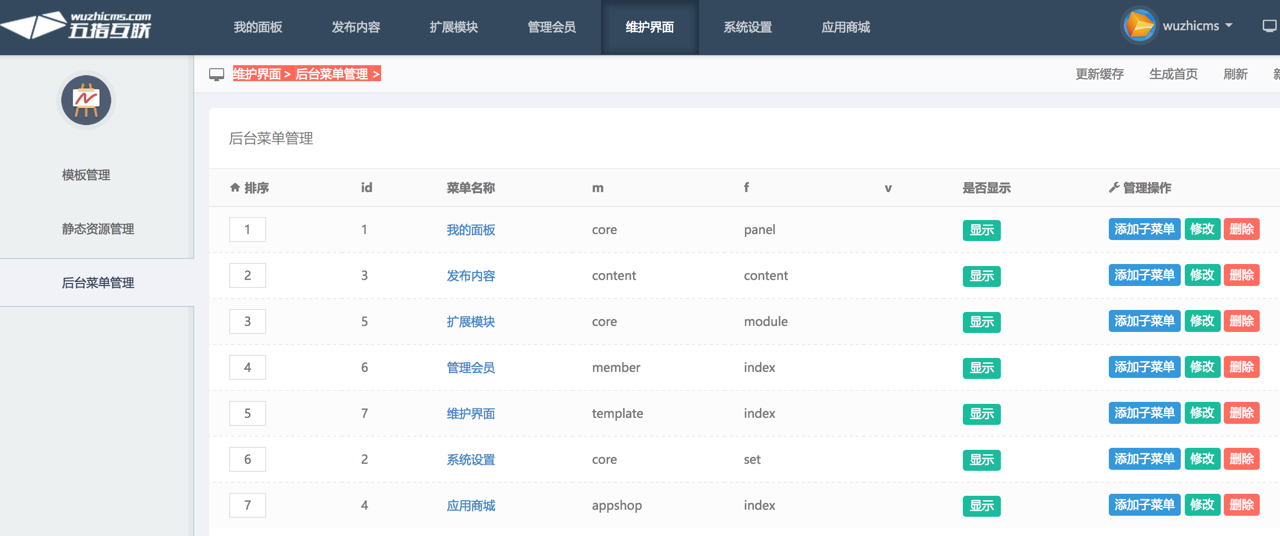
在扩展模块栏目:添加子菜单。
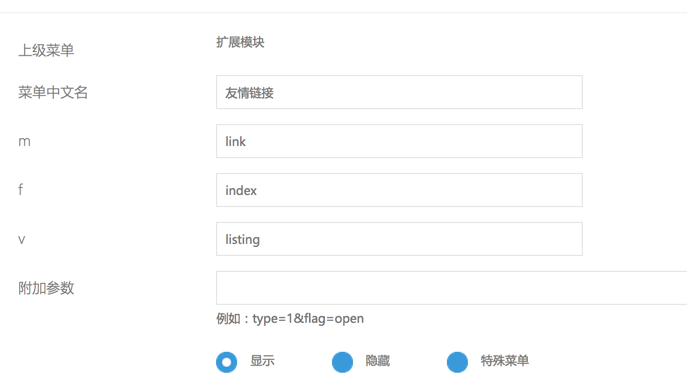
添加完成后,就会在对应的菜单下面找到。
后台文件的编写:
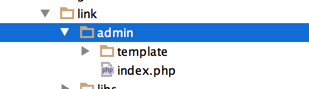
后台文件一定要放置到 admin目录。
在:模块目录下:coreframe/app/link/admin/下面添加文件。
具体可以参考下:
defined('IN_WZ') or exit('No direct script access allowed');

/**

 * 友情链接

 */

load_class('admin');

class index extends WUZHI_admin {

   private $db;

   function __construct() {

      $this->db = load_class('db');

   }

    /**

     * 友情链接列表

     */

    public function listing() {

        $page = isset($GLOBALS['page']) ? intval($GLOBALS['page']) : 1;

        $page = max($page,1);

        $result = $this->db->get_list('link', '', '*', 0, 20,$page,'sort ASC');

        $pages = $this->db->pages;

        $total = $this->db->number;

        include $this->template('listing');

    }
wuzhicms 模块开发的更多相关文章
- AngularJS多模块开发
angularJS中的多模块开发是指多个module模块开发,步骤为: 1. 确定主模块 var app=angular.module('myApp',[]); 2. 其他的子模块添加到主模块后 ...
- js模块开发(一)
现在嵌入页面里面的javascript代码越来越复杂,于是可能依赖也越来越严重,使用别人开发的js也越来越多,于是在理想情况下,我们只需要实现核心的业务逻辑,其他都可以加载别人已经写好的模块. 于是j ...
- seajs实现JavaScript 的 模块开发及按模块加载
seajs实现了JavaScript 的 模块开发及按模块加载.用来解决繁琐的js命名冲突,文件依赖等问题,其主要目的是令JavaScript开发模块化并可以轻松愉悦进行加载. 官方文档:http:/ ...
- Asp.net Mvc模块化开发之“开启模块开发、调试的简单愉快之旅”
整个世界林林种种,把所有的事情都划分为对立的两个面. 每个人都渴望的财富划分为富有和贫穷,身高被划分为高和矮,身材被划分为胖和瘦,等等. 我们总是感叹,有钱人的生活我不懂;有钱人又何尝能懂我们每天起早 ...
- 基于ASP.NET MVC的热插拔模块式开发框架(OrchardNoCMS)--模块开发
之前文章中给大家说明了下我这个小小的想法,发现还是有不少人的支持和关注.你们的鼓励是对我最大的支持. 我总结了了大家的评论,有以下几个问题: 1.希望有更多的文档说明. 2.希望介绍下Orchard的 ...
- js 模块开发之一(模块开发价值)
首先引用我们的今天的主角 ----<前端模块化开发的价值> 1,前端开发最常见的两个问题 ---命名冲突和文件依赖 2,对于命名冲突的基本解决办法就是学习其他语言的习惯,添加命名空间 va ...
- nginx模块开发篇 (阿里著作)
背景介绍 nginx历史 使用简介 nginx特点介绍 nginx平台初探(100%) 初探nginx架构(100%) nginx基础概念(100%) connection request 基本数据结 ...
- Drupal8开发教程:模块开发——创建新页面
之前我们已经通过<Drupal8开发教程:认识.info.yml文件>对模块的YAML文件有了了解,今天我们来看如何通过模块开发的方式添加一个新的页面. 在 Drupal 7 中,通过模块 ...
- SpringMvc+jquery easyui模块开发7步骤
搞了一段java的开发,总结出模块开发经验: SpringMvc+jquery easyui模块开发7步骤:1) 数据表(table): 定义表结构并创建数据表t_use ...
随机推荐
- CNKI翻译助手-连接数据库失败
IP并发数限制,老师说西工大的CNKI才20个并发指标,HPU自不必说.但是我略表怀疑,这只是翻译助手而已,就像百度翻译和百度数据库的区别,如何验证呢?去校外用该助手,如果能用,那么就不是IP并发限制 ...
- WCF获取客户端IP和端口
//提供方法执行的上下文环境 OperationContext context = OperationContext.Current; //获取传进的消息属性 MessageProperties pr ...
- PE 文件
一.PE文件基本结构 上图便是PE文件的基本结构.(注意:DOS MZ Header和部分PE header的大小是不变的:DOS stub部分的大小是可变的.) 二.Section 详解 一个PE文 ...
- 互斥锁Mutex与信号量Semaphore的区别
转自互斥锁Mutex与信号量Semaphore的区别 多线程编程中,常常会遇到这两个概念:Mutex和Semaphore,两者之间区别如下: 有人做过如下类比: Mutex是一把钥匙,一个人拿了就可进 ...
- Titan DB的一些问题
使用熟悉一点的系统来测试TitanDB,HBASE+ES,记录下来一些小tips. 1.首先TitanDB支持的Hadoop只有1.2.1,所以Hbase自然也只能取到0.98,虽然官网上提供了tit ...
- struts2 标签的使用之一 s:if
struts2 的web 项目中为了方便的编写jsp,标签是最好的选择 1:struts2 标签库的定义在**-core-版本号.jar META-INF 路径下找到struts-tags.tld文件 ...
- GridBagLayout()的使用方法
GridBagLayout是java里面最重要的布局管理器之一,可以做出很复杂的布局,可以说GridBagLayout是必须要学好的的, GridBagLayout 类是一个灵活的布局管理器,它不要求 ...
- 关于MIM金属注射成型技术知识大全
1.什么是MIM MIM即(Metal Injection Molding)是金属注射成型的简称.是将金属粉末与其粘结剂的增塑混合料注射于模型中的成形方法.它是先将所选粉末与粘结剂进行混合,然后将混合 ...
- IntelliJ IDEA MyBatis插件安装
打开IntelliJ IDEA工具,打开菜单File--> Settings 选择 Plugins,点击Browse repositories,在搜索框输入MyBatis.
- (转)CAP理论十二年回顾:"规则"变了
编者按:由InfoQ主办的全球架构师峰会将于2012年8月10日-12日在深圳举行,为了更好地诠释架构的意义.方法和实践,InfoQ中文站近期会集中发布一批与架构相关的文章,本篇即为其中之一.Info ...