
一款jquery写出来的tab切换
当时做这个的时候,当前状态是不规则的,li对应的有3块内容,分别设定不同背景图片,只显示当前的一个背景,鼠标移上去的时候其余2个用background-position: -1000px 0px;来隐藏,用jquery找到他的同辈给有一个样式background-position: 0px 0px;
html部分:
<div class="gold_list">

    <ul>

        <li class="ino_a hover" style="background-position:0 0;">1.填写详细信息</li>

        <li class="ino_b" >2.确定保单信息</li>

        <li class="ino_c">3.支付</li>

    </ul>

</div>

<div class="table_gold2">

    <div class="table_conter" >

        1111111111

        </div>

    <div class="table_conter" style="display:none; height: 300px; background: green;">222222222222</div>

    <div class="table_conter" style="display:none; height: 600px; background: blue;">33333333333333</div>

</div>
css部分:
 <style>

     * { margin:; padding:; }

     .gold_list{width:945px;  height:48px;  margin:auto; padding-top: 30px;}

     .gold_list ul{position:relative; height:48px;}

     .gold_list ul li{ line-height:48px; cursor:pointer; float:left; position:absolute;text-align:center;

         color:#333333; font-size:16px; top:0px;}

     .gold_list ul .ino_a{  left:0px;}

     .gold_list ul .ino_b{  left:315px;}

     .gold_list ul .ino_c{  left:630px;}

     .gold_list ul .ino_a, .gold_list ul .ino_b, .gold_list ul .ino_c,

     .gold_list ul .ino_a.hover, .gold_list ul .ino_b.hover, .gold_list ul .ino_c.hover

     {width:315px; height:48px;font-weight:bold;">#f5f5f5;background-repeat: no-repeat;

         background-position: -1000px 0px;overflow: hidden;}

     .gold_list ul .hover{color: #ffffff;}

     .gold_list ul .ino_a{background-image:url(images/c.png); }

     .gold_list ul .ino_b{background-image:url(images/ba.png);}

     .gold_list ul .ino_c{background-image:url(images/a.png);}

     .table_gold2, .table_conter{width:945px; height: auto; overflow: hidden; margin:auto;}

 </style>
jquery部分:
//tab 切换

$(function(){

    $('.gold_list li').mouseover(function() {

        $(this).addClass('hover');

        $(this).siblings().removeClass('hover');

        $(this).siblings().attr("style",""); //属性值,可设置

        $(this).css("background-position","0px 0px");

        $('.table_conter').eq($(this).index()).show().siblings().hide();

    })

})
效果图:
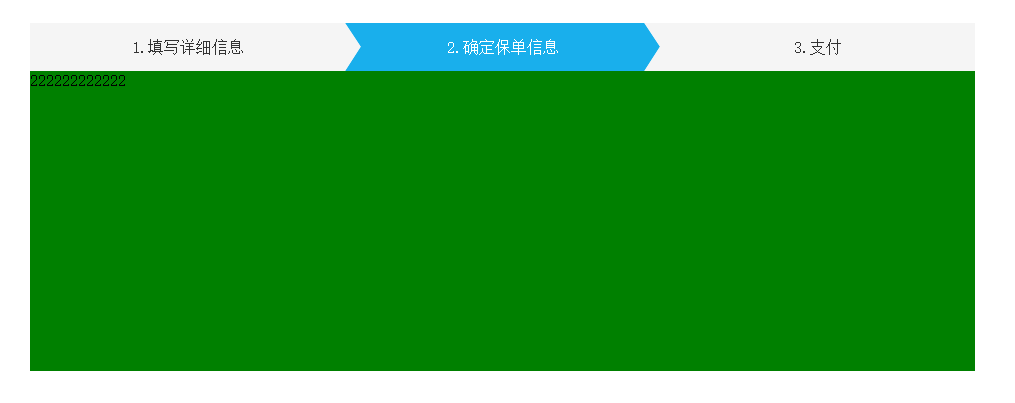
不明白的伙伴可自行下载查看:

链接: http://pan.baidu.com/s/1o7Wnk2Q 密码: 72k8
一款jquery写出来的tab切换的更多相关文章
- jquery实现简单的Tab切换菜单
实现tab切换的主要html代码: <div class="container"> <ul class="tabs"> <li c ...
- jquery 选项卡切换、选项卡封装、简单的jquery选项卡封装、tab切换效果
相信选项卡切换是大家常用的效果单独写一个选项卡切换很方便但是要是一个页面出现多个选项卡不做封装的话会显得代码很杂乱 <div class="bodyCenter"> & ...
- 利用jquery写的一个TAB页切换效果
函数如下 /** *切换效果 */ function switab(tab,con,tab_c_css,tab_n_css,no) { $(tab).each(function(i){ if(i == ...
- jQuery 写的幻灯左右切换插件
<html> <head> <meta charset="utf-8"> <title>官网</title> <s ...
- Jquery实现下拉tab切换
//需求:分别点击html,css,js元素时展示对应的列表内容,其他列表内容要自动收起来 //代码如下 <!DOCTYPE html> <html lang="en&qu ...
- jQuery实现简单的tab切换
html: <section> <nav id="nav"> <a class="on">tab1</a& ...
- jquery写简单的div切换
<!DOCTYPE html> <html lang="en"> <head> <meta charset="UTF-8&quo ...
- jQuery带小图标的Tab切换焦点图
在线演示 本地下载
- 手机端的tab切换,响应式切换效果
之前写过这些tab切换的效果,无论网页上还是手机端,网上也有很多的例子,这个好像是我参考网上,也不知道是哪里的了.总结了一下,就当保存下来了把. <!DOCTYPE html > < ...
随机推荐
- USB相关知识
USB基础知识概论 如何实现Linux下的U盘(USB Mass Storage)驱动: How to WriteLinux USB MSC (Mass Storage Class) Driver U ...
- Matrix 二维树状数组的第二类应用
Matrix Time Limit: 3000MS Memory Limit: 65536K Total Submissions: 17976 Accepted: 6737 Descripti ...
- Android(java)学习笔记117:英文朗诵android App编写实例
1.首先,我先把代码放到下面: package com.himi.speaker; import java.util.Locale; import android.app.Activity; impo ...
- ASP.NET弹出模态对话框【转】
主页面 PageBase.aspx.cs 中的代码 protected void Page_Load(object sender, EventArgs e) { if (!this.IsPost ...
- git merge branches
git clone url #克隆新的版本库 git init git pull repo_name #有关联的远程库,抽取并和本地合并 git fetch remote_repo_name #抽取并 ...
- javaweb学习总结六(泛型)
一:泛型的概念 泛型用来现在集合中的存储类型,防止取出时强制转换发生错误. 1:没有使用泛型时,如下: @Test public void test1() { List list = new Arra ...
- DedeCMS更新文章同步发布到新浪微博
如果在网站推广过程中能利用好微博这个工具的话,将会给网站的推广工作带来巨大的便利.下面以dede程序为例讲讲如何将网站内容自动同步到新浪微博. 在新浪微博的工具中有个自动关联博客的功能,利用好这个功能 ...
- Ionic中弹窗
Ionic中弹窗有两种ionicModal和ionicPopup; $ionicModal是完整的页面: $ionicPopup是(Dialog)对话框样式的,直接用JavaScript设定对话框的一 ...
- 为dedecms v5.7的ckeditor添加jwplayer插件
dedecms v5.7的默认编辑器是ckeditor,不过用的是php版本的,默认的工具栏不在config.js里面配置,而是在ckeditor.inc.php里面配置,默认的工具栏是$toolba ...
- HTML5와 CSS3 적용기
HTML5의 DTD 선언 <!DOCTYPE html> HTML5의 인코딩 선언 <meta charset="utf-8"> 그리고나서는 새로 ...