
《Programming WPF》翻译 第5章 1.不使用样式
原文:《Programming WPF》翻译 第5章 1.不使用样式
作为一个样式如何使其在WPF使用的例子,,让我们看一下TTT简单的实现,如示例5-1。
示例5-1
 <!-- Window1.xaml --><Window x:Class="TicTacToe.Window1" xmlns="http://schemas.microsoft.com/winfx/avalon/2005" xmlns:x="http://schemas.microsoft.com/winfx/xaml/2005" Text="TicTacToe"> <!-- the black background lets the tic-tac-toe --> <!-- crosshatch come through on the margins --> <Grid Background="Black"> <Grid.RowDefinitions> <RowDefinition /> <RowDefinition /> <RowDefinition /> </Grid.RowDefinitions> <Grid.ColumnDefinitions> <ColumnDefinition /> <ColumnDefinition /> <ColumnDefinition /> </Grid.ColumnDefinitions> <Button Margin="0,0,2,2" Grid.Row="0" Grid.Column="0" x:Name="cell00" /> <Button Margin="2,0,2,2" Grid.Row="0" Grid.Column="1" x:Name="cell01" /> <Button Margin="2,0,0,2" Grid.Row="0" Grid.Column="2" x:Name="cell02" /> <Button Margin="0,2,2,2" Grid.Row="1" Grid.Column="0" x:Name="cell10" /> <Button Margin="2,2,2,2" Grid.Row="1" Grid.Column="1" x:Name="cell11" /> <Button Margin="2,2,0,2" Grid.Row="1" Grid.Column="2" x:Name="cell12" /> <Button Margin="0,2,2,0" Grid.Row="2" Grid.Column="0" x:Name="cell20" /> <Button Margin="2,2,2,0" Grid.Row="2" Grid.Column="1" x:Name="cell21" /> <Button Margin="2,2,0,0" Grid.Row="2" Grid.Column="2" x:Name="cell22" /> </Grid></Window>
这个grid的外观上排列了一组9个按钮在一个3X3栅格的TTT单元中,在按钮上使用了页面空白为了TTT的交叉线阴影。对游戏逻辑的一个简单的实现,在xaml后台代码中,如示例5-2所示。
示例5-2
// Window1.xaml.cs

 namespace TicTacToe {
 public partial class Window1 : Window {
 // Track the current player (X or O) string currentPlayer; // Track the list of cells for finding a winner etc. Button[] cells; public Window1( ) { InitializeComponent( ); // Cache the list of buttons and handle their clicks this.cells = new Button[] { this.cell00, this.cell01, }; foreach( Button cell in this.cells ) { cell.Click += cell_Click;
 } // Initialize a new game NewGame( ); } // Wrapper around the current player for future expansion, // e.g. updating status text with the current player string CurrentPlayer { get { return this.currentPlayer; } set { this.currentPlayer = value; } } // Use the buttons to track game state void NewGame( ) { foreach( Button cell in this.cells ) { cell.Content = null; } CurrentPlayer = "X"; } void cell_Click(object sender, RoutedEventArgs e) { Button button = (Button)sender; // Don't let multiple clicks change the player for a cell if( button.Content != null ) { return; } // Set button content button.Content = CurrentPlayer; // Check for winner or a tie if( HasWon(this.currentPlayer) ) { MessageBox.Show("Winner!", "Game Over"); NewGame( ); return; } else if( TieGame( ) ) { MessageBox.Show("No Winner!", "Game Over"); NewGame( ); return; } // Switch player if( CurrentPlayer == "X" ) { CurrentPlayer = "O"; } else { CurrentPlayer = "X"; } } // Use this.cells to find a winner or a tie bool HasWon(string player) {} bool TieGame( ) {} }
 }
}我们的简单TTT逻辑使用字符串代表玩家,使用按钮来跟踪游戏状态。当点击任意一个按钮时,我们将内容设置为字符串,用来象征当前玩家以及转换玩家。当游戏结束的时候,每一个按钮上的内容都会被清除。游戏中的截图如图5-1。
图5-1
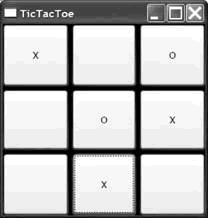
注意到图5-1中,grid的背景来自页面的空白。这些空白差不多使grid看上去像一个可绘制的TTT木板(虽然我们将来会做的更好)。然而,如果我们真的指望模仿一个手绘的游戏,我们已经对按钮上的字体大小做了设置,但并没匹配到线条的厚度。
一种修复这个问题的方法是为每一个按钮对象设置字体和宽度,如示例5-3。
示例5-3
<Button FontSize="32" FontWeight="Bold" x:Name="cell00" /><Button FontSize="32" FontWeight="Bold" x:Name="cell01" /><Button FontSize="32" FontWeight="Bold" x:Name="cell02" /><Button FontSize="32" FontWeight="Bold" x:Name="cell10" /><Button FontSize="32" FontWeight="Bold" x:Name="cell11" /><Button FontSize="32" FontWeight="Bold" x:Name="cell12" /><Button FontSize="32" FontWeight="Bold" x:Name="cell20" /><Button FontSize="32" FontWeight="Bold" x:Name="cell21" /><Button FontSize="32" FontWeight="Bold" x:Name="cell22" />依照我的视觉敏感性,今天,虽然这样做使得X的和O的外观更好,一旦我以后想改动它,我就要负责在9个独立的地方改变这些属性,这是重复性的努力——违反了我的编码敏感性。我宁愿重制我的决定——为了以后的维护,将我的TTT单元的外观放在一个共同的地方。这是样式派得上用场的地方。
《Programming WPF》翻译 第5章 1.不使用样式的更多相关文章
- 《Programming WPF》翻译 第6章 2.资源与样式
原文:<Programming WPF>翻译 第6章 2.资源与样式 WPF的样式机制以来于资源体系来定位样式.正如你在第5章看到的,样式在元素的资源片段中定义,而且样式通过其名字被引用, ...
- 《Programming WPF》翻译 第5章 4.元素类型样式
原文:<Programming WPF>翻译 第5章 4.元素类型样式 命名样式非常有用,当你得到一组属性并应用到特点的元素上.然而,如果你想要应用一个统一的样式到所有确定元素类型的实例, ...
- 《Programming WPF》翻译 第5章 2.内嵌样式
原文:<Programming WPF>翻译 第5章 2.内嵌样式 每一个“可样式化”的WPF元素都有一个Style属性,可以在内部设置这个属性--使用XAML属性-元素的语法(在第一章讨 ...
- 《Programming WPF》翻译 第9章 5.默认可视化
原文:<Programming WPF>翻译 第9章 5.默认可视化 虽然为控件提供一个自定义外观的能力是有用的,开发者应该能够使用一个控件而不用必须提供自定义可视化.这个控件应该正好工作 ...
- 《Programming WPF》翻译 第9章 6.我们进行到哪里了?
原文:<Programming WPF>翻译 第9章 6.我们进行到哪里了? 只有当任何内嵌控件都没有提供你需要的底层行为时,你将要写一个自定义控件.当你写一个自定义控件,你将要使用到依赖 ...
- 《Programming WPF》翻译 第9章 4.模板
原文:<Programming WPF>翻译 第9章 4.模板 对一个自定义元素最后的设计考虑是,它是如何连接其可视化的.如果一个元素直接从FrameworkElement中派生,这将会适 ...
- 《Programming WPF》翻译 第9章 3.自定义功能
原文:<Programming WPF>翻译 第9章 3.自定义功能 一旦你挑选好一个基类,你将要为你的控件设计一个API.大部分WPF元素提供属性暴露了多数功能,事件,命令,因为他们从框 ...
- 《Programming WPF》翻译 第9章 2.选择一个基类
原文:<Programming WPF>翻译 第9章 2.选择一个基类 WPF提供了很多类,当创建一个自定义元素时,你可以从这些类中派生.图9-1显示了一组可能作为类--可能是合适的基类, ...
- 《Programming WPF》翻译 第9章 1.自定义控件基础
原文:<Programming WPF>翻译 第9章 1.自定义控件基础 在写一个自定义控件之前,你需要问的第一个问题是,我真的需要一个自定义控件吗?一个写自定义控件的主要原因是为了用户界 ...
随机推荐
- 【转】android 5.0 64bit系统加载库文件失败问题浅析
原文网址:http://blog.csdn.net/andrewblog/article/details/43601303 最近公司的一个项目使用android 5.0 64 bit平台,相对以前版本 ...
- 【转】Win7与Ubuntu 14.04双系统修改启动项顺序
原文网址:http://blog.sina.com.cn/s/blog_b381a98e0102v1gy.html 一.Ubuntu14.04采用默认安装方式的情况 采用默认安装方式,在win7下安装 ...
- jQuery ajax方法在Chrome浏览器下失效问题
最近做测试时碰到一个问题,chrome下使用ajax的一些方法(如get,load等)的时候完全失效: $(function() { $("#send").click(functi ...
- tyvj1038忠诚
描述 Description 老管家是一个聪明能干的人.他为财主工作了整整10年,财主为了让自已账目更加清楚.要求管家每天记k次账,由于管家聪明能干,因而管家总是让财主十分满意.但是由于一些人的挑拨, ...
- poj3641:伪素数检测
知道miller robin 素数测试中的伪素数定义就可以很容易解决,详见总结帖 #include <iostream> #include<stdio.h> #include& ...
- [置顶] android之存储篇_SQLite数据库_让你彻底学会SQLite的使用
SQLite最大的特点是你可以把各种类型的数据保存到任何字段中,而不用关心字段声明的数据类型是什么. 例如:可以在Integer类型的字段中存放字符串,或者在布尔型字段中存放浮点数,或者在字符型字段中 ...
- <php>上传文件的程序
<!DOCTYPE html PUBLIC "-//W3C//DTD XHTML 1.0 Transitional//EN" "http://www.w3.org/ ...
- Android开发小问题——java使用
2013-09-25 导语:离上次写博客有点久了,这次写两个开发中解决的问题吧. 正文: 1.ArrayList<E>使用remove问题: 2.字符串映射到函数运行方法: ==== 1. ...
- Codeforces Round #311 (Div. 2) E - Ann and Half-Palindrome(字典树+dp)
E. Ann and Half-Palindrome time limit per test 1.5 seconds memory limit per test 512 megabytes input ...
- C# 将窗口移动到指定位置
private void button1_Click(object sender, EventArgs e) { Frm f = new Frm(); f.StartPosition = FormSt ...