
IIS Hang Troubleshoot
Your website maybe stop working and response very lowly. How to find out the reason? Below are the guide, hope it will help you out!
Identify it is a hang
What website hang really means? An IIS website hangs whenever it appears to stop serving incoming requests, with requests either taking a very long time or timing out. It's generally caused by all available application threads becoming blocked, causing subsequent requests to get queued(or sometimes by the number of active reuqests exceeding configured concurrency limits).
There are three types of hangs which we should differentiate fist.
1. Full hang. All the requests are very slow or timeout.
Symptoms include detectable request queuing and sometimes 503 service unavailable errors when queue limits are reached. Most hang doesn't involve high CPU, and are often called "low CPU hangs". Also most of the time, high CPU does not itself cause a hang. In rare cases, you may also get a "high CPU hang", which we don't cover here.
2. Rolling hang. Most request are slow, but eventually load.
This usually occurs before a full hang develops, but may also represent a stable state for an application that is overloaded.
3. Slow requests. Only specific URLs in your application are slow.
This is not generally a true hang, but rather just a performance problem with as specific part of your application.
Below three signs are the hints of hang
1. Performance counter "Http Service Request Queues\MaxQueueItemAge"
It means IIS is falling behind in request processing if this counter keep increasing, so all incoming requests are waiting at least this long to begin getting processed.
2. Performance counter "Http Service Request Queues\ArrivalRate" and "W3WP_W3SVC\Requests / sec"
If "Http Service Request Queues\ArrivalRate" exceeds "W3WP_W3SVC\Requests / sec" for the application pool's worker process over a period of time. This basically implies that more requests are coming into the system than are being processed, and this always eventually results in queuing.
3. Snapshotting currently executing requests.
It is the best way to detect a hang. If the number of currently executing requests is growing, this can reliably tell you that requests are piling up which always lead to high latencies and request queuing. Most importantly, this can also tell you which Urls are causing the hang and which requests are queued. You can use GUI of InetMgr(IIS manager) or AppCmd tool to get this information.
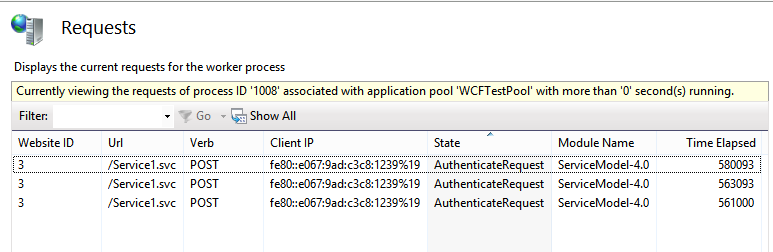
Using InetMgr: Open IIS manager and navigate to server node, going to Worker Processes, and picking your application pool's worker process:
Using AppCmd: This tool is located at folder %windir%\system32\inetsrv, you run below command to get requets that have run at least 10 seconds.
appcmd list requests /elapsed:10000
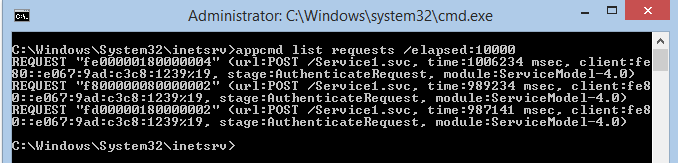
If you see mutiple requests that are taking a long time to execute AND you are seeing more and more requests begin to accumulate, you likely have a hang. If you don't see requests accumulating, it is likely that you have slow requests to some parts of your application, but you do not have a hang.
Diagnose the hang
1. Eliminate IIS as the source of hang
IIS hangs happen when all available IIS threads are blocked, causing IIS to stop dequeueing additional requests. This is rare these days, because IIS request threads almost never block. Instead, IIS hands off request processing to an Asp.Net, Classic ASP, or FastCGI application, freeing up its threads to dequeue more requests. We can use below performance counter eliminate IIS as source of the hang quickly:
"Http Service Request Queues\CurrentQueueSize", IIS is having no problems dequeuing requests if it is 0
"W3WP_W3SVC\Active Threads" This will almost always be 0, or 1 because IIS threads almost never block. If it is significantly higher, you likely have IIS thread blockage due to a custom module or because you explicitly configured ASP.NET to run on IIS threads. Consider increasing your MaxPoolThreads registry key.
2. Snapshot the currently executing request to identify where blockage is taking place
From the resulting list of executing request (please use AppCmd or Inetmgr to get these information), we can know which URL is causing the blockage, and which requests are queued.
What code is causing the hang?(for developers)
At this point, you've confirmed the hang, and determined where in your application its located (e.g. URL). The next and final step is for the developer to figure out what in the application code is causing the hang.
Are you that developer? Then, you know how hard it is to make this final leap, because most of the time hangs are very hard to reproduce in the test environment. Because of this, you'll likely need to analyze the hang in production while its still happening.
Here is how:
- Make sure you have Windows Debugging Tools installed on the server (takes longer), or get ProcDump (faster).
Expert tip #3: It always pays to have these tools available on each production server ahead of time. Taking the dump approach is usually faster and poses less impact to your production process, letting you analyze it offline. However, taking a dump could be a problem if your process memory is many Gbs in size.
- Identify the worker process for the application pool having the hang. The executing request list will show you the process id if you run it with the /xml switch.
- Attach the debugger to the process, OR, snapshot a dump using procdump and load it in a debugger later.
// attach debugger live (if you are fast)

        ntsd -p [PID]

        // or take a dump to attach later

        procdump -ma -w [PID] c:\dump.dmp

ntsd -z c:\dump.dmp - Snapshot the thread stacks, and exit. Make sure to detach before closing the debugger, to avoid killing the process!
.loadby sos clr

        .loadby sos mscorwks

        ~*e!clrstack

        .detach

qq - The output will show you the code where each thread is currently executing. It will look like this:
OS Thread Id: 0x88b4 (7)

        RetAddr          Call Site

        000007fed5a43ec9 ASP.test_aspx.Page_Load(System.Object, System.EventArgs)

        000007fee5a50562 System.Web.UI.Control.OnLoad(System.EventArgs)

        000007fee5a4caec System.Web.UI.Control.LoadRecursive()

        000007fee5a4beb0 System.Web.UI.Page.ProcessRequest()

        000007ff001b0219 System.Web.UI.Page.ProcessRequest(System.Web.HttpContext)

        000007fee5a53357 ASP.test_aspx.ProcessRequest(System.Web.HttpContext)

000007fee61fcc14 System.Web.Hosting.PipelineRuntime.ProcessRequestNotification(IntPtr, IntPtr, IntPtr, Int32) - Wait 10-20 seconds, and do it again. If you are taking a dump, just take two dumps 10 seconds or so apart.
Alright. Once you have the two thread stack lists, your objective is to find thread ids that have the same stack in both snapshots. These stacks show the code that is blocking the threads, and thereby causing the hang.
NOTE: If you are only seeing a couple threads or no threads with the same stack, its likely because you either a) have a rolling hang where requests are taking a while but are still moving, or b) your application is asynchronous. If its async, debugging hangs is WAY harder because its nearly impossible to tell where requests are blocked without stacks. In this case, you need to implement custom application tracing across async boundaries to help you debug hangs.
References
https://www.leansentry.com/Guide/IIS-AspNet-Hangs
IIS Hang Troubleshoot的更多相关文章
- Installed .NET Framework 4.5 Ajax POST IIS hang
去年我已写过一篇关于安装.NET Framework 4.5后特定场景Ajax POST的挂起问题 => http://www.cnblogs.com/junchu25/archive/2012 ...
- 如何调试IIS错误信息
原文链接: http://blogs.msdn.com/b/tess/archive/2009/03/20/debugging-a-net-crash-with-rules-in-debug-diag ...
- [troubleshoot][archlinux][X] GPU HANG
前言:如下内容已经是在hang完大概半个多月后了,当时想写,一直没过来写,写blog果然也是已经花费时间的事情. 最近一直在休假,电脑的使用频率也不多.后来还是为了生活,不情愿的去开始上班了,上班的第 ...
- Asp.Net MVC<二> : IIS/asp.net管道
MVC是Asp.net的设计思想,而IIS/asp.net是它的技术平台.理解ASP.NET的前提是对ASP.NET管道式设计的深刻认识.而ASP.NET Web应用大都是寄宿于IIS上的. IIS ...
- 如何诊断oracle数据库运行缓慢或hang住的问题
为了诊断oracle运行缓慢的问题首先要决定收集哪些论断信息,可以采取下面的诊断方法:1.数据库运行缓慢这个问题是常见还是在特定时间出现如果数据库运行缓慢是一个常见的问题那么可以在问题出现的时候收集这 ...
- Installing IIS 8.5 on Windows Server 2012 R2
原文 Installing IIS 8.5 on Windows Server 2012 R2 Introduction This document describes how to install ...
- Asp.net core使用IIS在windows上进行托管
摘要 最近项目中,尝试使用asp.net core开发,在部署的时候,考虑现有硬件,只能部署在windows上,linux服务器暂时没有. 部署注意事项 代码中启用iis和Kestrel public ...
- 一篇分析诊断被"hang"住数据库的资料(Oracle Performance Diagnostic Guide——Hang/Locking)
该资料已上传至本人QQ群空间,如需该资料,可到本人QQ群空间查找.下面贴表文本: Oracle Performance Diagnostic GuideHang/LockingVersion 3.1. ...
- IIS调试技术之 Debug Diagnostic (调试诊断)
IIS 调试技术之 Debug Diagnostic (调试诊断) 1 概述 1.1 文档简介 系统出现错误或崩溃,免不了要进行调试.调试能进行的前提是错误能重现,但实际上要重现一个错误有 ...
随机推荐
- windows中java读目录空格变成%20 处理方法
URL url = Thread.currentThread().getContextClassLoader().getResource(""); String path = ur ...
- 洛谷 P1241 括号序列
P1241 括号序列 题目描述 定义如下规则序列(字符串): 1.空序列是规则序列: 2.如果S是规则序列,那么(S)和[S]也是规则序列: 3.如果A和B都是规则序列,那么AB也是规则序列. 例如, ...
- Remove掉Request.QueryString
好久上博客来了,最近有点忙,有点懒. 今天在解决一个Request.QueryString 传值的问题上遇到了,当不是第一次加载时需要把Request.QueryString的值赋值为null,刚开始 ...
- 基于ViewPager的一些酷炫切换效果
1.ViewPager可以用于实现类似banner的功能,我曾经在“时间超市”项目中使用过.但如何在此基础上实现一些切换的酷炫效果呢?今天细细品读了鸿洋大神的相关博文,终于学会了如何自定义切换效果. ...
- Word Break II 解答
Question Given a string s and a dictionary of words dict, add spaces in s to construct a sentence wh ...
- 【HDU1301】Jungle Roads(MST基础题)
爽爆.史上个人最快MST的记录7分40s..一次A. #include <iostream> #include <cstring> #include <cstdlib&g ...
- systemd-journald详解
配置文件详解 [Journal] #Storage=persistent Storage=persistent #Compress=yes #Seal=yes #SplitMode=uid #Sync ...
- Linux 通过HTTP进行域名更新
一.3322动态域名更新接口 接口地址 API URL http://members.3322.net/dyndns/update HTTP请求 GET /dyndns/update?hostname ...
- python之路-pip安装
pip类似RedHat里面的yum,安装Python包非常方便 安装pip方法: 1.安装环境:ubuntu-14.04.2 sudo apt-get install python-pip pyt ...
- Hibernaate事务管理
Hibernate使用session时需要继承HibernateDaoSupport对象 HibernateDaoSupport对象中包含默认的getSession()方法,但不可以通过该方法直接启动 ...