
使用JSP实现商场购物车模块
这些日子,学习JSP,只要找到一个小模块来试试你的手:
这里是实现车模块结果页面截图:
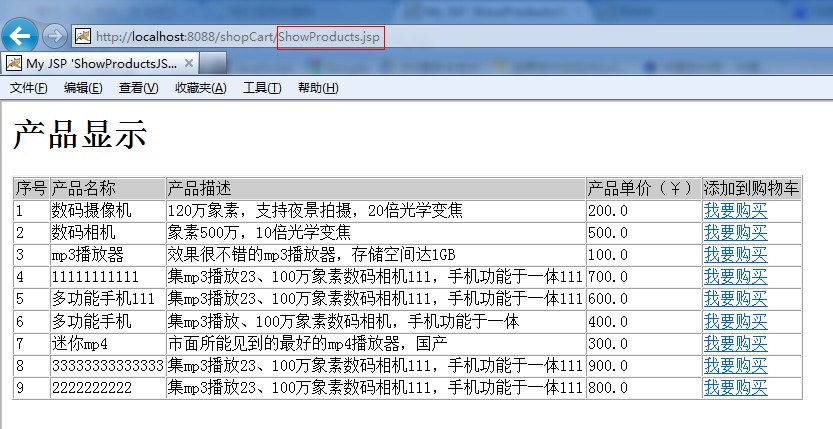
图1. 产品显示页面 通过此页面进行产品选择。增加到购物车
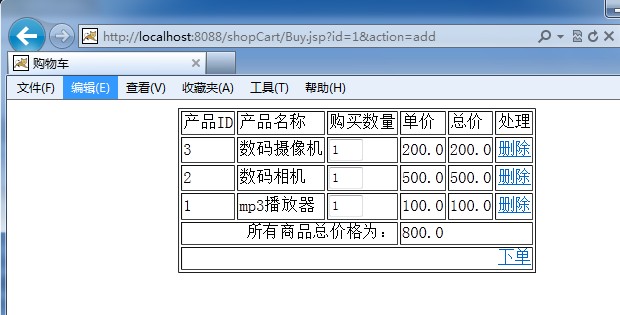
图2 .购物车页面
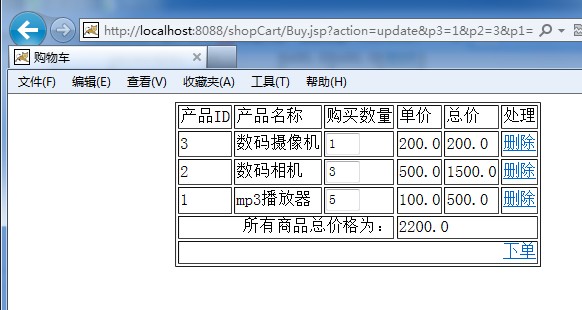
图3 . 商品数量设置
好了,先不贴图了,直接上代码。先看看项目的文档结构把(麻雀虽小。五脏俱全):
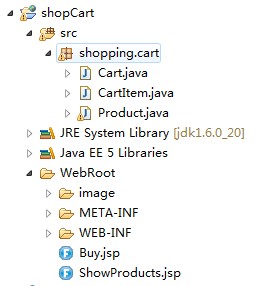
整个项目包括三个类,两个JSP页面。以下分别把他们的代码贴上:
Cart.java
package shopping.cart;

import java.util.ArrayList;

import java.util.Iterator;

import java.util.List;

public class Cart {

	List<CartItem> items = new ArrayList<CartItem>();

	public List<CartItem> getItems() {

		return items;

	}

	public void setItems(List<CartItem> items) {

		this.items = items;

	}

	public void add(CartItem ci) {

		for (Iterator<CartItem> iter = items.iterator(); iter.hasNext();) {

			CartItem item = iter.next();

			if(item.getProduct().getId() == ci.getProduct().getId()) {

				item.setCount(item.getCount() + 1);

				return;

			}

		}

		items.add(ci);

	}

	public double getTotalPrice() {

		double d = 0.0;

		for(Iterator<CartItem> it = items.iterator(); it.hasNext(); ) {

			CartItem current = it.next();

			d += current.getProduct().getPrice() * current.getCount();

		}

		return d;

	}

	public void deleteItemById(String productId) {

		for (Iterator<CartItem> iter = items.iterator(); iter.hasNext();) {

			CartItem item = iter.next();

			if(item.getProduct().getId().equals(productId)) {

				iter.remove();

				return;

			}

		}

	}

}
CartItem.java
package shopping.cart;

import shopping.cart.Product;

public class CartItem {

	private Product product;

	private int count;

	public int getCount() {

		return count;

	}

	public void setCount(int count) {

		this.count = count;

	}

	public Product getProduct() {

		return product;

	}

	public void setProduct(Product product) {

		this.product = product;

	}

}
Product.java
package shopping.cart;

import java.io.Serializable;

public class Product implements Serializable {

	private String id;// 产品标识

	private String name;// 产品名称

	private String description;// 产品描写叙述

	private double price;// 产品价格

	public Product() {

	}

	public Product(String id, String name, String description, double price) {

		this.id = id;

		this.name = name;

		this.description = description;

		this.price = price;

	}

	public void setId(String id) {

		this.id = id;

	}

	public void setName(String name) {

		this.name = name;

	}

	public void setDescription(String description) {

		this.description = description;

	}

	public void setPrice(double price) {

		this.price = price;

	}

	public String getId() {

		return id;

	}

	public String getName() {

		return name;

	}

	public String getDescription() {

		return description;

	}

	public double getPrice() {

		return price;

	}

}
以下是俩JSP页面源代码:
ShowProducts.jsp
<%@ page language="java" import="java.util.*" pageEncoding="GB18030"%>

<%@ page import="shopping.cart.*"%>

<%

	String path = request.getContextPath();

	String basePath = request.getScheme() + "://"

			+ request.getServerName() + ":" + request.getServerPort()

			+ path + "/";

%>

<!DOCTYPE HTML PUBLIC "-//W3C//DTD HTML 4.01 Transitional//EN">

<html>

	<head>

		<title>My JSP 'ShowProductsJSP.jsp' starting page</title>

		<meta http-equiv="pragma" content="no-cache">

		<meta http-equiv="cache-control" content="no-cache">

		<meta http-equiv="expires" content="0">

		<meta http-equiv="keywords" content="keyword1,keyword2,keyword3">

		<meta http-equiv="description" content="This is my page">

	</head>

	<body bgcolor="#ffffff">

		<%

			Map products = new HashMap();

			products.put("1", new Product("1", "mp3播放器",

					"效果非常不错的mp3播放器,存储空间达1GB", 100.00));

			products.put("2", new Product("2", "数码相机", "象素500万,10倍光学变焦",

					500.00));

			products.put("3", new Product("3", "数码摄像机",

					"120万象素,支持夜景拍摄,20倍光学变焦", 200.00));

			products.put("4", new Product("4", "迷你mp4",

					"市面所能见到的最好的mp4播放器,国产", 300.00));

			products.put("5", new Product("5", "多功能手机",

					"集mp3播放、100万象素数码相机,手机功能于一体", 400.00));

			products.put("6", new Product("6", "多功能手机111",

					"集mp3播放23、100万象素数码相机111,手机功能于一体111",600.00));

			products.put("7", new Product("7", "11111111111",

					"集mp3播放23、100万象素数码相机111,手机功能于一体111",700.00));

			products.put("8", new Product("8", "2222222222",

					"集mp3播放23、100万象素数码相机111,手机功能于一体111",800.00));

			products.put("9", new Product("9", "33333333333333",

					"集mp3播放23、100万象素数码相机111,手机功能于一体111",900.00));

			session.setAttribute("products", products);

		%>

		<H1>

			产品显示

		</H1>

		<form name="productForm"

			action="http://localhost:8088/JSPlearning/ShopCartJSP.jsp"

			method="POST">

			<input type="hidden" name="action" value="purchase">

			<table border="1" cellspacing="0">

				<tr bgcolor="#CCCCCC">

					<tr bgcolor="#CCCCCC">

						<td>

							序号

						</td>

						<td>

							产品名称

						</td>

						<td>

							产品描写叙述

						</td>

						<td>

							产品单位价格(¥)

						</td>

                        <td>

							加入到购物车

						</td>

					</tr>

					<%

						Set productIdSet = products.keySet();

						Iterator it = productIdSet.iterator();

						int number = 1;

						while (it.hasNext()) {

							String id = (String) it.next();

							Product product = (Product) products.get(id);

					%><tr>

						<td>

							<%=number++%>

						</td>

						<td>

							<%=product.getName()%>

						</td>

						<td><%=product.getDescription()%>

						</td>

						<td>

							<%=product.getPrice()%></td>

						<td>

							<a href="Buy.jsp?id=<%=product.getId()%>&action=add" target="cart">我要购买</a>

						</td>

					</tr>

					<%

						}

					%>

			</table>

			<p>

			</p>

		</form>

	</body>

</html>
Buy.jsp
<%@ page language="java" import="java.util.*" pageEncoding="GB18030"%>

<%@ page import="shopping.cart.*" %>

<%

Cart c = (Cart)session.getAttribute("cart");

if(c == null) {

	c = new Cart();

	session.setAttribute("cart", c);

}

double totalPrice = c.getTotalPrice();

request.setCharacterEncoding("GBK");

String action = request.getParameter("action");

Map products = (HashMap)session.getAttribute("products");

if(action != null && action.trim().equals("add")) {

	String id = request.getParameter("id");

	Product p = (Product)products.get(id);

	CartItem ci = new CartItem();

	ci.setProduct(p);

	ci.setCount(1);

	c.add(ci);

}

if(action != null && action.trim().equals("delete")) {

	String id = request.getParameter("id");

	c.deleteItemById(id);

}

if(action != null && action.trim().equals("update")) {

	for(int i=0; i<c.getItems().size(); i++) {

		CartItem ci = c.getItems().get(i);

		int count = Integer.parseInt(request.getParameter("p" + ci.getProduct().getId()));

		ci.setCount(count);

	}

}

 %>

<%

String path = request.getContextPath();

String basePath = request.getScheme()+"://"+request.getServerName()+":"+request.getServerPort()+path+"/";

%>

<%

List<CartItem> items = c.getItems();

%>

<!DOCTYPE html PUBLIC "-//W3C//DTD HTML 4.01 Transitional//EN" "http://www.w3.org/TR/html4/loose.dtd">

<html>

<head>

<meta http-equiv="Content-Type" content="text/html; charset=GB18030">

<title>购物车</title>

</head>

<body>

<!-- c的值是:<%=(c == null) %> items的值是:<%=(items == null) %> -->

<form action="Buy.jsp" method="get">

<input type="hidden" name="action" value="update"/>

<table align="center" border="1">

	<tr>

		<td>产品ID</td>

		<td>产品名称</td>

		<td>购买数量</td>

		<td>单位价格</td>

		<td>总价</td>

		<td>处理</td>

	</tr>

	<%

	for(Iterator<CartItem> it = items.iterator(); it.hasNext(); ) {

		CartItem ci = it.next();

		%>

		<tr>

			<td><%=ci.getProduct().getId() %></td>

			<td><%=ci.getProduct().getName() %></td>

			<td>

				<input type="text" size=3 name="<%="p" + ci.getProduct().getId() %>" value="<%=ci.getCount() %>"

					onkeypress="if (event.keyCode < 45 || event.keyCode > 57) event.returnValue = false;"

					onchange="document.forms[0].submit()">

			</td>

			<td><%=ci.getProduct().getPrice() %></td>

			<td><%=ci.getProduct().getPrice()*ci.getCount() %></td>

			<td>

				<a href="Buy.jsp?action=delete&id=<%=ci.getProduct().getId() %>">删除</a>

			</td>

		</tr>

		<%

	}

	%>

	<tr>

		<td colspan=3 align="right">

			全部商品总价格为:

		</td>

		<td colspan=3><%=c.getTotalPrice() %></td>

	</tr>

	<tr>

	<!--	<td colspan=3>

			 <a href="javascript:document.forms[0].submit()">改动</a>

		</td>  -->

		<td colspan=6 align="right">

			<a href="">下单</a>

		</td>

	</tr>

</table>

</form>

</body>

</html>
配置好相关文件,在tomcat中公布后,在浏览器中输入http://localhost:8088/shopCart/ShowProducts.jsp 他们可以进入产品页面,其他操作都能够完成在页面上!
注意:我用tomcatport(8088)由他转。假设没改过tomcatport鞋。默认port至8080。
使用JSP实现商场购物车模块的更多相关文章
- 用JSP实现的商城购物车模块
这两天,在学习JSP,正好找个小模块来练练手: 下面就是实现购物车模块的页面效果截图: 图1. 产品显示页面 通过此页面进行产品选择,增加到购物车 图2 .购物车页面 图3 . 商品数量设置 好了,先 ...
- 走进Vue时代进阶篇(01):重构电商购物车模块
前言 从这篇文章开始,我准备给大家分享一些关于Vue.js这门框架的技巧性系列文章,正好我们公司项目中也用到了Vue.所以,教是最好的学.进阶篇比较适合于二三线城市,还在小厂打拼的童鞋们.欢迎你们跟着 ...
- Java开源生鲜电商平台-购物车模块的设计与架构(源码可下载)
ava开源生鲜电商平台-购物车模块的设计与架构(源码可下载) 说明:任何一个电商无论是B2C还是B2B都有一个购物车模块,其中最重要的原因就是客户需要的东西放在一起,形成一个购物清单,确认是否有问题, ...
- Mvp快速搭建商城购物车模块
代码地址如下:http://www.demodashi.com/demo/12834.html 前言: 说到MVP的时候其实大家都不陌生,但是涉及到实际项目中使用,还是有些无从下手.因此这里小编带着大 ...
- python-django框架-电商项目-购物车模块开发_20191125
python-django框架-电商项目-购物车模块开发 商品详情页js代码: 在商品详情页,有加入购物车按钮, 点击加减号可以增加减少,手动输入也可以, 点击加入购物车,就要加过去, 先实现加减的操 ...
- mmall商城购物车模块总结
购物车模块的设计思想 购物车的实现方式有很多,但是最常见的就三种:Cookie,Session,数据库.三种方法各有优劣,适合的场景各不相同.Cookie方法:通过把购物车中的商品数据写入Cookie ...
- 网上图书商城项目学习笔记-014购物车模块页面javascrip
一.流程分析 二.代码 1.view层 (1)list.jsp <%@ page language="java" import="java.util.*" ...
- javaweb练手项目jsp+servlet简易购物车系统
简易购物车项目 这是一个用intellij IDEA做的简易的javaweb项目,开发环境使用的jdk1.8和tomcat8以及mysql数据库. 1.项目开发准备: 创建github仓库 项目框架搭 ...
- Vue node.js商城-购物车模块
一.渲染购物车列表页面 新建src/views/Cart.vue获取cartList购物车列表数据就可以在页面中渲染出该用户的购物车列表数据 data(){ return { car ...
随机推荐
- ISO/OSI网络体系结构和TCP/IP协议模型
1. ISO/OSI的参考模型共有7层,由低层至高层分别为:物理层.数据链路层.网络层.传输层.会话层.表示层. 应用层.各层功能分别为: (1)物理层 提供建立.维护和拆除 ...
- HTML5文件上传还有进度条
以下是自学it网--中级班上课笔记 网址:www.zixue.it 需要在chrome,ff,IE10下运行 html页面 <!DOCTYPE html> <html lang=&q ...
- make 2>&1 | tee log.txt之小析
前言 接触过linux的人,或多或少都会了解一点make 2>&1 | tee log.txt这个命令. 1. make是什么? make是linux下一个非常强大的命令,简单点就是你要 ...
- C语言中的system函数參数具体解释
http://blog.csdn.net/pipisorry/article/details/33024727 函数名: system 功 能: 发出一个DOS命令 用 法: int sy ...
- Unity MegaFiers 顶点动画
使用 MegaFiers 插件,能够使得Unity支持顶点动画的播放. 官方视频教程例如以下: 在这里简单測试使用下,环境例如以下: Blender 2.72 Unity 4.5.4 Mega ...
- 流动python - 字符串KMP匹配
首先我们看一下简单的字符串匹配. 你可以把文本字符串s固定,模式字符串p从s对齐的左边缘,作为承担部分完全一致,匹配成功,失败将是模式字符串p整体向右1地点,继续检查对齐部分,重复. #朴素匹配 de ...
- hdu5172(线段树)
传送门:GTY's gay friends 题意:判断区间[l,r]内的数字是否符合1~len(r-l+1)的一个全排列. 分析:pos[i]记录数字i出现的最大位置,pre[i]记录在位置i的数字a ...
- Hibernate 配置详解(7)
hibernate.order_updates: Hibernate文档中提到,该配置用于在刷新一级缓存,提交UPDATE的时候,按照每类对象的主键顺序排序后再提交,可以在高并发情况下减少事务死锁的可 ...
- 你是否是团队里面最默默付出的那个coder,却发现滔滔不绝的产品和设计是团队里的开心果(转)
程序员,你是否是团队里面最默默付出的那个coder,却发现滔滔不绝的产品和设计是团队里的开心果? 你是否自命不凡,精通Java.C++.Python……却发现得到的只是做不完的工作? 你是否觉得自己是 ...
- ReentrantLock可重入锁的使用场景(转)
摘要 从使用场景的角度出发来介绍对ReentrantLock的使用,相对来说容易理解一些. 场景1:如果发现该操作已经在执行中则不再执行(有状态执行) a.用在定时任务时,如果任务执行时间可能超过下次 ...