
分析UIWindow
转载自:http://www.cnblogs.com/YouXianMing/p/3811741.html
The UIWindow class defines an object known as a window that manages and coordinates the views an app displays on a device screen. Unless an app can display content on an external device screen, an app has only one window.
UIWindow定义了一个对象,用来管理视图的坐标系统,除非,app可以在另外一个窗口里面展示内容,否则,一个app只有一个window.
每一个controller都会被UIWindow接管,UIWindow一次只能接管一个controller,下面用代码验证.
首先,我们来看看,UIWindow何时接管了controller.
请写以下代码:

//

//  RootViewController.m

//  Window

//

//  Copyright (c) 2014年 Y.X. All rights reserved.

//

#import "RootViewController.h"

@interface RootViewController ()

@end

@implementation RootViewController

- (void)viewDidLoad

{

    [super viewDidLoad];

    if (self.view.window)

    {

        NSLog(@"viewDidLoad");

        NSLog(@"%@", NSStringFromCGRect(self.view.window.frame));

    }

}

- (void)viewWillAppear:(BOOL)animated

{

    [super viewWillAppear:animated];

    if (self.view.window)

    {

        NSLog(@"viewWillAppear");

        NSLog(@"%@", NSStringFromCGRect(self.view.window.frame));

    }

}

- (void)viewDidAppear:(BOOL)animated

{

    [super viewDidAppear:animated];

    if (self.view.window)

    {

        NSLog(@"viewDidAppear");

        NSLog(@"%@", NSStringFromCGRect(self.view.window.frame));

    }

}

- (void)viewWillDisappear:(BOOL)animated

{

    [super viewWillDisappear:animated];

    if (self.view.window)

    {

        NSLog(@"viewWillDisappear");

        NSLog(@"%@", NSStringFromCGRect(self.view.window.frame));

    }

}

- (void)viewDidDisappear:(BOOL)animated

{

    [super viewDidDisappear:animated];

    if (self.view.window)

    {

        NSLog(@"viewDidDisappear");

        NSLog(@"%@", NSStringFromCGRect(self.view.window.frame));

    }

}

@end
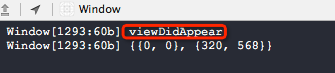
打印信息,注意哦,UIWindow会在一个controller的viewDidAppear方法中才接管了当前controller,而不是在ViewDidLoad方法中,注意:)
接下来,我们在导航栏控制器间切换,来观察,UIWindow如何放弃一个controller然后接管另外一个controller
- (BOOL)application:(UIApplication *)application didFinishLaunchingWithOptions:(NSDictionary *)launchOptions

{

    self.window = [[UIWindow alloc] initWithFrame:[[UIScreen mainScreen] bounds]];

    // Override point for customization after application launch.

    UINavigationController *NC = \

        [[UINavigationController alloc] initWithRootViewController:[RootViewController new]];

    self.window.rootViewController = NC;

    self.window.backgroundColor = [UIColor whiteColor];

    [self.window makeKeyAndVisible];

    return YES;

}
//

//  RootViewController.m

//  Window

//

//  Copyright (c) 2014年 Y.X. All rights reserved.

//

#import "RootViewController.h"

#import "SecondViewController.h"

#import "YXGCD.h"

@interface RootViewController ()

@end

@implementation RootViewController

- (void)viewDidLoad

{

    [super viewDidLoad];

    if (self.view.window)

    {

        NSLog(@"viewDidLoad");

        NSLog(@"%@", NSStringFromCGRect(self.view.window.frame));

    }

    [[GCDQueue mainQueue] execute:^{

        [self.navigationController pushViewController:[SecondViewController new]

                                             animated:YES];

    } afterDelay:NSEC_PER_SEC * 4];

}

- (void)viewWillAppear:(BOOL)animated

{

    [super viewWillAppear:animated];

    if (self.view.window)

    {

        NSLog(@"viewWillAppear");

        NSLog(@"%@", NSStringFromCGRect(self.view.window.frame));

    }

}

- (void)viewDidAppear:(BOOL)animated

{

    [super viewDidAppear:animated];

    if (self.view.window)

    {

        NSLog(@"viewDidAppear");

        NSLog(@"%@", NSStringFromCGRect(self.view.window.frame));

    }

}

- (void)viewWillDisappear:(BOOL)animated

{

    [super viewWillDisappear:animated];

    if (self.view.window)

    {

        NSLog(@"viewWillDisappear");

        NSLog(@"%@", NSStringFromCGRect(self.view.window.frame));

    }

}

- (void)viewDidDisappear:(BOOL)animated

{

    [super viewDidDisappear:animated];

    if (self.view.window)

    {

        NSLog(@"viewDidDisappear");

        NSLog(@"%@", NSStringFromCGRect(self.view.window.frame));

    }

}

@end
//

//  SecondViewController.m

//  Window

////  Copyright (c) 2014年 Y.X. All rights reserved.

//

#import "SecondViewController.h"

@interface SecondViewController ()

@end

@implementation SecondViewController

- (void)viewDidLoad

{

    [super viewDidLoad];

    self.view.backgroundColor = [UIColor redColor];

}

@end
查看结果:
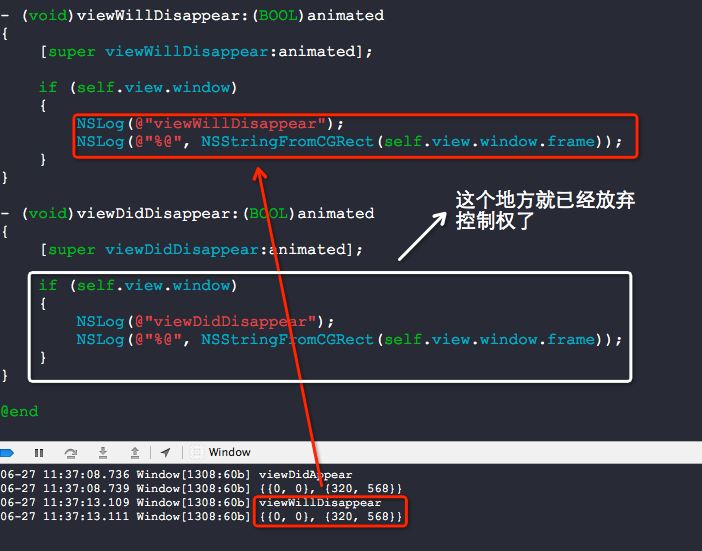
结论很自然,一个UIWindow只能在接管一个controller.
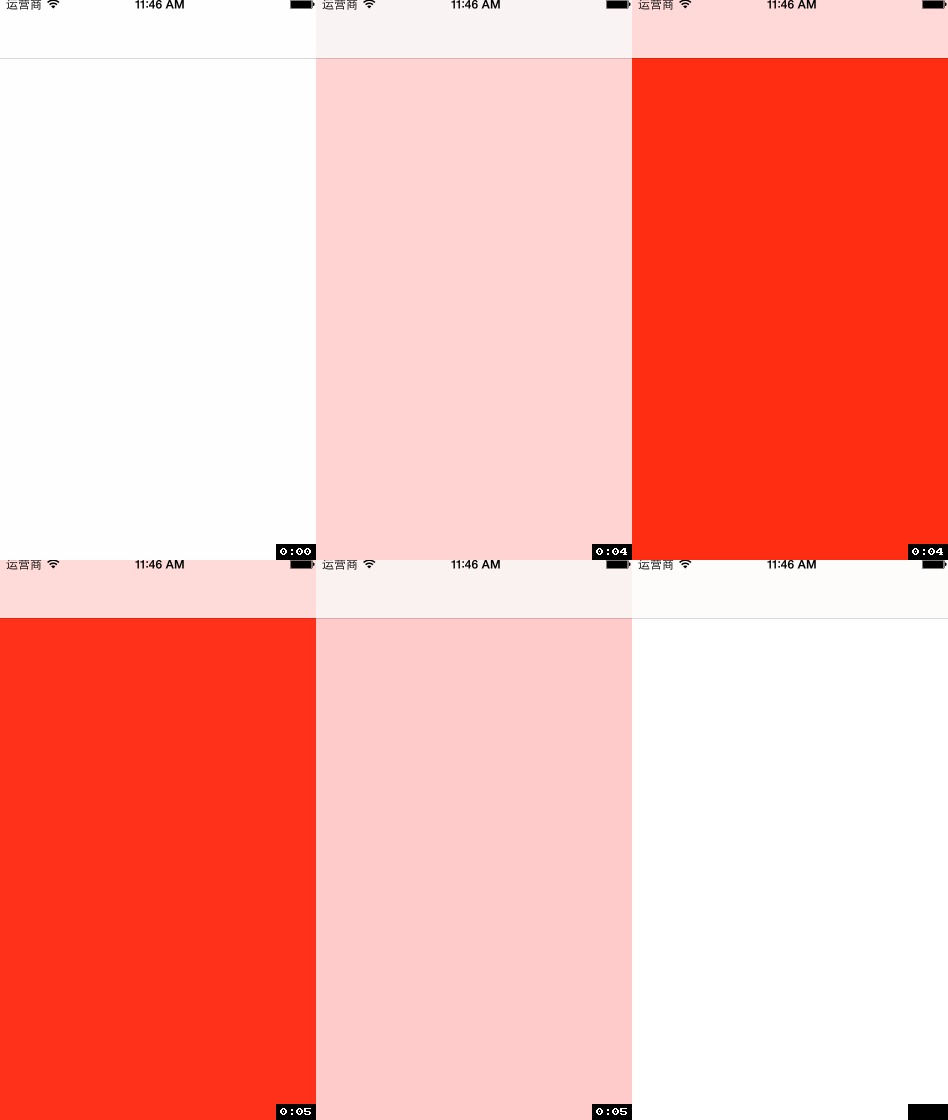
为什么要纠结于UIWindow的这些小细节呢?因为,UIWindow有着比一切controller都要高的优先级显示权利,加载在UIWindow上面的View是不会被遮挡住的.
效果(注意查看上面的导航条的地方,也被遮盖住了):

源码:
//

//  RootViewController.m

//  Window

//

//  Copyright (c) 2014年 Y.X. All rights reserved.

//

#import "RootViewController.h"

#import "YXGCD.h"

@interface RootViewController ()

@end

@implementation RootViewController

- (void)viewDidLoad

{

    [super viewDidLoad];

    [[GCDQueue mainQueue] execute:^{

        UIView *redView         = [[UIView alloc] initWithFrame:self.view.window.frame];

        redView.backgroundColor = [UIColor redColor];

        redView.alpha           = 0.f;

        [self.view.window addSubview:redView];

        [UIView animateWithDuration:1 animations:^{

            redView.alpha = 1.f;

        } completion:^(BOOL finished) {

            [UIView animateWithDuration:1 animations:^{

                redView.alpha = 0.f;

            } completion:^(BOOL finished) {

                [redView removeFromSuperview];

            }];

        }];

    } afterDelay:NSEC_PER_SEC * 10];

}

@end
普通的View的加载的效果(注意上方的导航栏,它并没有变成红色):
//

//  RootViewController.m

//  Window

//

//  Copyright (c) 2014年 Y.X. All rights reserved.

//

#import "RootViewController.h"

#import "YXGCD.h"

@interface RootViewController ()

@end

@implementation RootViewController

- (void)viewDidLoad

{

    [super viewDidLoad];

    [[GCDQueue mainQueue] execute:^{

        UIView *redView         = [[UIView alloc] initWithFrame:self.view.window.frame];

        redView.backgroundColor = [UIColor redColor];

        redView.alpha           = 0.f;

        [self.view addSubview:redView];

        [UIView animateWithDuration:1 animations:^{

            redView.alpha = 1.f;

        } completion:^(BOOL finished) {

            [UIView animateWithDuration:1 animations:^{

                redView.alpha = 0.f;

            } completion:^(BOOL finished) {

                [redView removeFromSuperview];

            }];

        }];

    } afterDelay:NSEC_PER_SEC * 10];

}

@end
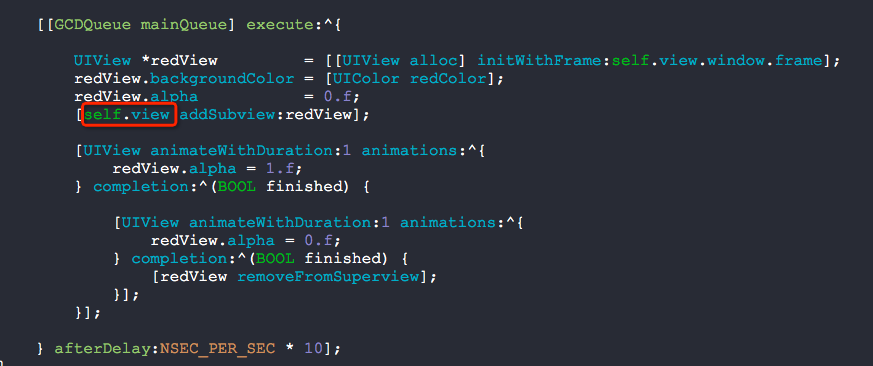
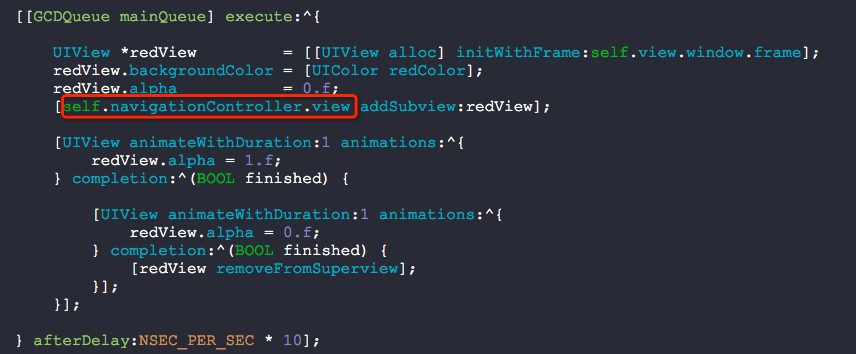
其实呢,你如果写成这样子,也是可以遮盖导航条的呢:
其实,就这么多东西:)
分析UIWindow的更多相关文章
- 【转】iOS应用崩溃日志分析
作为一名应用开发者,你是否有过如下经历? 为确保你的应用正确无误,在将其提交到应用商店之前,你必定进行了大量的测试工作.它在你的设备上也运行得很好,但是,上了应用商店后,还是有用户抱怨会闪退 ! ...
- iOS 第三方自定义Alertview项目MBProcessHud中的重要代码分析
做ios,弹出一个自定义的alertview挺常见的.ios7以前,我们可以对系统的UIAlertView进行一点操作,实现一点简单的定制,但是ios7不再允许我们这样做了.因此,我们需要自己创建一个 ...
- UIWindow 详解
UIWindow对象是所有UIView的根视图,管理和协调的应用程序的显示.分发事件给View.UIWindow类是UIView的子类,可以看作是特殊的UIView.一般应用程序只有一个UIWindo ...
- cocos2D(三)---- 第一cocos2d的程序代码分析
在第一讲中已经新建了第一个cocos2d程序,执行效果例如以下: 在这讲中我们来分析下里面的代码,了解cocos2d的工作原理,看看屏幕上的这个"Hello World"是怎样显示 ...
- IOS计划 分析
1.基本介绍 IOS苹果公司iPhone.iPod touch和iPad操作系统和其他设备的发展. 2.知识点 1.IOS系统 iPhone OS(现在所谓的iOS)这是iPhone, iPod to ...
- [转]MBProgressHUD 源码分析
源码来源: https://github.com/jdg/MBProgressHUD 版本:0.9.1 MBProgressHUD是一个显示HUD窗口的第三方类库,用于在执行一些后台任务时,在程序中显 ...
- JDiPad项目runtime的使用分析
首先,项目有点老 但是运行还是没有问题的.其中很多地方到了runtime,同时也看到了 早期的开发人员 基本没用pod 第三方也很少用,除了微信登录,整个项目还没看到集成的第三方SDK.然后慢慢梳理 ...
- 三、第一个cocos2d程序的代码分析
http://blog.csdn.net/q199109106q/article/details/8591706 在第一讲中已经新建了第一个cocos2d程序,运行效果如下: 在这讲中我们来分析下里面 ...
- iOS应用崩溃日志分析 iOS应用崩溃日志揭秘
转自:http://www.raywenderlich.com/zh-hans/30818/ios%E5%BA%94%E7%94%A8%E5%B4%A9%E6%BA%83%E6%97%A5%E5%BF ...
随机推荐
- hdu_5807_Keep In Touch(分段dp)
题目链接:hdu_5807_Keep In Touch 题意: 在Byteland一共有nn个城市,编号依次为11到nn,同时有mm条单向道路连接着这些城市,其中第ii条道路的起点为u_iui, ...
- hdu_5802_Windows 10(贪心)
题目链接:hdu_5802_Windows 10 题意: 给你两个音量a,b,要让你将音量a变到音量b,up:每秒只能一次加1的音量,down:如果连续按x秒,那么就会减2x-1的音量 题解: 对于a ...
- storm 使用过程中遇到的问题
1 bolt不停重启,excutor无法启动. nimbus日志类似如下(), 2014-03-12 10:55:06 b.s.d.nimbus [INFO] Executor MITAS3-74-1 ...
- 如何在sharepoint里通过correlation id查找详细的错误信息
Sharepoint里我们经常遇到这样的错误信息: 我们能通过下面的power shell 命令来查到详细的错误信息: $correlationid = "943e6e9c-b5d9-207 ...
- weka简介
1.weka的历史 1992年末,新西兰怀卡托大学计算机科学系Ian Written博士申请基金. 1993年获新西兰政府资助,并于同年开发出接口和基础架构. 1994年发布了第一个weka的内部版本 ...
- 并查集+bfs+暴力滑窗 Codeforces Round #356 (Div. 2) E
http://codeforces.com/contest/680/problem/E 题目大意:给你一个n*n的图,然后图上的 . (我们下面都叫做‘点’)表示可以走,X表示不能走,你有如下的操作, ...
- QML Flipable、Flickable和状态与动画 上篇
本文介绍的是QML Flipable.Flickable和状态与动画,我们以前接触过QML组件,和一些QML相关的内容,那么本文介绍的内容就很明了了.先来看内容. AD:51CTO 网+ 第十二期沙龙 ...
- linux查看文件及文件夹的大小
最近发现服务器的磁盘容量使用率超过了90%,所以有必要查看是哪个文件占用了太多的空间, 服务器系统:CentOS6.5 df -h #查看磁盘使用情况,步骤1 cd / #切换到根目录, 步骤2 du ...
- Commit message 和 Change log 编写指南
来源:http://www.ruanyifeng.com/blog/2016/01/commit_message_change_log.html Git 每次提交代码,都要写 Commit messa ...
- Oracle 游标及存储过程实例
/*********实例一*********/ create or replace procedure users_procedure is cursor users_cursor is select ...