
wpf之ListBox横向显示所有ListBoxItem
Xaml:
<Window x:Class="WpfApplication6.MainWindow"

        xmlns="http://schemas.microsoft.com/winfx/2006/xaml/presentation"

        xmlns:x="http://schemas.microsoft.com/winfx/2006/xaml"

        Title="MainWindow" Height="350" Width="525">

    <Grid>

        <ListBox x:Name="lb">

            <ListBox.ItemsPanel>

                <ItemsPanelTemplate>

                    <WrapPanel IsItemsHost="True" />

                </ItemsPanelTemplate>

            </ListBox.ItemsPanel>

            <ListBox.ItemTemplate>

                <DataTemplate>

                    <TextBlock Text="{Binding Path=Name}" Margin="2"/>

                </DataTemplate>

            </ListBox.ItemTemplate>

        </ListBox>

    </Grid>

</Window>
C#:
using System;

using System.Collections.Generic;

using System.Linq;

using System.Text;

using System.Windows;

using System.Windows.Controls;

using System.Windows.Data;

using System.Windows.Documents;

using System.Windows.Input;

using System.Windows.Media;

using System.Windows.Media.Imaging;

using System.Windows.Navigation;

using System.Windows.Shapes;

namespace WpfApplication6

{

    /// <summary>

    /// MainWindow.xaml 的交互逻辑

    /// </summary>

    public partial class MainWindow : Window

    {

        public MainWindow()

        {

            InitializeComponent();

            Person p1 = new Person { Name="张三",Age=};

            Person p2 = new Person { Name = "李四", Age =  };

            Person p3 = new Person { Name = "王五", Age =  };

            List<Person> list = new List<Person>();

            list.Add(p1);

            list.Add(p2);

            list.Add(p3);

            lb.ItemsSource = list;

        }

    }

    public class Person

    {

        private string name;

        public string Name

        {

            get { return name; }

            set { name = value; }

        }

        private int age;

        public int Age

        {

            get { return age; }

            set { age = value; }

        }

    }

}
运行效果:
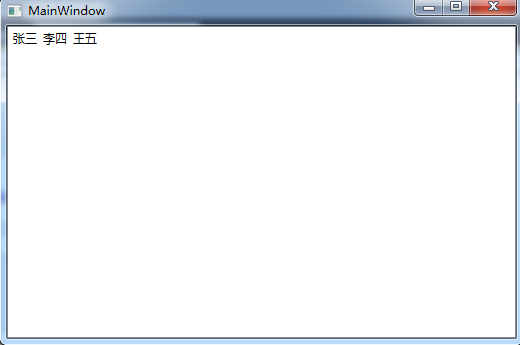
wpf之ListBox横向显示所有ListBoxItem的更多相关文章
- WPF中ListBox的项ListBoxItem被选中的时候Background变化
使用WPF 中ListBox,点击ListBoxItem的时候,自定义它的背景色,曾经在网上找了一些方法, 不是很理想,后来在StackOverflow上找到了,贴出代码和效果图: 效果图:
- WPF MultiSelect模式下ListBox 实现多个ListBoxItem拖拽
WPF 的ListBox不支持很多常见的用户习惯,如在Explorer中用鼠标可以选择多项Item,并且点击已经选择的Item,按住鼠标左键可以将所有已选择Item拖拽到指定的位置.本文简单的实现了这 ...
- WPF ListBox 横向排列
WPF ListBox 横向排列 如果只是单纯的让ListBox可以横向配列,这样很简单,只需要更改ListBox的ItemsPanel模板就可以,例如: <ListBox><L ...
- WPF DataGrid横向显示
前言 利用各种变换,将其水平改向至横向显示. 注意的是要固定好单元格的高宽,或者手动编写style 否者在滚动的时候,会有高宽比例不一样的时候 再其次,要注意datagrid的容器或者datagrid ...
- WPF中ListBox的绑定
WPF中列表式控件派生自ItemsControl类,继承了ItemsSource属性.ItemsSource属性可以接收一个IEnumerable接口派生类的实例作为自己的值(所有可被迭代遍历的集合都 ...
- 转:WPF中ListBox的创建和多种绑定用法
先从最容易的开始演示ListBox控件的创建. Adding ListBox Items下面的代码是向ListBox控件中添加多项ListBoxItem集合.XAML代码如下:<ListBox ...
- WPF图片浏览器(显示大图、小图等)
原文:WPF图片浏览器(显示大图.小图等) 版权声明:本文为博主原创文章,未经博主允许不得转载. https://blog.csdn.net/wangshubo1989/article/details ...
- listbox横向排列
在Listbox中横向显示CheckBox 前台代码 <ListBox Height=" > <StackPanel x:Name="sp" Orien ...
- WPF 自定义ListBox
如题,要实现一个如下的列表,该如何实现? 在设计过程中,会遇到如下问题: 1.ListBox中ListBoxItem的模板设计 2.ListBox中ListBoxItem的模板容器设计 3.List ...
随机推荐
- [妙味DOM]第三课:Event-事件详解1
知识点总结 焦点事件 onfocus 获取焦点 onblur 失点焦点 obj.focus() 给指定元素设置焦点 obj.blur() 取消指定元素的焦点 obj.select() 选择指定元素里的 ...
- PAT 团体程序设计天梯赛-练习集 L1-003. 个位数统计
给定一个k位整数N = dk-1*10k-1 + ... + d1*101 + d0 (0<=di<=9, i=0,...,k-1, dk-1>0),请编写程序统计每种不同的个位数字 ...
- POJ 1067 取石子游戏(威佐夫博弈)
传送门 #include<iostream> #include<cstdio> #include<cstring> #include<algorithm> ...
- linux命令 time
功能:用于计算命令执行的世界 语法: time command 例如: hbg@root:~/dl$ time ls111 apple.sh b.txt duplic ...
- tftp常用命令
root@hbg:/# tftpBusyBox v1.22.1 (2015-12-18 15:33:52 CST) multi-call binary. Usage: tftp [OPTIONS] H ...
- JVM基础(4)-编译
一.编译过程 不论是物理机还是虚拟机,大部分的程序代码从开始编译到最终转化成物理机的目标代码或虚拟机能执行的指令集之前,都会按照如下图所示的各个步骤进行: (其中绿色的模块可以选择性实现.) 很容易看 ...
- [转]最常见的20个jQuery面试问题及答案
毫无疑问,jQuery给了JavaScript急需的提振,这是一门如此有用,但同时总是常常被低估的语言. 在 jQuery 粉墨登场之前,我们曾经会写出冗长的JavaScript代码,不仅仅为更大型的 ...
- java邮件发送(以163邮箱为例)
1.首先应该开通163邮箱的smtp和pop3,得到授权码 2.其次建立一个web项目,否则需要倒jar包mail.jar 3.创建一个类 4.注意:邮件内容必须为正式话语,否则系统会认为是垃圾邮件而 ...
- Openjudge-计算概论(A)-放苹果
描述: 把M个同样的苹果放在N个同样的盘子里,允许有的盘子空着不放,问共有多少种不同的分法?(用K表示)5,1,1和1,5,1 是同一种分法.输入第一行是测试数据的数目t(0 <= t < ...
- 注册表被篡改,请重新安装应用程序 acdphotoEdit
破解之后,运行程序,提示“注册表被篡改,请重新安装应用程序”,反复重装,重启,都不行,删除注册表,重新安装后运行一次ACDSee,绿化,也不行,最后发现设置属性以管理员权限运行,ok,解决了