
--@ui-router——$state服务原版详解
$state
ui.router.state Description
$state service is responsible for representing states as well as transitioning between them. It also provides interfaces to ask for current state or even states you're coming from.
Dependencies
Methods
get(stateOrName, context)
Returns the state configuration object for any specific state or all states.
Parameters
Param Type Details stateOrName (optional)stringobject (absolute or relative) If provided, will only get the config for the requested state. If not provided, returns an array of ALL state configs.
context (optional)stringobject When stateOrName is a relative state reference, the state will be retrieved relative to context.
Returns
Object|Array State configuration object or array of all objects.
go(to, params, options)
Convenience method for transitioning to a new state.
$state.gocalls$state.transitionTointernally but automatically sets options to{ location: true, inherit: true, relative: $state.$current, notify: true }. This allows you to easily use an absolute or relative to path and specify only the parameters you'd like to update (while letting unspecified parameters inherit from the currently active ancestor states).Parameters
Param Type Details to string Absolute state name or relative state path. Some examples:
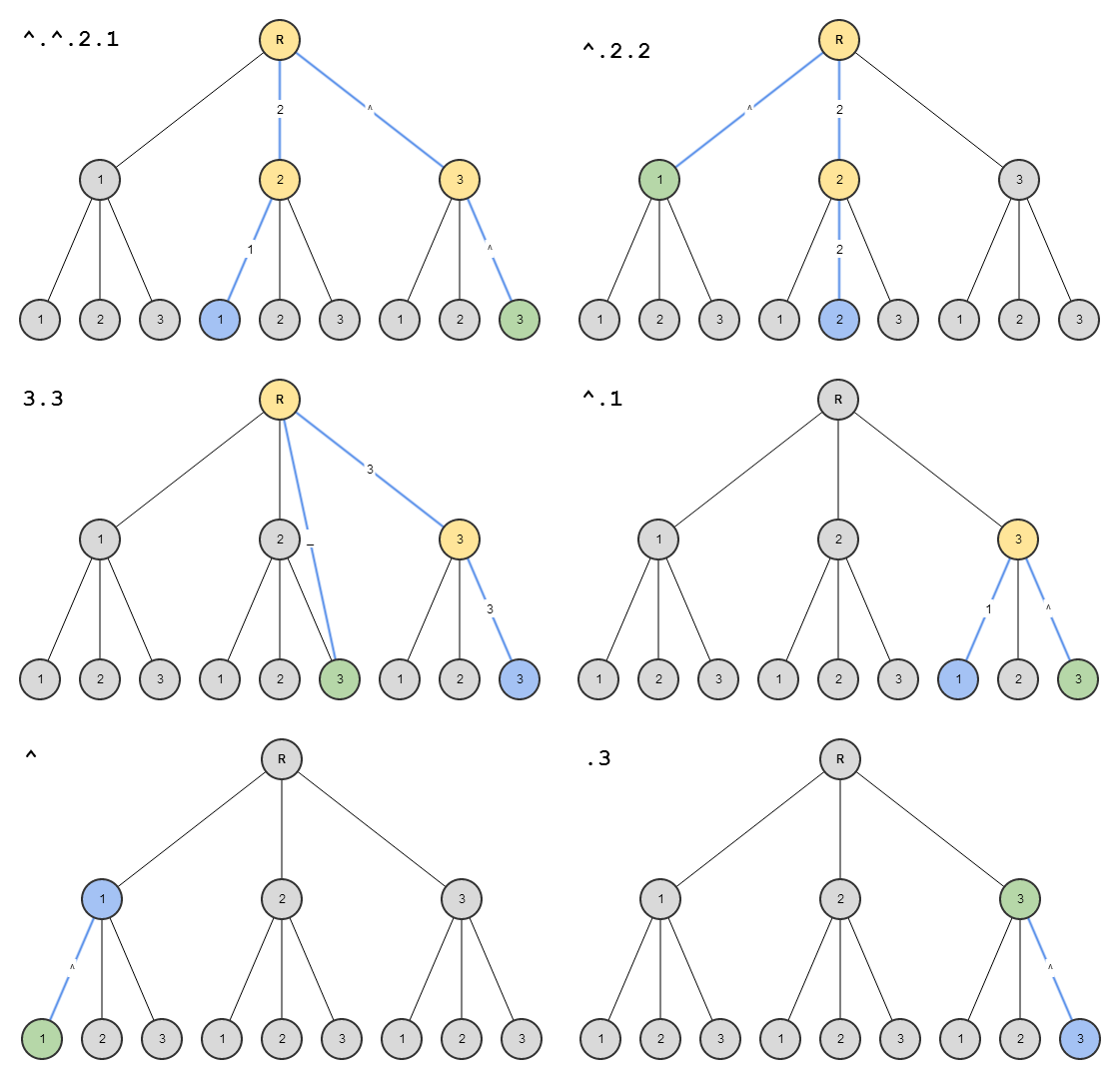
$state.go('contact.detail')- will go to thecontact.detailstate$state.go('^')- will go to a parent state$state.go('^.sibling')- will go to a sibling state$state.go('.child.grandchild')- will go to grandchild state
params (optional)object A map of the parameters that will be sent to the state, will populate $stateParams. Any parameters that are not specified will be inherited from currently defined parameters. This allows, for example, going to a sibling state that shares parameters specified in a parent state. Parameter inheritance only works between common ancestor states, I.e. transitioning to a sibling will get you the parameters for all parents, transitioning to a child will get you all current parameters, etc.
options (optional)object Options object. The options are:
location- {boolean=true|string=} - Iftruewill update the url in the location bar, iffalsewill not. If string, must be"replace", which will update url and also replace last history record.inherit- {boolean=true}, Iftruewill inherit url parameters from current url.relative- {object=$state.$current}, When transitioning with relative path (e.g '^'), defines which state to be relative from.notify- {boolean=true}, Iftruewill broadcast $stateChangeStart and $stateChangeSuccess events.reload(v0.2.5) - {boolean=false}, Iftruewill force transition even if the state or params have not changed, aka a reload of the same state. It differs from reloadOnSearch because you'd use this when you want to force a reload when everything is the same, including search params.
Returns
promise A promise representing the state of the new transition.
Possible success values:
- $state.current
Possible rejection values:
- 'transition superseded' - when a newer transition has been started after this one
- 'transition prevented' - when
event.preventDefault()has been called in a$stateChangeStartlistener - 'transition aborted' - when
event.preventDefault()has been called in a$stateNotFoundlistener or
when a$stateNotFoundevent.retrypromise errors. - 'transition failed' - when a state has been unsuccessfully found after 2 tries.
- resolve error - when an error has occurred with a
resolve
Example
- var app = angular.module('app', ['ui.router']);
- app.controller('ctrl', function ($scope, $state) {
- $scope.changeState = function () {
- $state.go('contact.detail');
- };
- });
href(stateOrName, params, options)
A url generation method that returns the compiled url for the given state populated with the given params.
Parameters
Param Type Details stateOrName stringobject The state name or state object you'd like to generate a url from.
params (optional)object An object of parameter values to fill the state's required parameters.
options (optional)object Options object. The options are:
lossy- {boolean=true} - If true, and if there is no url associated with the state provided in the first parameter, then the constructed href url will be built from the first navigable ancestor (aka ancestor with a valid url).inherit- {boolean=true}, Iftruewill inherit url parameters from current url.relative- {object=$state.$current}, When transitioning with relative path (e.g '^'), defines which state to be relative from.absolute- {boolean=false}, If true will generate an absolute url, e.g. "http://www.example.com/fullurl".
Returns
string compiled state url
Example
- expect($state.href("about.person", { person: "bob" })).toEqual("/about/bob");
includes(stateOrName, params, options)
A method to determine if the current active state is equal to or is the child of the state stateName. If any params are passed then they will be tested for a match as well. Not all the parameters need to be passed, just the ones you'd like to test for equality.
Parameters
Param Type Details stateOrName string A partial name, relative name, or glob pattern to be searched for within the current state name.
params (optional)object A param object, e.g.
{sectionId: section.id}, that you'd like to test against the current active state.options (optional)object An options object. The options are:
relative- {string|object=} - IfstateOrNameis a relative state reference andoptions.relativeis set, .includes will test relative tooptions.relativestate (or name).
Returns
boolean Returns true if it does include the state
Example
Partial and relative names
- $state.$current.name = 'contacts.details.item';
- // Using partial names
- $state.includes("contacts"); // returns true
- $state.includes("contacts.details"); // returns true
- $state.includes("contacts.details.item"); // returns true
- $state.includes("contacts.list"); // returns false
- $state.includes("about"); // returns false
- // Using relative names (. and ^), typically from a template
- // E.g. from the 'contacts.details' template
- <div ng-class="{highlighted: $state.includes('.item')}">Item</div>
Basic globbing patterns
- $state.$current.name = 'contacts.details.item.url';
- $state.includes("*.details.*.*"); // returns true
- $state.includes("*.details.**"); // returns true
- $state.includes("**.item.**"); // returns true
- $state.includes("*.details.item.url"); // returns true
- $state.includes("*.details.*.url"); // returns true
- $state.includes("*.details.*"); // returns false
- $state.includes("item.**"); // returns false
is(stateOrName, params, options)
Similar to $state.includes, but only checks for the full state name. If params is supplied then it will be tested for strict equality against the current active params object, so all params must match with none missing and no extras.
Parameters
Param Type Details stateOrName stringobject The state name (absolute or relative) or state object you'd like to check.
params (optional)object A param object, e.g.
{sectionId: section.id}, that you'd like to test against the current active state.options (optional)object An options object. The options are:
relative- {string|object} - IfstateOrNameis a relative state name andoptions.relativeis set, .is will test relative tooptions.relativestate (or name).
Returns
boolean Returns true if it is the state.
Example
- $state.$current.name = 'contacts.details.item';
- // absolute name
- $state.is('contact.details.item'); // returns true
- $state.is(contactDetailItemStateObject); // returns true
- // relative name (. and ^), typically from a template
- // E.g. from the 'contacts.details' template
- <div ng-class="{highlighted: $state.is('.item')}">Item</div>
reload(state)
A method that force reloads the current state. All resolves are re-resolved, controllers reinstantiated, and events re-fired.
Parameters
Param Type Details state (optional)string=object - A state name or a state object, which is the root of the resolves to be re-resolved.
Returns
promise A promise representing the state of the new transition. See $state.go.
Example
- //assuming app application consists of 3 states: 'contacts', 'contacts.detail', 'contacts.detail.item'
- //and current state is 'contacts.detail.item'
- var app angular.module('app', ['ui.router']);
- app.controller('ctrl', function ($scope, $state) {
- $scope.reload = function(){
- //will reload 'contact.detail' and 'contact.detail.item' states
- $state.reload('contact.detail');
- }
- });
reload()is just an alias for:- $state.transitionTo($state.current, $stateParams, {
- reload: true, inherit: false, notify: true
- });
transitionTo(to, toParams, options)
Low-level method for transitioning to a new state. $state.go uses
transitionTointernally.$state.gois recommended in most situations.Parameters
Param Type Details to string State name.
toParams (optional)object A map of the parameters that will be sent to the state, will populate $stateParams.
options (optional)object Options object. The options are:
location- {boolean=true|string=} - Iftruewill update the url in the location bar, iffalsewill not. If string, must be"replace", which will update url and also replace last history record.inherit- {boolean=false}, Iftruewill inherit url parameters from current url.relative- {object=}, When transitioning with relative path (e.g '^'), defines which state to be relative from.notify- {boolean=true}, Iftruewill broadcast $stateChangeStart and $stateChangeSuccess events.reload(v0.2.5) - {boolean=false|string=|object=}, Iftruewill force transition even if the state or params have not changed, aka a reload of the same state. It differs from reloadOnSearch because you'd use this when you want to force a reload when everything is the same, including search params. if String, then will reload the state with the name given in reload, and any children. if Object, then a stateObj is expected, will reload the state found in stateObj, and any children.
Returns
promise A promise representing the state of the new transition. See $state.go.
Example
- var app = angular.module('app', ['ui.router']);
- app.controller('ctrl', function ($scope, $state) {
- $scope.changeState = function () {
- $state.transitionTo('contact.detail');
- };
- });
Properties
params
A param object, e.g. {sectionId: section.id)}, that you'd like to test against the current active state.
current
A reference to the state's config object. However you passed it in. Useful for accessing custom data.
transition
Currently pending transition. A promise that'll resolve or reject.
Events
$stateChangeError
Fired when an error occurs during transition. It's important to note that if you have any errors in your resolve functions (javascript errors, non-existent services, etc) they will not throw traditionally. You must listen for this $stateChangeError event to catch ALL errors.
Type:
broadcastTarget:
root scopeParameters
Param Type Details event Object Event object.
toState State The state being transitioned to.
toParams Object The params supplied to the
toState.fromState State The current state, pre-transition.
fromParams Object The params supplied to the
fromState.error Error The resolve error object.
$stateChangeStart
Fired when the state transition begins. You can use
event.preventDefault()to prevent the transition from happening and then the transition promise will be rejected with a'transition prevented'value.Type:
broadcastTarget:
root scopeParameters
Param Type Details event Object Event object.
toState State The state being transitioned to.
toParams Object The params supplied to the
toState.fromState State The current state, pre-transition.
fromParams Object The params supplied to the
fromState.Example
- $rootScope.$on('$stateChangeStart',
- function(event, toState, toParams, fromState, fromParams){
- event.preventDefault();
- // transitionTo() promise will be rejected with
- // a 'transition prevented' error
- })
$stateChangeSuccess
Fired once the state transition is complete.
Type:
broadcastTarget:
root scopeParameters
Param Type Details event Object Event object.
toState State The state being transitioned to.
toParams Object The params supplied to the
toState.fromState State The current state, pre-transition.
fromParams Object The params supplied to the
fromState.$stateNotFound
Fired when a requested state cannot be found using the provided state name during transition. The event is broadcast allowing any handlers a single chance to deal with the error (usually by lazy-loading the unfound state). A special
unfoundStateobject is passed to the listener handler, you can see its three properties in the example. You can useevent.preventDefault()to abort the transition and the promise returned fromgowill be rejected with a'transition aborted'value.Type:
broadcastTarget:
root scopeParameters
Param Type Details event Object Event object.
unfoundState Object Unfound State information. Contains:
to, toParams, optionsproperties.fromState State Current state object.
fromParams Object Current state params.
Example
- // somewhere, assume lazy.state has not been defined
- $state.go("lazy.state", {a:1, b:2}, {inherit:false});
- // somewhere else
- $scope.$on('$stateNotFound',
- function(event, unfoundState, fromState, fromParams){
- console.log(unfoundState.to); // "lazy.state"
- console.log(unfoundState.toParams); // {a:1, b:2}
- console.log(unfoundState.options); // {inherit:false} + default options
- })
--@ui-router——$state服务原版详解的更多相关文章
- 2-4、nginx特性及基础概念-nginx web服务配置详解
Nginx Nginx:engine X 调用了libevent:高性能的网络库 epoll():基于事件驱动event的网络库文件 Nginx的特性: 模块化设计.较好扩展性(不支持模块动态装卸载, ...
- Linux:SSH服务配置文件详解
SSH服务配置文件详解 SSH客户端配置文件 /etc/ssh/ssh——config 配置文件概要 Host * #选项“Host”只对能够匹配后面字串的计算机有效.“*”表示所有的计算机. For ...
- Nginx服务优化详解
Nginx服务优化详解 1.隐藏Nginx版本信息 编辑主配置文件nginx.conf,在http标签中添加代码 server_tokens off;来隐藏软件版本号. 2.更改Nginx服务启动的默 ...
- “全栈2019”Java多线程第十章:Thread.State线程状态详解
难度 初级 学习时间 10分钟 适合人群 零基础 开发语言 Java 开发环境 JDK v11 IntelliJ IDEA v2018.3 文章原文链接 "全栈2019"Java多 ...
- (转)Nginx静态服务配置---详解root和alias指令
Nginx静态服务配置---详解root和alias指令 原文:https://www.jianshu.com/p/4be0d5882ec5 静态文件 Nginx以其高性能著称,常用与做前端反向代理服 ...
- vuex的使用及持久化state的方式详解
vuex的使用及持久化state的方式详解 转载 更新时间:2018年01月23日 09:09:37 作者:baby格鲁特 我要评论 这篇文章主要介绍了vuex的使用及持久化state的方 ...
- Nginx静态服务配置---详解root和alias指令
Nginx静态服务配置---详解root和alias指令 静态文件 Nginx以其高性能著称,常用与做前端反向代理服务器.同时nginx也是一个高性能的静态文件服务器.通常都会把应用的静态文件使用ng ...
- iOS开发——UI篇OC篇&SpriteKit详解
SpriteKit详解 SpriteKit,iOS/Mac游戏制作的新纪元 这是我的WWDC2013系列笔记中的一篇,完整的笔记列表请参看这篇总览.本文仅作为个人记录使用,也欢迎在许可协议范围内转载或 ...
- Android----drawable state各个属性详解----ListView几个比较特别的属性:
android:drawable 放一个drawable资源android:state_pressed 是否按下,如一个按钮触摸或者点击.android:state_focused 是否取得焦点,比如 ...
随机推荐
- 关于Tcpreplay
tcpprep -p -o /root/Desktop/ZS/Tcpreplay/cache_test.cache -i /root/Desktop/ZS/Tcpreplay/9.17.pcap tc ...
- CodeForces 591A Wizards' Duel
水题 #include<cstdio> #include<cstring> #include<cmath> #include<algorithm> us ...
- XHTML与HTML的差别
HTML与XHTML之间的差别,粗略可以分为两大类比较:一个是功能上的差别,另外是书写习惯的差别.关于功能上的差别,主要是XHTML可兼容各大浏览器.手机以及PDA,并且浏览器也能快速正确地编译网页. ...
- Android系统开机启动画面显示过程简要说明
开机启动会显示三个画面: Linux内核的启动画面,静态画面 Init进程启动过程中出现的静态画面 系统服务启动过程中出现的动态画面 这些画面的显示的过程不同,但最终是通过framebuffer显示的 ...
- Android音频系统之AudioPolicyService
地址:http://blog.csdn.net/edmond999/article/details/18599327 1.1 AudioPolicy Service 在AudioFlinger小节,我 ...
- android usb挂载分析----vold启动
http://blog.csdn.net/new_abc/article/details/7396733 前段时间做了下usb挂载的,现在出了几个bug,又要把流程给梳理下,顺便也把相关的知识总结下, ...
- 【poj解题】1028
stack的应用 #include<iostream> #include<stack> #include<stdio.h> #include<stdlib.h ...
- background系列属性
1.background-color背景颜色属性 ①颜色表示方法 英语单词:red blue purple skyblue. rgb:r代表红色 g代表绿色 b代表蓝色 也 ...
- Linux 高可用(HA)集群基本概念详解
大纲一.高可用集群的定义二.高可用集群的衡量标准三.高可用集群的层次结构四.高可用集群的分类 五.高可用集群常用软件六.共享存储七.集群文件系统与集群LVM八.高可用集群的工作原理 推荐阅读: Cen ...
- 屌爆了的两个在线编辑网站runjs和jsbin
作者:zccst HTML5+css3做的小游戏 http://timelineapp.pointstone.org/coreball/game.html 切图工具:http://kuaiqie.co ...