
Arduino 各种模块篇 震动模块 vibrator module
The vibrator I got works at the voltage ranging from 3.3V ~ 5.5V

I want to make it vibrate variably.
So I planned to test in 2 different ways.
1) analog valtage supply
2) PWM full valtage supply
Here's the test situations and codes
1) analog valtage supply
int vibratorPin=A1; // vibrator on A1

int i=;

void setup()

{

  Serial.begin();

  //pinMode(vibratorPin,OUTPUT);

  pinMode(,OUTPUT); // Full valtage Pin

  digitalWrite(,HIGH);

}

void loop()

{

  for(i=; i < ; i=i+)

  //Acutally the vibrator works from on i = 130

  //analog doesn't work so ideally

  {

    analogWrite(vibratorPin,i); // analogRead values go from 0 to 1023, analogWrite values from 0 to 255

    Serial.print("vibration value");

    Serial.print("\t");

    Serial.println(i);

    delay();

  }

  i=;

}
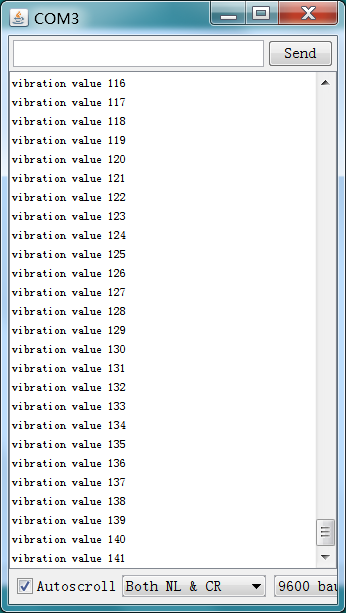
--analysis : only when "i" goes up more than 130 , the vibrator begins to work.
Also not very different from if just give it full voltage supply. ( digital Pin 10 as a control experiment here )
2) PWM full voltage supply
int vibratorPin=; // vibrator on Pin 9

int i=;

void setup()

{

  Serial.begin();

  pinMode(vibratorPin,OUTPUT);

  pinMode(,OUTPUT); // Full valtage Pin

  digitalWrite(,HIGH);

}

void loop()

{

  for(i=; i < ; i++)

  //Acutally the vibrator works from on i = 130

  //analog doesn't work so ideally

  {

    digitalWrite(vibratorPin,i); // analogRead values go from 0 to 1023, analogWrite values from 0 to 255

    Serial.print("vibration value");

    Serial.print("\t");

    Serial.println(i);

    delay();

  }

  i=;

}
--effect analysis:
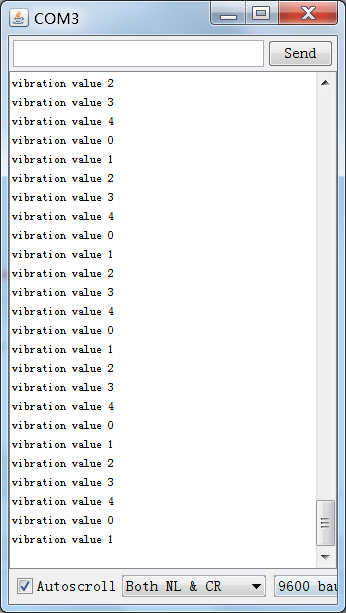
Initially when variable "i" ranges from 0 to 100, I can feel the module vibrates dynamically clearly. But after "i" goes up to more than 100, I feel it all the same, which means "100" is no different from "200" for this instance.
So I re-code it.
int vibratorPin=; // vibrator on Pin 9

int i=;

void setup()

{

  Serial.begin();

  pinMode(vibratorPin,OUTPUT);

  pinMode(,OUTPUT); // Full valtage Pin

  digitalWrite(,HIGH);

}

void loop()

{

  for(i=; i < ; i=i+) // Here is the part i changed , but still not different from previous one

  //Acutally the vibrator works from on i = 130

  //analog doesn't work so ideally

  {

    digitalWrite(vibratorPin,i); // analogRead values go from 0 to 1023, analogWrite values from 0 to 255

    Serial.print("vibration value");

    Serial.print("\t");

    Serial.println(i);

    delay();

  }

  i=;

}
#############
Summery:
Above all, so for this vibrator module, please don't think to use it like a vibrator variably.
Buy a digital one! Haha! Gonna get one!
Arduino 各种模块篇 震动模块 vibrator module的更多相关文章
- Arduino 各种模块篇 震动模块 vibrator
vibrator is a good thing. it has multi-funtionality . :) Now the vibrator we choose is the one whic ...
- Arduino 各种模块篇 摇杆模块
Arduino的另外几种模块,我们常见的joystick摇杆模块. 用起来很爽,摇杆 有X,Y轴可调 这里有一篇非常想尽的示例代码: http://www.geek-workshop.com/foru ...
- Arduino 各种模块篇 蓝牙模块 手机蓝牙控制Arduino LED灯
解决方案. 条件: 1.手机android 商店下载 blueTerm 2.向arduino中载入如下代码: char val; ; void setup() { Serial.begin(); pi ...
- 转:OSGi 入门篇:模块层
OSGi 入门篇:模块层 1 什么是模块化 模块层是OSGi框架中最基础的一部分,其中Java的模块化特性在这一层得到了很好的实现.但是这种实现与Java本身现有的一些模块化特性又有明显的不同. 本文 ...
- Orchard详解--第八篇 拓展模块及引用的预处理
从上一篇可以看出Orchard在处理拓展模块时主要有两个组件,一个是Folder另一个是Loader,前者用于搜索后者用于加载. 其中Folder一共有三个:Module Folder.Core Fo ...
- Orchard详解--第七篇 拓展模块(译)
Orchard作为一个组件化的CMS,它能够在运行时加载任意模块. Orchard和其它ASP.NET MVC应用一样,支持通过Visual Studio来加载已经编译为程序集的模块,且它还提供了自定 ...
- python之常用模块篇5
一.日志模块,logging模块 1)logging模块简单使用,屏幕输出.默认级别30 import logging logging.debug( logging.info( logging.war ...
- Arduino 基于 ESP8266 配置WIFI模块
Arduino 基于 ESP8266 配置WIFI模块 使用ESP8266作为服务器,使用浏览器访问该服务器,从而控制LED灯 选择 [文件]->[示例]->[ESP8266WIFI]-& ...
- Python学习【第十一篇】模块(1)
模块 模块让你能够有逻辑地组织你的Python代码段. 把相关的代码分配到一个模块里能让你的代码更好用,更易懂. 模块也是Python对象,具有随机的名字属性用来绑定或引用. 简单地说,模块就是一个保 ...
随机推荐
- C#函数式编程-序列
C#函数式编程之序列 过了许久的时间,终于趁闲暇的时间来继续将函数式编程这个专辑连载下去,这段时间开头是为IOS这个新方向做准备,将OC的教程写成了SWIFT版,当然我个人是支持Xamarin,但是我 ...
- Swift入门教程:基本语法(一)
简介: 什么是S ...
- POJ 1182(食物链-另类做法【拆点】)[Template:并查集]
食物链 Time Limit: 1000MS Memory Limit: 10000K Total Submissions: 46039 Accepted: 13400 Description ...
- C语言库函数大全及应用实例三
原文:C语言库函数大全及应用实例三 [编程资料]C语言库函数大全及应用实例三 函数名: ecvt 功 能: 把一个浮点数转换为字符串 用 法: char ecvt(double value, int ...
- select刷新后,保持选定状态,Cookies存储select选定状态信息
//cookies存储select选定值,防止刷新后没了 window.onload = function () { var cooki = document.cookie; if (cooki != ...
- 快速构建Windows 8风格应用8-贴靠视图
原文:快速构建Windows 8风格应用8-贴靠视图 本篇博文主要介绍如何切换出贴靠视图.关于贴靠视图的设计.关于贴靠视图的应用程序栏和如何实现贴靠视图. 如何切换出贴靠视图 第一步:水平方向全屏视图 ...
- 调查问卷Html5发展综述
[Html5可以离线操作.是否能开发Html5离线网络应用程序] 按常理Html5开发出来的是Web网页应用.则需网络连接才干下载并使用,作为Html5对离线应用开发的支持最大的特殊,支持离线须要满足 ...
- 转载:你需要知道的16个Linux服务器监控命令
源址:http://web.itivy.com/article-653-1.html 如果你想知道你的服务器正在做干什么,你就需要了解一些基本的命令,一旦你精通了这些命令,那你就是一个 专业的 Lin ...
- a:focus{outline: none;} 如何去掉点击链接时周围的虚线框outline属性
1. CSS方式 在IE下是使用html属性:hideFoucs,在HTML标签中加上hidefocus=”true”属性即可,但这个属性是IE私有的,Firefox是不认的. 加了hidefocus ...
- 基于Jcrop的图片上传裁剪加预览
最近自己没事的时候研究了下图片上传,发现之前写的是有bug的,这里自己重新写了一个! 1.页面结构 <!DOCTYPE html> <html lang="en" ...