
【ASP.NET Web API教程】4.1 ASP.NET Web API中的路由
原文:【ASP.NET Web API教程】4.1 ASP.NET Web API中的路由
注:本文是【ASP.NET Web API系列教程】的一部分,如果您是第一次看本博客文章,请先看前面的内容。
4.1 Routing in ASP.NET Web API
4.1 ASP.NET Web API中的路由
本文引自:http://www.asp.net/web-api/overview/web-api-routing-and-actions/routing-in-aspnet-web-api
By Mike Wasson|February 11, 2012
作者:Mike Wasson | 日期:2012-2-11
This article describes how ASP.NET Web API routes HTTP requests to controllers.
本文章描述ASP.NET Web API如何将HTTP请求路由到控制器。
If you are familiar with ASP.NET MVC, Web API routing is very similar to MVC routing. The main difference is that Web API uses the HTTP method, not the URI path, to select the action. You can also use MVC-style routing in Web API. This article does not assume any knowledge of ASP.NET MVC.
如果你熟悉ASP.NET MVC,Web API路由与MVC路由十分类似。主要差别是Web API使用HTTP方法而不是URI路径来选择动作。你也可以在Web API中使用MVC风格的路由。本文不假设你具备ASP.NET MVC的任何知识。
Routing Tables
路由表
In ASP.NET Web API, a controller is a class that handles HTTP requests. The public methods of the controller are called action methods or simply actions. When the Web API framework receives a request, it routes the request to an action.
在ASP.NET Web API中,一个控制器是处理HTTP请求的一个类。控制器的public方法称为动作方法(action methods)或简称为动作(action)。当Web API框架接收到一个请求时,它将这个请求路由到一个动作。
To determine which action to invoke, the framework uses a routing table. The Visual Studio project template for Web API creates a default route:
为了确定调用哪一个动作,框架使用了一个路由表(routing table)。Visual Studio中Web API的项目模板会创建一个默认路由:
routes.MapHttpRoute(

    name: "API Default",

    routeTemplate: "api/{controller}/{id}",

    defaults: new { id = RouteParameter.Optional }

);
This route is defined in the WebApiConfig.cs file, which is placed in the App_Start directory:
这条路由是在WebApiConfig.cs文件中定义的,该文件位于App_Start目录(见图4-1):
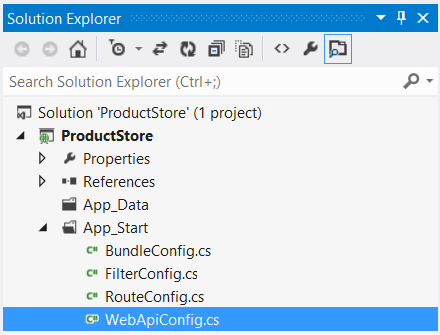
图4-1. 项目中的WebApiConfig.cs配置文件
For more information aboout the WebApiConfig class, see Configuring ASP.NET Web API.
关于WebApiConfig类的更多信息参阅“配置ASP.NET Web API”(本教程系列的第10章 — 译者注)。
If you self-host Web API, you must set the routing table directly on the HttpSelfHostConfiguration object. For more information, see Self-Host a Web API.
如果要自托管(self-host )Web API,你必须直接在HttpSelfHostConfiguration对象上设置路由表。更多信息参阅“自托管Web API”(本教程系列的第8章 — 译者注)。
Each entry in the routing table contains a route template. The default route template for Web API is "api/{controller}/{id}". In this template, "api" is a literal path segment, and {controller} and {id} are placeholder variables.
路由表中的每一个条目都包含一个路由模板(route template)。Web API的默认路由模板是“api/{controller}/{id}”。在这个模板中,“api”是一个文字式路径片段,而{controller}和{id}则是占位符变量。
When the Web API framework receives an HTTP request, it tries to match the URI against one of the route templates in the routing table. If no route matches, the client receives a 404 error. For example, the following URIs match the default route:
当Web API框架接收一个HTTP请求时,它会试图根据路由表中的一个路由模板来匹配其URI。如果无路由匹配,客户端会接收到一个404(未找到)错误。例如,以下URI与这个默认路由的匹配:
- /api/contacts
- /api/contacts/1
- /api/products/gizmo1
However, the following URI does not match, because it lacks the "api" segment:
然而,以下URI不匹配,因为它缺少“api”片段:
- /contacts/1
Note: The reason for using "api" in the route is to avoid collisions with ASP.NET MVC routing. That way, you can have "/contacts" go to an MVC controller, and "/api/contacts" go to a Web API controller. Of course, if you don't like this convention, you can change the default route table.
注:在路由中使用“api”的原因是为了避免与ASP.NET MVC的路由冲突。通过这种方式,可以用“/contacts”进入一个MVC控制器,而“/api/contacts”进入一个Web API控制器。当然,如果你不喜欢这种约定,可以修改这个默认路由表。
Once a matching route is found, Web API selects the controller and the action:
一旦找到了匹配路由,Web API便会选择相应的控制和动作:
- To find the controller, Web API adds "Controller" to the value of the {controller} variable.
为了找到控制器,Web API会把“控制器”加到{controller}变量的值(意即,把URI中的“控制器”作为{controller}变量的值 — 译者注)。 - To find the action, Web API looks at the HTTP method, and then looks for an action whose name begins with that HTTP method name. For example, with a GET request, Web API looks for an action that starts with "Get...", such as "GetContact" or "GetAllContacts". This convention applies only to GET, POST, PUT, and DELETE methods. You can enable other HTTP methods by using attributes on your controller. We’ll see an example of that later.
为了找到动作,Web API会考查HTTP方法,然后寻找一个名称以HTTP方法名开头的动作。例如,对于一个GET请求,Web API会查找一个以“Get…”开头的动作,如“GetContact”或“GetAllContacts”等。这种约定仅运用于GET、POST、PUT和DELETE方法。通过把注解属性运用于控制器,你可以启用其它HTTP方法。后面会看到一个例子。 - Other placeholder variables in the route template, such as {id}, are mapped to action parameters.
路由模板中的其它占位变量,如{id},被映射成动作参数。
Let's look at an example. Suppose that you define the following controller:
让我们考察一个例子。假设你定义了以下控制器:
public class ProductsController : ApiController

{

    public void GetAllProducts() { }

    public IEnumerable<Product> GetProductById(int id) { }

    public HttpResponseMessage DeleteProduct(int id){ }

}
Here are some possible HTTP requests, along with the action that gets invoked for each:
以下是一些可能的HTTP请求,及其将要被调用的动作:
| HTTP Method HTTP方法 |
URI Path URI路径 |
Action 动作 |
Parameter 参数 |
|---|---|---|---|
| GET | api/products | GetAllProducts | (none) (无) |
| GET | api/products/4 | GetProductById | 4 |
| DELETE | api/products/4 | DeleteProduct | 4 |
| POST | api/products | (no match) (不匹配) |
Notice that the {id} segment of the URI, if present, is mapped to the id parameter of the action. In this example, the controller defines two GET methods, one with an id parameter and one with no parameters.
注意,URI的{id}片段如果出现,会被映射到动作的id参数。在这个例子中,控制器定义了两个GET方法,其中一个带有id参数,而另一个不带参数。
Also, note that the POST request will fail, because the controller does not define a "Post..." method.
另外要注意,POST请求是失败的,因为该控制器未定义“Post…”方法。
Routing Variations
路由变异
The previous section described the basic routing mechanism for ASP.NET Web API. This section describes some variations.
上一节描述了ASP.NET Web API基本的路由机制。本小节描述一些变异。
HTTP Methods
HTTP方法
Instead of using the naming convention for HTTP methods, you can explicitly specify the HTTP method for an action by decorating the action method with the HttpGet, HttpPut, HttpPost, or HttpDelete attribute.
替代用于HTTP方法的命名约定,可以明确地为一个动作指定HTTP方法,这是通过以HttpGet、HttpPut、HttpPost或HttpDelete注解属性对动作方法进行修饰来实现的。
In the following example, the FindProduct method is mapped to GET requests:
在下列示例中,FindProduct方法被映射到GET请求:
public class ProductsController : ApiController

{

    [HttpGet]

    public Product FindProduct(id) {}

}
To allow multiple HTTP methods for an action, or to allow HTTP methods other than GET, PUT, POST, and DELETE, use the AcceptVerbs attribute, which takes a list of HTTP methods.
要允许一个动作有多个HTTP方法,或允许对GET、PUT、POST和DELETE以外的其它HTTP方法,需使用AcceptVerbs(接收谓词)注解属性,它以HTTP方法列表为参数。
public class ProductsController : ApiController

{

    [AcceptVerbs("GET", "HEAD")]   // 指示该动作接收HTTP的GET和HEAD方法 — 译者注

    public Product FindProduct(id) { }


    // WebDAV method

    // WebDAV方法(基于Web的分布式著作与版本控制的HTTP方法,是一个扩展的HTTP方法 — 译者注)

    [AcceptVerbs("MKCOL")]   // MKCOL是隶属于WebDAV的一个方法,它在URI指定的位置创建集合

    public void MakeCollection() { }

}
Routing by Action Name
通过动作名路由
With the default routing template, Web API uses the HTTP method to select the action. However, you can also create a route where the action name is included in the URI:
利用默认的路由模板,Web API使用HTTP方法来选择动作。然而,也可以创建在URI中包含动作名的路由:
routes.MapHttpRoute(

    name: "ActionApi",

    routeTemplate: "api/{controller}/{action}/{id}",

    defaults: new { id = RouteParameter.Optional }

);
In this route template, the {action} parameter names the action method on the controller. With this style of routing, use attributes to specify the allowed HTTP methods. For example, suppose your controller has the following method:
在这个路由模板中,{action}参数命名了控制器上的动作方法。采用这种风格的路由,需要使用注解属性来指明所允许的HTTP方法。例如,假设你的控制器有以下方法:
public class ProductsController : ApiController

{

    [HttpGet]

    public string Details(int id);

}
In this case, a GET request for “api/products/details/1” would map to the Details method. This style of routing is similar to ASP.NET MVC, and may be appropriate for an RPC-style API.
在这个例子中,一个对“api/products/details/1”的GET请求会映射到这个Details方法。这种风格的路由类似于ASP.NET MVC,而且可能与RPC式的API相接近。
You can override the action name by using the ActionName attribute. In the following example, there are two actions that map to "api/products/thumbnail/id". One supports GET and the other supports POST:
可以通过使用ActionName注解属性来覆盖动作名。在以下例子中,有两个动作映射到“api/products/thumbnail/id”。一个支持GET,而另一个支持POST:
public class ProductsController : ApiController

{

    [HttpGet]

    [ActionName("Thumbnail")]

    public HttpResponseMessage GetThumbnailImage(int id);


    [HttpPost]

    [ActionName("Thumbnail")]

    public void AddThumbnailImage(int id);

}
Non-Actions
非动作
To prevent a method from getting invoked as an action, use the NonAction attribute. This signals to the framework that the method is not an action, even if it would otherwise match the routing rules.
为了防止一个方法被作为一个动作所请求,要使用NonAction注解属性。它对框架发出信号:该方法不是一个动作,即使它可能与路由规则匹配。
// Not an action method.

// 不是一个动作方法

[NonAction]

public string GetPrivateData() { ... }
Further Reading
进一步阅读
This topic provided a high-level view of routing. For more detail, see Routing and Action Selection, which describes exactly how the framework matches a URI to a route, selects a controller, and then selects the action to invoke.
本论题提供了关于路由的总体概述。更多细节参见“路由与动作选择”(本教程系列的下一小节 — 译者注),它精确地描述了框架如何把URI匹配到路由、如何选择控制器、以及随后选择动作进行调用。
看完此文如果觉得有所收获,恳请给个推荐
【ASP.NET Web API教程】4.1 ASP.NET Web API中的路由的更多相关文章
- 【ASP.NET Web API教程】2.4 创建Web API的帮助页面
原文:[ASP.NET Web API教程]2.4 创建Web API的帮助页面 注:本文是[ASP.NET Web API系列教程]的一部分,如果您是第一次看本博客文章,请先看前面的内容. 2.4 ...
- 【ASP.NET Web API教程】2 创建各种Web API
原文 [ASP.NET Web API教程]2 创建各种Web API Chapter 2: Creating Web APIs第2章 创建各种Web API 本文引自:http://www.asp. ...
- 【ASP.NET Web API教程】1 ASP.NET Web API入门
原文 [ASP.NET Web API教程]1 ASP.NET Web API入门 Getting Started with ASP.NET Web API第1章 ASP.NET Web API入门 ...
- 【ASP.NET Web API教程】2.4 创建Web API的帮助页面[转]
注:本文是[ASP.NET Web API系列教程]的一部分,如果您是第一次看本博客文章,请先看前面的内容. 2.4 Creating a Help Page for a Web API2.4 创建W ...
- ASP.NET Core 入门教程 9、ASP.NET Core 中间件(Middleware)入门
一.前言 1.本教程主要内容 ASP.NET Core 中间件介绍 通过自定义 ASP.NET Core 中间件实现请求验签 2.本教程环境信息 软件/环境 说明 操作系统 Windows 10 SD ...
- ASP.NET Core 入门教程 8、ASP.NET Core + Entity Framework Core 数据访问入门
一.前言 1.本教程主要内容 ASP.NET Core MVC 集成 EF Core 介绍&操作步骤 ASP.NET Core MVC 使用 EF Core + Linq to Entity ...
- ASP.NET Core 入门教程 10、ASP.NET Core 日志记录(NLog)入门
一.前言 1.本教程主要内容 ASP.NET Core + 内置日志组件记录控制台日志 ASP.NET Core + NLog 按天记录本地日志 ASP.NET Core + NLog 将日志按自定义 ...
- ASP.NET Core 入门教程 7、ASP.NET Core MVC 分部视图入门
一.前言 1.本教程主要内容 ASP.NET Core MVC (Razor)分部视图简介 ASP.NET Core MVC (Razor)分部视图基础教程 ASP.NET Core MVC (Raz ...
- ASP.NET Core 入门教程 6、ASP.NET Core MVC 视图布局入门
一.前言 1.本教程主要内容 ASP.NET Core MVC (Razor)视图母版页教程 ASP.NET Core MVC (Razor)带有Section的视图母版页教程 ASP.NET Cor ...
- ASP.NET Core 入门教程 5、ASP.NET Core MVC 视图传值入门
一.前言 1.本教程主要内容 ASP.NET Core MVC 视图引擎(Razor)简介 ASP.NET Core MVC 视图(Razor)ViewData使用示例 ASP.NET Core MV ...
随机推荐
- HFS - 简单的将个人电脑变服务器!
网络硬盘 HTTP File Server(HFS)是我目前所知道的最简便的P2P文件分享方式,只一个大小为559KB的单文件绿色软件(hfs.exe)就可以在瞬间不经过任何系统设置将一台普通的联 ...
- Foundation补充
1常用结构体: NSRange.NSPoint(CGPoint).NSSize(CGSize).NSRect(CGRect) 2 NSRange: 字符串中有一个方法rangeOfString:str ...
- USB中CDC-ECM的了解和配置
USB中典型类及子类: 类别 解释 子类 典型应用 IC芯片 备注 UVC 视频类 免驱USB摄像头 CDC 通讯类 RNDIS ECM(p24) 免驱USB网卡 RTL8152B EEM ..... ...
- C# - InnerList
运行效果: 代码: using System; using System.Collections.Generic; using System.Linq; using System.Text; name ...
- IE 下使用firebug
javascript :var firebug=document.createElement('script');firebug.setAttribute('src','http://getfireb ...
- 基于visual Studio2013解决面试题之1007鸡蛋和篮子
题目
- 在TC(Total Commander)中添加启动Cygwin快捷键的方法
在TC(Total Commander)中添加启动Cygwin快捷键的方法 1.在Cygwin的安装目录下,增加文件tc-cygwin.bat(例如C:\cygwin-177\tc-cygwin.ba ...
- How to search a table in a store proc and open the store proc
1. select*fromdba_dependencieswherereferenced_name='CNTL_ISSUE'andTYPE='PROCEDURE' 2. selecttextfrom ...
- SharePoint2010 部署步骤“激活功能”中出现错误:无法启动计算机“PCName”上的服务SPUserCodeV4
在SharePoint2010开发中,选择部署类型为“部署为沙盒解决方案”,在部署代码是出现如下错误提示: 部署步骤“激活功能”中出现错误:无法启动计算机“PCName”上的服务SPUserCodeV ...
- Response.AppendCookie
//写入 protected void Button2_Click(object sender, EventArgs e) { HttpCookie cookie=new HttpCookie(&qu ...