
shell bash终端中输出的颜色和格式详解(超详细)
文章目录
ANSI/VT100终端和终端仿真器不只是能够显示黑色和白色文本; 由于转义序列,它们可以显示颜色和格式化文本。这些序列由Escape字符(通常用“^[” 或"<Esc>"表示)组成,后跟一些其他字符:“<Esc>[FormatCodem”。
在Bash中,可以使用以下语法获取字符:
\e
\033
\x1B
例子:
| 代码(Bash) | Preview |
|---|---|
| echo -e “\ e [31mHello World \ e [0m” |  |
| echo -e “\ 033 [31mHello \ e [0m World” |  |
注意:
- 该命令的-e选项echo启用转义序列的解析。
- "\e[0m"序列删除所有属性(格式和颜色)。在每个彩色文本的末尾添加它是个好主意。;)
- 本页中的示例使用Bash,但
ANSI/VT100转义序列可用于各种编程语言。
1) 格式
1.1 Set
| code | Description | Example | Preview |
|---|---|---|---|
| 1 | 粗体/高亮 | echo -e “Normal \ e [1mBold” |
 |
| 2 | 变暗 | echo -e “Normal \ e [2mDim” |
 |
| 4 | 下划线 | echo -e “Normal \ e [4mUnderlined” |
 |
| 5 | 闪烁 | echo -e “Normal \ e [5mBlink” |
 |
| 7 | 反转(反转前景色和背景色) | echo -e “Normal \ e [7minverted” |
 |
| 8 | 隐藏(对密码有用) | echo -e “Normal \ e [8mHidden” |
 |
1.2 Reset
| Code | Description | Example | Preview |
|---|---|---|---|
| 0 | 重置所有属性 | echo -e “\e[0mNormal Text” |  |
| 21 | 重置粗体/高亮 | echo -e “Normal \e[1mBold \e[21mNormal” |  |
| 22 | 重置变暗 | echo -e “Normal \e[2mDim \e[22mNormal” |  |
| 24 | 重置下划线 | echo -e “Normal \e[4mUnderlined \e[24mNormal” |  |
| 25 | 重置闪烁 | echo -e “Normal \e[5mBlink \e[25mNormal” |  |
| 27 | 重置反显 | echo -e “Normal \e[7minverted \e[27mNormal” |  |
| 28 | 重置隐藏 | echo -e “Normal \e[8mHidden \e[28mNormal” |  |
2)8/16 Colors
2.1 前景(文字)
以下颜色适用于大多数终端和终端仿真器2), 请参阅兼容性列表以获取更多信息。
颜色可能因终端配置而异。
| Code | Color | Example | Preview |
|---|---|---|---|
| 39 | 默认前景色 | echo -e “Default \ e [39mDefault” |  |
| 30 | 黑色 | echo -e “Default \ e [30mBlack” |  |
| 31 | 红色 | echo -e “Default \ e [31mRed” |  |
| 32 | 绿色 | echo -e “Default \ e [32mGreen” |  |
| 33 | 黄色 | echo -e “Default \ e [33mYellow” |  |
| 34 | 蓝色 | echo -e “Default \ e [34mBlue” |  |
| 35 | 品红 | echo -e “Default \ e [35mMagenta” |  |
| 36 | 青色 | echo -e “Default \ e [36mCyan” |  |
| 37 | 浅灰 | echo -e “Default \ e [37mLight grey” |  |
| 90 | 深灰色 | echo -e “Default \ e [90mDark grey” |  |
| 91 | 红灯 | echo -e “默认\ e [91mLight red” |  |
| 92 | 浅绿色 | echo -e “Default \ e [92mLight green” |  |
| 93 | 淡黄色 | echo -e “Default \ e [93mLight yellow” |  |
| 94 | 浅蓝 | echo -e “Default \ e [94mLight blue” |  |
| 95 | 浅洋红色 | echo -e “Default \ e [95mLight magenta” |  |
| 96 | 浅青色 | echo -e “Default \ e [96mLight cyan” |  |
| 97 | 白色 | echo -e “Default \ e [97mWhite” |  |
2.2 背景
| Code | Color | Example | Preview |
|---|---|---|---|
| 49 | 默认背景颜色 | echo -e “Default \ e [49mDefault” |  |
| 40 | 黑色 | echo -e “Default \ e [40mBlack” |  |
| 41 | 红色 | echo -e “Default \ e [41mRed” |  |
| 42 | 绿色 | echo -e “Default \ e [42mGreen” |  |
| 43 | 黄色 | echo -e “Default \ e [43mYellow” |  |
| 44 | 蓝色 | echo -e “Default \ e [44mBlue” |  |
| 45 | 品红 | echo -e “Default \ e [45mMagenta” |  |
| 46 | 青色 | echo -e “Default \ e [46mCyan” |  |
| 47 | 浅灰 | echo -e “Default \ e [47mLight grey” |  |
| 100 | 深灰色 | echo -e “Default \ e [100mDark grey” |  |
| 101 | 红灯 | echo -e “默认\ e [101mLight red” |  |
| 102 | 浅绿色 | echo -e “默认\ e [102mLight green” |  |
| 103 | 淡黄色 | echo -e “默认\ e [103mLight yellow” |  |
| 104 | 浅蓝 | echo -e “Default \ e [104mLight blue” |  |
| 105 | 浅洋红色 | echo -e “Default \ e [105mLight magenta” |  |
| 106 | 浅青色 | echo -e “Default \ e [106mLight cyan” |  |
| 107 | 白色 | echo -e “Default \ e [107mWhite” |  |
3)88/256颜色
某些终端(参见兼容性列表)可以支持88或256种颜色。以下是允许您使用它们的控制序列。
注意:颜色编号256仅由vte支持(GNOME终端,XFCE4终端,Nautilus终端,终结者…)。
注意2:88色终端(如rxvt)与256色终端的颜色图不同。要显示88色终端颜色映射,请在88色终端中运行“ 256-colors.sh ”脚本。
3.1 前景(文字)
要使用前景中的256种颜色之一(文本颜色),控制序列为“ <Esc>[38;5;ColorNumberm ”,其中ColorNumber是以下颜色之一:
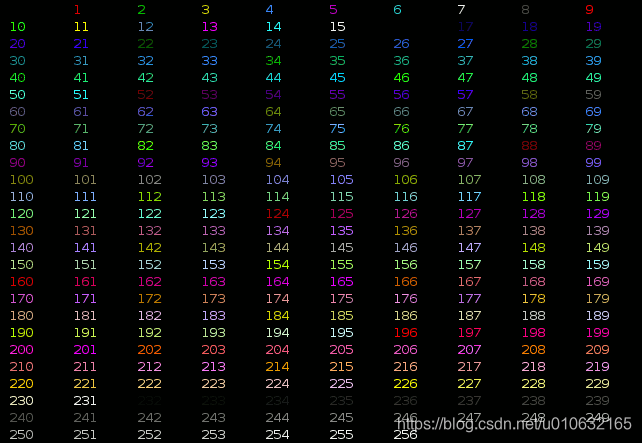
Example:
echo -e "\e[38;5;82mHello \e[38;5;198mWorld"

for i in {16..21} {21..16} ; do echo -en "\e[38;5;${i}m#\e[0m" ; done ; echo

3.2 背景色
要在背景上使用256种颜色中的一种,控制序列为“ <Esc>[48;5;ColorNumberm ”,其中ColorNumber是以下颜色之一:
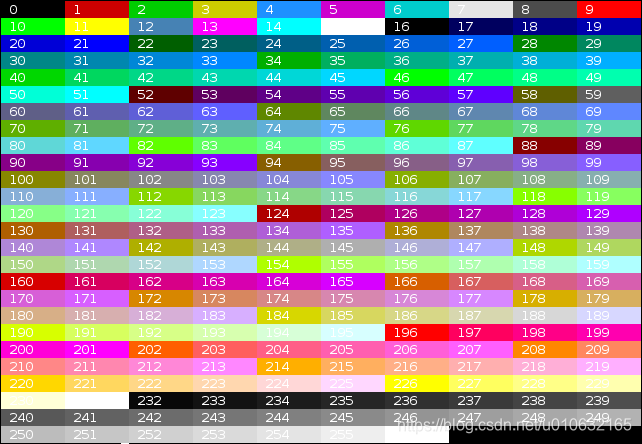
Example:
echo -e "\e[40;38;5;82m Hello \e[30;48;5;82m World \e[0m"

for i in {16..21} {21..16} ; do echo -en "\e[48;5;${i}m \e[0m" ; done ; echo

4)组合属性
终端允许属性组合。属性必须用分号(“ ;”)分隔。
| Description | Code (Bash) | Preview |
|---|---|---|
| Bold + Underlined | echo -e “\e[1;4mBold and Underlined” |  |
| Bold + Red forground + Green background | echo -e “\e[1;31;42m Yes it is awful \e[0m” |  |
5)终端兼容性
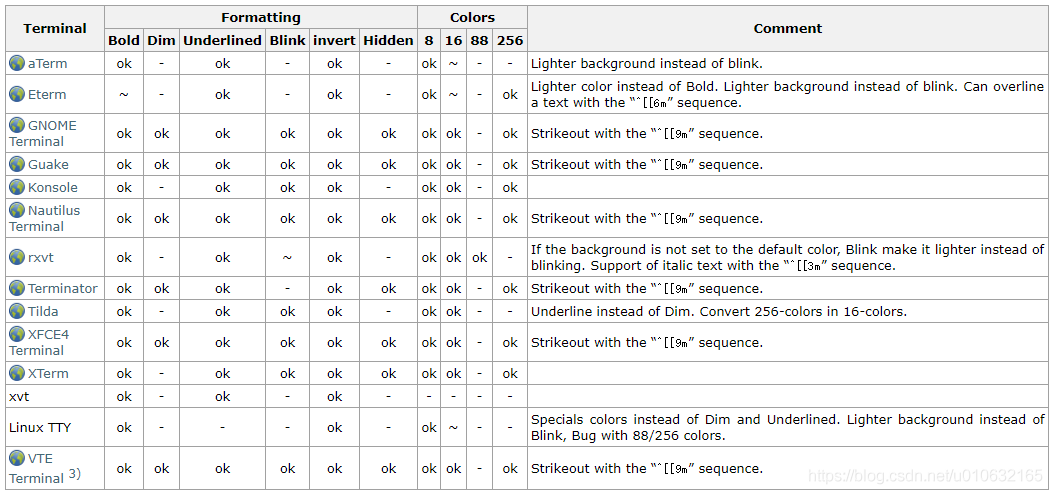
表中使用的符号:
“ ok”:终端支持。
“ ~”:终端以特殊方式支持。
“ -”:终端根本不支持。
6)示例程序
6.1 Colors and formatting (16 colors)
以下shell脚本显示了许多可能的属性组合(但不是全部,因为它一次只使用一个格式属性)。
#!/bin/bash

# This program is free software. It comes without any warranty, to

# the extent permitted by applicable law. You can redistribute it

# and/or modify it under the terms of the Do What The Fuck You Want

# To Public License, Version 2, as published by Sam Hocevar. See

# http://sam.zoy.org/wtfpl/COPYING for more details.

#Background

for clbg in {40..47} {100..107} 49 ; do

	#Foreground

	for clfg in {30..37} {90..97} 39 ; do

		#Formatting

		for attr in 0 1 2 4 5 7 ; do

			#Print the result

			echo -en "\e[${attr};${clbg};${clfg}m ^[${attr};${clbg};${clfg}m \e[0m"

		done

		echo #Newline

	done

done

exit 0
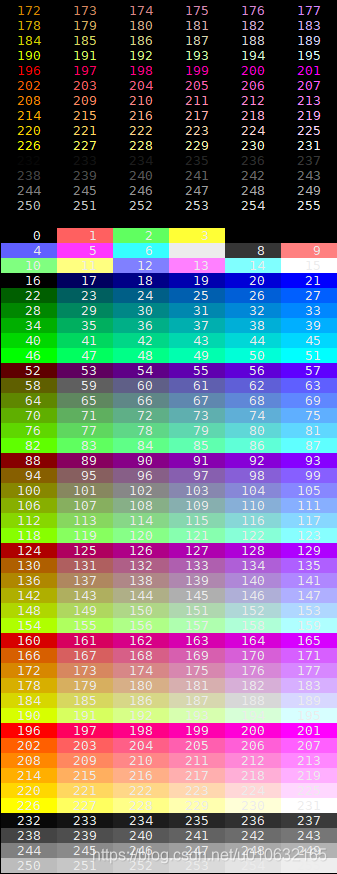
6.2 256 colors
以下脚本显示某些终端和终端仿真器(如XTerm和GNOME Terminal)上可用的256种颜色。
#!/bin/bash

# This program is free software. It comes without any warranty, to

# the extent permitted by applicable law. You can redistribute it

# and/or modify it under the terms of the Do What The Fuck You Want

# To Public License, Version 2, as published by Sam Hocevar. See

# http://sam.zoy.org/wtfpl/COPYING for more details.

for fgbg in 38 48 ; do # Foreground / Background

    for color in {0..255} ; do # Colors

        # Display the color

        printf "\e[${fgbg};5;%sm  %3s  \e[0m" $color $color

        # Display 6 colors per lines

        if [ $((($color + 1) % 6)) == 4 ] ; then

            echo # New line

        fi

    done

    echo # New line

done

exit 0
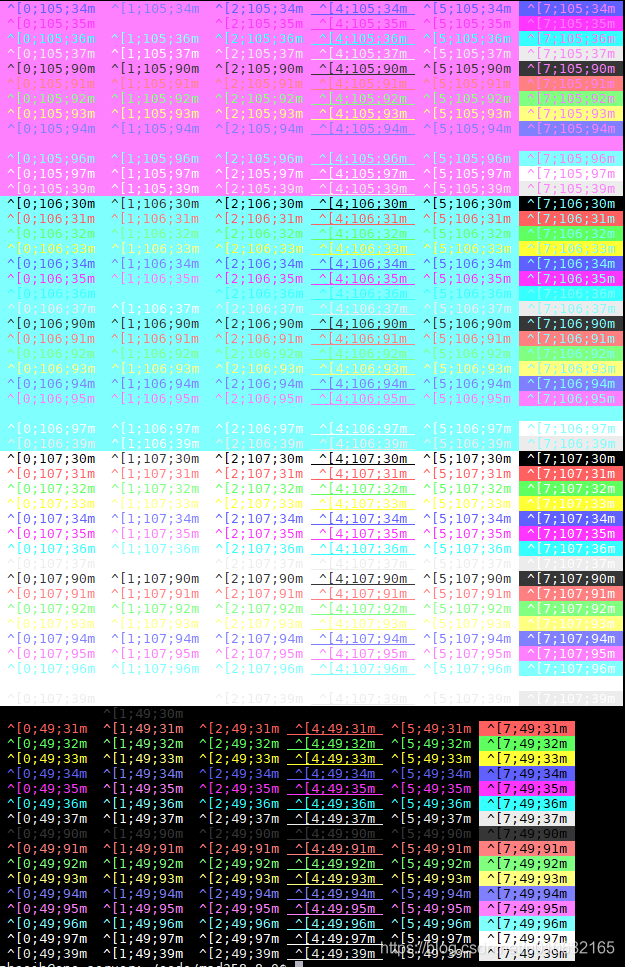
参考
Linux console codes manual (’‘man console_codes’’)
XTerm Control Sequences
shell bash终端中输出的颜色和格式详解(超详细)的更多相关文章
- 在Linux终端中查看公有IP的方法详解
首先回顾一下一般的查看IP的命令: ifconfigLinux查看IP地址的命令--ifconfigifconfig命令用于查看和更改网络接口的地址和参数 $ifconfig -a lo0: fla ...
- Android中自定义属性attr.xml的格式详解
1. reference:参考某一资源ID. (1)属性定义: <declare-styleable name = "名称"> ...
- 【转】angularjs指令中的compile与link函数详解
这篇文章主要介绍了angularjs指令中的compile与link函数详解,本文同时诉大家complie,pre-link,post-link的用法与区别等内容,需要的朋友可以参考下 通常大家在 ...
- angularjs指令中的compile与link函数详解
这篇文章主要介绍了angularjs指令中的compile与link函数详解,本文同时诉大家complie,pre-link,post-link的用法与区别等内容,需要的朋友可以参考下 通常大家在 ...
- PHP输出缓存ob系列函数详解
PHP输出缓存ob系列函数详解 ob,输出缓冲区,是output buffering的简称,而不是output cache.ob用对了,是能对速度有一定的帮助,但是盲目的加上ob函数,只会增加CPU额 ...
- Linux中redis安装配置及使用详解
Linux中redis安装配置及使用详解 一. Redis基本知识 1.Redis 的数据类型 字符串 , 列表 (lists) , 集合 (sets) , 有序集合 (sorts sets) , 哈 ...
- c++中内存拷贝函数(C++ memcpy)详解
原型:void*memcpy(void*dest, const void*src,unsigned int count); 功能:由src所指内存区域复制count个字节到dest所指内存区域. 说明 ...
- java中List的用法和实例详解
java中List的用法和实例详解 List的用法List包括List接口以及List接口的所有实现类.因为List接口实现了Collection接口,所以List接口拥有Collection接口提供 ...
- PHP中的命名空间(namespace)及其使用详解
PHP中的命名空间(namespace)及其使用详解 晶晶 2年前 (2014-01-02) 8495次浏览 PHP php自5.3.0开始,引入了一个namespace关键字以及__NAMESPAC ...
随机推荐
- 参数化parameterized
pip install parameterized 注意:之前的nose-parameterized已经更新为parameterized库了 模块下测试方法直接使用parameterized impo ...
- python列表简介
什么是列表?如何使用列表?https://docs.python.org/3/library/stdtypes.html#sequence-types-list-tuple-range 列表相关知识: ...
- redis: 其他数据类型(八)
1.geospatial 地理位置 有效的经度从-180度到180度 有效的纬度从-85.05112878度到85.05112878度 当坐标位置超出上述指定范围时,该命令将会返回一个错误 底层实现原 ...
- api接口安全
API接口安全 在做app开发中,如何保证api的接口安全,不被其他app去调用? 接口安全的措施很多,今天记录一个常用的措施 签名: 前台想要调用接口,需要使用几个参数生成签名: 时间戳:当前时间 ...
- 树莓派4b 上手三板斧
树莓派4b 上手三板斧 1.无屏幕和网线连接准备 windows / mac 电脑下载安装Notepad++ 新建文件并保存为ssh(该文件为空文件) 新建文件wpa_supplicant.conf ...
- mybatis源码学习:基于动态代理实现查询全过程
前文传送门: mybatis源码学习:从SqlSessionFactory到代理对象的生成 mybatis源码学习:一级缓存和二级缓存分析 下面这条语句,将会调用代理对象的方法,并执行查询过程,我们一 ...
- SpringCloud-Bus 消息总线
概述 基本介绍 Spring Cloud Bus 目前支持两种消息代理:RabbitMQ.Kafka Spring Cloud Config 配合 Spring Cloud Bus 使用可以实现配置的 ...
- 关于mysql的范式——反范式的思路
数据库的设计,是有模式的,就是在实际生产的项目中,按照怎样怎样步骤的去做.减少冗余呀,一对多呀等等. 那么回归到一个问题:数据库究竟是为了添加,还是为了查询?这个问题有些轴,以 增删改查四律而言,都是 ...
- QT 执行windows cmd 命令并读取结果
1,写好命令, 2,用QProcess执行,等待完成(有超时), 3,读取结果 注意形如“Program Files”的有 空格 的路径,要加上双引号. QProcess process; QStri ...
- ReportEventA 错误 ERROR_CRC
如果 level 的宏弄错了,就会出现这种奇怪的现象.