
Python pip设置为清华镜像
pip设置为默认镜像
pip config set global.index-url https://pypi.tuna.tsinghua.edu.cn/simple
conda 设置为默认镜像
运行以下命令声明condarc文件
conda config --set show_channel_urls yes
在用户目录找到该文件打开
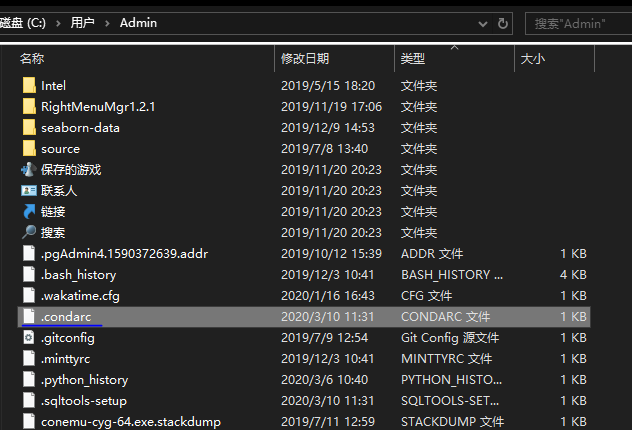
编辑,并输入以下内容:
channels:

  - defaults

show_channel_urls: true

channel_alias: https://mirrors.tuna.tsinghua.edu.cn/anaconda

default_channels:

  - https://mirrors.tuna.tsinghua.edu.cn/anaconda/pkgs/main

  - https://mirrors.tuna.tsinghua.edu.cn/anaconda/pkgs/free

  - https://mirrors.tuna.tsinghua.edu.cn/anaconda/pkgs/r

  - https://mirrors.tuna.tsinghua.edu.cn/anaconda/pkgs/pro

  - https://mirrors.tuna.tsinghua.edu.cn/anaconda/pkgs/msys2

custom_channels:

  conda-forge: https://mirrors.tuna.tsinghua.edu.cn/anaconda/cloud

  msys2: https://mirrors.tuna.tsinghua.edu.cn/anaconda/cloud

  bioconda: https://mirrors.tuna.tsinghua.edu.cn/anaconda/cloud

  menpo: https://mirrors.tuna.tsinghua.edu.cn/anaconda/cloud

  pytorch: https://mirrors.tuna.tsinghua.edu.cn/anaconda/cloud

  simpleitk: https://mirrors.tuna.tsinghua.edu.cn/anaconda/cloud
清除缓存即可:conda clean -i
Python pip设置为清华镜像的更多相关文章
- python pip 安装使用国内镜像源
国内镜像源 清华:https://pypi.tuna.tsinghua.edu.cn/simple 阿里云:http://mirrors.aliyun.com/pypi/simple/ 中国科技大学 ...
- python pip 切换阿里云镜像
示例: pip install xxx -i http://mirrors.aliyun.com/pypi/simple/ --trusted-host mirrors.aliyun.com
- Python pip 下载速度慢? Windows 设置 国内源,用 阿里云 国内镜像 加速
pip 提供了对 Python 包的查找.下载.安装.卸载的功能,是非常方便的 Python 包管理工具.但是,令人苦恼的是 pip 在国内的下载速度非常慢,速度常常只有每秒几十 K,甚至才几 K,小 ...
- pip安装python库时使用国内镜像资源加速下载过程
pip默认安装包是从网站https://pypi.org/simple下载,我们可以将其改成国内的镜像网站,加速下载过程,下面以安装numpy库为例: pip install -i https://p ...
- python 使用pip安装使用国内镜像加速下载安装包的方法
清华大学提供开源镜像站:https://mirrors.tuna.tsinghua.edu.cn/help/pypi/ pypi 镜像每 5 分钟同步一次. pip install 包的名字 == 版 ...
- pip和conda添加国内清华镜像源(亲测有效)
文章目录 pip和conda 添加国内清华镜像 1. pip源更改: 2. conda源更改: pip和conda 添加国内清华镜像 python模块安装,使用国内源可以提高下载速度. 1. pip源 ...
- mark LINUX_6.8 python_2.6.6 setup版本升级 python 2.7.9 安装 pip 临时使用国内镜像源库 指定模块版本 删除指定模块
简单但却又经常需要使用 网上 贴子也很多 也经常用 所以 做个mark 吧: 1首先下载python2.7.9 源tar包 源码安装 可利用linux自带下载工具wget下载,如下所示: ...
- PIP设置镜像源
PIP设置镜像源 pip安装Python包时候,默认是国外的下载源,速度太慢,本文介绍几种设置pip国内镜像源的方法 镜像源 阿里云 http://mirrors.aliyun.com/pypi/si ...
- Python pip 国内镜像大全及使用办法
Python pip 国内镜像大全及使用办法 一.国内镜像 清华 https://pypi.tuna.tsinghua.edu.cn/simple 豆瓣 pip install -i http://p ...
随机推荐
- 线程context
线程切换的时候,要保存当前运行状态,以便后续切换回来 CONTEXT结构体保存的是一堆寄存器 两个函数 //You cannot get a valid context for a running t ...
- main.js index.html与app.vue三者关系详解
main.js index.html与app.vue三者关系详解 2019年01月23日 11:12:15 Pecodo 阅读数 186 main.js与index.html是nodejs的项目启 ...
- RabbitMq学习笔记——配置
1.RabbitMq server官网下载地址:https://www.rabbitmq.com 2.Rabbit MQ 是建立在强大的Erlang OTP平台上,因此安装Rabbit MQ的前提是安 ...
- SpringMVC controller中业务方法的参数、返回值
业务方法的参数 业务方法的参数类型.参数个数是任意的,根据需要使用. 常见的参数类型: HttpServletRequest.HttpServletResponse.HttpSession 获取 ...
- hdu 3549 Flow Problem 最大流问题 (模板题)
Flow Problem Time Limit: 5000/5000 MS (Java/Others) Memory Limit: 65535/32768 K (Java/Others)Tota ...
- Visual Studio中的“build”、“rebuild”、“clean”的区别
区别 rebuild基本相当于clean+build build只针对修改过的文件进行编译,rebuild会对所有文件编译(无论是否修改). clean 删除中间和输出文件,中间文件是指一些生成应用的 ...
- 洛谷 P4391 [BOI2009]Radio Transmission 无线传输
题目传送门 解题思路: 本题所要求的循环节,其实就是最长公共前缀的前缀长度减去前后缀重叠的一部分 AC代码: #include<iostream> #include<cstdio&g ...
- STM32CubeIDE 编译C/C++程序
文章转自 https://www.cnblogs.com/skyofbitbit/p/3708216.html STM32CubeIDE 其实就是STM32CubeMx + eclipse 首先,W ...
- HTML中用自定义字体实现小图标icon(不是原作, 只是一个研究笔记)
最近在做一个项目时, 研究了一下新浪微博的前端, 看到首页中那个图标了吗, 以前看到这类效果的第一反应就是用一个gif之类的图标做出来!! 但在研究的过程, 发现了一个小技巧, 注意那个em标签中的文 ...
- 值得一学的C语言
P1085 不高兴的津津 #include <stdio.h> int main( ) { int a,b; int max=0; int result; for (int i = 0; ...